

Event lead capture for sales teams
One process for every event your team attends. Whether you exhibit at five events a year or fifty, every rep captures leads the same way on their own phone, and managers see every lead, team activity and results in one place.
- Works on each rep's own phone
- Every rep, one live list
- Sync to 10+ CRMs
- No per-event or per-lead fees
Every event is different. Your lead process should not be.
Different venues, organisers, reps and badge systems. Yet after every event, your sales team needs the same things: complete contacts, clear requirements, timely follow-up and accurate reporting.
Without one process
- Lists stay with the rep.Contacts sit in personal phones and spreadsheets until someone asks for them.
- Every event starts from scratch.A new spreadsheet and new columns for every event.
- Follow-up has no owner.Two reps email the same buyer, or nobody does.
With Habsy
- One list, grouped by event.Every scan from every phone lands in Habsy Platform as it happens.
- The same setup at every event.Shared categories and intent signals, so every rep records leads the same way.
- An owner for every lead.Each lead gets an owner, a reminder and a follow-up status the team can see.
From one booth to your whole event calendar
Six steps, the same at every event. The app handles the booth, and Habsy Platform handles everything after.
Step 1 of 6
Set the event up once
Create a campaign for each event, set the qualification fields everyone uses, and get the team ready.
- One campaign per event, with name, dates and team
- Organisation-wide categories and intent signals, or intent signals created with AI from your website
- Two free digital cards for every rep: Professional and Business
Intent signals are the questions your team answers for every lead. Set them once for the organisation.
Step 2 of 6
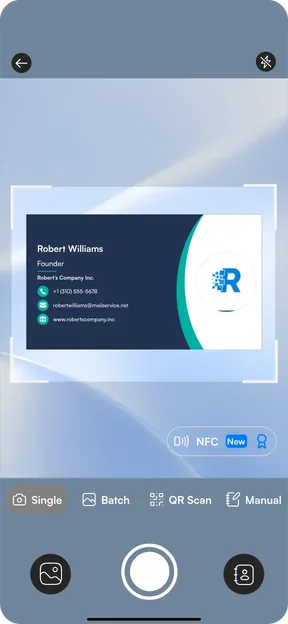
Capture leads on any phone
Reps use the Habsy app on their own phones, at any event, with any organiser. Nothing to rent.
- Business cards in 200+ languages, at 99% accuracy
- Event badges, LinkedIn and digital card QR codes, and NFC cards
- Batch scan up to 150 cards in about 5 minutes, even offline
The Habsy app scan screen.
Step 3 of 6
Record what the visitor needs
Add context while the conversation is fresh, so whoever follows up starts with the facts.
- Intent signals for requirements, buying timeline and buying authority
- Notes and voice notes, added in seconds
- A reminder for the next step
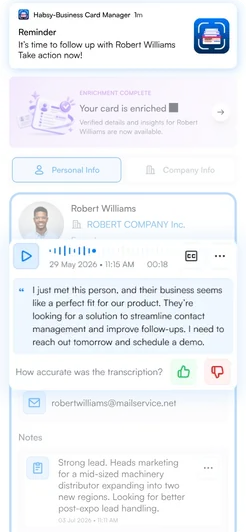
A contact with a voice note, notes and a reminder.
Step 4 of 6
Work from one shared list
Every lead lands in Habsy Platform as it is scanned, grouped by event.
- Each lead gets an owner and a follow-up status
- Duplicate alerts when two reps meet the same person
- History across events on one contact
Illustrative contacts.
Step 5 of 6
Reach every lead, keep your CRM current
Follow up by the channel that suits each lead, and sync leads to your CRM.
- AI-written email and WhatsApp messages, templates and bulk sends
- Multi-step email sequences
- Sync to 10+ CRMs, or export to Excel, CSV or VCF
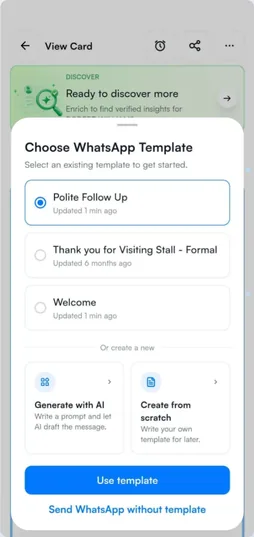
A WhatsApp follow-up template in the Habsy app.
Step 6 of 6
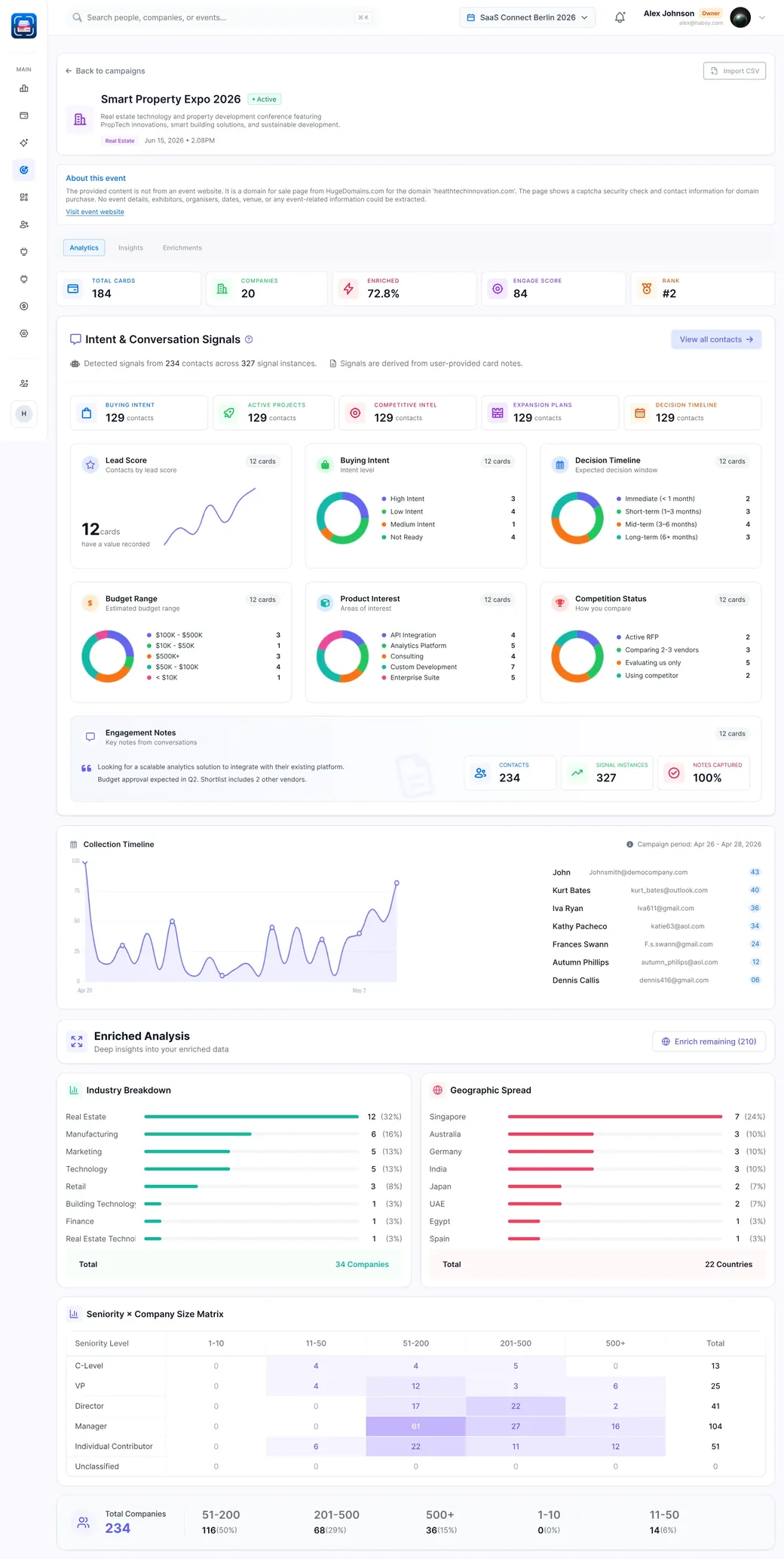
See what each event brought in
When the event ends, the report shows what it brought in and who to call first.
- Total contacts and unique companies
- Seniority reached and top companies
- Team performance and lead scoring
Illustrative report.
Every rep captures. Every manager stays informed.
Three places, one list. What a rep records at the booth is what the sales desk works from and what headquarters reports on.
At the booth
Fast capture with context
Reps scan and add context in seconds, then get back to the next conversation.
- Cards, badges, QR codes and NFC
- Intent signals, notes and voice notes
- Works offline
At the sales desk
Ownership and follow-up
Every lead has an owner, a reminder and a follow-up status, with the conversation context attached.
- Owners, reminders and follow-up status
- AI-written email and WhatsApp messages
- Leads synced to your CRM
At headquarters
Visibility across every event
See campaigns, lead quality and team performance, and review each report before you book the next event.
- A post-event report for every event
- Seniority reached and top companies
- Team leaderboard and per-user analytics
Make every event more valuable than the last
Each event's report shows which conversations were worth having and which prospects deserve attention. Your team keeps that history for the next event.
- History across events. When your team meets the same person again, every meeting appears on one contact.
- A report for every event. Contacts, companies, seniority and team performance, to review before you book the next event.
- The same setup every time. Your twentieth event runs like your first.
- PackTech Expo 2025October 2025Met by SarahExploring a new line for 2027
- IndiaPack 2026March 2026Met by RahulNeeds a 120 cpm line, wants a brochure
- PackTech Expo 2026October 2026Met by DavidDecision maker, asked for a quote
Illustrative contact. One contact, three events, three reps.
Event leads that fit your sales process
Your sales team should not have to rebuild the event before starting work. Leads arrive in your CRM with the context your reps recorded.
- Cards, badges, QR and NFC
- Notes, voice notes, intent signals
- Campaigns, owners, follow-up status
- Outreach and post-event reports
- One-way sync as standard
- You choose the field mapping
- One-way sync as standardPush selected leads from a campaign, or sync each contact automatically after it is saved.
- Your field mappingChoose which Habsy fields map to which CRM fields.
- Two-way sync on requestAvailable as a custom integration, and we can build an integration for a CRM that is not listed.
- Exports and other toolsExcel, CSV or VCF with your own column templates. Email, calendar and contact integrations, WhatsApp Business API and Instantly.
Bring every event team onto one standard process
Set the rules once and every rep follows them, at every event. Every team starts with a product demo on a video call that covers every feature, and we help you get set up.
- Users and seatsAdd users anytime, billed pro rata. Remove, freeze or move a seat when people change.
- Shared settingsOrganisation-wide categories and intent signals for every rep.
- Lead ownershipEvery lead gets an owner, a reminder and a follow-up status.
- Security and privacyData encrypted in transit and at rest, and exportable anytime. Working towards ISO 27001 and SOC 2.
Rollout checklist for your first event
- Book a demoSee every feature on a video call.
- Add your teamInvite the reps and managers who work your events.
- Set shared fieldsCategories and intent signals for the organisation.
- Connect your CRMChoose the field mapping. Ask us for two-way or custom.
- Create the first campaignName, dates and the reps who are going.
- Give every rep their digital cardsProfessional and Business, shared by QR, link or NFC.
- Agree who follows upOwners, reminders and the follow-up status to use.
- Review the post-event reportContacts, companies, seniority and team performance.
Questions during rollout? Reach us by email or WhatsApp. We reply within 1 to 2 business days.
One team price. No per-event or per-lead fees.
Each rep uses Habsy Plus in the app, and Habsy Platform is the team dashboard, charged separately. For teams, we put together one custom quote based on how many people work your events.
- Nothing per event or per leadNo per-event, per-lead or per-scan fees.
- Prepaid seatsAdd users anytime, billed pro rata. Remove, freeze or move a seat when people change. Freezing a user does not pause billing for that seat.
- WhatsApp Business APIBulk WhatsApp sending and auto-send need a connected WhatsApp Business API account.
A year of events, with a team that changes
- January10 reps start the year. One campaign per event, so every rep records leads the same way.
- JuneTwo reps join for the busy season, billed pro rata from the day they join.
- SeptemberOne rep leaves. Their seat moves to the new hire.
- December20 post-event reports, one contact history across all of them, and nothing paid per event or per lead.
Illustrative example. Your quote depends on your team.
Built for teams that exhibit
Trusted by 500+ businesses at 500+ events in 70+ countries




































































Habsy for teams, explained.
Answers for the sales and marketing leads who run a team of reps across many events.
Talk to us about your teamWhat is Habsy for teams?
Habsy for teams combines the Habsy app, where each rep scans cards and badges on their own phone, with Habsy Platform, the web dashboard where managers see every lead by event, assign owners, follow up, sync to their CRM and review a report for every event.
Does every rep need their own device?
No. Reps use the Habsy app on their own iPhone or Android phone. There is nothing to rent at each event, and it works with any organiser.
Does Habsy charge per event or per lead?
No. Team pricing has no per-event, per-lead or per-scan fees. Add users anytime, billed pro rata.
What happens when we meet the same person at different events?
Every meeting appears on one contact, so whoever follows up can see the history. Duplicate alerts also show it when two reps meet the same person.
Which CRMs does Habsy connect to?
10+ CRMs, including Salesforce, HubSpot, Zoho CRM, Dynamics 365, Odoo and Zapier. Sync is one-way into your CRM as standard, with field mapping you choose. Two-way sync and integrations for other CRMs are available on request.
Does Habsy work for large and enterprise teams?
Yes. Teams of any size use Habsy, with prepaid seats, organisation-wide categories and intent signals, a report for every event, and CRM sync. Data is encrypted in transit and at rest, and we are working towards ISO 27001 and SOC 2 certification.
How is Habsy priced for teams?
Each rep uses Habsy Plus, and Habsy Platform is charged separately. For teams, we put together one custom quote based on how many people work your events.
What does rollout look like?
Book a demo and we walk you through every feature on a video call. Then add your team, set shared categories and intent signals, connect your CRM and create your first campaign. We stay available by email and WhatsApp.
Make your next 20 events
easier to manage.
Give every team a consistent process and every event lead a clear next step.
Talk to the Habsy team
Planning a big event season, setting up a team, or just have a question about the app? Send us a note and we will get back to you within one working day.