Popl vs Habsy: the Popl alternative built for exhibitors
Popl and Habsy are both event lead capture apps: they scan contacts, draft follow-up emails, sync to a CRM such as Salesforce or HubSpot, and report on events. For exhibitors, Habsy is the better event system, and the reasons are practical: what a rep can do before anyone signs a quote, how the app copes with a stack of cards in several languages, and how far the email follow-up runs after the first message.
Amélie Tremblay18 min read
On this page
- Day three at the booth
- Who this comparison is for
- Start at your next show, not after procurement
- Cards in any language come back in English
- The phone is both the scanner and your card
- Save it, and Habsy does the rest
- Qualify at the booth, in your team’s own words
- Follow-up that lands while the buyer still remembers you
- Every show becomes a campaign, and the report says who to call first
- At a glance
- Habsy is the superior choice for exhibitors.
- Moving from Popl
Day three at the booth
It is the third afternoon of a four-day show. Your rep has a jacket pocket full of business cards, a few dozen badge scans, and a clear memory of which conversations mattered: the distributor who wanted pricing by Friday, the plant engineer who asked about lead times, the buyer who said to call after their budget review. None of that is written down anywhere the rest of the team can see.
Then the show ends. There is a travel day, then a Monday spent catching up on everything that waited. The cards get typed into the CRM sometime the following week. By the time the follow-up email goes out, the notes have faded, the message reads like it could have gone to anyone, and the buyer has met dozens of other exhibitors since.
The cost of that week is easy to underestimate. Warm leads go cold. Nobody can say which ten contacts were worth a call and which were polite small talk. And when someone asks marketing whether the show paid for itself, the honest answer is a guess.
The two products started in different places. Popl grew out of a digital business card and the tap accessory that shares it. Today it also sells a capable event product, the Event Lead Capture plan, with badge scanning, qualifying questions, follow-up emails, and event reporting, priced by quote after a meeting. Habsy was built around the exhibitor’s workflow from the start. It puts the first part of that workflow, unlimited scanning and a written follow-up email, in a free app, and publishes the price of everything above it.
Who this comparison is for
Exhibitors
If you run or staff a booth, most of this page is for you. You scan cards and badges all day, you need to know which conversations were worth something, and you need the follow-up out before the buyer forgets your stand. The sections below argue that case one step at a time.
Visitors
If you are walking the show as an attendee, you can use the Habsy app free, with unlimited card scanning, no trial, and export to Excel, CSV, or VCF. Popl’s free plan centres on a digital card, and its badge scanner sits in a team plan. On both, the person you share your card with opens it in a browser without installing anything.
Start at your next show, not after procurement
Exhibiting already comes with a long list of approvals: stand space, travel, freight, giveaways. An event lead capture or lead retrieval tool with its own sales cycle adds one more, and it often lands after the show it was bought for. Popl’s team plans, Event Lead Capture and Digital Business Card, are priced by quote, and Popl says it prefers to give that quote in a meeting. The plans cover unlimited users and events, but the number arrives after a demo.
Popl does have an individual route. Pro is $7.99 a month and Pro+ is $14.99 a month in the App Store, but neither includes Popl’s badge scanner. Pro includes a five-scan trial, and full badge scanning comes with the Event Lead Capture plan. At a show where the badge is often the only thing a visitor hands over, that makes the team plan the real starting point.
Habsy publishes its prices. The free app scans cards, badges, QR codes, and NFC without a limit, so a rep can install it the night before and scan from the first conversation. Plus costs USD 99.99 per user per year with no seat minimum, and adds qualification, enrichment, and CRM sync. Platform, for teams that run several shows a year, is a custom annual price with no per-event or per-lead fee.
| Feature | Popl | Habsy |
|---|---|---|
| Visitor or individual | Free plan: a digital card, a lead form, and an automatic intro email. Pro $7.99 and Pro+ $14.99 a month. | Free. The app is $0 with unlimited scanning, no trial, and no card limit. |
| Exhibitor rep | Badge scanning comes with the Event Lead Capture plan. Pro and Pro+ do not include it; Pro includes a 5-scan trial. | Free app with unlimited badge and card scanning, or Plus at USD 99.99 per user per year with no seat minimum. |
| Team | Event Lead Capture or Digital Business Card plan, priced by quote after a meeting. | Platform, a custom annual price. |
| Per lead or per event | Team pricing by quote. | No per-lead or per-event fee. |
| How you start | A demo, then an onboarding plan with a customer success manager. | Download the app and scan. |
Popl’s Pro and Pro+ prices are from its US App Store listing. Popl quotes team prices in a meeting.
Cards in any language come back in English
Picture the last evening of a show in Frankfurt, Dubai, or Shanghai. The day’s cards are in German, Arabic, Mandarin, Korean, and English, sometimes with two scripts on one card. The rep who met those buyers can follow up only once someone can read the cards, and typing them in by hand is where the evening goes.
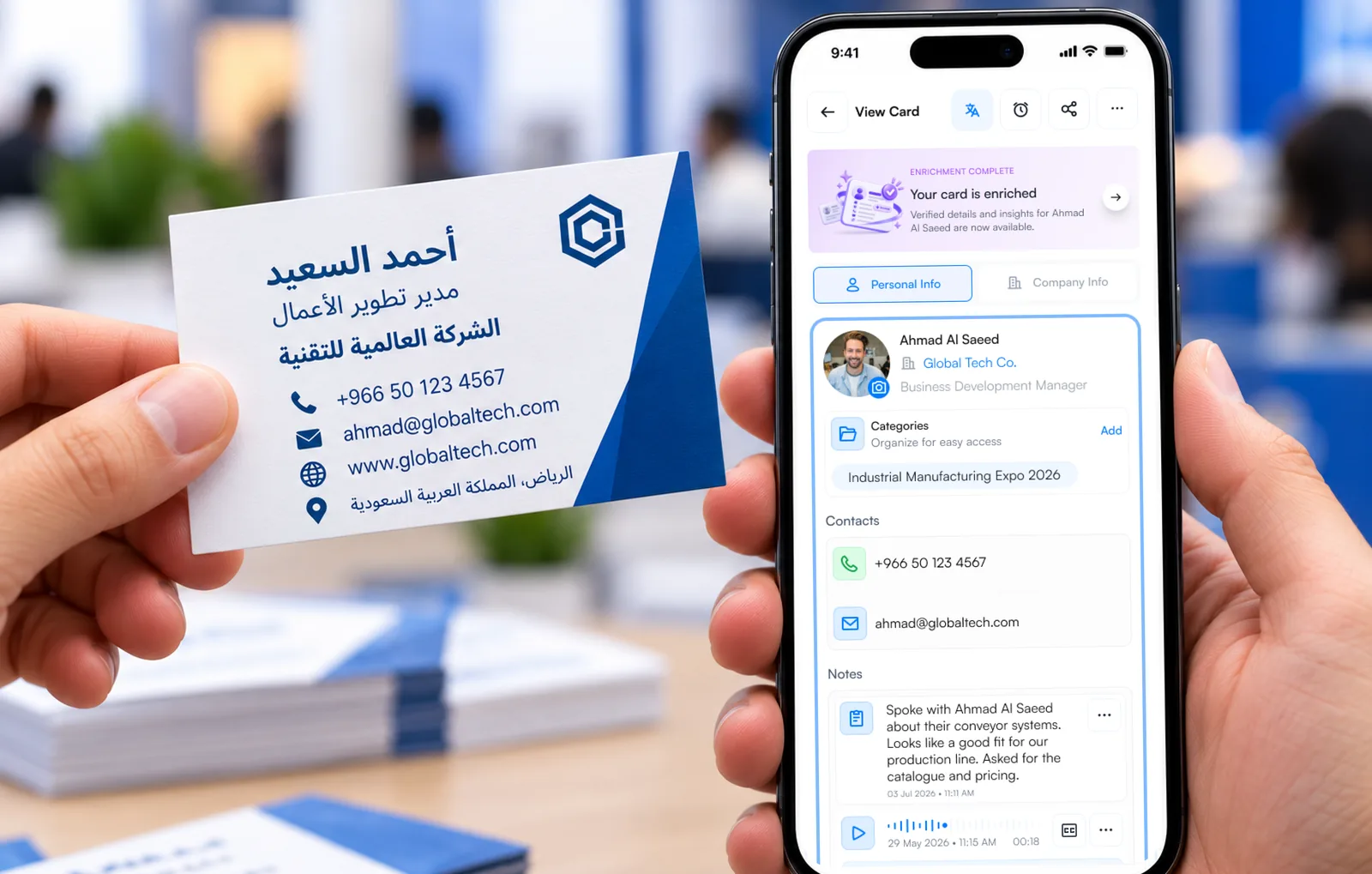
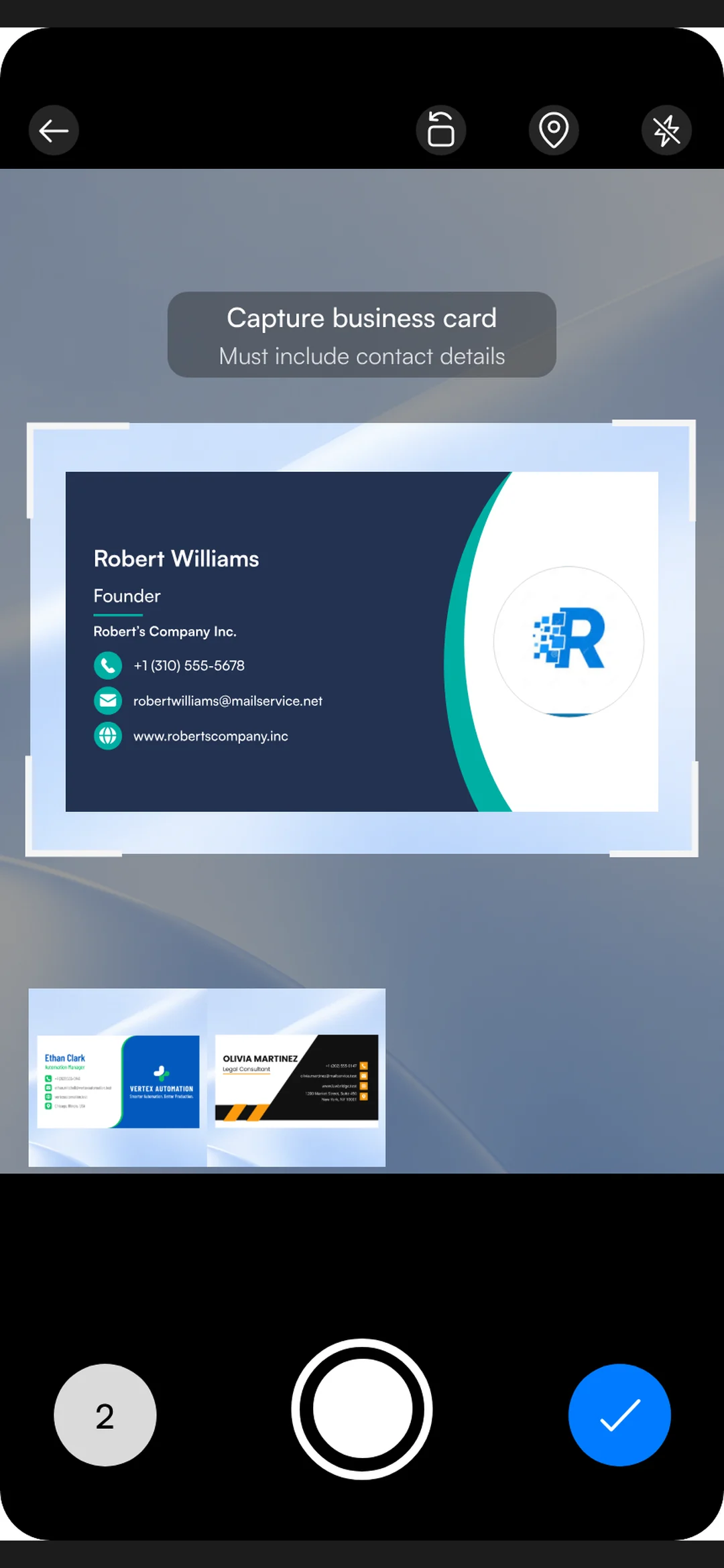
The Habsy business card scanner is built for that pile. It reads cards in more than 200 languages and translates them into English, so each contact lands in a form every rep and every CRM can use. Batch mode works through about 150 cards in about five minutes. The app itself runs in 14 languages, so a team drawn from several country offices can each work in their own.
Popl’s app is listed in English on the App Store, and its help centre says Popl does not automatically translate text. Its card scanner takes one card per photo, and capturing several cards at once is marked as planned on Popl’s own feedback board. For a team selling into one English-speaking market, that may be enough. For an international exhibitor, it decides whether the stack is ready the same evening or waits until someone who reads the language gets to it.
The phone is both the scanner and your card
On the free Habsy app, a rep scans business cards, badges, QR codes, and NFC without a limit. Both products keep working when hall signal drops. Popl switches to offline mode and syncs after the app reconnects, and Habsy captures offline and finishes processing when the phone is back online.
A straight answer on badges
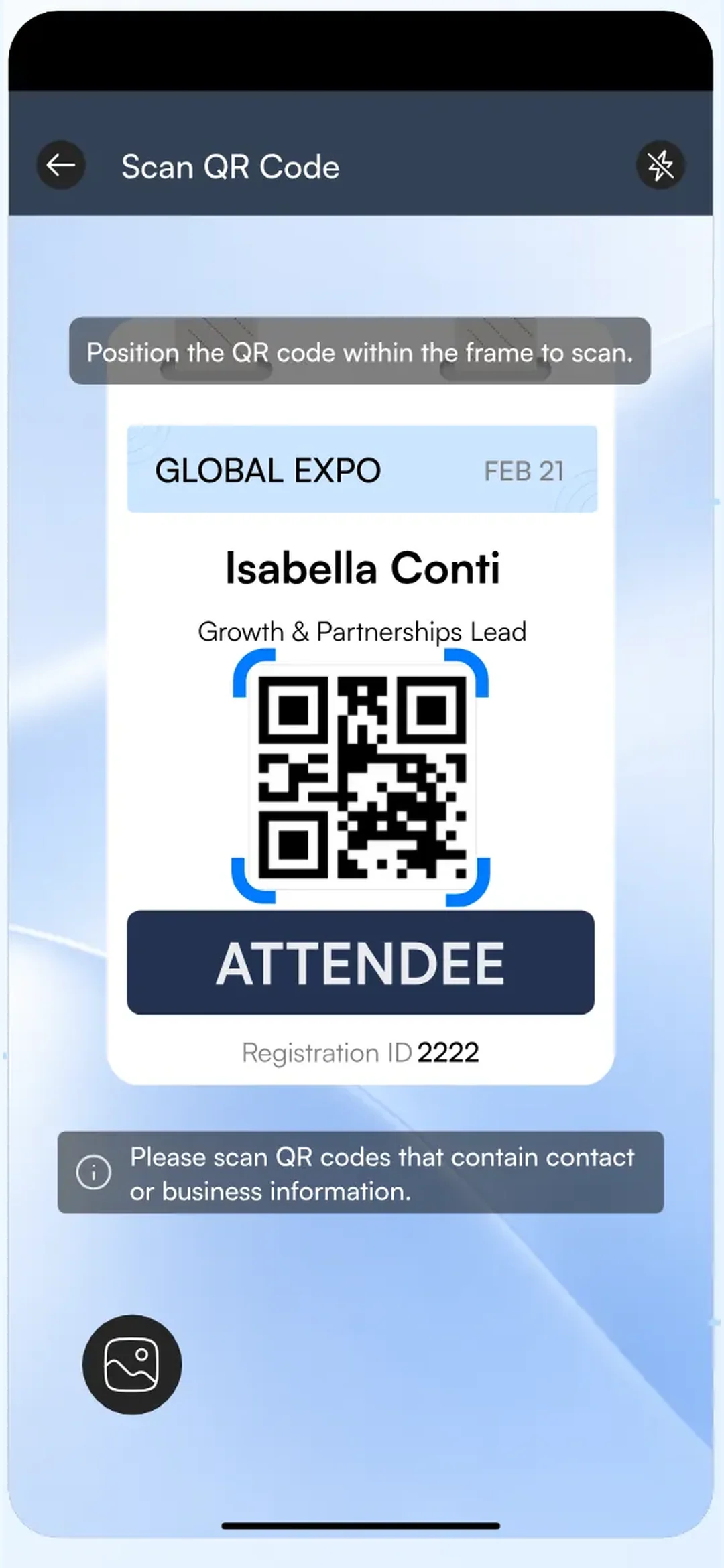
Many organisers encrypt the QR code on the badge, or put only a registration number in it, so that only their licensed scanner can use it. Neither Habsy nor Popl decrypts those codes. Habsy reads badge QR codes that carry the visitor’s contact details, plus NFC badges, and where a badge only holds a registration number, reps scan the person’s business card, tap an NFC card or use manual entry. The bigger difference is access: on Habsy the trade show badge scanner is in the free app, and on Popl it comes with the Event Lead Capture plan.
The same phone hands out your own digital business card. On both products you can share by QR code or link, keep a QR widget on the home screen, and the person you meet opens the card in a browser without installing anything. The difference is the tap. Habsy sends the card by NFC from the phone itself, and each rep gets two cards on Free. Popl’s NFC tap runs through its physical accessories, such as cards, stickers, and keychains, which are sold separately. When you are equipping a whole booth team, that is one less thing to order, ship, and replace.
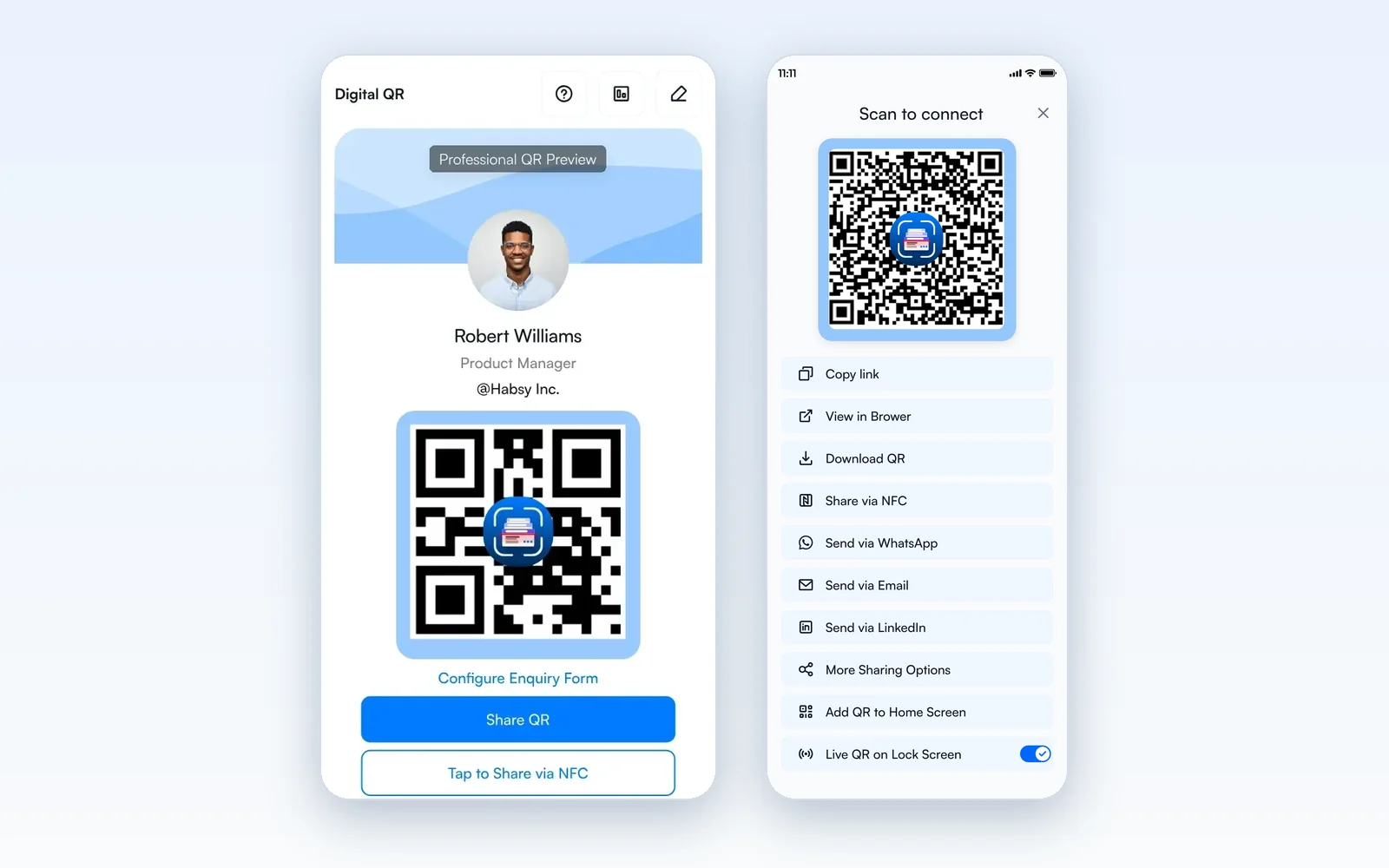
The Business card carries your company profile, services, brochures to download, and a Calendly booking button. Send My Card picks one or more contacts in the app and sends your card to all of them in one go, and Habsy’s email signature builder puts your professional card QR in every email, with AI-suggested designs to start from.
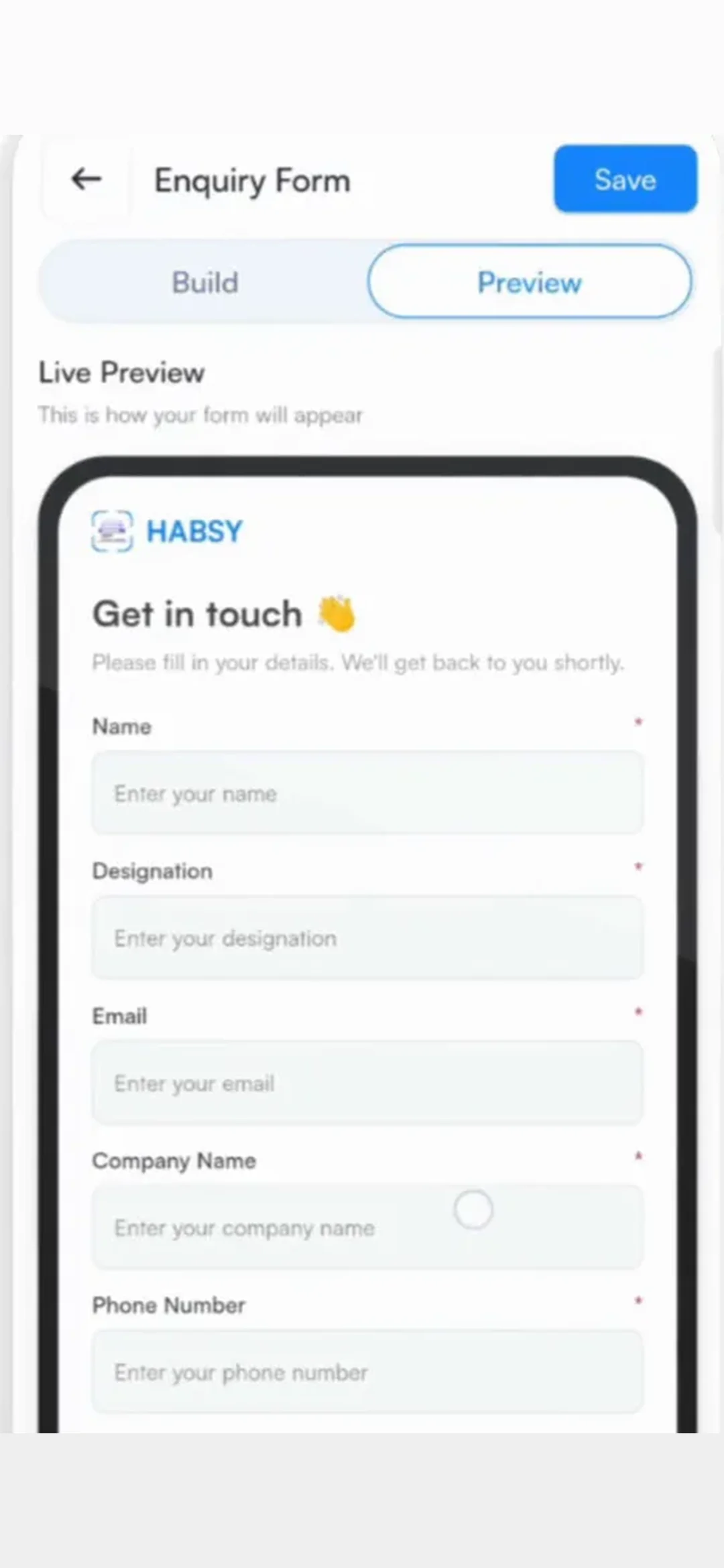
The difference shows on the way back. Popl’s Free plan includes a lead form on the card. On Habsy Plus, an enquiry form sits on your Professional or Business card with the fields you choose, each one mandatory or optional. Submissions arrive in the Habsy app and on Habsy Platform as enquiries, open as a filtered list on the Home screen, and convert into contacts you follow up like anyone you scanned. Card analytics then show visits, unique visitors, how many saved your contact, clicks by channel, and where visitors came from, so the QR on the stall banner is working the room while the rep is at lunch, and you can see it.
Popl also offers sharing through Apple Wallet, Google Wallet, and Apple Watch, along with email signatures and branded virtual backgrounds. Those are real conveniences for handing over a contact. For an exhibitor, though, they sit on top of the moment of exchange. They do not change how fast the booth captures, how the follow-up goes out, or what the team learns after the show, and those three things decide whether the stand paid for itself.
Save it, and Habsy does the rest
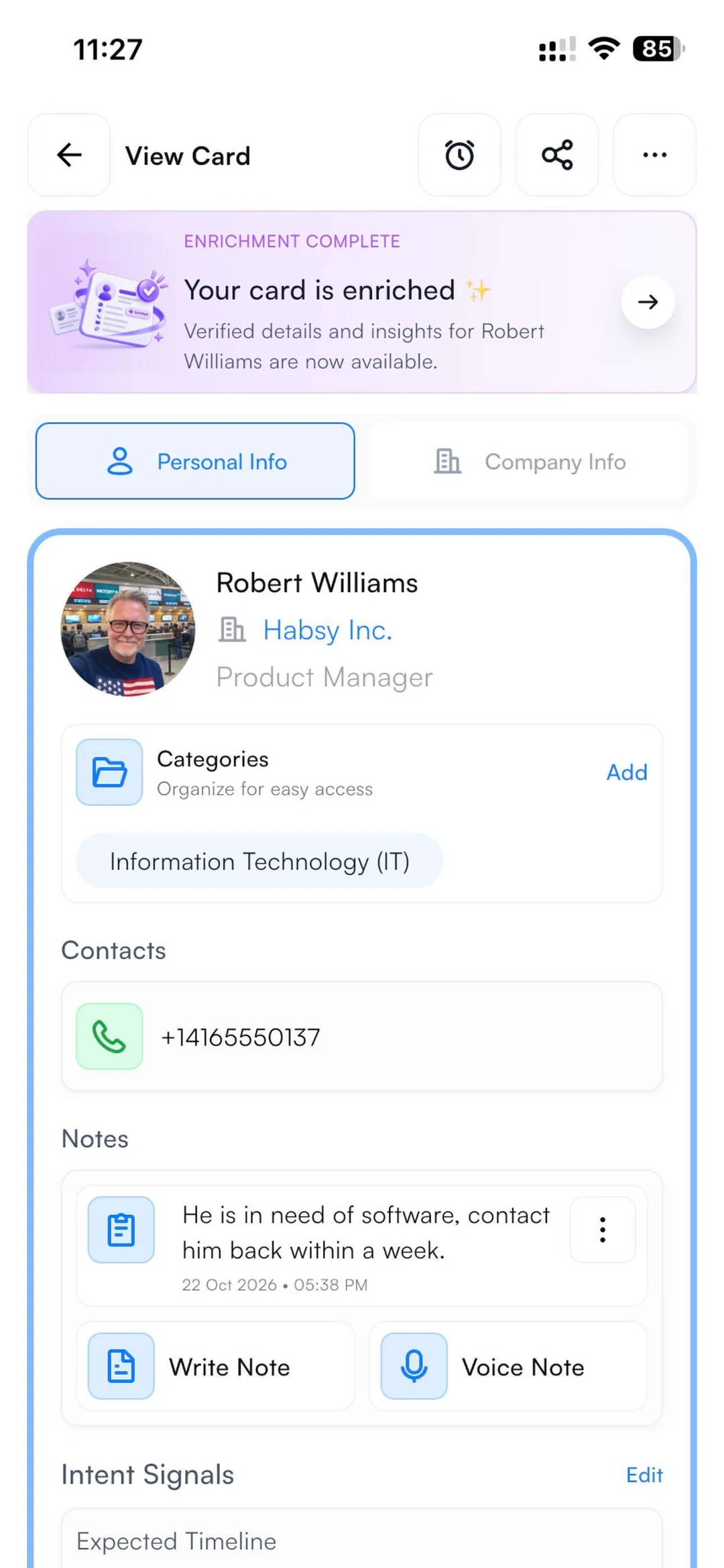
The part of the week that costs the most is the hour after the show closes, when every card still needs the same four things done to it. Habsy folds those into the save. Set your Card Preferences once, as defaults in Settings or for a single save, and whenever a contact is saved, from a scan, a batch, or a manual entry, Habsy runs the steps you picked in the background while the rep moves to the next conversation.
Card Preferences, after every save
- Company and profile details (AI): Look up the company and the person automatically.
- Send your follow-up template: Your email or WhatsApp template goes out right after the save.
- Send your digital card back: They get your card while you are still talking.
- Sync to CRM: Pushed to Salesforce, HubSpot, Zoho CRM, Dynamics 365, Odoo, Zapier, or any of Habsy’s 10+ CRM integrations.
Card Preferences automation is on Habsy’s paid plans. The template and CRM steps need the matching integration.
Popl has pieces of this chain on its team plans: Auto Sync sends each lead to the CRM in real time, enrichment runs through its data partners, and an Event Flow sends one automatic follow-up email per lead. On Habsy the four steps are one setting that runs on every save, at a published price on Plus, whether the contact came from a badge, a card in a batch, or a name typed in by hand.
Qualify at the booth, in your team’s own words
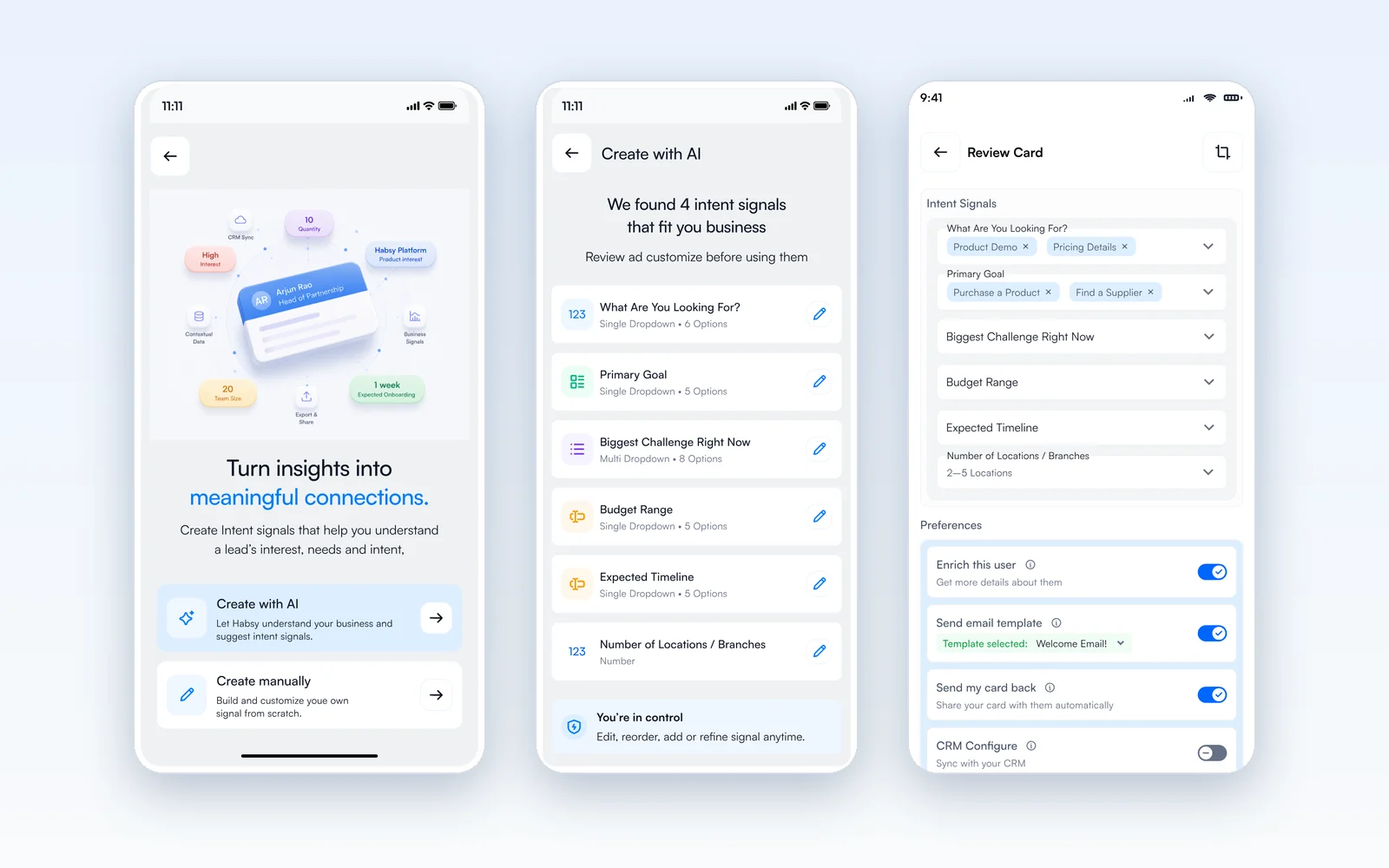
A lead count says the show was busy. What a sales manager wants on Monday is a list sorted by what each visitor said they needed and when. Popl’s Event Flows ask qualifying questions, with Dynamic Qualifiers that branch on an answer, on the Event Lead Capture plan. Habsy Plus adds intent signals to every contact at a published price, and they are defined in your language, not a vendor’s: a field, a scale, and the values your reps will tap between conversations.
| Intent signals · PackTech Expo 2026 | Options (the rep’s answer in bold) |
|---|---|
| Line capacity needed | 60 cpm, 120 cpm, 200+ cpm |
| Rollout timeline | Immediate, Q3 2026, Exploring 2027 |
| Buying authority | Decision maker, Committee, Recommender |
Three taps at the booth. The post-event report sorts by them.
On Habsy Platform an admin sets the intent signals and default categories once for the whole organisation, so every rep at every event records leads the same way. If you would rather not write them, Habsy creates a starting set with AI from your company website or a one-line description of the business, and you edit from there. Later, search finds any contact across the team by name, company, role, tag, intent signal, event, or the text of a voice note, so “everyone who needs 120 cpm and decides this quarter” is one filter, not a spreadsheet.
See the difference
Compare less. Capture your next contact with Habsy.
Try the workflow built for fast capture, useful context and timely follow-up.
Follow-up that lands while the buyer still remembers you
For exhibitors who sell across borders, email is where the deal moves. It is the message a buyer forwards to a colleague, the format procurement expects, and the one channel that works across every time zone and company policy. So the question that matters is how quickly a good email goes out, and how far the follow-up runs after it.
Both products draft the first email for you. Popl’s AI follow-up writes a draft with tone, length, and goal settings and sends it by email or text, on Pro and above; its Free plan sends a fixed intro email that cannot be customised. Habsy writes the follow-up email on Free, from what was captured, so a rep can send it from the booth or that evening at the hotel. Plus adds email templates and a Calendly link at a published price, where Popl’s calendar booking links come with the Event Lead Capture plan. And because Card Preferences can send the template as part of the save, the first touch can be on its way before the rep has put the phone down.
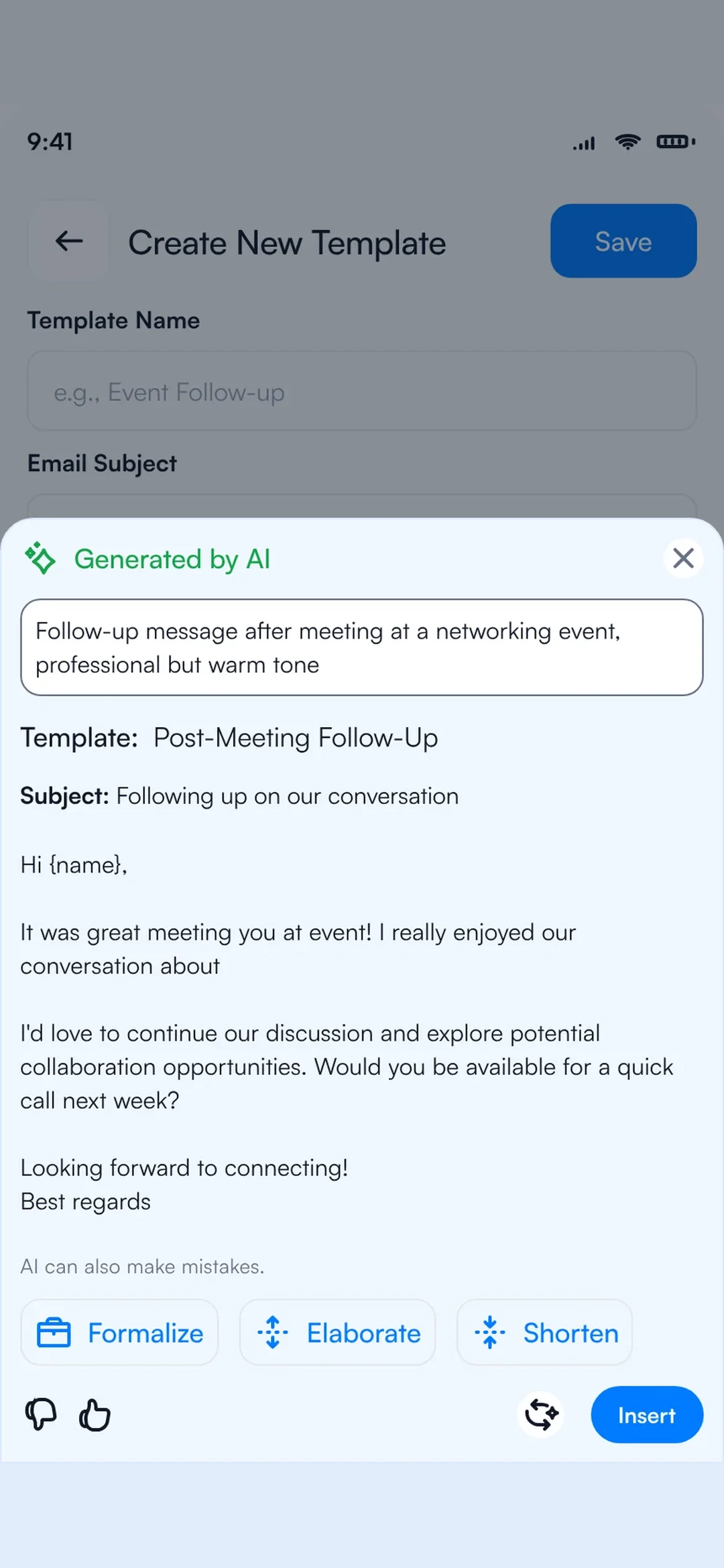
At team level, the two look alike at first. Popl lets admins connect Gmail or Outlook mailboxes as senders and push signature templates through an Outlook add-in. Habsy Platform sends from your company domain with a shared team signature, in bulk with merge variables for the contact’s name, title, and company, or individually with each email AI-drafted from the contact card. The difference is what happens after the first message. Popl’s newer help article on dynamic follow-up describes one automatic follow-up email per lead in each Event Flow. Habsy Platform keeps an email timeline on every contact, shows outreach analytics across the team, and runs multi-step sequences through Instantly, so the second and third touch go out without anyone tracking them by hand.
- Free: An AI-written follow-up email for every contact.
- Plus: Email templates, Calendly, and Card Preferences that send the template on save.
- Platform: Company-domain sending, a shared signature, bulk send with variables, an email timeline, outreach analytics, and multi-step sequences through Instantly.
Some buyers answer faster on other channels. On Popl, WhatsApp is a way to share your card. Habsy drafts the WhatsApp follow-up message itself: a draft on Free, templates on Plus, and the WhatsApp Business API on Platform. Both products list LinkedIn outreach, and Habsy’s LinkedIn drafts are on Platform. These are useful additions, but the follow-up still starts with email.
Every show becomes a campaign, and the report says who to call first
Both products now treat an event as a campaign. Popl does it through Event Flows on its Event Lead Capture plan, with qualifying questions, Dynamic Qualifiers that branch on an answer, auto tags, and CRM routing. Habsy Platform gives each event its own campaign with a live dashboard as reps scan, and Habsy Plus qualifies each contact with intent signals, categories, and the rep’s own voice note at a published price. On Plus or Platform the contact reaches the CRM as the rep scans, one-way using the team’s field mapping. Popl’s Auto Sync is real-time too, so CRM timing is not where the two differ.
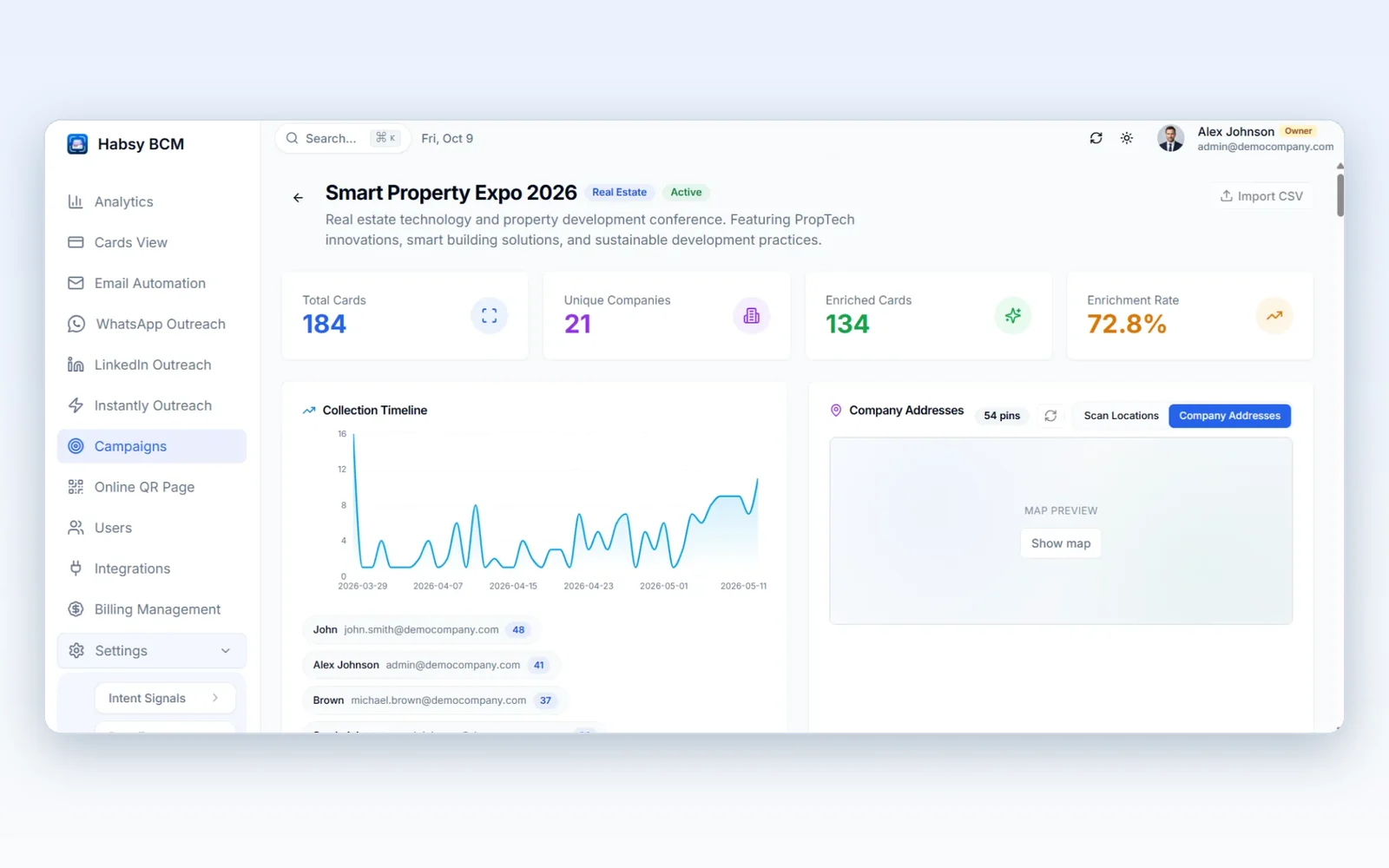
Both also handle the buyer who turns up twice. Popl checks the CRM for an existing record and shows an “Already met” banner when the team has met someone before, and lets admins reassign lead owners in bulk. On Habsy, duplicate detection checks email, phone, company, and name, flags each match, and lets you choose how to handle it, so nothing is lost or doubled. On Platform, duplicate alerts spot it when two reps meet the same person, and every meeting with that person appears on one contact, with an owner and a reminder.
A lead count says the show was busy. A scored list says who to call first.
The clearer difference comes after the show. Popl’s Event Flow dashboard tracks total leads, completion, meetings booked, an estimated pipeline, and a member leaderboard. Habsy’s post-event report, on Platform, also follows results through to pipeline and revenue, and adds a judgement on each lead, scored by seniority, urgency, engagement, and intent signals. The example report is organised into Overview, Analytics, ROI & CRM Outcomes, Capture quality, Key observations, and The companies, so marketing sees how good the capture was and a company-by-company view, not only a total.
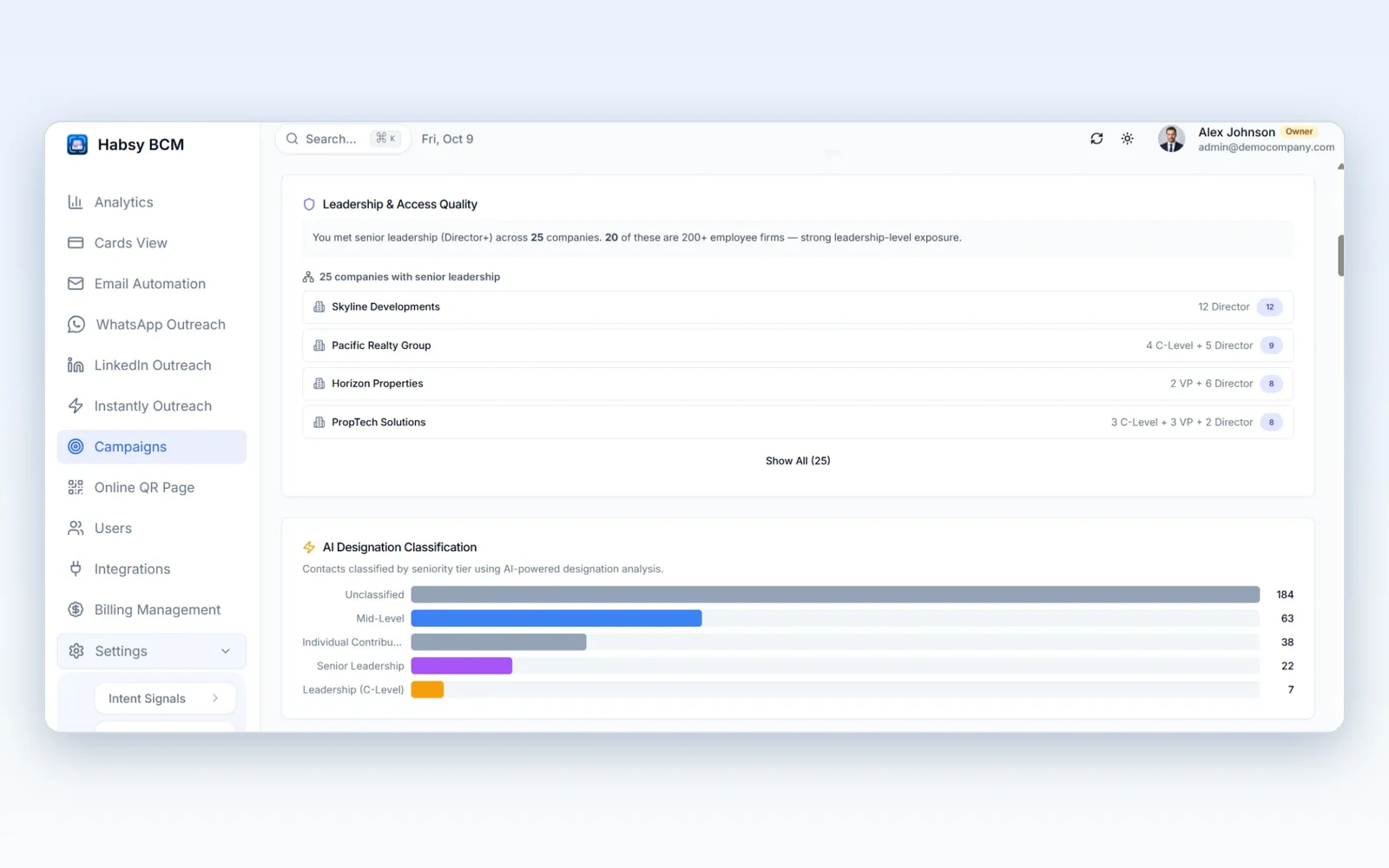
Enrichment is a separate job, and the two products approach it differently. Popl’s team plans fill in emails, phone numbers, and firmographics through a waterfall of more than 20 data partners. Habsy Plus builds a brief on the person and the company from the scan, so the rep knows who they just met and what that company does before writing the email. One fills fields in a record; the other prepares the next conversation.
At a glance
The sections above carry the argument. This table collects the main points in one place, with the Habsy plan named on every row and Popl’s plan named where it decides access.
| Feature | Popl | Habsy |
|---|---|---|
| Capture | ||
| Cards and badges | Paper card scanner. Badge scanning on the Event Lead Capture plan; Pro gets a 5-scan trial. | Free. Unlimited cards, badge QR codes, and NFC. |
| Batch | One card per photo. Multi-card capture is marked planned on Popl’s feedback board. | Free. About 150 cards in about 5 minutes. |
| Languages | App listed in English. Does not automatically translate text. | Free. 200+ card languages translated into English. App in 14 languages. |
| Offline | Yes. Saves leads offline; enrichment and CRM sync after reconnect. | Free. Captures offline and processes on reconnect. |
| After the save | Real-time Auto Sync to the CRM; one automatic follow-up email per lead in an Event Flow. | Plus. Card Preferences: enrich, send your template, send your card back, and sync to CRM, in the background. |
| Follow-up | ||
| Qualifying at the booth | Qualifying questions and Dynamic Qualifiers in Event Flows, on the Event Lead Capture plan. | Plus. Intent signals with your own fields and scales, categories, and a voice note. Platform: organisation-wide, or created with AI from your website. |
| First message | AI draft by email or text on Pro and above. Free sends a fixed intro email. WhatsApp shares the card. | Free. AI-written email, with a WhatsApp draft second. Plus: email and WhatsApp templates, sent on save by Card Preferences. |
| Team email | Gmail or Outlook senders and team signatures. One automatic email per lead per Event Flow, per Popl’s newer help article. | Platform. Company-domain sending, shared signature, bulk send with variables, timeline, analytics, and multi-step Instantly sequences. |
| Calendar booking | Booking links on the Event Lead Capture plan. | Plus. Calendly. Platform: Google Calendar from the contact. |
| Team and reporting | ||
| CRM | Real-time Auto Sync to 30+ CRMs, plus Zapier. | Plus or Platform. Reaches the CRM as the rep scans, one-way with field mapping. |
| Search and duplicates | CRM duplicate check and an “Already met” banner. | Free: search and advanced filters. Plus: filter by category, intent signal, or voice-note transcript. Platform: search across the team by event; duplicates flagged by email, phone, company, and name, with your choice per match. |
| Event campaign | Event Flows with a member leaderboard, CRM duplicate check, and an “Already met” banner. | Platform. Campaign per event, live dashboard, one contact across meetings, duplicate alerts, owners and reminders. |
| Post-event report | Event Flow metrics: leads, completion, meetings booked, and estimated pipeline. | Platform. Leads scored by seniority, urgency, engagement, and intent; pipeline and revenue; capture quality; key observations; the companies. |
| Your card | ||
| Sharing your card | QR, link, widget, and Apple or Google Wallet. NFC tap through a Popl accessory, sold separately. | Free. Two cards shared by QR, link, or NFC from the phone, with an on-screen widget. No accessory to buy. Send My Card sends your card to several contacts at once. |
| Leads from your card | A lead form on the Free card. | Plus. Enquiry form with your own fields, and card analytics. |
| Email signature | Email signatures, and team signature templates through an Outlook add-in. | Signature builder with AI-suggested designs and your card QR. Platform: a shared team signature. |
| Visitors | Free plan is a digital card with a lead form. Badge scanning needs the team plan, and Free cannot export leads. | Free. Unlimited card scans, no trial, your own card, and export to Excel, CSV, or VCF. |
Habsy is the superior choice for exhibitors.
Popl has built a capable event product, but its badge scanner, Event Flows, and calendar booking sit in a team plan you see priced only after a meeting. Habsy puts unlimited scanning of cards and badges in a free app, reads cards in more than 200 languages, batch-scans a stack in minutes, and sends your card from the phone with nothing to buy. Everything above that has a published price, Card Preferences do the after-scan work on save, and on Platform the follow-up runs as multi-step email sequences and each show ends with a scored report that reaches pipeline and revenue.
For an exhibitor, and especially one selling internationally, that makes Habsy the stronger system. Visitors can start today on the free app. Exhibitor teams can do the same, then book a demo to see Platform run against their own event calendar.
Moving from Popl
Switching is mostly a data move followed by one setup session. Your existing leads come across as a CSV from Popl’s web dashboard, which exports on its paid plans, and the rest is deciding how your team will qualify and route contacts, which is worth doing well once. Larger teams can book a demo and do the setup with us.
- Export your leads as a CSV from the Popl dashboard.
- Import the CSV into the Habsy app or Habsy Platform.
- Review the flagged duplicates. Habsy matches on email, phone, company, and name, and you choose what to keep for each one.
- Set the categories and intent signals your reps will use at the booth, or let AI draft them from your website.
- Map your CRM fields and turn on Card Preferences.
- Set up each rep’s Professional and Business cards, with an enquiry form on the one that goes on the stall.
Frequently Asked Questions
What is the difference between Popl and Habsy?
Popl and Habsy are both event lead capture apps, and the difference is access and reach. Habsy’s free app scans cards and badges without limit, reads cards in more than 200 languages, and batch-scans a stack, while Popl’s badge scanner and event features sit in a team plan priced by quote. On Platform, Habsy adds multi-step email sequences and a post-event report that scores each lead.
What is the best Popl alternative for trade shows?
For exhibitors, Habsy is the stronger choice, because reps can start on the free app with unlimited card and badge scanning at the next show. Teams add Plus for qualification and CRM sync, then Platform for event campaigns, company-domain email with sequences, and the post-event report. For a wider comparison, see our roundup of Popl alternatives.
Is the Habsy app free for visitors?
Yes. Visitors use the free Habsy app with unlimited card scanning, no trial, and no card limit. It also includes a digital card, badge and QR capture, notes, reminders, offline use, and export to Excel, CSV, or VCF.
How much does Popl cost?
Popl’s individual Pro and Pro+ plans are $7.99 and $14.99 a month in the App Store, and neither includes the badge scanner, though Pro gets a five-scan trial. Popl’s team plans, Event Lead Capture and Digital Business Card, are priced by quote after a meeting. By comparison, the Habsy app is free with unlimited scanning, and Habsy Plus is USD 99.99 per user per year.
Is there a Popl alternative with published pricing?
Yes. Habsy publishes its prices: a Free app with unlimited scanning, Plus at USD 99.99 per user per year with no seat minimum, and Platform at a custom annual price with no per-lead or per-event fee. Popl’s team plans are priced by quote after a meeting.
Does Popl scan event badges for free?
No. Popl’s badge scanner comes with its Event Lead Capture team plan, and Popl Pro users get a five-scan trial, while Habsy’s trade show badge scanner is free and unlimited. Habsy reads badge QR codes that carry contact details, and neither app decrypts an encrypted QR code.
Which business card scanner reads cards in other languages?
Habsy’s business card scanner reads cards in more than 200 languages and translates them into English on the free app, and the app itself runs in 14 languages. Popl’s app is listed in English, and its help centre says it does not automatically translate text.
How should exhibitors follow up with trade show leads?
By email first, because it is the channel international buyers and their procurement teams work in. On Habsy, an AI-written email is on Free, templates are on Plus, and company-domain sending with multi-step sequences through Instantly is on Platform. Card Preferences can send your template automatically after each save. WhatsApp and LinkedIn are available as additional channels.
Does Habsy sync leads to Salesforce and HubSpot?
Yes. On Plus or Platform, the contact reaches Salesforce, HubSpot, Zoho CRM, Dynamics 365, or Odoo as the rep scans, one-way using your team’s field mapping, with Zapier for other CRMs and two-way sync available as a custom integration. Popl’s Auto Sync is also real-time, so timing is not the deciding difference.
What does Habsy Platform add?
Platform turns each show into a campaign, with a live dashboard, search across the whole team, one contact across every meeting, duplicate alerts, owners and reminders, filtered exports with your own column templates, CSV import, and the post-event report with lead scoring. On the email side it adds sending from your company domain, a shared signature, bulk send with variables, an email timeline, outreach analytics, and multi-step sequences through Instantly. It also includes the WhatsApp Business API, LinkedIn drafts, and Google Calendar from the contact. Admins set organisation-wide categories and intent signals, or let AI create them from the company website, and seats are billed pro rata.
How do I move leads from Popl to Habsy?
Export a CSV from the Popl dashboard on a paid Popl plan, then import it into Habsy. Habsy flags possible duplicates by email, phone, company, and name, and you choose what to do with each match. Then set your categories and intent signals, map your CRM fields, turn on Card Preferences, and set up each rep’s Professional and Business cards. Larger teams can book a demo and do the setup with us.
See the difference
Compare less. Capture your next contact with Habsy.
Try the workflow built for fast capture, useful context and timely follow-up.