

Be the smartest networker at every event.
Meet someone worth remembering. Save their contact, keep what you discussed and follow up with a reason they’ll recognise.
Habsy is an event networking app for visitors and professionals. Scan unlimited business cards for free, share your digital card and keep each conversation’s next step close at hand.
✓ Unlimited business card scans. $0. No trial period.
Exploring suppliers for a new project. Share my shortlist.
Send recommendations while the conversation is fresh.
An event full of people. A network you can build on.
A good introduction deserves a next step.
Habsy is an event networking app for visitors and individual professionals. Save the people you meet, help them save you, and keep enough context to continue the conversation after the event.
01Before you arrive
Your digital business card. Ready in a few simple steps.
Enter your LinkedIn profile and website, or upload your business card. Habsy helps turn your details into a digital business card you can share from your phone.
- Add your details
Use your links or upload a card.
- Review your profile
Check your details and make it yours.
- Share your QR or profile link
They can save you without installing Habsy.
Capture their contact and send your card back, so you both have a way to reconnect.
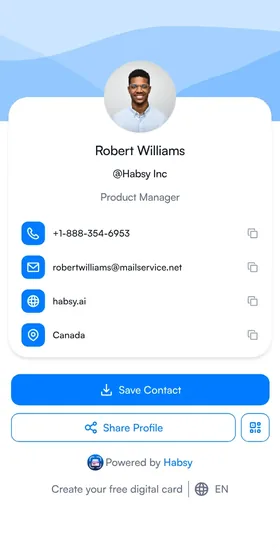
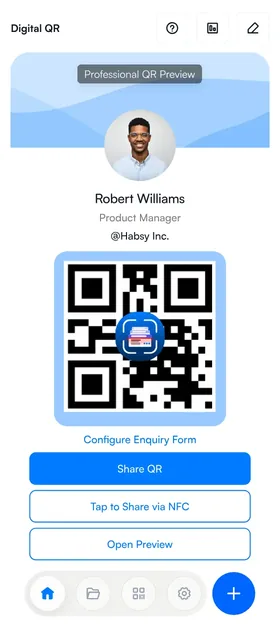 Your QR, ready to share.
One scan opens your profile.
02While you meet
Take the contact. Keep the conversation going.
A business card at one booth. A QR code at the next. An NFC card over coffee. Capture the details in Habsy and stay focused on the person in front of you.
Use the universal QR scanner for contact details shared by QR. Scan business cards and readable event badges, or tap an NFC card, and bring those introductions into one contact list.
Business card scanning is free and unlimited. Keep meeting people without watching a scan counter.
Use the Habsy app in 14 languages: English, Hindi, Tamil, Arabic, German, French, Spanish, Italian, Portuguese, Japanese, Korean, Chinese, Dutch and Turkish. More are coming soon.
03Before the details fade
Remember why you wanted to stay in touch.
“Send the supplier shortlist on Friday.” That detail will help you more than a name alone. Add a note while the conversation is still fresh. Set a quick or custom reminder, with an alarm when you need one.
Want to say it instead of type it? With voice notes, record a quick recap in a supported language and use transcription into English. Add your own intent signals, quick tap-to-answer questions such as what a vendor offers or when to follow up, to mark what matters, and use categories to keep each event’s contacts together.
Your next step stays beside the person it belongs to. Text notes and reminders are free. Voice notes, intent signals and categories are part of Habsy Plus.
Looking for a supplier shortlist. Asked me to send my recommendations on Friday.
Built for the busy event floor
Weak signal? Keep networking.
Capture cards offline and save them on your phone. Habsy processes and syncs your saved captures when you reconnect, so a crowded hall does not have to end a good introduction.
Capture now. Save on your phone.
Process and sync your saved captures.
04After the event
Pick up where the conversation left off.
Open a contact to see what you discussed, what you promised and when to get back in touch. Use that context to write a personal email or WhatsApp message, with Habsy AI helping you draft it.
With Habsy Plus, configure your email app in Habsy and connect your own email account first. Your follow-ups are then sent from your email address, so replies come back to you.
Open your event category, select the right contacts, choose a saved template and review before sending or scheduling. You can also enable your first introduction after a scan and check delivery and engagement in outreach analytics.
Hi Maya,
It was great meeting you at the event. As promised, I’m sharing the supplier shortlist for your project.
Would next week work for a quick call to discuss the options?
Alex
When a connection deserves more
Make your next move more relevant.
Learn more about the person, prepare a thoughtful message and move the contact into your everyday tools.
Know who you’re reaching out to.
Explore available person and company information beyond the card. Give your next conversation a more informed starting point.
Start with a message worth replying to.
Save email and WhatsApp templates, shape your intent signals with AI, and customise a suggested email signature. Review and make each one yours.
Here’s the shortlist we discussed…
Keep the next step in your workflow.
Sync contacts with supported CRMs, including Salesforce, HubSpot and Zoho CRM. Connect email, calendar and WhatsApp Business for your follow-up workflow.
Your free networking essentials stay available.
Explore Habsy PlusA strong start. At no cost.
Every introduction can start here.
$0
Unlimited business card scanning.No card limit. No trial period.
Available on iOS & AndroidYOUR FREE EVENT NETWORKING ESSENTIALS
Meet without a scan limit
Digitise unlimited business cards. No trial deadline.
Make it easy to save you
Create and share your digital business card by QR or link.
Capture the details they share
Use QR, readable event badges and NFC contact capture.
Remember the next step
Keep text notes and reminders beside each contact.
Keep going through a weak signal
Save card captures offline; process and sync when you reconnect.
Keep your contacts within reach
Export to Excel, CSV or VCF whenever you need them.
Habsy Plus adds enrichment, categories, voice notes, intent signals, saved templates and integrations.
Compare current plansWhy choose Habsy for event networking?
Leave with more than contacts.
Leave ready to reconnect.
Choose Habsy when you want to turn event introductions into relationships. You can save their details, share yours, remember the conversation and give it a next step in one app, starting with unlimited free business card scanning.
She asks for your supplier shortlist.
- Save Maya’s contact.
Scan her business card without using up a free allowance.
- Make sure she has yours.
Share your digital card by QR or send your card back.
- Keep the reason to reconnect.
“Send the shortlist on Friday.” Add the note and reminder.
Your networking starts free.
Unlimited business card scanning, a digital card, text notes, reminders and export give you a useful event workflow from day one.
The introduction goes both ways.
Save their contact and help them save you. The people you meet can open your digital card without downloading Habsy.
The next conversation has a reason.
Your notes and reminders preserve what mattered. Add Plus when you want deeper research and connected follow-up from your own email.
Clear answers before you go
Event networking with Habsy, explained.
What is free, what you can capture, and how to make your next introduction count.
What is Habsy, and how does it help event visitors?
Habsy is an event networking and contact capture app for individual professionals attending trade shows, conferences and networking events. It brings business card scanning, badge, QR and NFC capture, your digital business card, conversation context and follow-up into one app.
Is Habsy free for individual event visitors?
Yes. Business card scanning is free and unlimited, with no trial period or card limit. You can also create a digital business card, capture QR and NFC contact details, add text notes and reminders, and export your contacts. Contact enrichment, categories, voice notes, intent signals (your own tap-to-answer questions), saved templates and integrations are part of Habsy Plus.
Can Habsy scan every event badge or QR code?
Habsy’s universal QR scanner captures readable contact details contained in a QR code. Habsy can also read visible contact details on event badges. A code containing only an organiser-specific ID or a protected record does not expose the contact details. In that case, scan a business card or add the details manually.
Can I use Habsy when the event has no internet?
Yes. Capture cards offline and save them on your phone. Habsy processes and syncs saved captures when your connection returns. Online research, enrichment, linked profiles, message sending and cloud integrations need internet access.
How do I create and share my digital business card?
Enter your LinkedIn profile and website in Habsy, or upload your business card. Review your details, then share your digital business card by QR code or profile link. Recipients can open it in a browser and save your contact without installing Habsy.
How can I remember what I discussed with each person?
Add a text note and a reminder to the contact while the conversation is fresh. With Habsy Plus, you can also add voice notes, intent signals and event categories. Voice notes support transcription and translation into English in supported languages. These tools keep the conversation and next step beside the contact.
Are enrichment, categories and outreach also unlimited and free?
No. Business card scanning is free and unlimited. Contact enrichment, categories, voice notes, intent signals, saved templates and integrations are part of Habsy Plus. Connected email or WhatsApp services may have their own requirements and charges.
How do I follow up with people after an event?
Open a contact and use your conversation notes to write a relevant email or WhatsApp message. Habsy AI can help you draft it. With Habsy Plus, configure your email app in Habsy and connect your own email account before sending. Then select contacts from your event category, review a saved template, and send or schedule follow-ups from your email address. Check delivery and engagement in outreach analytics.
Can I export the contacts I collect?
Yes. Export your contacts to Excel, CSV or VCF. You can keep a copy, work with a spreadsheet or move contacts into another tool. CRM sync is part of Habsy Plus.
Why choose Habsy over using a separate scanner and digital card app?
Choose Habsy for an event networking workflow that brings contact capture, your digital card, conversation context and the next step into one app. Free unlimited business card scanning, text notes, reminders and export make it useful from your first event. Share your card without asking recipients to install Habsy, then add Habsy Plus for enrichment and connected follow-up as your needs grow.
Exhibiting next time?
Turn your booth conversations into leads.
See how Habsy helps booth teams capture context, follow up and share leads with the whole team.
Running a team of reps across many events? See Habsy for teams.
Scan. Remember. Connect.
Your next great connection starts with a conversation.
Bring Habsy to your next trade show, conference or networking event. Scan for free. Share who you are. Give every good conversation a next step.
Get Habsy freeAvailable on iOS and Android · Unlimited business card scanning at $0