

A day of data entry. Replaced by minutes with Habsy.
After events, Saravanan, COO of Kwality Mede Exporters, used to copy business card details into a notebook and then Excel. Now Habsy scans the cards in a batch and exports the contacts, so he can get on with calling leads.
A full day
Copy details from 250 to 300 business cards into a notebook, check them, then type them into Excel.
About 5 minutes per batch
Scan the stack in one session and let Habsy extract the contact details. Then export the contacts in seconds.
Before: about a week later. With Habsy: the same day.

Kwality Mede Exporters
Hospital and home-care equipment · Coimbatore, India
01 / The challenge
Every card meant another entry.
The conversations happened at the event. Turning the business cards into a contact list was a separate day's work.
Kwality Mede Exporters supplies hospital and home-care equipment, from wheelchairs, hospital cots and walkers to medical trolleys and IV stands, with offices in Coimbatore, Chennai and Cochin.
For Saravanan, COO of Kwality Mede Exporters, the routine was familiar: collect cards at the event, write the details into a notebook, check the information, and transfer it into Excel.
He had attended more than 10 trade shows and knew the effort involved. At each event he collects 250 to 300 business cards, and a bag like that could take a full day to work through by hand. His priority was simple: get the details into Excel without typing them all himself.
02 / The change
One batch of cards. A contact list ready to use.
Habsy replaced the manual entry with a simple scan-and-export workflow. Saravanan liked the scanning and contact extraction most, but export was the feature that made it fit the way he works.
Scan the cards together
He selects batch scanning and works through the stack of business cards in one session, which he described as taking about five minutes.
Let Habsy extract the details
Habsy turns the information on each card into a digital contact, so nobody copies details by hand.
Export and start following up
He exports the contacts in seconds and uses the list to make calls and continue the conversations from the event.
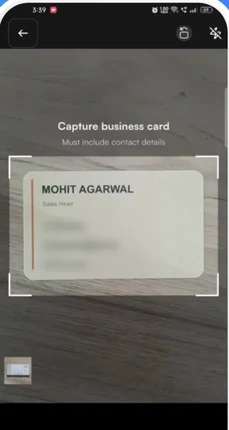
1Batch scan the stack of cards
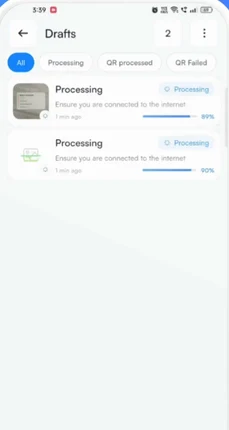
2Habsy reads each card in Drafts
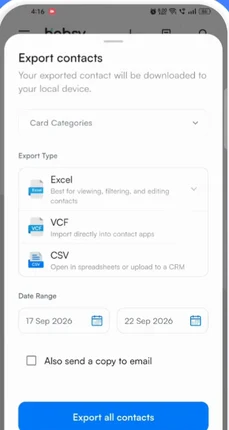
3Export to Excel, CSV or VCF
03 / The results
The value was in what happened after the scan.
The cards became leads he could follow up with, rather than details he still needed to type. Saravanan reported using the leads captured in Habsy to make calls, follow up and close business.
Time saved on repetitive entry
A process he described as taking a full day became a short scanning session followed by export.
Contacts in the format he needed
Excel export fitted his existing workflow and was his main reason for using the app.
Leads he could call and follow up
He described Habsy as helping him follow up and close the leads captured through the app.
The amount of time I've saved since I started using Habsy is incredible! I can now fully focus on engaging with leads as soon as an event is over, instead of spending hours manually transferring contact details from business cards to notes and then into Excel. Habsy has been spot-on with accuracy, and I don't even need to double-check the cards after scanning them. Kudos to the team!
04 / Follow-up and the digital card
Follow up the same day, not a week later.
Before Habsy, follow-up was the part that slipped. Saravanan would come back from a show with a pile of cards, and by the time he had typed them up, a week had gone and people had forgotten them.
Follow-up that goes out on its own
He sets up his email and WhatsApp templates before the event. When he scans someone's card at the booth, the follow-up goes out on its own with his digital card attached, so visitors get the brochure while they are still walking the hall. Many of them reply the same day.
Event lead capture →Notes, reminders and AI-written messages
He adds a quick note after each conversation and sets a reminder for the people who want a quote. When he needs something more personal, Habsy writes the message and he just tweaks it.
Contact intelligence →A digital card that brings in enquiries
Visitors scan his QR code and check his company details. If they are interested, they fill in the enquiry form and their details come straight into his contacts. He can also see how many people opened his card.
Digital business cards →The difference is speed.
Saravanan now follows up the same day instead of a week later. He closed more deals from one show than before, and more people get back to him.
In summary
Habsy's summary of the story
The real benefit wasn't just scanning faster. It was having contacts ready for the next call.
For Saravanan, batch scanning saved the manual effort, and export made the information usable. Together, they turned the business cards from an event into leads he could act on. With automatic follow-up and his digital card, he now reaches them the same day.
Clear answers
Batch scanning and export, explained.
How long does it take to digitize business cards after a trade show?
With batch scanning in Habsy, a stack of up to 150 business cards takes about 5 minutes to scan. Habsy reads each card and turns it into a digital contact, so there is no typing. Saravanan of Kwality Mede Exporters collects 250 to 300 cards per event, a job that used to take him a full day by hand.
Can I export scanned business cards to Excel?
Yes. Habsy exports your contacts to Excel, CSV or VCF. You can export by category and date range, and send a copy to your email. Saravanan uses Excel export to call and follow up with leads straight after an event.
Can I scan many business cards at once?
Yes. Switch to Batch on the scan screen, add any shared details such as a category once, and scan up to 150 cards in about 5 minutes without leaving the camera. Habsy processes them in Drafts and they appear in your contacts.
Can Habsy send follow-up messages automatically after scanning a card?
Yes. Set up your email and WhatsApp templates before the event. When you scan a card at the booth, Habsy sends the follow-up on its own with your digital card attached. Saravanan of Kwality Mede Exporters uses this so visitors get his brochure while they are still at the show, and many reply the same day.
Bring back the cards.
Skip the day of typing.
Batch scan the cards from your next event, check the details and export your list for follow-up.