

The best event lead capture app for exhibitors
Capture any contact, note what they need, see who you are talking to, and follow up at the right time. The only app your booth needs.
The full exhibitor journey: Habsy for exhibitors


Rated 4.9across 100+ reviews
One app, from the first scan to the post-event report
Before the event
At the booth
After the event

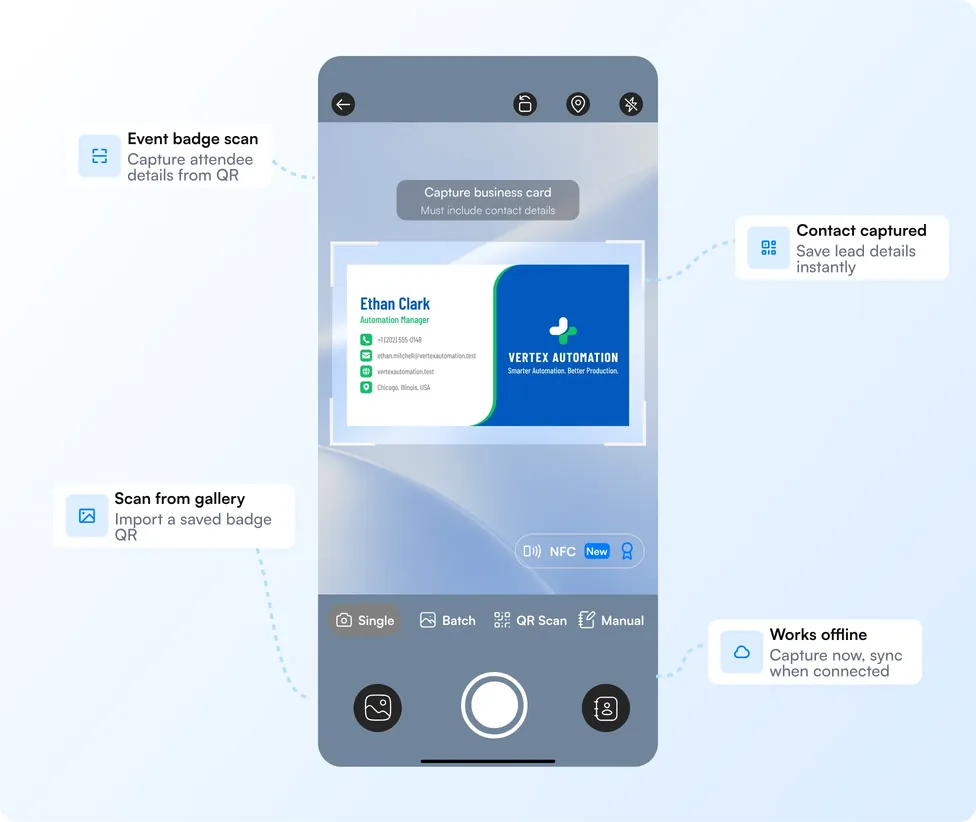
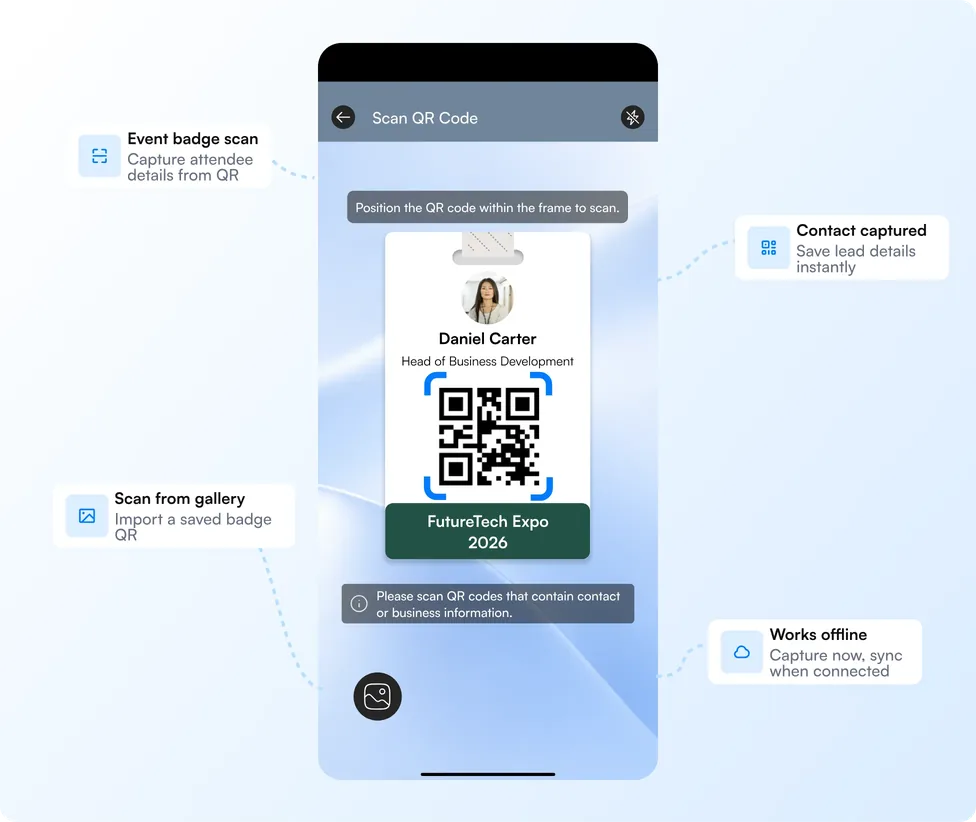
Capture any contact at your booth
Whatever a visitor hands you, it goes into one list. Works offline too, so poor hall signal never stops capture.
Business cards
Front and back, in 200+ languages.
Read more: Business card scanner
Event badges
Scan the badge QR code.
Read more: Universal badge scanner
QR digital cards
LinkedIn QR codes and digital cards from any provider, saved in a single scan.
Read more: Digital business cards
NFC cards
Tap to capture.
Manual entry
For visitors without a card.
Some organizers encode only an ID number in the badge QR. In that case the details cannot be read from the badge, and the contact can be added by card or manually.
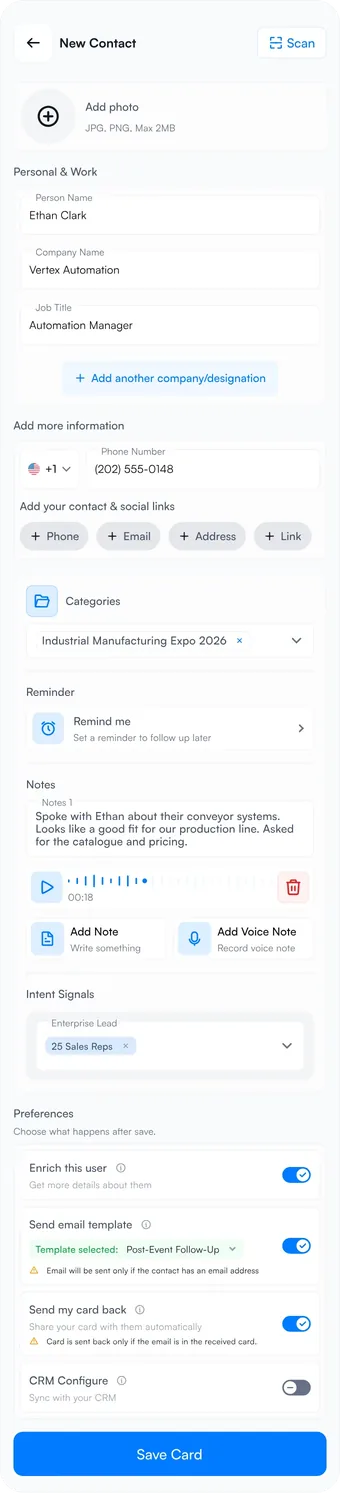
Record intent signals and next steps for every lead
Tap the intent signals you set up before the event, then add a voice note or text note and a reminder. It takes about thirty seconds. Setting up signals is quick too: Habsy can create them with AI from your website or a short business description.
Day 2
"Replacing two bottling lines in Dallas. Needs 120 cpm by Q3. Wants specs and a demo next week."
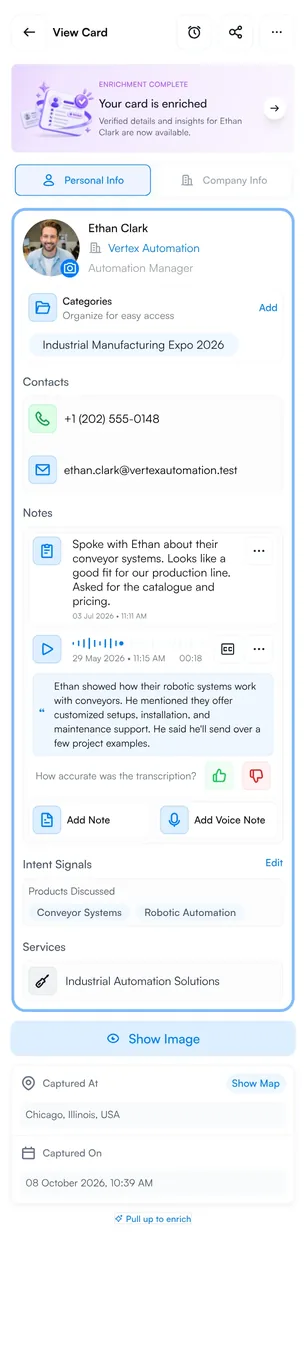
Know who is at your booth with contact enrichment
Tap a scanned contact, or let Card Preferences do it after every save, to open an AI-enriched contact brief: the person's role and career, how they fit, and the company's products and services. Your team knows who they are talking to while the conversation is still going.
Details appear when you tap for them, or automatically after every save with Card Preferences, from publicly available sources. Know the person, not just the card
Follow up with event leads after the show
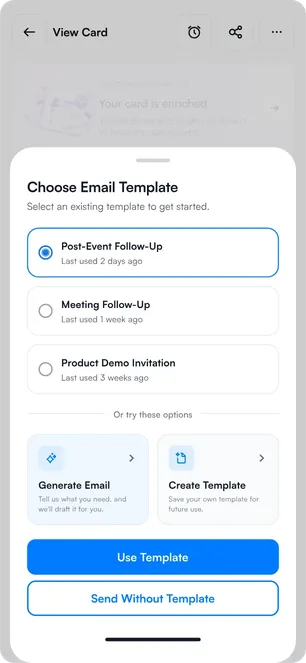
Write your email and WhatsApp templates before the event, attach a brochure or spec sheet, and send them to any contact in a couple of taps. Each message fills in the contact's name and details for you. For the conversations that deserve more, type a short prompt describing what you want to say, and AI writes a personal message for you.
Email template
Thanks for visiting Booth 412. I have attached our carton sealer range so the team at {company} can take a look. Let me know a good time for a walkthrough.
Rahul Sharma, Kelvara Packline
Written once, sent to every contact with their details filled in.
WhatsApp template
Brochure attached, sent from the contact in a couple of taps.
AI draft from your prompt
Type what you want to say, and AI writes a personal message. Edit before sending.
Collect enquiries from your stall with a QR code
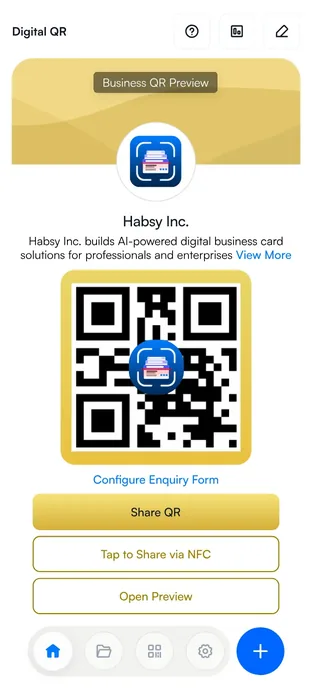
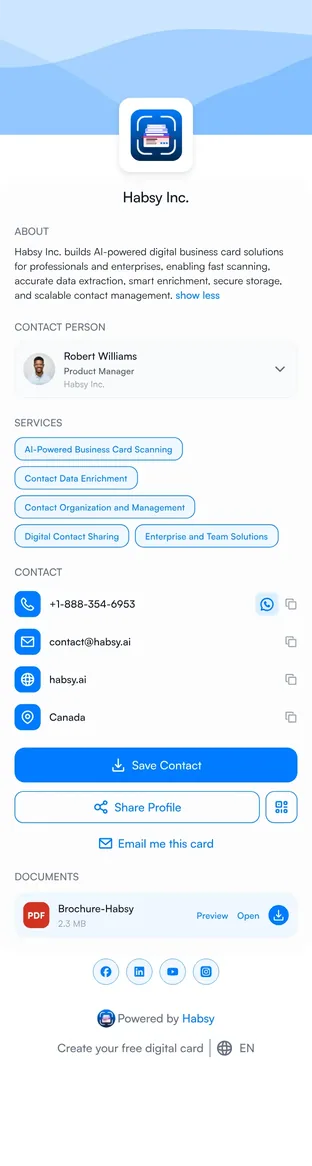
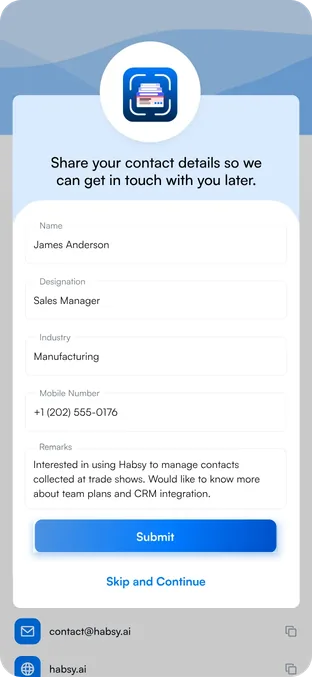
Your team cannot talk to everyone who walks past. Put your business digital card QR on the stall: visitors scan it, see your company card, and leave an enquiry through a form you design. Each enquiry lands in the app and on the platform, ready to follow up. See digital business cards
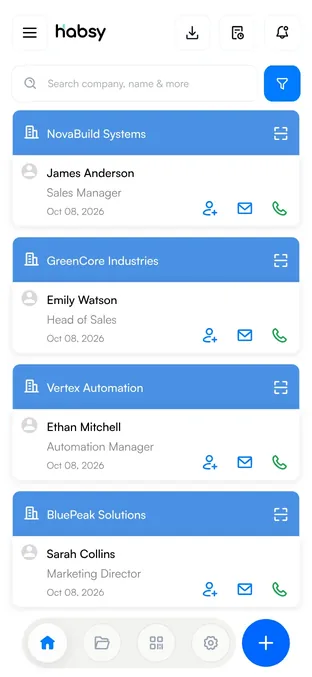
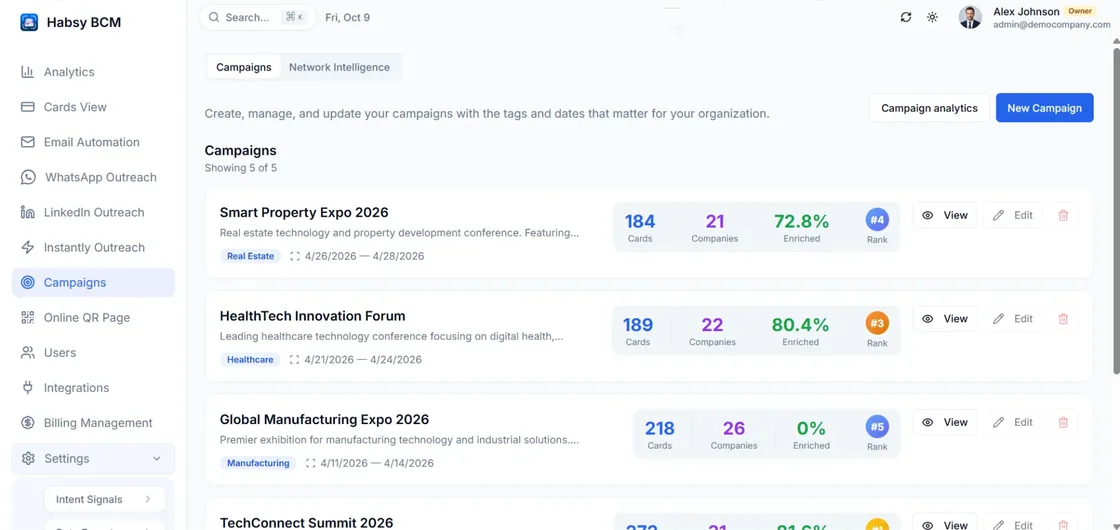
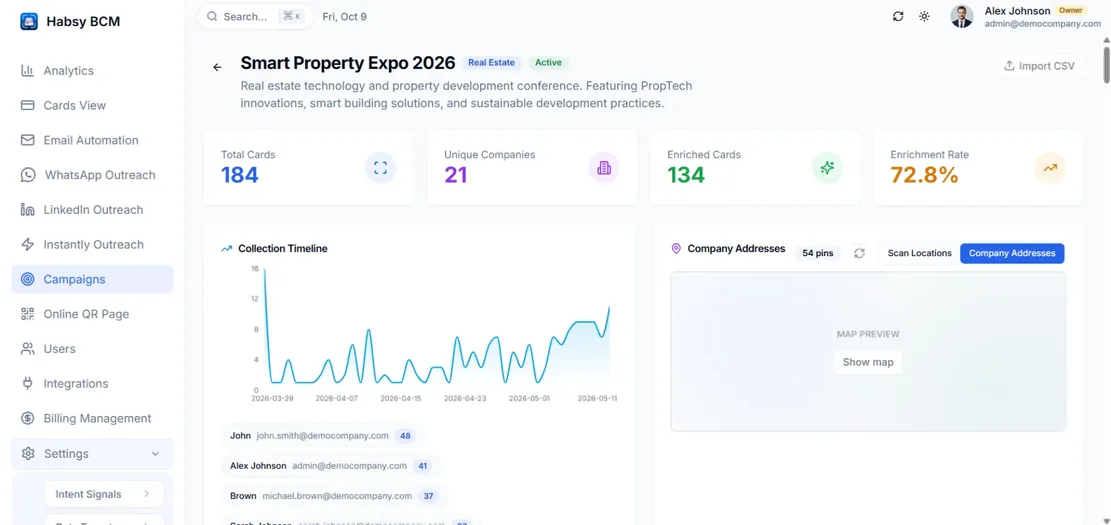
Manage event leads as a team in one dashboard
Scans from every phone and enquiries from the stall QR land in one place, grouped by event.
See contacts as they are scanned
New contacts appear with notes and signals attached. Duplicates are flagged when two reps meet the same person.
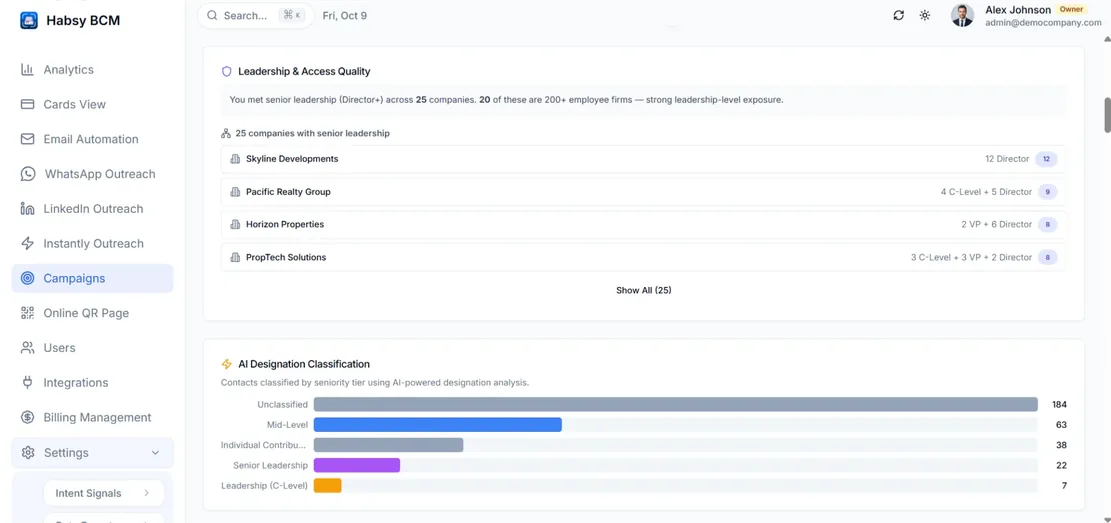
Lead scoring in the post-event report
When the event ends, the report ranks contacts by seniority, urgency, engagement and recorded intent signals, so you know who to call first.
Assign leads and track follow-up
Assign contacts with reminders, book meetings to Google Calendar, and reach leads by email, WhatsApp or LinkedIn.
Post-event reports
When the show ends, see what it brought in: total contacts, unique companies, enquiries from the stall QR, seniority reached, top companies, how capture built up across the event days, and how each team member performed.
Sync leads to Salesforce, HubSpot, Zoho CRM, Dynamics 365, Odoo, Zapier or any of our 10+ CRM integrations, or export to CSV.
A lead capture app for event visitors too
Visitors meet dozens of exhibitors. Scan their cards, see company details, and note what they offered.
Real people, there to help at every event
Events move fast, and you should never be on your own. Our customer support team is always there to help you out, from setting up before the show to following up after it.
Before the event
Help setting up your campaign, intent signals, templates and team, so everyone is ready on day one.
During the event
If something comes up on the show floor, our team is a message or a call away.
After the event
Help with exports, CRM sync and getting the most out of your follow-up.
How Habsy compares to other ways of capturing event leads
| Rented badge scanner | Paper or spreadsheet | Other lead capture apps | HabsyBest overall | |
|---|---|---|---|---|
| Cost to scan | Per event, per device | Hours of typing | Per user, often per event | No rental, no per-event fee |
| Works at | Events that offer one | Anywhere | Any event | Any event |
| Cards and badges | Usually badges only | Typed by hand | Varies by app | Both, plus QR and NFC |
| Notes and signals | Limited | Often lost | Basic notes | At capture |
| Available to the team | After the event | When typed up | After sync | As scanned |
| Works offline | Varies | Yes | Often needs a connection | Yes |
| Post-event report | Varies | Built by hand | Export only | In the dashboard |
Event lead capture questions
What is event lead capture?
Event lead capture is the process of collecting contact details and conversation context from people exhibitors meet at an event, so the team can follow up afterwards. Habsy does this in one app: scanning cards and badges, recording intent signals and notes, and organizing every contact by event.
What is the best way to capture leads at a trade show?
Use one app that every booth staff member has on their phone, captures cards and badges, and records notes and intent signals at the moment of the conversation. That keeps leads consistent across the team and avoids losing context between the booth and the follow-up.
Do exhibitors need to rent a badge scanner at a trade show?
Not with Habsy. Exhibitors scan badges with their own phones at any event, with no hardware rental or per-event fee.
Can Habsy scan every event badge?
Habsy reads the contact details encoded in badge QR codes. Some organizers encode only an ID number, with details held in their own system, and in that case the details cannot be read from the badge. The contact can then be added by scanning a business card or entering it manually.
Does Habsy work without internet at an event?
Yes. Contacts are captured offline and saved on the device. They are processed once the phone reconnects.
How do follow-ups work after the event?
Each contact can have a reminder with notes attached. When it is time to follow up, send a prepared WhatsApp or email template with an attachment, or describe what you want to say and let AI write a personal message from your prompt.
What is contact enrichment?
Contact enrichment adds company and professional details to a scanned contact: company website, industry and size, the person's role and career, a How They Fit summary, and the company's products and services. In Habsy, details appear when you tap for them, or automatically after every save when auto-enrich is on in Card Preferences, from publicly available sources.
How does a stall QR code collect enquiries?
Exhibitors display their Habsy business digital card QR at the stall. Visitors scan it, view the company card, and submit an enquiry form. Enquiries arrive in the Habsy app and on Habsy Platform.
What is in a post-event report?
A post-event report shows what an event brought in: total contacts, unique companies, enquiries from the stall QR, seniority reached, top companies, lead scoring, and performance by team member. In Habsy, post-event reports are available in the Habsy Platform dashboard.
Can event visitors use Habsy?
Yes. Visitors can scan exhibitor cards, add notes and reminders, and use enrichment to see company details for each exhibitor they meet.
Will I get help during an event?
Yes. Habsy's customer support team is always there to help, before, during and after your event. Reach us at contact@habsy.ai or +1-888-354-6953.
Trusted by 500+ businesses
Exhibiting teams use Habsy at 500+ events in 70+ countries


































































What exhibitors say about Habsy at events
“We used to come back from a show with a box of cards and a week of data entry. With Habsy, every lead was in our list before we left the hall, with notes on what each visitor needed. Our follow-ups went out the next morning.”
“The stall QR brought in enquiries even when all three of us were busy with visitors.”
“Tapping intent signals at the booth meant sales knew exactly who to call first.”
“The post-event report finally showed management what the show was worth.”
What Habsy does at an event
Habsy is an event lead capture app for exhibitors, made by Habsy Inc. Booth teams use it on their own phones to scan business cards, event badges, QR codes and NFC cards, add intent signals and notes to each contact, and follow up by WhatsApp or email. Enquiries from a stall QR code arrive in the same app. Every contact is grouped under the event it came from, so teams can see what each event brought in, with a post-event report once the show ends. Habsy is used by 30,000+ people at 500+ events in 70+ countries.
Try Habsy at your next event
Capture every contact, know who you met, and follow up at the right time.