Trade Show Follow-Up Email Templates: 8 Examples You Can Send Tomorrow
The follow-up email decides whether a trade show conversation turns into business. These eight templates cover the situations you will actually face, from the urgent quote request to the visitor you barely spoke to. Each one is short, specific and easy to personalise.
Claire Bennett7 min read
On this page
- The quick answer
- Before you write: sort your leads
- Template 1: Quote request
- Template 2: Demo request
- Template 3: Brochure or information request
- Template 4: Brief conversation
- Template 5: They visited while you were busy
- Template 6: Sample or trial sent
- Template 7: Second follow-up, no reply
- Template 8: Distributor or partner enquiry
- Subject lines that get opened
- How to personalise at scale with Habsy
- Prompts that get good AI-written follow-ups
- Turning these templates into Habsy templates
- Common mistakes
- Bottom line
The quick answer
A good trade show follow-up email is sent within one business day, names the event and one specific detail from your conversation, and asks for one clear next step. Use a different template for each kind of visitor: quote requests, demo requests, brochure collectors and people you barely spoke to. The eight templates below cover those cases. Replace the parts in [brackets].
Before you write: sort your leads
Templates only work if you send the right one to the right person. Sort your contacts by what they asked for. If your team recorded intent signals at the booth, such as “wants a quote” or “wants a demo”, this takes minutes. If not, start with your notes and voice notes.
Template 1: Quote request
Subject: Your quote for [product] from [Event]
Hi [First name],
Thanks for stopping by our stand at [Event]. You asked for pricing on [product] for about [quantity], delivered by [date].
I have attached the quote. It includes [one detail, such as delivery terms or volume pricing].
Can we take 15 minutes this week to go through it? I am free [day] at [time] or [day] at [time].
[Your name]
Template 2: Demo request
Subject: The [product] demo we discussed at [Event]
Hi [First name],
Good to meet you at [Event]. You mentioned [problem they described], and I said a short demo would show how [product] handles it.
Would [day] at [time] or [day] at [time] work for 30 minutes? I will focus on [the specific use case they mentioned].
[Your name]
Template 3: Brochure or information request
Subject: The [catalogue / brochure] you asked for at [Event]
Hi [First name],
As promised at [Event], here is our [catalogue / brochure]. Page [number] covers [the product they asked about].
If it would help, I can send a sample or set up a short call with our [specialist].
[Your name]
Template 4: Brief conversation
Subject: Good to meet you at [Event]
Hi [First name],
We only spoke for a minute at [Event], so here is the short version: we help [type of company] with [outcome].
If [problem] is on your list this year, I would be glad to share how [similar company type] approaches it. Worth a 15-minute call?
[Your name]
Ready for your next event?
Bring every booth conversation back with context.
Capture cards and badges in seconds, qualify leads on the spot and give your team a clean next step.
Template 5: They visited while you were busy
Subject: Sorry we missed you at [Event]
Hi [First name],
I saw you stopped by our stand at [Event] while we were with other visitors. I am sorry we did not get to talk properly.
What were you hoping to find? If it is [main product area], I can send details or set up a quick call.
[Your name]
Template 6: Sample or trial sent
Subject: Your [product] sample is on its way
Hi [First name],
Following our chat at [Event], your sample of [product] ships today. Tracking: [link].
Once you have tested it, could we talk on [day] about results and next steps?
[Your name]
Template 7: Second follow-up, no reply
Subject: Re: [original subject]
Hi [First name],
Following up on my note after [Event]. I know the week after a show is busy.
One thing that might help: [a short, relevant resource, price point or customer example].
Is [next step] still of interest, or should I check back next quarter?
[Your name]
Template 8: Distributor or partner enquiry
Subject: Partnering in [region] after [Event]
Hi [First name],
Thanks for the conversation at [Event] about distributing [product] in [region].
I have attached our partner overview, including [margins / territory / support]. Could we schedule a call with [decision maker] on [day] or [day]?
[Your name]
Subject lines that get opened
| Situation | Subject line |
|---|---|
| Quote | Your quote for [product] from [Event] |
| Demo | The [product] demo we discussed at [Event] |
| Brochure | The [catalogue] you asked for at [Event] |
| Brief chat | Good to meet you at [Event] |
| Missed them | Sorry we missed you at [Event] |
| No reply | Re: [original subject] |
How to personalise at scale with Habsy
Personal emails are slow to write for 100 contacts. Habsy helps:
- AI-written messages, free. Write a short prompt, such as “thank them for visiting, attach the price list, suggest Thursday”, and Habsy drafts a personal email or WhatsApp message from the contact card.
- Templates with dynamic variables, with Habsy Plus, so name, company and event fill in automatically.
- Bulk email to selected contacts through your connected email account, such as Google, Outlook, Zoho Mail, Microsoft Exchange or Amazon SES, with Habsy Plus.
- Auto-send after save, with Habsy Plus: set Card Preferences so a template goes out when you save a contact (requires the email integration).
- Email signature builder, with your Professional QR code in the signature.
- Reminders so the second follow-up actually happens.
For WhatsApp versions, see WhatsApp follow-up message templates. For timing, read why follow-up timing determines networking ROI.
Prompts that get good AI-written follow-ups
Habsy’s AI drafts a personal email from a short prompt plus what is on the contact: their name, company, your notes and, with Habsy Plus, the voice note transcript. The better the prompt, the less editing you do. Some examples:
| Situation | Prompt you might write |
|---|---|
| Quote request | “Thank her for visiting our stand, attach the quote for 2,000 units, mention the delivery time she asked about, suggest a call Thursday.” |
| Demo request | “Remind him of the problem he described at the booth, offer two demo slots next week, keep it under 100 words.” |
| Brief chat | “Short note, we only spoke for a minute, one line on what we do for packaging companies, ask if worth a call.” |
| No reply | “Polite second follow-up, add the case study link, ask whether to check back next quarter.” |
Read the draft, change anything that does not sound like you, and send. For contacts where you recorded a voice note at the booth, the draft can pick up the specific detail you mentioned, which is exactly what makes a follow-up feel personal.
Turning these templates into Habsy templates
With Habsy Plus, save the templates above as email templates with dynamic variables, so the name, company and event fill in on their own. Use them for bulk sending to a group, such as everyone who asked for the brochure, through your connected Google, Outlook, Zoho Mail, Microsoft Exchange or Amazon SES account. Keep the personal AI-written emails for the most important contacts.
Common mistakes
- Waiting a week. By then, they have heard from five other exhibitors.
- Attaching everything. Send what they asked for.
- No next step. “Let me know if you have questions” rarely gets a reply.
- The same email to everyone. One specific line per contact makes the difference.
Bottom line
Sort your leads by what they asked for, pick the matching template, add one specific line, and send within a day. Habsy writes the personal version for you from a short prompt, free. See event lead capture.
Frequently Asked Questions
When should I send a trade show follow-up email?
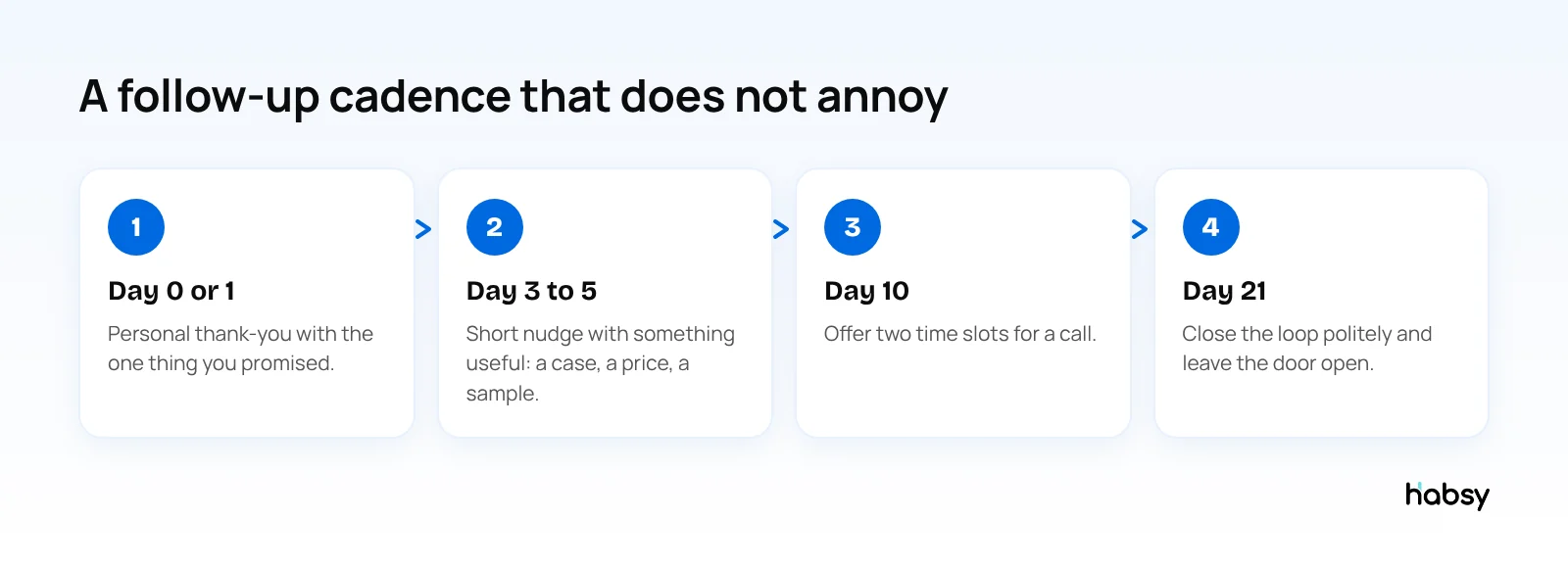
Within one business day of the conversation, ideally the same evening or the next morning. Send a second follow-up about three to five business days later if there is no reply.
What should a trade show follow-up email include?
A reminder of where you met, one specific detail from the conversation, what you are sending or offering, and one clear next step, such as a call or a quote. Keep it under about 120 words.
What is a good subject line for a trade show follow-up?
Name the event and the specific topic, for example “Your quote request from [Event]” or “The [product] demo we discussed at [Event]”. Avoid generic lines like “Following up”.
Should I send the same email to every lead?
No. Group leads by what they asked for, such as quote, demo or brochure, and use a template for each group with one personal line per contact. Intent signals captured at the booth make this grouping easy.
Can Habsy write follow-up emails for me?
Yes. Habsy writes a personal email or WhatsApp message with AI from a short prompt, using details from the contact card. This is free. With Habsy Plus you also get email templates with dynamic variables and bulk sending through your connected email account.
Ready for your next event?
Bring every booth conversation back with context.
Capture cards and badges in seconds, qualify leads on the spot and give your team a clean next step.