Habsy vs Linq Business Card Scanner: Which One Wins in 2026?
Habsy vs Linq Business Card Scanner: Which One Wins in 2026?
Linq built a loyal following as a simple, accessible digital business card tool. This comparison covers both platforms with honesty, acknowledging where Linq delivered and where Habsy goes further. For former Linq users looking to move their data to a stable platform, there is a migration section at the end. For a full look at the category, the business card scanner app comparison for 2026 covers all major alternatives.

Sivasanjeev
13 Mins
Table of Contents
Key Takeaways
Linq has pivoted away from digital business cards, making it less suitable for professionals looking for a long-term networking and lead capture platform.
Habsy combines digital business cards with AI-powered lead capture, including business card scanning, QR badge scanning, two-way NFC, and contact intelligence.
Habsy captures more than contact details with Intent Signals, voice notes, AI enrichment, reminders, and personalized follow-ups that help sales teams convert more leads.
Habsy Platform extends the workflow with CRM integrations, team management, campaign tracking, and CRM-ready exports for organizations.
For professionals, exhibitors, and sales teams looking for the best Linq alternative in 2026, Habsy provides a more complete and future-focused networking solution.

Why Choosing the Right Linq Alternative Matters
For professionals who built their networking workflow around Linq, the platform pivot creates an urgent practical problem. The NFC cards you purchased are linked to Linq's platform. The contacts you captured are stored in their system. And the product you paid for is no longer focused on the use case you bought it for.
Choosing a Linq alternative is not just about finding another digital business card. It is about finding a platform that covers the full networking and event lead capture workflow without pivoting away from it. Habsy vs Linq is most relevant when:
You need a stable digital business card and lead capture platform that will not pivot away from the use case
You attend trade shows, conferences, or client meetings and need contacts to be actionable the next morning, not just stored
You want voice notes with transcription, intent signals, and AI enrichment at the point of capture, features Linq never provided
You need two-way NFC capture so inbound contacts land in the app with tags and intent signals, not just in phone contacts
You want personalized email and WhatsApp follow-up templates sent from inside the app, not from a separate tool after export
You work internationally and need cards in non-English languages scanned and translated automatically
How to Choose: Linq vs Habsy in 2026
The comparison in 2026 is less about feature parity and more about product direction. Linq is now an AI messaging infrastructure company. Its digital card product is a legacy feature bundled into a pricing tier aimed at AI-powered sales outreach, not everyday networking or event lead capture.
Habsy is the best Linq alternative for professionals who need the complete networking and lead capture workflow that Linq once partially offered, now with features Linq never had. Batch card scanning with 200+ language support, QR badge capture, two-way NFC, voice notes with automatic transcription, intent signals at the point of scan, AI enrichment for both person and company, card translation, and personalized follow-up templates via email and WhatsApp, all in a single app that is focused on exactly this use case.
Feature Coverage: Linq vs Habsy
Feature | Linq | Habsy |
|---|---|---|
Platform status | Pivoted to AI messaging; DBC product being sunset | Actively developed for networking and lead capture |
Platform | iOS and Android | iOS and Android |
Digital business card | Customizable profile: photos, videos, links, lead forms | Personalized digital card: QR, NFC, iOS widget |
NFC cards | Physical NFC cards from $19.99; tap to share profile | NFC tap sharing and receiving; inbound lands in app |
QR code sharing | QR, link, text, email, virtual background | QR, NFC, iOS widget, link; inbound capture on scan |
Business card scanning | Basic OCR scanner, synced across devices | 99% accuracy, 200+ languages, 150 cards in 5 minutes |
Badge scanning | Not specified | Universal: event badges, LinkedIn QR, on-screen, printed |
Card translation | Not available | Scans and translates to working language (200+ languages) |
Voice notes | Not available | Record and auto-transcribe at capture, fully searchable |
Intent signals | Not available | Interest, Priority, and custom fields at point of scan |
Tags | Basic lead grouping | Event, product, session tags; bulk-apply post-event |
AI person enrichment | Not available | Role context, LinkedIn, professional background |
AI company enrichment | Not available | Summary, mission, products, market, leadership from first scan |
Inbound NFC capture | Not in workflow; required active scan | Received in-app with tags, intent signals, and notes ready |
Business QR inbound capture | Lead form on profile (visitor submits manually) | Recipient prompted to share details, saved as lead automatically |
Email follow-up templates | Not available in-app | AI-generated personalized templates, sent from within app |
WhatsApp follow-up templates | Not available | AI-generated personalized templates, sent from within app |
Follow-up reminders | Mobile CRM with reminders (genuine Linq strength) | Contact-level reminders with one-tap presets and snooze |
Multiple card profiles | Up to 5 on Pro plan | Single personalized digital card profile |
CRM integrations | Salesforce, HubSpot (mobile CRM) | HubSpot, Salesforce, Zoho plus CRM-mapped CSV export |
Shared team directory | Teams plan (enterprise pricing) | Admin view and management via Habsy Platform |
Offline capture | Not specified | Full offline: scan, voice notes, tags, reminders, all sync later |
Duplicate detection | Not specified | Email, phone, company plus name with merge prompts |
Advanced search | Basic search | Deep search across contacts, transcriptions, tags, intent, status |
Platform stability | Pivoting; DBC product future uncertain | Focused on networking and lead capture; stable product direction |
Habsy: Contact Intelligence and Lead Capture for Every Professional
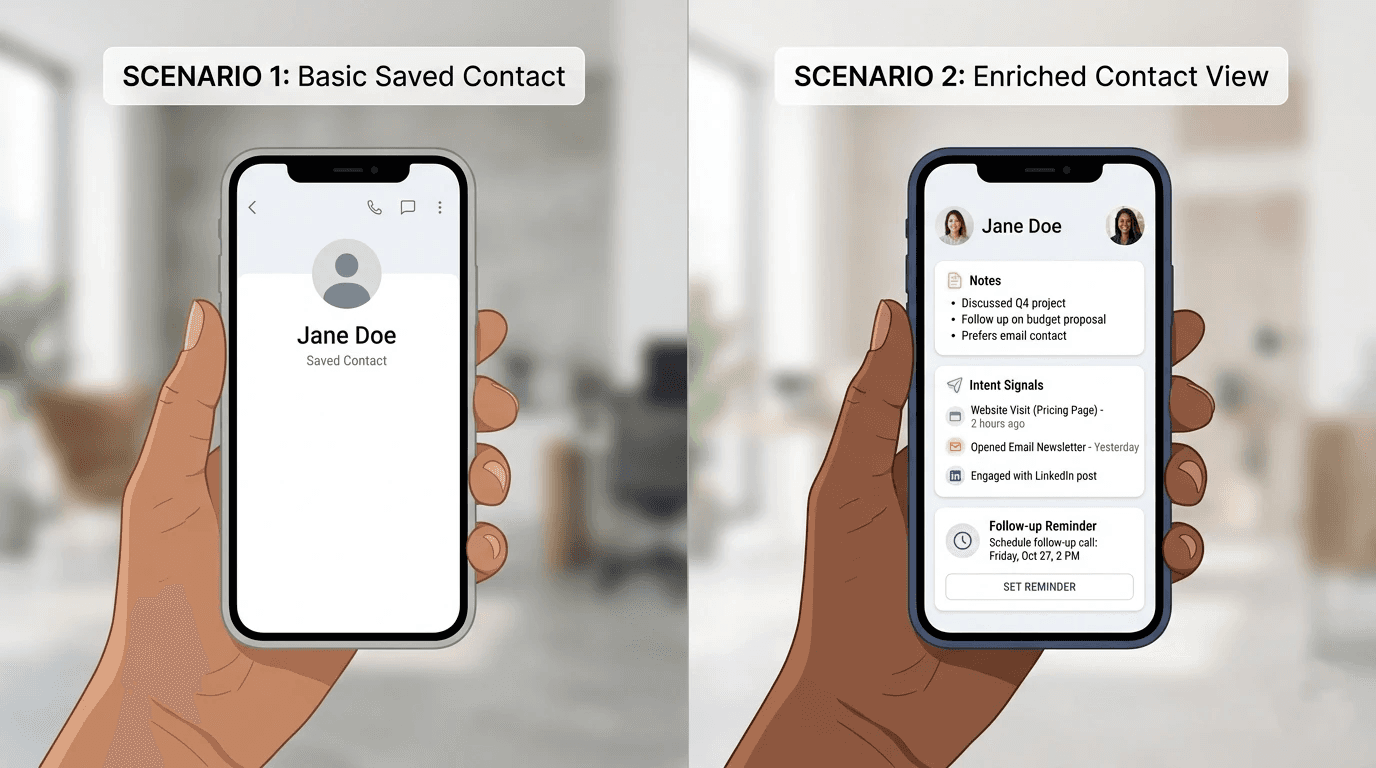
Habsy is more than a business card scanner. It's a complete lead capture and contact intelligence platform built for professionals, exhibitors, and sales teams. From AI-powered card scanning and digital business cards to lead qualification, follow-ups, and CRM integration, Habsy helps teams capture, organize, and convert every connection from a single platform.
High-Performance Lead Capture
AI Business Card Scanning – Scan up to 150 business cards in minutes with highly accurate AI-powered OCR supporting 200+ languages, including multilingual and complex card layouts.
Universal QR Badge Scanning – Capture event badges, LinkedIn QR codes, digital QR codes, and printed QR codes into one structured workflow.
Two-Way NFC – Share your digital business card via NFC while also capturing inbound NFC contacts directly into Habsy with lead context attached.
Business QR Lead Capture – Every QR scan becomes a two-way exchange by prompting visitors to share their details, automatically creating a new lead.
Offline Mode – Continue scanning cards, recording notes, setting reminders, and qualifying leads without an internet connection.
Digital Business Card
A digital business card should do more than replace paper. Habsy helps professionals share their identity while capturing new opportunities.
Professional & Business Profiles – Maintain separate digital profiles for personal networking and company representation.
Multi-Channel Sharing – Share your digital business card through QR codes, NFC, links, or widgets without requiring recipients to install the app.
Built-in Enquiry Forms – Collect inbound enquiries and contact details directly from your digital profile, turning every share into a lead generation opportunity.
Contact Intelligence
Every captured contact includes the context needed for meaningful follow-up.
Intent Signals – Capture buying intent, priority, and custom qualification fields while the conversation is still fresh.
Voice Notes – Record voice notes that are automatically transcribed and attached to each contact.
AI Enrichment – Automatically enrich contacts with LinkedIn profiles, professional details, company insights, leadership information, and market context.
Smart Reminders – Schedule follow-ups instantly with standard or alarm reminders to ensure important conversations are never forgotten.
Advanced Search – Find contacts using names, companies, voice note transcripts, Intent Signals, reminder status, tags, or any captured detail.
AI Email & WhatsApp Follow-Up – Send personalized follow-up messages directly from the contact card using AI-generated templates with auto-filled contact information.
One-Tap Actions – Call, email, or message contacts instantly without leaving Habsy.
Habsy Platform
For teams and organizations, Habsy Platform extends lead capture into a complete sales workflow.
Shared Team Directory – Centralize all captured contacts and manage team activity from a single dashboard.
CRM Integration – Sync enriched, CRM-ready contacts directly with HubSpot, Salesforce, Zoho, and other CRM platforms.
Smart Duplicate Management – Automatically detect and merge duplicate contacts before they reach your CRM.
CRM-Ready Export – Export mapped CSV or Excel files that import seamlessly into virtually any CRM.
Campaign & Team Management – Manage users, permissions, lead ownership, and event campaigns while tracking team performance across every exhibition.
Linq
Linq is primarily a digital business card platform that helps professionals share contact information through NFC, QR codes, and customizable digital profiles. It also includes business card scanning, lead forms, reminders, and CRM integrations, making it suitable for individual professionals and small teams focused on digital networking.
Digital Business Card
Linq's core strength is its digital business card experience, offering multiple ways to share your profile and collect new contacts.
Customizable Digital Profiles – Create branded digital business cards with contact information, social links, media, and lead forms.
Multi-Channel Sharing – Share via NFC, QR codes, links, email, text messages, and virtual backgrounds without requiring recipients to install the app.
Multiple Card Profiles – Create different digital business cards for various roles, businesses, or networking scenarios.
Contact Capture
Linq provides essential tools for capturing and organizing contacts after networking conversations.
Business Card Scanner – Scan paper business cards and save contact details digitally.
Lead Forms – Collect visitor information through forms embedded on your digital profile.
Notes & Reminders – Add notes to contacts, group leads, and schedule follow-up reminders.
Integrations & Productivity
Linq connects with common business tools to streamline contact management.
CRM Integrations – Sync contacts with platforms such as Salesforce and HubSpot.
Calendar Booking – Add meeting booking links to your digital profile for easier scheduling.
Analytics – Monitor profile views, card shares, and engagement with your digital business card.
Where Linq Falls Short
Built for Digital Business Cards, Not Lead Capture – Linq is designed primarily around sharing digital business cards rather than managing the complete lead capture and follow-up workflow used by sales teams and exhibitors.
Limited Contact Intelligence – Contacts are captured with basic details, but there are no voice notes, AI enrichment, multilingual translation, or structured qualification fields to preserve conversation context.
Basic Lead Organization – Lead management relies on notes, reminders, and simple grouping, making it harder to organize, filter, and prioritize large volumes of contacts after an event.
One-Way NFC Experience – NFC is optimized for sharing your digital business card, but it does not support a complete two-way lead capture workflow that automatically collects inbound contacts with qualification and context.
Less Comprehensive Sales Workflow – CRM integrations and reminders are available, but sales teams looking for AI-powered follow-ups, structured lead qualification, advanced search, and CRM-ready contact intelligence may find the workflow limiting compared to dedicated lead capture platforms like Habsy.
Migrating from Linq to Habsy: What to Do Now
If you are a former Linq user, act now while the Linq platform remains accessible. Here is the practical migration path.
Step 1 — Export your contacts from Linq
Export your contacts as a CSV file from Linq. This preserves every contact you captured before the platform winds down.
Step 2 — Import your contacts into Habsy
Open the Habsy app and go to Settings
Tap Manage Account
Tap Upload Contact
Tap Import in the top right corner
Tap Select File and choose your Linq CSV
Check the field mapping to confirm columns are correctly assigned
To skip duplicates, tick the Exclude Duplicates checkbox
Tap Upload CSV
Your contacts are now in Habsy, immediately enrichable with AI person and company enrichment, intent signals, voice notes, and follow-up reminders.
Step 3 — Set up your Habsy digital card
Create your Habsy digital card in one of three ways:
Scan your existing business card — Habsy reads your card and populates your profile automatically
Link your LinkedIn profile — paste your LinkedIn URL and Habsy pulls your details across
Enter details manually — fill in your name, role, company, and contact information directly
Your card is shareable via QR code or a direct link. Recipients do not need the Habsy app installed to view or save your contact details.
Final Thoughts
Habsy is the best Linq alternative for professionals who need the capture and follow-up workflow Linq once partially addressed, now with features Linq never had. Voice notes with automatic transcription, intent signals that produce a ranked lead list at scan time, AI enrichment for person and company, card translation across 200+ languages, two-way NFC capture into the app, and personalized email and WhatsApp follow-up templates are all built into the core product at $99/year.
For former Linq users, the practical advice is to export your contact data now, move to Habsy for the full networking and event lead capture workflow, and replace NFC hardware with a platform that is actively building in that direction rather than leaving it behind.
Related articles


Ajay Karuppasamy is a digital marketing trainee at Habsy, where he enjoys creating engaging content and building campaigns that help brands connect with the right audience. He is passionate about storytelling, social media, and performance marketing. Outside of work, Ajay loves exploring the latest digital trends, experimenting with creative ideas, and finding new ways to make brands stand out online.