
Blinq vs Habsy: Best Blinq Alternative for Event Lead Capture
In the Blinq vs Habsy comparison, both products appear in searches for event lead capture apps and the best business card scanner for sales teams. However, they solve different problems. The table below shows where they align and where they diverge.
Amélie Tremblay13 min read
Feature Comparison at a Glance
| Feature | Blinq | Habsy |
|---|---|---|
| Business card scanning | AI-powered scanner for individual badges and cards | 99% scan accuracy with OCR and AI |
| Batch scanning | Not listed | Batch scan up to 150 cards in minutes, with a review step |
| QR badge scanning | Universal scanner across badge types | Universal badge scanner for event QR codes and digital badges from any registration system |
| Multilingual OCR | Supports multiple languages | Reads cards in multiple languages and translates them into English |
| Voice notes | AI notetaker that transcribes and summarizes conversations and attaches them to the CRM contact | Voice notes with transcription tied directly to each contact record for conversation context |
| Reminders | Not listed | Reminders added right after the contact is saved, including alarm-type reminders, linked to the contact |
| Email and WhatsApp follow-up | Not available in-app | AI-powered customizable templates for immediate, personalized email and WhatsApp follow-up directly from the app |
| Offline capture | Scanning, tagging, and notes work offline; leads sync later | Offline capture; cards are processed once you are back online |
| Duplicate detection | Matches contacts by email and updates existing records | Detects duplicates using email, phone number, company, and name, and lets you choose how to handle each match, so your lead database stays clean and CRM-ready |
| AI enrichment | Fills email, phone, LinkedIn, and company details from 25+ data providers | AI Enriched Contact Brief: career history, company profile, products and services, and company contact details |
| Intent signals at capture | Preset tags and custom qualifiers per campaign | Per-contact intent signals you define (interest level, requirement size, buying timeline) plus tags, notes, and voice notes |
| Card translation | Not listed | Translates cards in other languages into English |
| CRM integration | 20+ native CRM integrations, including HubSpot, Salesforce, and Microsoft Dynamics | 10+ CRMs including HubSpot, Salesforce, and Zoho CRM; custom integrations built on request |
| Digital profile | High customization with multiple profiles | Professional digital profile with two profile types: Professional and Business |
| Digital business cards | NFC, QR, email signature, and virtual background sharing | Branded cards with NFC, QR, and link sharing |
| Email signatures | Supported with branded templates | Built in, with your professional card QR in the signature |
| Virtual backgrounds | Supported for video calls | Not available |
Habsy Business Card Manager
Habsy Business Card Manager is one of the most complete lead capture tools available, not because it does everything, but because it never falls short where it matters. From scanning the first badge to booking the follow-up call, it works as a quiet companion that keeps every lead moving forward.
High-Speed, AI-Driven Contact Capture
Habsy is built for environments where volume and pace matter. A sales team might need to scan business cards to CRM after a full day on the floor. Alternatively, they may need to process a full stack of cards the morning after a trade show. Either way, Habsy reduces friction so teams move quickly without sacrificing accuracy. For event exhibitors running high-volume capture across a full show day, it works as a complete lead capture app and lead retrieval platform in one.
- Batch business card scanning handles up to 150 cards in minutes, with a review step. This makes it the fastest way to process card stacks collected at exhibitions and conferences.
- QR code and badge scanning captures verified details from event badges without manual entry. The universal badge scanner reads QR codes from any event registration system, functioning as a dedicated badge scanner app for trade shows of any size.
- Multilingual OCR and AI read cards in multiple languages and scripts. Essential for international exhibitions where cards arrive in many different languages.
- Offline lead capture works in low-connectivity environments. Cards are captured on the spot and processed once a network is available. Essential for large expo halls where WiFi coverage is unreliable.
- Card translation converts card content in other languages into English for teams operating across regions.
Digital Business Card
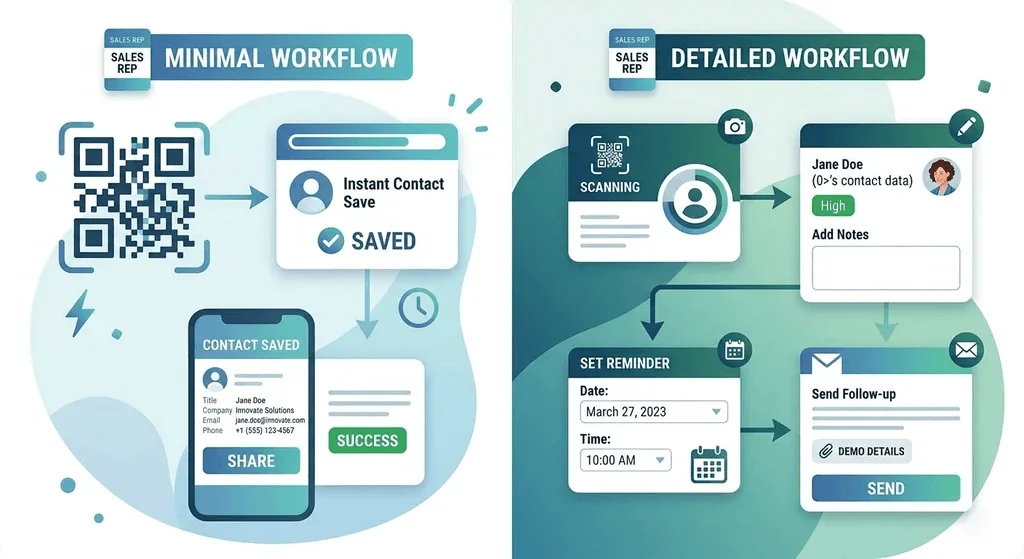
A digital business card should do more than replace a printed one. It should make sharing effortless, help you collect new leads, and adapt to different networking situations. Habsy's Digital Business Card combines flexible sharing with built-in lead capture, ensuring every exchange becomes the start of a meaningful business relationship rather than just another contact.
Digital Profile for Cards
Habsy provides every user with a professional digital profile that serves as their shareable identity at events.
The profile supports two distinct modes:
- Professional profile for work and event contexts
- Business profile for company and brand representation.
Reps can share the right context depending on who they are meeting. Both profiles are clean, focused, and designed to make a strong first impression without unnecessary complexity.
Digital Card Sharing
Habsy supports branded digital business cards shared via NFC, QR, and link across multiple channels, so teams are never locked into a single method during fast-paced event conversations. Recipients do not need the Habsy app to receive or save contact details.
- Two-Way NFC: Unlike standard tap-to-share, Habsy's NFC works in both directions. A rep can share their card and read a contact's NFC-enabled card in the same interaction.
- Always-On QR: The Habsy QR code pins as a home-screen widget, giving reps one-tap access without unlocking the app or navigating any screens.
- Scan to Capture: When someone scans a Habsy QR code or taps NFC, they are prompted to share their own details via a form, saved automatically as a lead inside Habsy. Every card share becomes a two-way exchange, not a one-way broadcast.
Lead Management
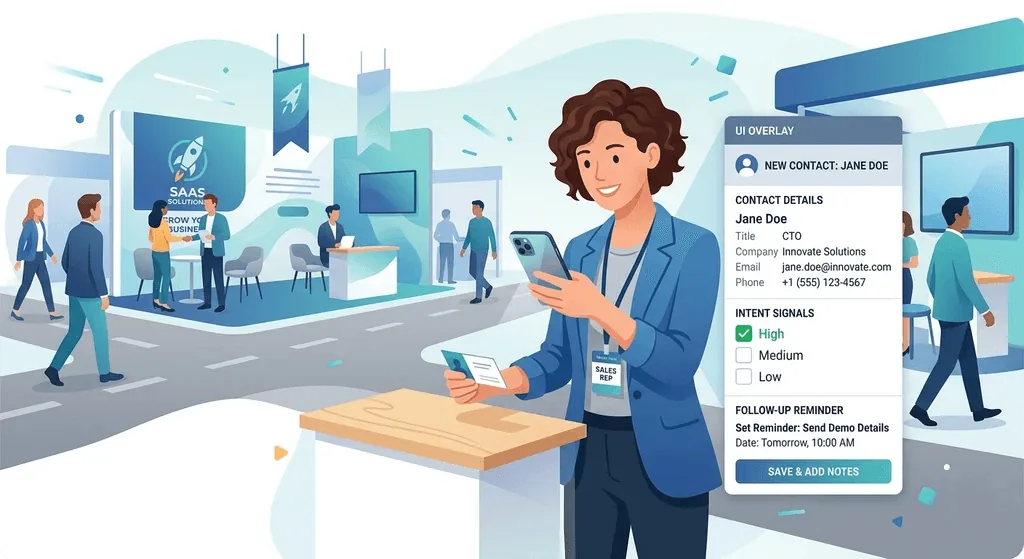
Capturing a contact is only valuable if it leads to timely action. Habsy helps teams stay organized after every conversation with built-in reminders, powerful search, and personalized follow-up tools, all from a single platform.
- Smart Reminders: Set reminders as soon as the contact is saved, so the next step is scheduled while the conversation is still fresh. Standard and high-priority reminders ensure important follow-ups are never missed.
- Advanced Search: Find contacts by name, company, role, tag, custom field, or voice note transcript, and filter by intent signals, event, or category, making even large contact databases easy to navigate.
- AI-Powered Email & WhatsApp Follow-Up: Send personalized Email and WhatsApp messages directly from the contact card using customizable AI-generated templates that automatically populate contact details such as name, designation, and company.
- Centralized Team Management: Manage digital business card profiles, standardize branding across the organization, and manage team access from a single dashboard, ensuring every representative stays consistent and up to date.
See the difference
Compare less. Capture your next contact with Habsy.
Try the workflow built for fast capture, useful context and timely follow-up.
Context That Converts
Beyond capture, Habsy applies intelligence to retain what made each interaction meaningful and to give sales teams the context they need before the first outreach call. Habsy ties context directly to the contact record at the moment of capture, alongside intent signals and enrichment. For any exhibitor evaluating a Blinq alternative with real contact intelligence and event lead capture built in, this is where the gap becomes clear.
- Intent signals at capture let reps record interest level, requirement size, or buying timeline at the point of scan, so the sales team knows who to call first on Day 1 without post-show sorting. This structured contact intelligence layer is what separates a list of names from a working pipeline.
- Voice notes for lead capture let reps record a short audio note after each conversation. Habsy converts it into searchable text tied to the contact so intent, next steps, and conversation context are never lost.
- AI enrichment creates an AI Enriched Contact Brief with career history, company profile, products and services, and company contact details. This makes it easier to qualify leads and personalize outreach without opening multiple browser tabs.
Team Management
For organizations, Habsy Platform extends lead capture into a complete post-event sales workflow by centralizing CRM sync, team management, outreach, and reporting.
- CRM Integration: Push clean contacts directly into HubSpot, Salesforce, Zoho CRM, or any of 10+ supported CRMs from the app or Habsy Platform, with custom CRM integrations built on request. Duplicates are resolved before export, eliminating manual cleanup.
- AI-Powered Follow-Up: Send personalized Email, WhatsApp, and LinkedIn follow-ups using AI-generated messages built from the contact card and your prompt, plus customizable templates.
- Campaign Management: Organize leads by exhibition or campaign, assign contacts to team members, monitor outreach activity, and review a post-event report with lead scoring, giving every trade show measurable outcomes instead of just a contact list.
- Enterprise Team Management: Add users anytime, remove or freeze them, and manage digital business card profiles, branding, and contact assignment from a centralized admin dashboard, ensuring consistency across every representative and event.
- Geotagged Lead Capture: Automatically record the location of every scan, allowing managers to visualize where leads were captured and track on-ground team activity across booths and event floors.
Habsy Platform transforms business card scanning into a complete lead management system, from the first scan and qualification to AI-powered follow-up, CRM synchronization, and measurable sales performance.
Other Integrations:
- 10+ CRMs including Salesforce, HubSpot, and Zoho CRM: clean contact data pushed directly into the CRM without manual cleanup, with custom CRM integrations built on request.
- Instantly: pipe event-captured leads straight into high-volume cold outreach sequences.
- Calendly: embedded into the QR page so contacts can book a meeting the moment they scan.
- Google Calendar: Add meetings, reminders, and follow-up appointments directly to Google Calendar, helping sales teams stay on top of every prospect without switching between apps.
- CSV and Excel export: mapped and ready for any platform that accepts a standard import.
Limitations
- Habsy's digital card sharing does not include virtual backgrounds for video calls.
- For teams where scheduled meeting workflows and passive video call branding are the primary goal, Blinq offers a more complete experience in those areas.
Blinq
Blinq is a digital business card platform that has expanded into event lead capture as a paid add-on. It is best suited for B2B professionals in calendar-driven roles, account executives on video calls, and organisations rolling out a consistent digital card standard across departments.
Digital Card Sharing
Blinq covers the full spectrum of outbound identity sharing. Cards go out via NFC, QR, email signature, link, and virtual meeting backgrounds, meaning teams can share contact details in virtually any professional context without carrying physical cards. Recipients do not need the app. Branded templates with logo, profile photo, and colour options keep visual identity consistent across the team from a centralised dashboard.
AI Features
AI contact enrichment fills in email, phone, LinkedIn, and company details from 25+ data providers. The AI notetaker transcribes and summarizes conversations and attaches them to the contact in the CRM.
Scheduled Meetings and Virtual Networking
Where Blinq genuinely stands out is in recurring, calendar-driven interactions. Virtual meeting backgrounds display branded card details passively during video calls, and combined with the meeting notetaker, this creates a lightweight capture loop for scheduled conversations without manual data entry after the call.
CRM and Team Management
Native CRM integrations (20+) cover HubSpot, Salesforce, Microsoft Dynamics, Zoho, and others with direct sync and no manual export. Team management includes a centralised admin dashboard, SSO support, card templates, and branding controls, making Blinq a strong fit for IT-driven enterprise rollouts with strict access requirements.
Limitations of Blinq
- Built for Digital Business Cards, Not Lead Capture: Blinq excels at sharing digital business cards, and event lead capture is an add-on to that card product rather than its core.
- Pay-per-lead event capture: Event lead capture is a paid add-on priced per captured lead ($9.99 each on pay-as-you-go), which adds up for high-volume shows.
- Limited Post-Capture Sales Workflow: While Blinq provides a team dashboard for managing digital business cards, it does not offer in-app email or WhatsApp follow-up, contact reminders, or post-event reports with lead scoring.
Final thoughts
Blinq shares a card well. Habsy wins the deal.
Habsy covers the core of what Blinq does on the identity side and then goes several steps further. Batch scanning, intent signals, contact reminders, in-app follow-up across Email, WhatsApp, and LinkedIn, card translation, and campaign tracking with post-event reports. For teams that treat events as a serious revenue channel, Habsy is not a Blinq alternative. It is the upgrade Blinq users eventually need.
Frequently Asked Questions
What is Best Blinq Alternative?
Habsy is one of the best Blinq alternatives for professionals and sales teams, combining AI-powered lead capture, digital business cards, follow-ups, and CRM integration in a single platform.
Which app is better for trade shows and exhibitions?
Habsy is better suited for trade shows because it combines business card scanning, badge scanning, lead qualification, reminders, and AI-powered follow-ups in one platform.
Does Blinq support business card scanning?
Yes. Blinq can scan business cards, but Habsy is built specifically for high-volume lead capture with AI-powered scanning, batch scanning, multilingual OCR, and structured lead management.
Which app has better CRM integration?
Both support CRM integrations. Habsy connects with 10+ CRMs from the app and Habsy Platform and builds custom CRM integrations on request, reducing manual work after events.
Who should choose Habsy over Blinq?
Choose Habsy if your goal is to capture, qualify, organize, and convert leads. It's ideal for sales teams, exhibitors, recruiters, and professionals who need more than just a digital business card.
See the difference
Compare less. Capture your next contact with Habsy.
Try the workflow built for fast capture, useful context and timely follow-up.