SnapAddy vs Habsy: The Best SnapAddy Alternative for Lead Capture and Networking
SnapAddy vs Habsy: The Best SnapAddy Alternative for Lead Capture and Networking
This SnapAddy vs Habsy comparison is based on hands-on testing of both products. It covers scanning, NFC, contact intelligence, follow-up, and the features that separate a basic business card scanner from a comprehensive networking app built for lead capture.

Gopinath
13 mins
Table of Contents
Key Takeaways
SnapAddy focuses on contact digitization, while Habsy manages the complete networking workflow: Beyond scanning, Habsy helps capture context, qualify leads, enrich contacts, and follow up from a single app.
Habsy turns every contact into an actionable lead: Voice notes with transcription, Intent Signals, AI enrichment, tags, and reminders ensure every conversation is captured with the context needed for meaningful follow-ups.
Built for modern, global networking: Scan business cards in 200+ languages, translate foreign-language cards instantly, exchange contacts through QR codes and two-way NFC, and work seamlessly offline.
Follow up faster without switching tools: AI-generated email and WhatsApp templates, CRM-ready exports, and one-tap reminders help sales teams engage prospects while conversations are still fresh.
Choose the platform that fits your workflow: SnapAddy is well suited for teams focused on CRM data quality, while Habsy is designed for professionals and organizations that want to capture, organize, enrich, and convert every business connection.

Why Choosing the Right Tool Matters
Networking is not limited to trade shows or sales reps at events. Any professional who exchanges cards, meets clients, or captures contacts at conferences, meetings, or in the field faces the same event lead capture challenge: turning a conversation into a contact that is useful the next day, not just a name sitting in a list.
A comparison of SnapAddy and Habsy is most relevant when:
You capture business cards, QR badges, or leads via NFC at trade shows, client meetings, exhibitions, or networking events
You need conversation context (interest level, product discussed, next step) preserved at the moment of capture
Follow-up reminders and outreach templates need to be ready inside the same app, not managed separately
You want AI enrichment to surface company and person context automatically, so every follow-up starts informed
Your team needs a shared directory where admins can view and manage all contacts captured across the team
How to Choose: SnapAddy vs Habsy
Not all contact capture tools solve the same problem. The right choice depends on what needs to happen between the scan and the first follow-up.
Teams that primarily need to digitise business cards and push clean records into Salesforce, Microsoft Dynamics, or SAP will find SnapAddy covers that narrow job adequately. But as a SnapAddy alternative for event lead capture and full networking workflows, Habsy offers the complete picture: capture, context, enrichment, follow-up, and team management in one place, without bouncing between apps.
Habsy is not only for event teams. It is a networking app for any professional who captures contacts: a salesperson in the field, a founder at a conference, a recruiter at a meetup, or a consultant at a client site. For a broader look at how Habsy stacks up across the category.

Habsy Business Card Manager
Habsy is a comprehensive networking and lead capture platform built for any professional who captures contacts and needs to act on them. It is not a scanner with a contacts list. It is a complete workflow: scan or receive a contact, attach voice context and intent signals in the moment, enrich the company and person automatically, organize with tags, follow up with personalized email and WhatsApp templates, and manage everything through a shared directory via the Habsy Platform.
Networking happens everywhere: trade show booths, client site visits, industry dinners, airport lounges. Habsy is designed to make every one of those contacts useful for event lead capture and everyday networking alike, not just stored. The capture flow runs entirely within the app from the first scan to the outreach message, with no need to export to another tool to qualify, remind, or follow up.
Capture: Every Format, Every Environment
Business card scanning: Scan stacks of cards back to back, processing up to 150 cards in roughly 5 minutes. 99% accuracy across 200+ languages and scripts, including double-sided cards and non-Latin formats.
QR badge scanning: Read QR codes from event badges, LinkedIn profiles, on-screen displays, and printed cards. Extracts VCF, text, and links into a structured contact record instantly.
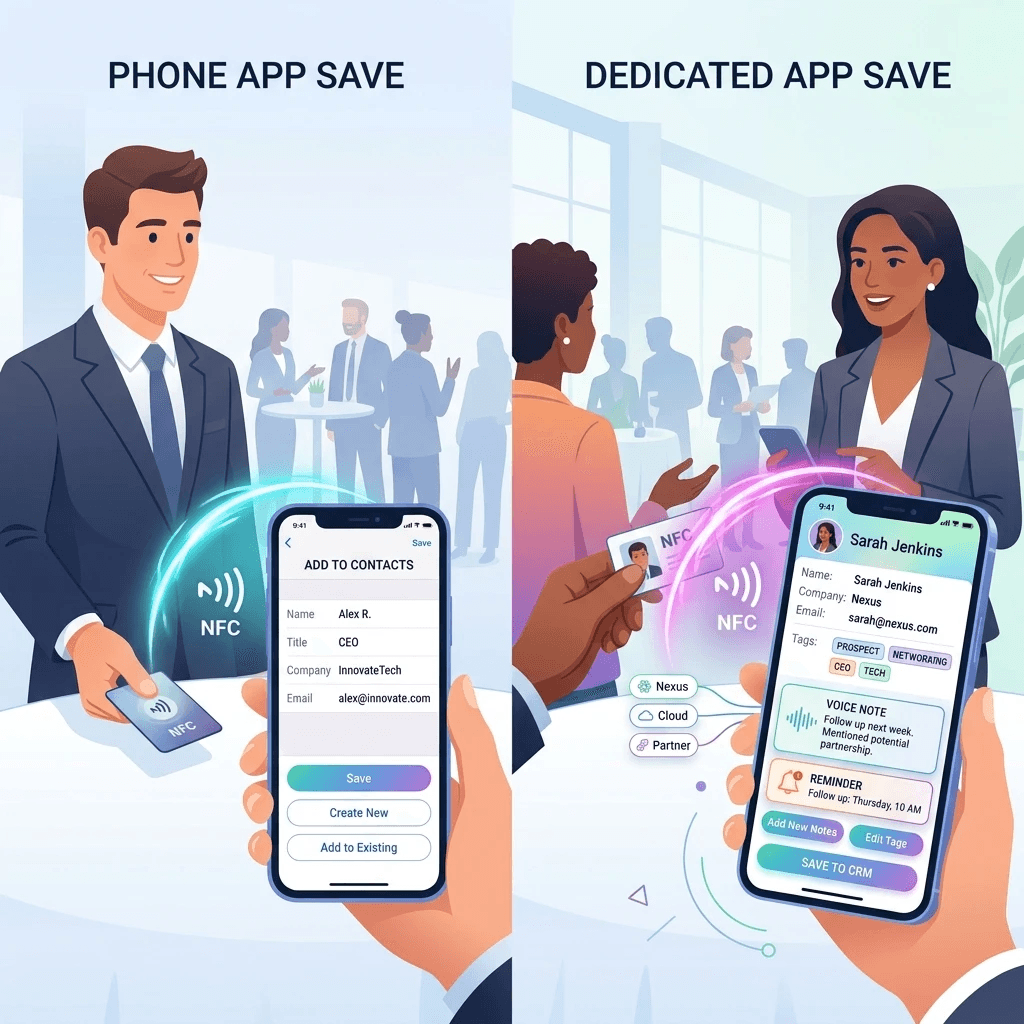
Two-way NFC: Share your digital card via NFC tap and receive the other person's contact via NFC directly into the app, not just saved to the phone. When a contact lands in Habsy via NFC, it carries all the same fields for tags, intent signals, and notes as any other capture method. Most apps that support NFC only share outward; received NFC contacts land in the phone contacts with no context, no tags, and no connection to a workflow. Habsy closes that gap.
Business QR (inbound capture): When someone scans your Habsy QR code, they are prompted to share their own contact details, which are saved automatically as a lead in Habsy. This turns passive sharing into active capture.
Manual entry: Add contacts manually in seconds when no card or QR is available.
Offline capture: Scan cards, record voice notes, set reminders, and apply tags without internet. Everything syncs automatically once connectivity returns, making it reliable in venues where Wi-Fi is unreliable.
Share: Digital Card That Works Both Ways
Digital business card: Create a branded digital profile and share via QR code, NFC tap, or link. No app required for the recipient. Pin the QR to the iOS home-screen widget for one-tap sharing during back-to-back conversations.
Multilingual scanning with translation: Capture cards in 200+ languages and translate the content into your working language. A Japanese or Arabic card scanned at an international event is immediately readable by the rep who follows up the next morning. SnapAddy reads cards in 40+ languages but does not translate.
Context: Capture What the Card Does Not Say
Voice notes with transcription: Drop a 10-second voice note while the conversation is still happening. The audio transcribes automatically and attaches to the contact record. Days later, search 'pricing discussion' or 'demo requested' and jump straight to the right lead, because the context is searchable, not buried in audio.
Notes: Attach typed notes, images, and additional information directly to a contact record for details that need to be written rather than spoken.
Intent signals at capture: Mark Interest and Priority the moment a badge or card is scanned, alongside custom fields for product line, deal stage, or any qualifier the team agrees on. Every contact enters the system already qualified, so there is no sorting to do after the event.
Tags: Apply tags by event, session, product, or any category during or after capture. Bulk-apply tags to a batch of cards scanned at the same conference in seconds.
AI person enrichment: Surfaces role context, LinkedIn information, and professional background for the contact automatically from the first scan.
AI company enrichment: Surfaces the company logo, business summary, mission, products and services, market context, and notable leadership from publicly available sources. Even a domain or email is enough to generate a company snapshot. This means every follow-up starts informed, not cold.
Manage and Act on captured Leads
Advanced search: Find contacts by name, company, voice-note transcript, tag, interest level, priority, or reminder status. Saved searches let SDRs pull their top-priority leads instantly on Day 1.
Duplicate detection: Detects duplicates using email, phone, and company plus name signals. Merge prompts before export keep the CRM clean.
Shared directory via Habsy Platform: Admins can view, manage, and organize all contacts captured across the team through the Habsy Platform. This gives sales managers visibility into lead volume and quality without chasing exports from each rep.
CRM-ready export: Export a mapped CSV that imports into HubSpot, Salesforce, or Zoho without reformatting. Direct integrations push contacts with intent signals and enrichment already applied.
Email and WhatsApp follow-up templates: Send a personalized follow-up email or WhatsApp message directly from the contact card using AI-generated templates. The template pulls in contact details and context so the message feels personal, not generic. This happens inside Habsy, not after exporting to another tool.
Follow-up reminders: Set a reminder during the conversation with one-tap presets like 'Tomorrow 10:00'. Snooze if plans shift. The reminder surfaces directly in the app so no lead goes quiet by accident.
One-tap actions: Call, email, or open WhatsApp directly from the contact card with one tap. No switching between apps to reach out.
SnapAddy: Contact Digitisation and CRM Data Quality
SnapAddy Business Cards product scans physical cards and pushes contact data into enterprise CRM systems. The separate VisitReport product adds structured questionnaires for trade show lead capture and requires a separate subscription.
SnapAddy Business Cards is available on iOS and Android. Basic scanning is free. CRM export requires a paid plan starting at approximately €60/year for individuals, scaling by user count for teams. The VisitReport trade show product is priced separately, starting at approximately €348/year for 25 users.
Core Capabilities
Business card scanning: OCR across 40+ languages. In other Hand Habsy Supports around 200+ languages. Cards are structured and exported to the connected CRM. Claims 99.5% recognition accuracy, though scanning reliability on complex or non-standard cards can vary in practice.
Batch scanning: Available for business cards and badge scanning. Processes stacks sequentially.
Digital business cards: Share via QR code, link, or NFC. Limited customization options compared to dedicated digital card platforms.
Notes: Attach text notes and images to a contact record.
Offline mode: Saves contacts offline and syncs to the CRM once connectivity is restored.
CRM integrations: Salesforce, Microsoft Dynamics 365, SAP Sales Cloud, HubSpot, SugarCRM, and Pipedrive. Export as VCF or CSV.
Duplicate check: Traffic-light indicator shows whether a contact already exists in the connected CRM. Paid feature.
Limitations
SnapAddy BusinessCards was designed for contact digitisation and CRM data quality. Tested hands-on, the gaps for professionals who need more than a scan are consistent and significant.
Scanning accuracy is inconsistent on complex cards. While SnapAddy claims 99.5% accuracy, cards with non-standard layouts, dense formatting, or unusual fonts produce errors that require manual correction. QR scanning is also not universal; it does not reliably read all badge formats or on-screen QR codes encountered at events.
NFC is basic and one-directional. SnapAddy's NFC shares your card outward. When you receive an NFC tap from someone else, the contact is saved directly to the phone contacts, not into SnapAddy. That means the received contact carries no tags, no intent signals, and no connection to any follow-up workflow. The NFC reader itself was found to be unreliable in hands-on testing.
No voice notes or transcription. The only way to attach context to a scan is a typed text note. In a fast-paced networking environment, this is slow and produces sparse records that are rarely useful the next day.
No intent signals or tags. Every captured contact enters the system with identical status. There is no way to mark interest level or priority at the point of capture. The ranked list that SDRs need for Day-1 outreach does not exist; someone has to sort it manually from a spreadsheet later.
No AI enrichment in the base product. SnapAddy captures what is printed on the card. Company summary, market context, leadership, and LinkedIn role context are not surfaced automatically. The Grabber add-on can pull some additional data but requires a separate subscription.
No follow-up reminders. There is no way to set a follow-up reminder for a specific contact inside the app. Reps have to rely on the CRM or a separate calendar tool after export.
No email or WhatsApp templates. Outreach has to happen in a separate app after the contact is exported. There is no way to send a personalised follow-up from within SnapAddy.
Multilingual support reads but does not translate. Cards scanned in foreign languages are captured, but the content is not translated into the rep's working language. A card scanned in Japanese stays in Japanese in the contact record.
No shared directory or team management in the base product. VisitReport, their separate trade show product, adds team features but requires a separate subscription priced for enterprise.
Feature Coverage at a Glance
Feature | SnapAddy BusinessCards | Habsy |
|---|---|---|
Platform | iOS and Android | iOS and Android |
Business card scanning | OCR, 40+ languages (accuracy varies on complex cards) | 99% accuracy, 200+ languages including non-Latin scripts |
Batch scanning | Available | Accurate and Faster |
QR badge scanning | Available but not universal | Universal: event badges, LinkedIn QR, on-screen, printed |
NFC Sharing (outbound) | Available | Available via tap, no app required for recipient |
NFC Receiving (inbound) | Saves to phone contacts only, no workflow integration | Received in-app with tags, intent signals, and notes ready |
Business QR (inbound capture) | Not available | Recipient prompted to share details, saved as lead automatically |
Card translation | Reads but does not translate (40+ languages) | Scans and translates to working language (200+ languages) |
Voice notes | Not available | Record and auto-transcribe at capture, fully searchable |
Notes | Available (text and images) | Available (text and images) |
Intent signals | Not available | Interest, Priority, and custom fields at point of scan |
Tags | Not available | Apply by event, product, session; bulk-apply post-event |
AI person enrichment | Not available | Role context, LinkedIn, professional background |
AI company enrichment | Not available | Summary, mission, products, market, leadership from first scan |
Email follow-up templates | Not available | AI-generated personalised templates, send from within app |
WhatsApp follow-up templates | Not available | AI-generated personalised templates, send from within app |
Follow-up reminders | Not available | Quick remainders for Faster follow-up |
Duplicate detection | CRM-linked traffic light | Email, phone, company plus name signals with merge prompts |
Offline capture | Saves offline, syncs later | Full offline: scan, voice notes, tags, reminders, all sync later |
Search | Basic search | Deep search across contacts, notes, transcriptions, tags |
Shared team directory | Not available in base product (VisitReport required) | Admin view and management via Habsy Platform |
Digital business card | QR, link, NFC (limited customization) | QR, NFC, iOS widget, no app required for recipient |
CRM integrations | Salesforce, Dynamics 365, SAP, HubSpot, SugarCRM, Pipedrive | HubSpot, Salesforce, Zoho etc |
Export format | VCF and CSV | CRM-mapped CSV, VCF, direct CRM push |
Switching from SnapAddy to Habsy
Step 1 — Export your contacts from SnapAddy
Export your contacts as a CSV file from SnapAddy while your data is accessible.
Step 2 — Import into Habsy
Open the Habsy app and go to Settings
Tap Manage Account
Tap Upload Contact
Tap Import in the top right corner
Tap Select File and choose your SnapAddy CSV
Check the field mapping to confirm columns are correctly assigned
Tick Exclude Duplicates to skip contacts already in Habsy
Tap Upload CSV
Contacts map cleanly without reformatting.
Step 3 — Enrich on demand
Tap any imported contact to surface their company background and role context instantly.
Step 4 — Apply intent signals and tags
Mark Interest and Priority on your imported contacts. Apply tags by event, product, or session. Your pipeline is prioritised before your next event.
Step 5 — Set up your Habsy digital card
Create your Habsy digital card in one of three ways:
Scan your existing business card — Habsy reads your card and populates your profile automatically
Link your LinkedIn profile — paste your LinkedIn URL and Habsy pulls your details across
Enter details manually — fill in your name, role, company, and contact information directly
Your card is shareable via QR code or a direct link. Recipients do not need the Habsy app installed to view or save your contact details.
Final Thoughts
SnapAddy is a reliable choice for digitizing business cards and maintaining CRM data quality. But today's sales teams need more than scanned contacts. They need conversation context, lead qualification, AI-powered insights, and faster follow-ups.
Habsy brings every step of that workflow into a single platform. From business card and badge scanning to voice notes, Intent Signals, AI enrichment, reminders, and personalized outreach, every contact is captured with the context needed to turn conversations into opportunities. If you're looking for a SnapAddy alternative that helps your team capture, qualify, and convert more leads, Habsy is the more complete solution.
Related articles


Ajay Karuppasamy is a digital marketing trainee at Habsy, where he enjoys creating engaging content and building campaigns that help brands connect with the right audience. He is passionate about storytelling, social media, and performance marketing. Outside of work, Ajay loves exploring the latest digital trends, experimenting with creative ideas, and finding new ways to make brands stand out online.










