

The smartest business card scanner app ever made
The best business card scanner on the market, for iPhone and Android, reads any card in seconds, front and back, in 200+ languages, and translates it into English. Then it keeps the notes, reminders and follow-up that turn a card into a lead.
Going to an event? Habsy for event visitors


Rated 4.9across 100+ reviews
 Zapier
Featured in Zapier’s best business card scanner software
Zapier selected Habsy for networking-focused workflows.
How to scan a business card with Habsy
Three steps, about ten seconds a card.
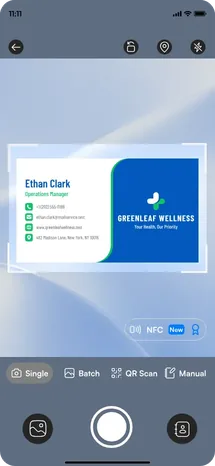
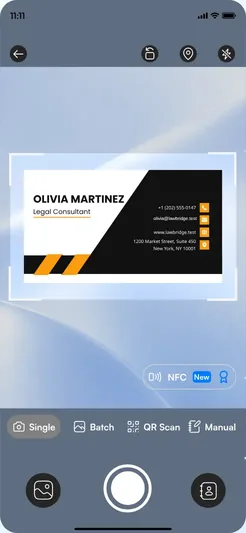
Point and capture
Take a photo of the card. Habsy reads the name, title, company, phone, email and website.
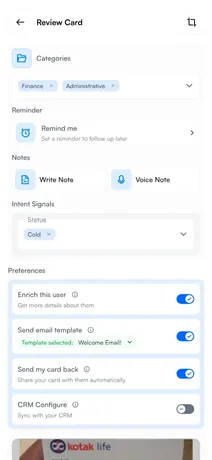
Review and add
Check the fields, add the back of the card if needed, and add notes while the conversation is fresh.
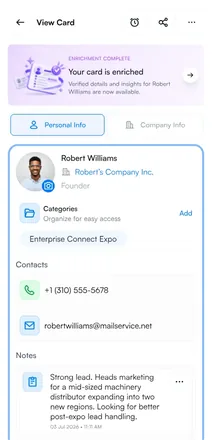
Save and follow up
Once the contact is saved, set a reminder, then call, email, export or sync it to your CRM.
A business card reader that splits personal and business details
Most scanners dump every line of a card into one long list. Habsy understands what each line is and sorts it into the person and the business behind them. The mobile number goes with the person and the office line with the company, so the contact is ready to use the moment you save it.
Scan every kind of card, in every situation
From a single card at a client meeting to a stack of 150 after a three-day show, Habsy digitizes every card and keeps it organized, like a business card organizer that fills itself in.
Front and back
Bilingual cards and notes on the reverse stay with the contact.
200+ languages
Cards in 200+ languages and scripts, translated to English. Translate contacts into 14 languages. The app is available in the same 14.
Batch scanning
Scan up to 150 cards in minutes after an event.
Works offline
Capture without signal. Cards process when you reconnect.
QR and NFC cards
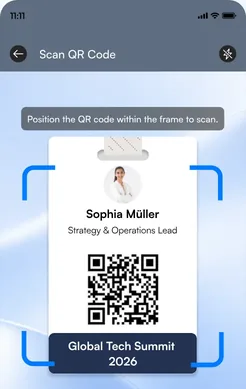
LinkedIn QR codes and digital cards from any provider in one scan, NFC cards with a tap.
Import from photos
Turn photos of cards already on your phone into contacts.
Automate what happens after you scan a business card
Set your Card Preferences once, as defaults in Settings or for a single save. Whenever you save a contact, whether from a scan, a batch at an event or manual entry, Habsy runs the steps you picked in the background while you move on to the next conversation.
Email, WhatsApp and CRM steps need the matching integration.
A phone camera can read a card. Habsy remembers why it matters.
Basic scanners rely on text recognition alone. Habsy combines OCR with AI to extract every detail accurately and sort it where it belongs, then turns the card into a contact you can act on. Know the person, not just the card
Voice and text notes
Record what was said and what happens next, right on the contact.
Categories and intent signals
Sort contacts by what they need and when they plan to buy.
Reminders
Each contact comes back on the day you choose.
Duplicate alerts
Scanned someone twice? Habsy flags it and you decide.
Company details, on tap or automatic
See the company and the person behind the card.
Follow-up drafts
Tell Habsy what you want to say, and AI writes a personal email or WhatsApp message from your prompt.
Why Habsy is the best business card scanner app on the market
| Typing it in | Phone camera text | Other scanner apps | HabsyBest overall | |
|---|---|---|---|---|
| Time per card | About two minutes | Copy and paste by hand | Seconds, one at a time | Seconds |
| Back of card | Manual | Separate photo | Varies | Kept with the contact |
| Other languages | Manual | Varies | Varies | 200+, read into English |
| Notes and reminders | Separate app | No | Basic notes | Voice notes, intent signals, reminders |
| Batch of 150 cards | Hours | One at a time | Varies | Minutes |
| Works offline | Yes | Yes | Often needs a connection | Yes |
| Export and CRM | Manual | No | Export only | CSV, VCF and 10+ CRMs |
Moving from another business card scanner app? Bring your contacts with you.
Switching to Habsy takes minutes. Export your contacts from your current app, import the file into Habsy, and every contact is ready to search, follow up and sync. Importing contacts is free.
Export from your old app
Save your contacts as a CSV file from the scanner app you use today.
Import into Habsy
Upload the CSV and your contacts appear in one list, ready to use.
Pick up where you left off
Duplicates are flagged for you to decide, so nothing is lost or doubled.
Use it anywhere you collect business cards
Trade shows and exhibitions
Batch scan the stack each evening so nothing waits until you are home.
Conferences and networking
Scan between sessions and add a note before the next conversation.
Client meetings
Save the card before you leave the room, with the next step attached.
Everyday business
Every card on your desk, finally in one searchable list.
Export scanned cards to Excel or sync them to your CRM
Export to Excel or CSV with the columns you choose, or send contacts straight to Salesforce, HubSpot, Zoho CRM, Dynamics 365, Odoo, Zapier or any of our 10+ CRM integrations. Your data is encrypted in transit and at rest.
Free business card scanner app, with unlimited scans
Your phone can already read a business card, so we do not charge for scanning. Scan as many cards as you like, with no trial and no card limits. Paid plans add the context, follow-up and team tools, and they fund the free app. No ads.
Business card scanner questions
Choosing a scanner?See the best business card scanner app in 2026.
What is the best business card scanner app?
The best business card scanner app reads cards accurately and helps you use the contact afterwards. Habsy uses OCR and AI to read cards front and back in 200+ languages, batch scans up to 150 cards in minutes, and adds notes, reminders and follow-up drafts to each contact.
Is the Habsy business card scanner free?
Yes. Scanning business cards in Habsy is free forever, with unlimited cards, no trial and no card limits. Paid plans add features such as voice notes, intent signals, company details, Card Preferences and CRM integrations.
Is there a free business card scanner for iPhone?
Yes. Habsy is a free business card scanner app for iPhone and Android. Scanning is unlimited, with no trial and no card limits.
How do I digitize a stack of business cards?
Use batch scanning in Habsy. Scan up to 150 cards in minutes, then review them in one queue. Each card becomes a contact you can search, export or sync to your CRM.
Can I import contacts from another business card scanner app?
Yes. Export your contacts from your current app as a CSV file and import it into Habsy. Importing is free, and duplicates are flagged so you can decide how to handle each one.
Is Habsy a business card organizer?
Yes. Every card you scan becomes a contact with personal and business details split, plus notes, categories and reminders, so your cards stay organized and searchable in one list.
Can Habsy scan and translate business cards in other languages?
Yes. Habsy reads business cards in 200+ languages and scripts, more than any other business card scanner, and translates them into English. You can also translate contacts into 14 languages: English, Hindi, Tamil, Arabic, German, French, Spanish, Italian, Portuguese, Japanese, Korean, Chinese, Dutch and Turkish. More languages are coming soon.
What are Card Preferences?
Card Preferences are actions you set once, as defaults or per save, that Habsy runs in the background after you save a contact: looking up company and profile details, sending an email or WhatsApp template, sending your digital card back, and syncing to your CRM. Email, WhatsApp and CRM steps need the matching integration.
How do I scan a business card with my phone?
Open Habsy, point your phone camera at the card and take a photo. Habsy reads the name, title, company, phone, email and website. Review the fields, add the back of the card if needed, add notes, and save. You can then set a reminder on the contact.
Can I scan many business cards at once?
Yes. Batch scanning captures up to 150 cards in minutes, which suits the stack you bring home from an event.
Does the business card scanner work offline?
Yes. Cards are captured offline and processed when your phone reconnects.
Can I export scanned business cards to Excel or my CRM?
Yes. Export contacts to Excel or CSV, or sync them to Salesforce, HubSpot, Zoho CRM, Dynamics 365, Odoo, Zapier or any of our 10+ CRM integrations.
Is my contact data safe?
Contacts are encrypted in transit and at rest. You own your data and can export it anytime.
Trusted by 500+ businesses
Exhibiting teams use Habsy at 500+ events in 70+ countries





































































What people say about the Habsy card scanner
“I've tried several scanner apps, and Habsy is the only one that gets every field right, even on cards in Japanese and German. It sorts the mobile number from the office line too, so I never have to fix contacts later.”
“I scanned a stack of 120 cards from a conference in a few minutes.”
“Importing my old contacts from my previous app took less than five minutes.”
“Free and unlimited, yet better than the paid apps I used before.”
What is the Habsy business card scanner?
The Habsy business card scanner is part of the Habsy mobile app for iPhone and Android, made by Habsy Inc. It uses OCR and AI to read business cards front and back in 200+ languages, translates them into English, splits personal and business details, batch scans up to 150 cards in minutes, and works offline. Scanning is free forever.
Each scanned card becomes a contact with notes, voice notes, intent signals and reminders. Card Preferences can then send your email or WhatsApp follow-up, share your digital card and sync to Salesforce, HubSpot, Zoho CRM, Dynamics 365, Odoo, Zapier or any of our 10+ CRM integrations automatically. More than 500,000 cards have been scanned with Habsy.
- Price
- Free forever, unlimited scans
- Platforms
- iPhone and Android
- Reads
- Front and back
- Languages
- 200+, translated to English
- Batch scanning
- 150 cards in minutes
- Works offline
- Yes
- Export
- Excel, CSV, VCF, CRM
Turn your next stack of cards into leads
The smartest business card scanner, free forever. Scan, remember and follow up, all in one app.