WhatsApp Follow-Up Message Templates After Events and Meetings
In many markets, WhatsApp gets a reply faster than email. But a follow-up on WhatsApp has to be shorter, more personal and better timed. These ten templates cover the common situations after events and meetings, with the etiquette that keeps them welcome.
Claire Bennett5 min read
The quick answer
A good WhatsApp follow-up is short (two to four lines), personal (one detail from your conversation), expected (you asked if WhatsApp is fine) and well timed (business hours, same day or next morning). Use the templates below and replace the parts in [brackets]. Habsy can write the personal version for you from a short prompt, free.
10 WhatsApp follow-up templates
1. Same-day thank you after an event
Hi [First name], this is [Your name] from [Company]. Good to meet you at [Event] today. As promised, here is our [catalogue / price list]. Happy to answer any questions.
2. Quote request
Hi [First name], [Your name] from [Company], we spoke at [Event] about [product] for around [quantity]. I have attached the quote. Could we talk for 10 minutes on [day]?
3. Demo request
Hi [First name], [Your name] here from [Event]. You wanted to see how [product] handles [use case]. Would [day] at [time] work for a 20-minute demo?
4. Sending what they asked for
Hi [First name], here is the [brochure / spec sheet] you asked for at [Event]. Page [number] covers [their topic].
5. Brief chat
Hi [First name], [Your name] from [Company]. We spoke briefly at [Event]. If [problem] is a priority this year, I can share how we help [type of company]. Would that be useful?
6. After a meeting
Hi [First name], thanks for your time today. Summary: [one line]. Next step: [what you agreed], by [date].
7. Meeting confirmation
Hi [First name], confirming our call on [day] at [time]. Here is the link: [link]. Speak then.
8. Gentle nudge, no reply
Hi [First name], following up on the [quote / sample] from [Event]. Is this still on your list, or should I check back next month?
9. Introducing a colleague
Hi [First name], as discussed, I am adding my colleague [Name], who handles [area]. [Name] will message you about [next step].
10. Closing the loop
Hi [First name], I will not keep messaging, but if [problem] comes back on your list, you can reach me here anytime. Good luck with [their project].
Etiquette that keeps WhatsApp follow-ups welcome
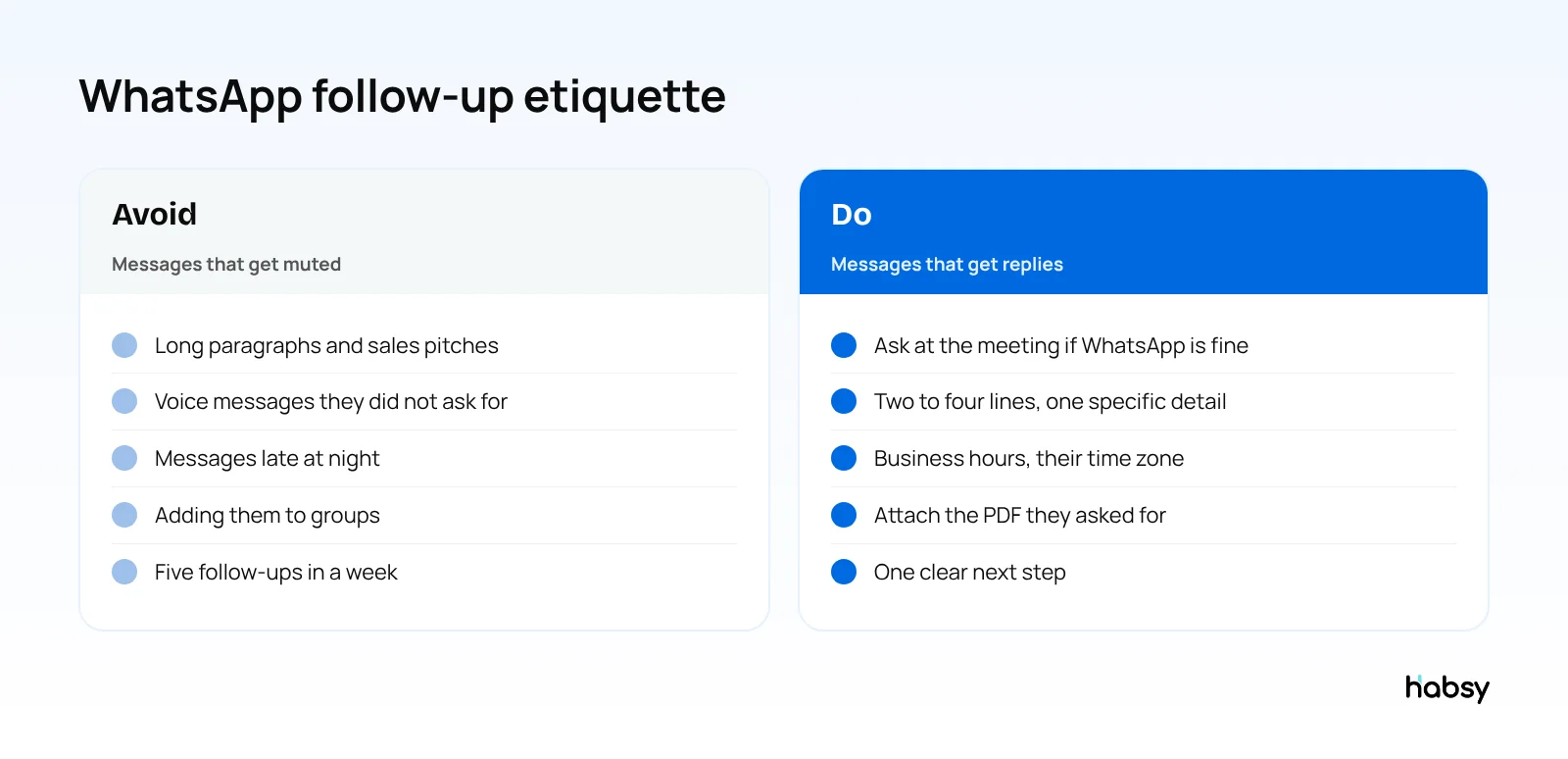
- Ask first. “Is WhatsApp fine for the details?” at the meeting makes your message expected.
- Introduce yourself in the first line. They may not have saved your number.
- Use business hours in their time zone.
- Attach, do not paste. Send the PDF or link instead of long text.
- One next step per message.
- Do not add people to groups without asking.
- Stop after two or three follow-ups with no reply.
Ready for your next event?
Bring every booth conversation back with context.
Capture cards and badges in seconds, qualify leads on the spot and give your team a clean next step.
Personal messages vs the WhatsApp Business API
| Personal WhatsApp or WhatsApp Business app | WhatsApp Business API | |
|---|---|---|
| Best for | A handful of contacts | Many contacts after a large event |
| How messages are sent | One at a time from your phone | Through an integrated platform |
| Rules | Normal WhatsApp etiquette | Meta’s rules, including approved templates for business-initiated messages |
| Analytics | No | Depends on the platform |
How Habsy helps with WhatsApp follow-up
- AI-written WhatsApp messages, free. Write a short prompt, such as “thank them for visiting, attach the catalogue, suggest a call on Thursday”, and Habsy drafts a personal message using details from the contact card.
- Smart message generation with rule sets on the Habsy Platform, so a team’s messages stay consistent while each one is personal.
- WhatsApp templates, with Habsy Plus.
- WhatsApp Business API integration, with Habsy Plus, for accounts with API access: bulk WhatsApp to selected contacts, and auto-send a template after you save a contact.
- Reminders so the next follow-up happens on time.
- Your digital card. Send your digital card to the contact so they have your details too.
For email versions of these messages, see trade show follow-up email templates.
Prompts for AI-written WhatsApp messages
WhatsApp messages need to be shorter than emails, so ask for that in the prompt. Habsy uses the details on the contact card, plus your notes, to write the message.
| Situation | Prompt you might write |
|---|---|
| Same-day thanks | “Two lines, thank him for visiting our stall at the expo, attach the price list.” |
| Quote | “Short, mention the 500-unit quote he asked for, ask if Monday works for a call.” |
| After a dealer meet | “Friendly, thank her for coming, confirm I will share the scheme details by Friday.” |
| Nudge | “One line, ask if he had a chance to look at the catalogue, no pressure.” |
On the Habsy Platform, teams can also set rule sets for WhatsApp message generation, such as tone, length or what must always be mentioned, so every rep’s messages stay consistent while each one is still personal.
Illustrative example. A building materials distributor’s three reps meet 90 contractors at a trade fair. That evening, each rep sends personal WhatsApp messages to the 15 contractors they spoke to in depth, drafted from short prompts and checked before sending. For the rest, the company sends an approved template with the catalogue through its WhatsApp Business API integration.
Bottom line
WhatsApp follow-ups work when they are short, personal, expected and well timed. Use these templates as a starting point, and let Habsy write the personal version from a short prompt. See how Habsy handles event follow-up.
Frequently Asked Questions
Is it OK to follow up on WhatsApp after a business meeting?
Yes, in many markets it is normal, especially in India, the Middle East, Latin America and parts of Europe and Africa. It works best when you asked at the meeting whether WhatsApp is fine, and when you keep the message short and relevant.
How long should a WhatsApp follow-up be?
Two to four short lines: who you are and where you met, one detail from the conversation, and one next step. Send longer material as a PDF or link.
What time should I send a WhatsApp follow-up?
During the other person’s business hours, ideally the same day or the next morning after you meet.
Can I send WhatsApp follow-ups in bulk?
For bulk sending, use the WhatsApp Business API, which follows Meta’s rules, including approved templates for business-initiated messages. Habsy Plus integrates with the WhatsApp Business API for accounts that have access.
Can Habsy write WhatsApp messages for me?
Yes. Habsy writes a personal WhatsApp message with AI from a short prompt, using details from the contact card. This is part of the free plan.
Ready for your next event?
Bring every booth conversation back with context.
Capture cards and badges in seconds, qualify leads on the spot and give your team a clean next step.