

Arrive prepared. Leave ready to follow up.
Across 6 events, 2Getherz Signage used Habsy to capture around 350 cards per event and connect the work before, during and after each show: reusable settings, context at capture, Zoho CRM sync, and outreach on email and WhatsApp.
2 to 3 days of sheet work
Type the cards and notebook entries into a sheet, import it into the CRM, then set up the campaign.
0 days of sheet work
Contacts land in the event category and sync to Zoho CRM as they are saved.
Days later
The introduction waited until the sheet and the campaign were ready.
At save
The selected template goes out from the company email as each contact is saved.
2Getherz Signage
Digital signage and display solutions · Delhi, India
The impact
2Getherz, in numbers.
26%
of contacts engaged after outreach
90 people interacted after the team’s outreach to a group of about 350 captured contacts.
3 min
to prepare for an event
Review the intent signals, set the event category and choose the template.
12 to 18 days
of sheet work removed
The 2 to 3 days after every event, across 6 events, now handled at capture.
2,100
cards captured
Six events at about 350 cards each, organised and synced as they were saved.
01 / The challenge
The team invested in the event. The follow-up still started from scratch.
Every show brought new conversations. Every show also ended with days of admin before the team could reply to any of them.
2Getherz Signage supplies digital signage, including wall-mounted displays, table-top screens and floor standees. Events give the team the chance to meet businesses, understand their display needs and start useful conversations.
The team used to collect cards and write details in notebooks. After each show it spent 2 to 3 days putting everything into a sheet, then imported it into the CRM and prepared the email campaign.
By the time the first email went out, the detail behind each conversation had started to fade. The team needed a process that was ready before the first visitor arrived.
02 / The change
Prepare once. Let the workflow run.
Habsy connected the preparation, the capture and the outreach, so the event no longer ended with a new pile of work.
Before the show: set the essentials.
Habsy AI suggests intent signals from the company website, the team sets the event category as the default and prepares an introduction template. Kanwarjeet put this at about three minutes.
At the show: capture the conversation.
Reps scan the card, add notes and intent signals, and save. Card Preferences then send the introduction email, share the digital card, enrich the contact and sync it to Zoho CRM.
After the show: follow up with purpose.
The team filters the event contacts, picks the right group and sends a relevant message by company email or WhatsApp Business, then checks the email activity in Habsy.
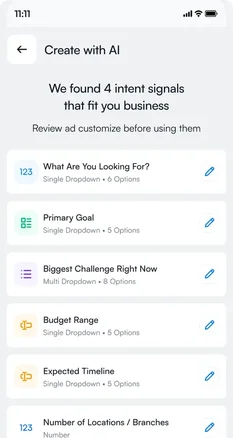
1Review the suggested intent signals
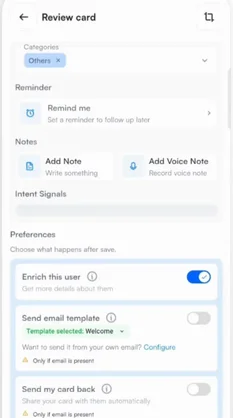
2Preferences run after each save
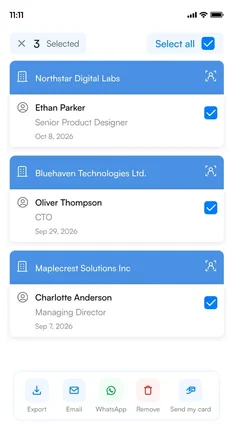
3Send to the right contacts
03 / The results
Less work rebuilding the event. More control over what comes next.
Kanwarjeet describes Habsy as a complete package for the team’s events: easier capture, organised contacts, introductions already sent, and connected outreach afterwards.
Contacts organised at capture
Every contact lands in the event category with its notes and intent signals, ready to filter after the show.
Introductions already underway
The first email and the digital card go out as contacts are saved, so the conversation continues while the show is still on.
Outreach with a reason
The recorded requirement shapes the follow-up, and 90 people engaged after the team’s outreach to one group of about 350 contacts.
Earlier, we came back from an event with cards and notebook entries, then spent two or three days putting the details into a sheet before preparing the CRM and campaign. With Habsy, we prepare the categories, intent signals, and introduction in advance. At the event, we capture the conversation and let our enabled workflow handle the introduction and CRM sync. Afterwards, the contacts are organised and we can concentrate on follow-up. It feels like a complete event workflow, with much clearer control of what to do next.
04 / Before, during and after the show
One workflow from the first setup to the next conversation.
The same settings carry from one event to the next, with the category and message updated for each show.
Before: reusable setup
Intent signals, templates and connected accounts are reused at the next event. Only the event category and the message change.
Event lead capture →During: actions after every save
Card Preferences send the introduction, share the digital card, enrich the contact and sync it to Zoho CRM in the background.
Contact intelligence →After: connected outreach
Filter the event contacts, send by company email or WhatsApp Business, and review sent, delivered, opened and bounced emails.
Habsy for teams →A 3-minute setup instead of a 3-day cleanup.
Across 6 events and about 2,100 cards, the team left each show with contacts organised, introductions sent and a clear next step.
In summary
Habsy's summary of the story
The preparation paid off in how the team left each event.
Contacts organised, context kept, introductions underway. Across 6 events, Habsy connected the work around capture so 2Getherz could spend the show talking to people and pick up the conversations straight after.
Clear answers
The event workflow, explained.
How long does it take to set up Habsy before an event?
Reviewing your intent signals, setting the event category and choosing an introduction template takes a few minutes. 2Getherz Signage puts it at about three minutes. Connecting your email, CRM and WhatsApp is a one-time setup you reuse at every event.
What can Habsy do automatically after a contact is saved?
With Card Preferences on, Habsy can enrich the contact, send an email or WhatsApp template, send your digital card back and sync the contact to your CRM. Each runs in the background after you save a contact from a scan, a batch or manual entry.
Does Habsy sync contacts to Zoho CRM?
Yes. Habsy connects to Zoho CRM, HubSpot, Salesforce, Dynamics 365, Odoo and Zapier, plus custom CRM integrations on request. You choose how the fields map, and contacts sync after they are saved.
Can I reuse intent signals and templates at the next event?
Yes. Your intent signals, templates and integrations stay in place. For a new show, set a new event category as the default and update the message if needed.
Prepare once.
Spend the show connecting.
Set up intent signals, a template and your CRM before the show, and leave with every contact ready for follow-up.