

4 to 5 days to start outreach. Now the scan starts it.
Asahi Kasei’s sales and marketing team used Habsy across 9 events, capturing 300+ business cards at each one. With context captured and Card Preferences on, saving a contact sends the introduction email, shares the digital card, enriches the lead and syncs it to the CRM.
4 to 5 days
Build a contact sheet, prepare the email template and run the campaign.
At save
The introduction email and the digital card go out as each contact is saved.
After the show
Each card was the starting point for finding out more about the person and company.
Built in
Person and company background appears in the contact brief.

Asahi Kasei
Material, Homes and Healthcare · Tokyo, Japan
The impact
Asahi Kasei, in numbers.
23%
reply rate
70+ replies from a group of 300+ scanned contacts who received the introduction.
4 to 5 days
faster first email
The introduction now starts when the contact is saved, not after a campaign is built.
2,700+
business cards captured
Nine events at 300+ cards each, with notes, intent signals and enrichment.
36 to 45 days
of campaign prep removed
The 4 to 5 days after each of 9 events, now replaced by after-save actions.
01 / The challenge
The event conversation ended. The preparation work began.
For the sales and marketing team, every conversation at a show was the start of a relationship. The first email still had to wait for days of admin.
Asahi Kasei is a Japanese group working across three sectors: Material, Homes and Healthcare. For its sales and marketing team, event conversations lead to relationships that need relevant information and a timely next step.
Reps used to collect cards and note discussion points separately. After the show, the team built a contact sheet, prepared an email template and organised a campaign. Noriko Nakamura described the process as taking 4 to 5 days.
In that gap, the detail behind each card could fade. The first email still had to be sent, the company researched, the team’s own details shared and the contact moved into the sales workflow.
02 / The change
A smarter capture. A head start on the next conversation.
The team connected its company email and CRM, turned on its preferred Card Preferences and chose the introduction template. Reps then capture a card, add context and save.
Keep the context with the card.
Notes and voice notes keep what was discussed. Categories and intent signals record the requirement and guide the follow-up. A reminder can be added after the contact is saved.
Save into the workflow.
With Card Preferences on, saving a contact enriches it, sends the introduction email from the company account, shares the digital card and syncs it to the CRM.
Continue with the reply.
The team reviews the captured context, the enriched brief and the email activity before continuing each conversation.
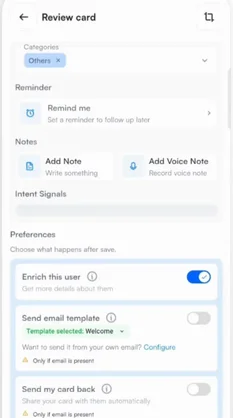
1Preferences on the review screen
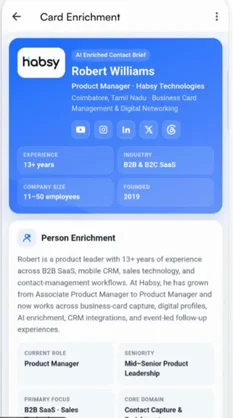
2The enriched contact brief
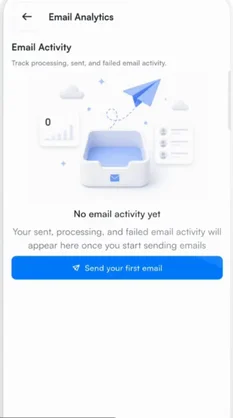
3Email activity in Habsy
03 / The results
From a pile of cards to conversations already moving.
The team reported 70+ replies from a group of 300+ scanned contacts, a reply rate of about 23%, with the original context ready for each next conversation.
Introductions start at capture
The first email goes out from the company account when the contact is saved, 4 to 5 days sooner than before.
Context with every contact
Notes, voice notes, intent signals and categories keep the discussion ready for the next conversation.
Background without the research
Person and company enrichment fills in the contact brief, so the team knows more before it replies.
Earlier, we had to prepare the contact sheet, create the template, and run a campaign after the event. That could take four or five days. With Habsy, we scan the card, add the conversation context, and save it with our preferences enabled. The introduction email, digital card, enrichment, and CRM sync are then handled through the workflow. It makes networking feel much more organised, and we can spend more time continuing the conversations that matter.
04 / What happens after save
Four actions. One tap on Save.
Card Preferences turn each saved contact into the start of the follow-up, while the rep moves on to the next conversation.
The introduction goes out
The selected email template is sent from the connected company account, and the digital card goes with it.
Event lead capture →The contact is enriched
An AI Enriched Contact Brief adds the person’s role and background and the company profile.
Contact intelligence →Your details are shared
The rep’s digital card goes back to the new contact, so the exchange is easy to continue.
Digital business cards →About 1 in 4 contacts replied.
With the first email sent at capture, the team had 70+ replies to continue from one group of 300+ contacts, without building a campaign first.
In summary
Habsy's summary of the story
A smarter scanner gave the team a smarter way to keep networking.
Context made each contact useful. Enrichment added background. After-save email, digital-card sharing and CRM sync moved each connection forward without the old 4 to 5 days of campaign preparation.
Clear answers
The after-save workflow, explained.
What happens automatically after I save a contact in Habsy?
With Card Preferences on, Habsy can enrich the contact, send your email or WhatsApp template, send your digital card back and sync the contact to your CRM. Asahi Kasei’s sales and marketing team uses this to start introductions at the event.
Which email account sends the introduction?
Your own. Connect Google, Outlook, Zoho Mail, Microsoft Exchange or Amazon SES in Settings, and Habsy sends from that account.
What is in an enriched contact brief?
The AI Enriched Contact Brief covers the person’s role and background and the company’s profile, products and contact details. When something cannot be verified, the brief says so rather than guessing.
Can I see whether my follow-up emails were opened?
Yes. Email analytics in Habsy show emails sent, delivered, opened and bounced, so you can see where each introduction stands.
Make the connection.
Let the next steps start.
Capture the conversation, then let Card Preferences send the introduction, enrich the lead and sync your CRM.