

2 to 3 days to get contacts into the CRM. Now it happens at the event.
OBO Bettermann India used Habsy across 11 events to scan business cards, capture what prospects needed and sync the details to HubSpot. When an event ends, the team goes straight to follow-up instead of preparing spreadsheets.
2 to 3 days after the event
Type the cards into Excel, check them, then import them into HubSpot before any follow-up.
At the event
Each saved contact syncs to HubSpot with the fields the team mapped.
1 to 2 days of typing
One person was assigned to enter every card into Excel by hand.
No typing
Habsy reads each card, so nobody enters the details again.
OBO Bettermann India
Electrical installation and infrastructure systems · India
The impact
OBO Bettermann India, in numbers.
22 to 33 days
of CRM preparation removed
The 2 to 3 days after each of 11 events, now done during the event.
2,750+
business cards captured
Eleven events at 250 to 350 cards each, with details sent to HubSpot.
1 to 2 days
of typing gone per event
No more entering every card into Excel before the import.
11
events on one process
Scan, add context, save and sync, the same way at every show.
01 / The challenge
The conversations happened at the booth. The CRM work waited.
Every event produced hundreds of cards and the requirements behind them. Getting both into HubSpot took days.
OBO Bettermann supplies systems for electrical infrastructure, including cable management, lightning and surge protection, and fire protection. At events, the India team needs to capture both the contact and the requirement behind each conversation.
The old routine split that information across cards, card holders and notebooks. Important cards were pinned beside handwritten notes. After each show, one person typed the details into Excel.
Typing alone took 1 to 2 days. Checking the data and importing it into HubSpot stretched that to 2 to 3 days before follow-up could start, with room for errors and requirements to match back to the right prospect by memory.
02 / The change
Connect HubSpot once. Capture every conversation with context.
The team connected HubSpot, mapped the fields and turned on automatic sync. Categories and intent signals were set up for what it needed to learn at events.
Set up the workflow before the event.
Connect HubSpot and choose how contact fields map. Set up categories, tags and intent signals so every rep captures the details that matter.
Scan the card. Keep the conversation.
Capture the card with the business card scanner, and add notes, voice notes and requirements while the meeting is fresh.
Let HubSpot receive the details.
When the contact is saved, Habsy syncs the mapped fields to HubSpot. Once the event ends, the team works through its usual HubSpot follow-up.
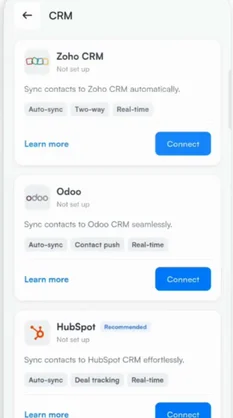
1Connect HubSpot
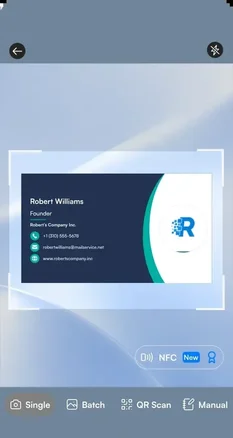
2Scan the business card
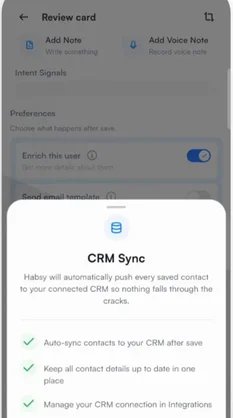
3Sync after each save
03 / The results
The difference shows when the event is over.
The team no longer starts with a pile of cards to type. It starts by reviewing the prospects it met and preparing outreach in HubSpot.
Ready when the event ends
Contacts are already in HubSpot, so follow-up starts the same day instead of 2 to 3 days later.
Requirements stay with the prospect
Notes, voice notes and intent signals keep what each prospect needed, so the next conversation picks up from the last.
A shared view of every event
On Habsy Platform, admins see the team’s captures and context in one place and decide where to focus next.
Earlier, we collected cards and noted important requirements in a notebook. After the event, entering the details, checking them, and importing them into the CRM took 2–3 days. With Habsy, we scan the card and record the context while we are meeting the person, and the mapped details sync to HubSpot. When the event ends, we can focus on the prospects and follow-up, with the conversation still clear.
04 / Beyond the CRM connection
More context. A clearer view of every event.
HubSpot sync was one link in a wider workflow. Capture tools kept the detail, and Habsy Platform showed the team what was happening.
The requirement stays with the person
Notes, voice notes and intent signals capture what a business card cannot, so follow-up starts with what the prospect needed.
Event lead capture →Stacks of cards keep moving
Batch scanning digitises a stack in one session, and person and company enrichment adds background for outreach.
Business card scanner →The admin sees the bigger picture
Habsy Platform brings the team’s captures, event activity and contact context together as contacts arrive.
Habsy Platform →22 to 33 days of preparation, gone.
Across 11 events and 2,750+ cards, the time between meeting a prospect and being ready to follow up dropped from days to the moment the contact is saved.
In summary
Habsy's summary of the story
When the event ended, the team had prospects to work on, not cards to type.
Across 11 events, OBO Bettermann India combined scanning, conversation context and HubSpot sync to remove the preparation delay between meeting a prospect and following up.
Clear answers
HubSpot sync, explained.
Does Habsy sync scanned business cards to HubSpot automatically?
Yes. Connect HubSpot, map the fields and turn on CRM sync in Card Preferences. Each contact then syncs after it is saved. OBO Bettermann India uses this to have event contacts in HubSpot before the show ends.
Which CRMs does Habsy connect to?
HubSpot, Salesforce, Zoho CRM, Dynamics 365, Odoo and Zapier, plus custom CRM integrations on request. Standard sync is one way, from Habsy to the CRM, and two-way sync is available as a custom integration.
Can I choose which fields sync to my CRM?
Yes. You decide how Habsy’s contact fields map to the fields in your CRM when you connect it, so the details land where your team expects them.
What happens if I scan cards without internet at the event?
Habsy captures the cards offline and processes them once your phone is back online. The contacts then sync to your CRM as usual.
Meet the prospect.
Skip the spreadsheet.
Scan the card, keep the context and send it to your CRM, so follow-up starts when the event ends.