CamCard vs Habsy: the CamCard alternative built for exhibitors
CamCard was one of the first business card scanners, and it has grown into an AI business assistant with a digital card, voice transcription and a team product priced on request. Habsy was built around the exhibitor’s week: the stack of cards, the badge scans, the follow-up and the report. For exhibitors, Habsy is the better event system, and the reasons are practical: what the free app lets a rep do before anyone pays, how a stack of cards in several languages gets processed, and whether the leads leave the phone with the context attached.
Amélie Tremblay19 min read
On this page
- Day three at the booth
- Who this comparison is for
- Start at your next show, and never run out of scans
- Cards in any language come back in English
- The phone is both the scanner and your card
- Save it, and Habsy does the rest
- Qualify at the booth, in your team’s own words
- Follow-up that lands while the buyer still remembers you
- Every show becomes a campaign, and the report says who to call first
- At a glance
- Habsy is the superior choice for exhibitors.
- Moving from CamCard
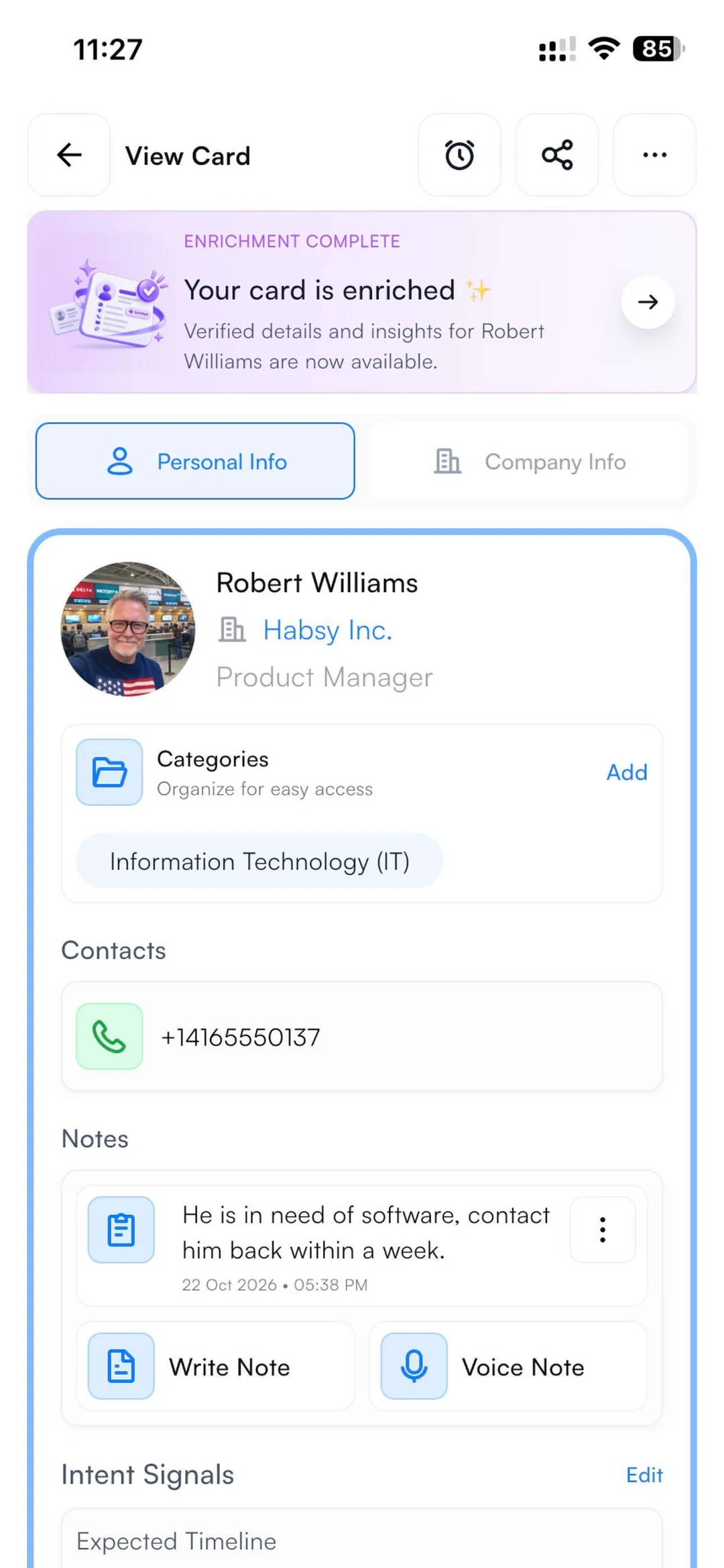
Day three at the booth
It is the third afternoon of a four-day show. Your rep has a jacket pocket full of business cards, a few dozen badge scans, and a clear memory of which conversations mattered: the distributor who wanted pricing by Friday, the plant engineer who asked about lead times, the buyer who said to call after their budget review. None of that is written down anywhere the rest of the team can see.
The rep installed a scanner app the night before the show. By the second afternoon the free allowance has been used up on cards from day one, and the app is asking for an upgrade between scans. The cards from day two go back in the pocket. On the train home the rep finds the “export to Excel” button, and that needs the upgrade too. The badges never got scanned at all, because the app does not read badges.
Then the show ends. There is a travel day, then a Monday spent catching up on everything that waited. The cards get typed into the CRM sometime the following week. By the time the follow-up email goes out, the notes have faded, the message reads like it could have gone to anyone, and the buyer has met dozens of other exhibitors since. When someone asks marketing whether the show paid for itself, the honest answer is a guess.
The two products started in different places. CamCard began as a card scanner in 2009 and has become, in its own App Store words, an AI business assistant: a card scanner with a 99.99% accuracy claim, AI business insights on the company behind the card, voice transcription with AI summaries, digital cards with email signatures and virtual backgrounds, and a separate team product, CamCard Business, with team contact sharing, task assignment, AI email writing and email campaigns, priced on request. Habsy was built around the exhibitor’s week from the start. It puts unlimited scanning, badge capture, batch mode, export and a written follow-up in a free app, and publishes the price of everything above it.
Who this comparison is for
Exhibitors
If you run or staff a booth, most of this page is for you. You scan cards and badges all day, you need to know which conversations were worth something, and you need the follow-up out before the buyer forgets your stand. The sections below argue that case one step at a time.
Visitors
If you are walking the show as an attendee, you can use the Habsy app free, with unlimited card scanning, no trial, and export to Excel, CSV or VCF. CamCard’s free account gives you a digital card and a scan allowance, and export sits on Premium. On both, the person you share your card with opens it in a browser without installing anything.
Start at your next show, and never run out of scans
Exhibiting already comes with a long list of approvals: stand space, travel, freight, giveaways. A scanner that stops mid-show, or a team product that needs a sales call before anyone sees a number, adds one more. CamCard’s individual app is free to download, and its Premium subscription, listed at USD 49.99 a year on the US App Store with monthly options alongside, is what the store listing describes as “Unlimited Scanning, No Ads, Sync to CRMs”. Premium also unlocks export to Excel or VCF, Secretary Scan Mode for delegated scanning, AI business insights and voice transcription with AI summaries. So the free account is best read as a trial with a scan allowance and ads, and the day-two rep in the story above is its natural customer.
For teams, CamCard’s pricing page shows two products, CamCard Business and CamCard Digital Business Card, behind a Request Pricing form and a 10-day Business free trial. The feature list is long, with unlimited scanning, AI auto-correction, CRM sync, team contact sharing, task assignment, duplicate detection, AI email writing, email campaigns, SSO and a dedicated account manager, but the number arrives after the form.
Habsy publishes its prices. The free app scans cards, badges, QR codes and NFC without a limit, with no ads, so a rep can install it the night before and scan from the first conversation to the last. Plus costs USD 99.99 per user per year with no seat minimum, and adds qualification, enrichment, templates, Card Preferences and CRM sync. Platform, for teams that run several shows a year, is a custom annual price with no per-event, per-scan or per-lead fee, and seats are billed pro rata when you add reps mid-season.
| Feature | CamCard | Habsy |
|---|---|---|
| Visitor or individual | Free account with a digital card, a scan allowance and ads. Premium, USD 49.99 a year on the US App Store, makes scanning unlimited and adds export, CRM sync, AI insights and transcription. | Free. The app is $0 with unlimited scanning, no trial, no ads, and export to Excel, CSV or VCF. |
| Exhibitor rep | Premium for unlimited scans and export. No badge scanner listed. | Free app with unlimited badge and card scanning, or Plus at USD 99.99 per user per year with no seat minimum. |
| Team | CamCard Business or CamCard Digital Business Card, priced on request after a form, with a 10-day trial. | Platform, a custom annual price, with pro-rata seats. |
| Per lead or per event | None listed; team pricing by quote. | No per-lead, per-scan or per-event fee. |
| How you start | Free download, then an upgrade prompt when the allowance runs out; a sales form for teams. | Download the app and scan. |
CamCard prices are from its US App Store listing and camcard.com/pricing, checked 26 October 2026. CamCard quotes team prices after a Request Pricing form.
Cards in any language come back in English
Picture the last evening of a show in Frankfurt, Dubai or Shanghai. The day’s cards are in German, Arabic, Mandarin, Korean and English, sometimes with two scripts on one card. The rep who met those buyers can follow up only once someone can read the cards, and typing them in by hand is where the evening goes.
The Habsy business card scanner is built for that pile. It reads cards in more than 200 languages and translates them into English, so each contact lands in a form every rep and every CRM can use. It splits the person from the business, so the mobile number stays with the person and the office line with the company. Batch mode works through about 150 cards in about five minutes, with a review step before anything is saved. The app itself runs in 14 languages, so a team drawn from several country offices can each work in their own.
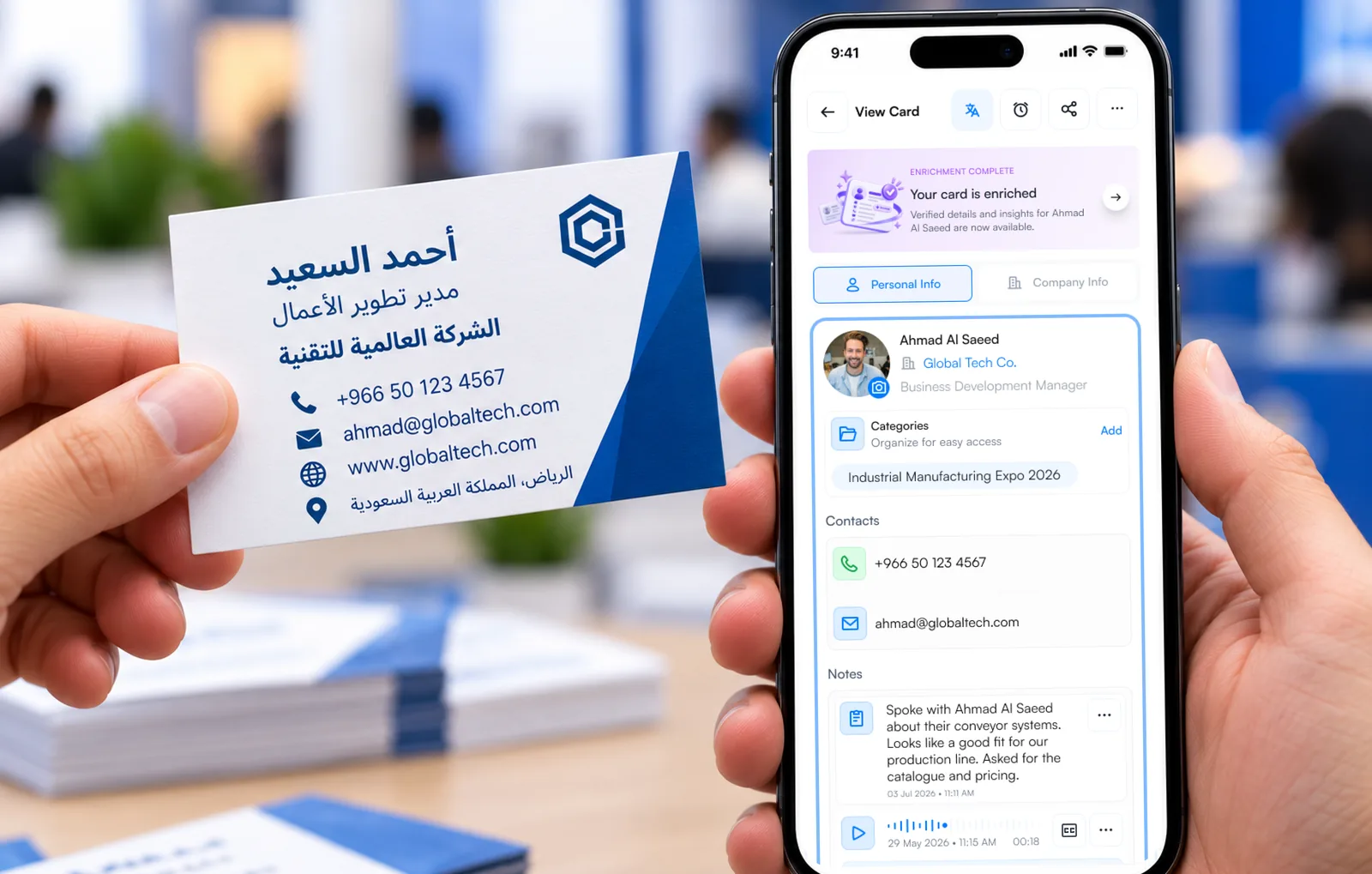
CamCard is strong in East Asia, where it started, and it has listed 16 recognition languages for years: the European languages, Japanese, Korean and both Chinese scripts. Its current store listing says “expanded recognition for global languages” without giving a number, and the app is listed in seven languages. On batch, CamCard’s team product lists Bulk Card Scanning with supported scanners, which means a desktop scanner on a desk, not a phone at the hotel, and its app notes mention improved recognition when scanning multiple cards. For a rep working through a stack of 150 on the last evening, that is the difference between a review queue on the phone and a job for the office.
The phone is both the scanner and your card
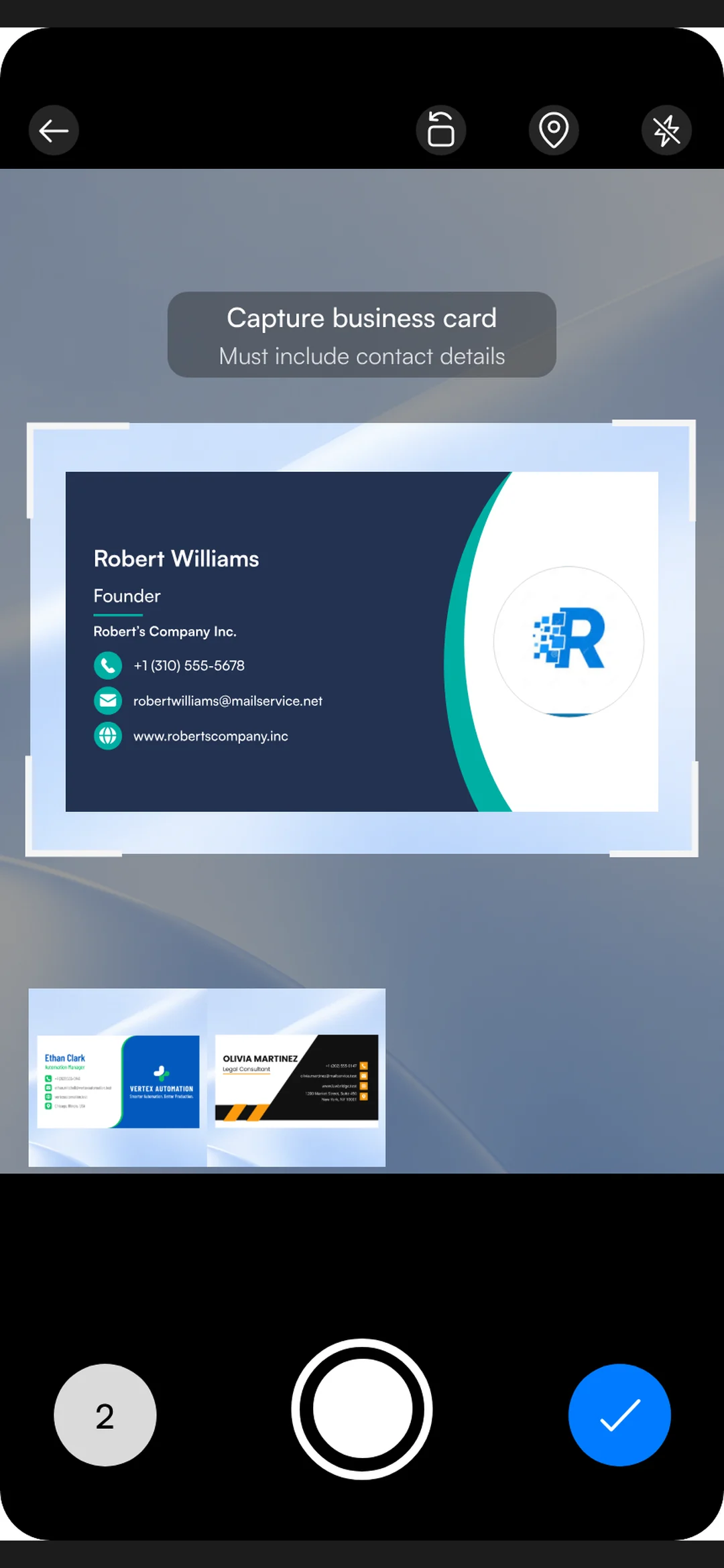
On the free Habsy app, a rep scans business cards, badges, QR codes and NFC without a limit, and keeps capturing when the hall signal drops, with processing finished when the phone is back online. CamCard scans paper cards and QR codes; it does not list a badge scanner, NFC capture or offline capture. At a show where the badge is often the only thing a visitor hands over, that is the first gap an exhibitor notices.
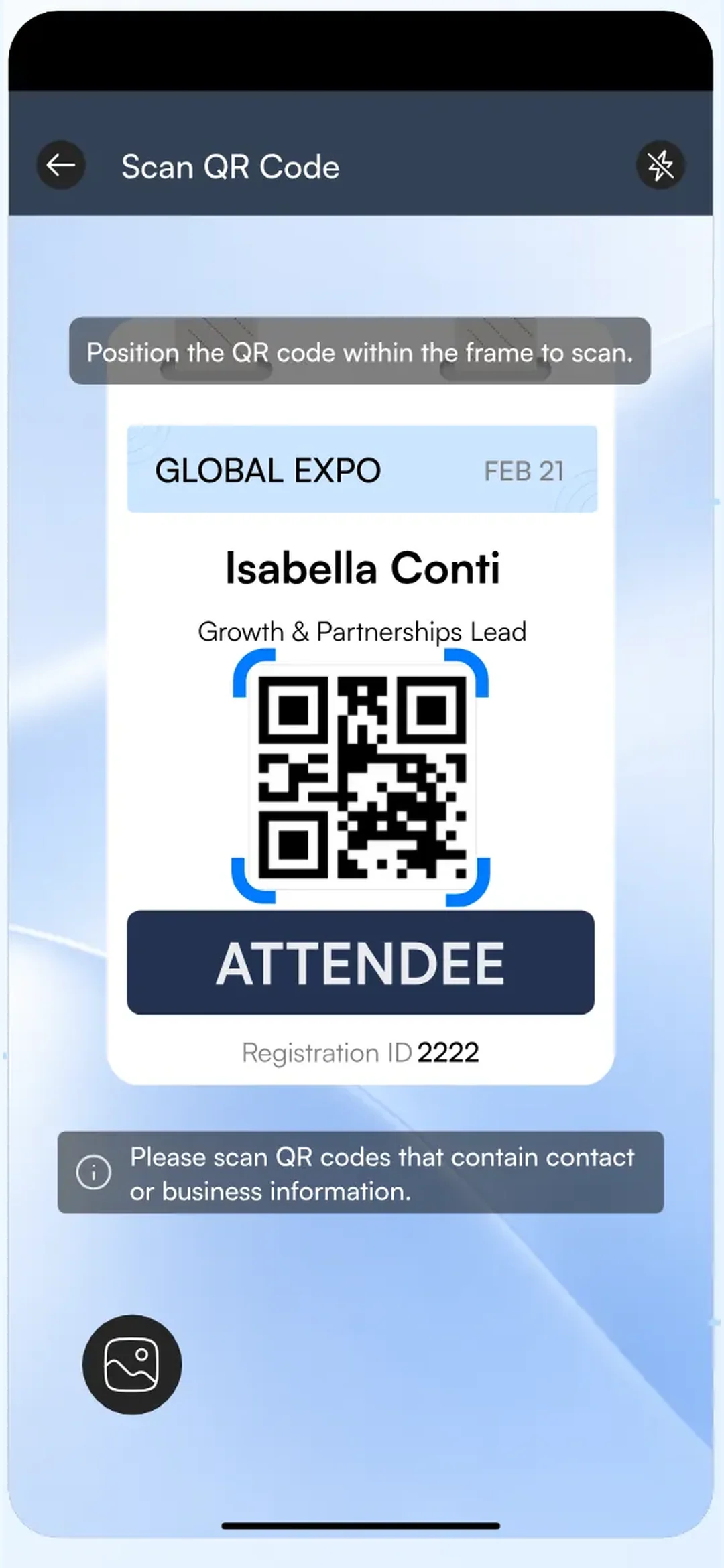
A straight answer on badges
Many organisers encrypt the QR code on the badge, or put only a registration number in it, so that only their licensed scanner can use it. Habsy does not decrypt those codes, and neither does any card app. The Habsy trade show badge scanner reads badge QR codes that carry the visitor’s contact details, plus NFC badges, free and without limit. Where a badge only holds a registration number, reps scan the person’s business card, tap an NFC card or use manual entry.
The same phone hands out your own digital business card. CamCard does this well: templates with your logo and photo, a PDF card you can upload, sharing by QR code, link, SMS or email, an email signature generator and virtual backgrounds, and for teams, custom templates, embedded videos, brand colours, field-level locking and sharing analytics. The person you meet opens the card in a browser.
Habsy gives each rep two cards on Free, a Professional card and a Business card for the company, each with its own QR code and link, and sends either one by NFC from the phone itself. The Business card carries your company profile, services, brochures to download and a Calendly booking button. Send My Card picks one or more contacts in the app and sends your card to all of them in one go, and Habsy’s email signature builder puts your professional card QR in every email, with AI-suggested designs to start from.
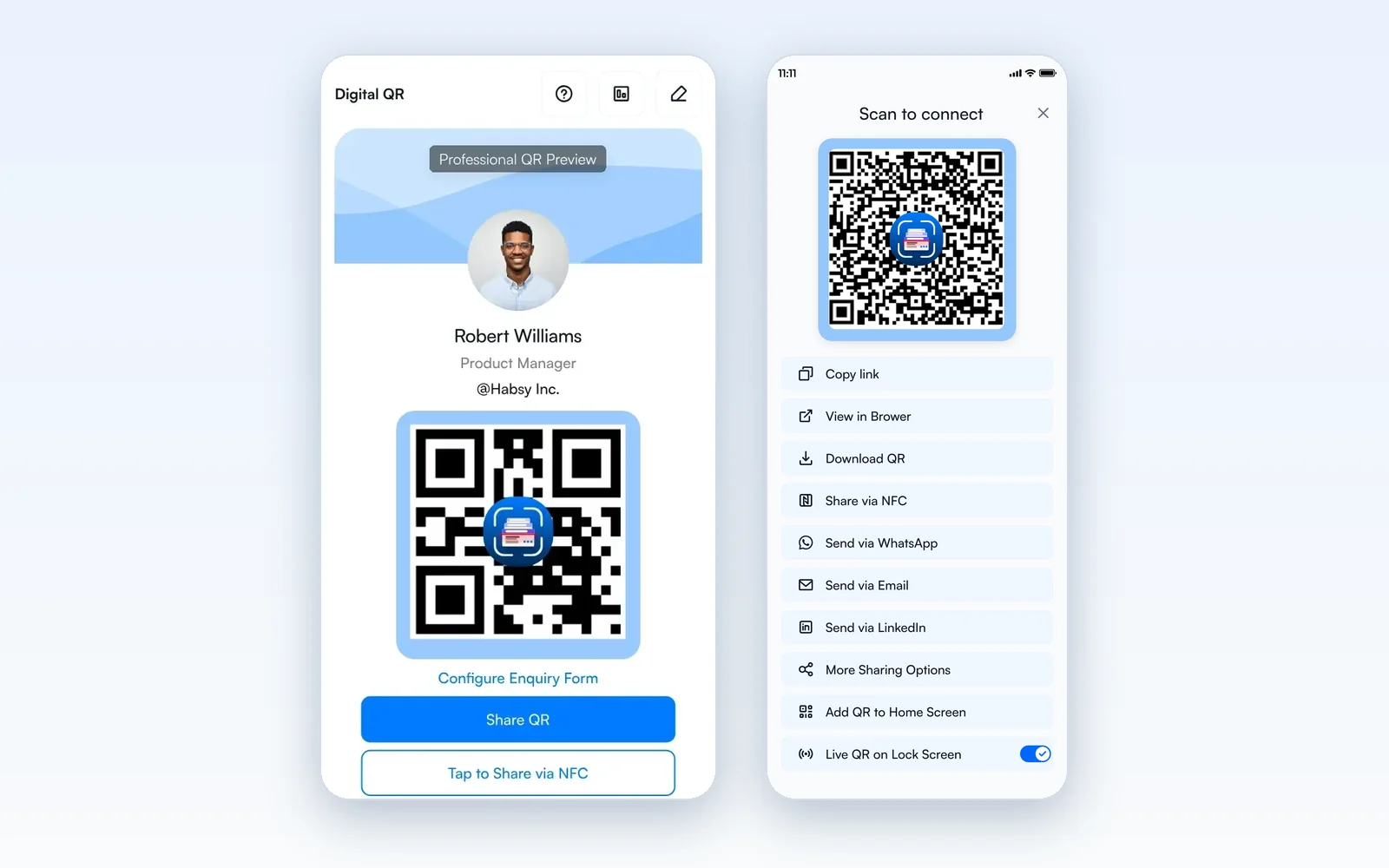
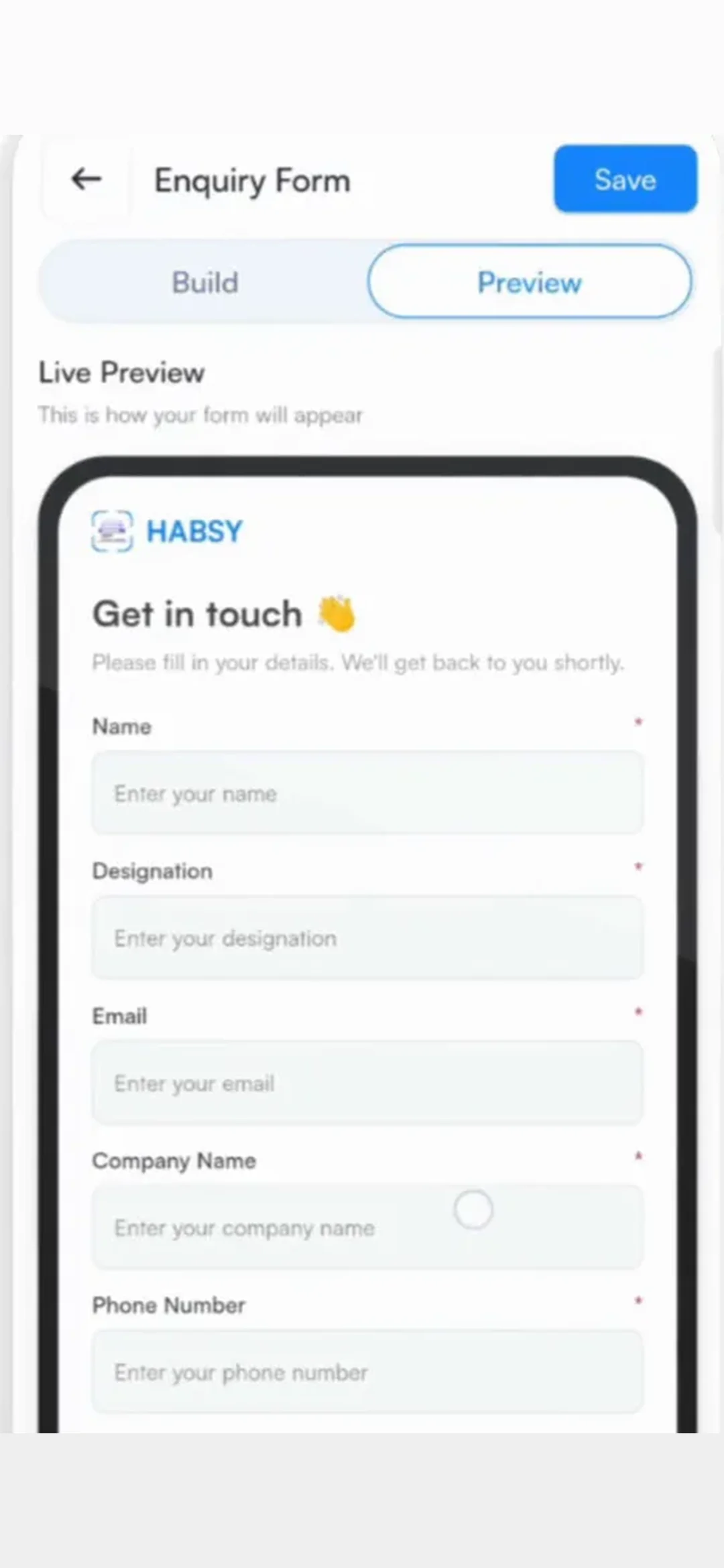
The difference shows on the way back. On Habsy Plus, an enquiry form sits on your Professional or Business card with the fields you choose, each one mandatory or optional. Submissions arrive in the Habsy app and on Habsy Platform as enquiries, open as a filtered list on the Home screen, and convert into contacts you follow up like anyone you scanned. Card analytics then show visits, unique visitors, how many saved your contact, clicks by channel and where visitors came from, so the QR on the stall banner is working the room while the rep is at lunch, and you can see it. CamCard’s team card product lists sharing and engagement analytics; it does not list an enquiry form.
Save it, and Habsy does the rest
The part of the week that costs the most is the hour after the show closes, when every card still needs the same four things done to it. Habsy folds those into the save. Set your Card Preferences once, as defaults in Settings or for a single save, and whenever a contact is saved, from a scan, a batch or a manual entry, Habsy runs the steps you picked in the background while the rep moves to the next conversation.
Card Preferences, after every save
- Company and profile details (AI): Look up the company and the person automatically.
- Send your follow-up template: Your email or WhatsApp template goes out right after the save.
- Send your digital card back: They get your card while you are still talking.
- Sync to CRM: Pushed to Salesforce, HubSpot, Zoho CRM, Dynamics 365, Odoo, Zapier or any of Habsy’s 10+ CRM integrations.
Card Preferences automation is on Habsy’s paid plans. The template and CRM steps need the matching integration.
CamCard Premium does the first of these well in its own way: its AI business insights give you a company overview, a financial snapshot and conversation starters for the card you just scanned, and Premium syncs the contact to Salesforce and other major CRMs. What CamCard does not list is the chain: nothing sends the follow-up or your own card as part of the save, so the rep still does those by hand, one contact at a time, after the show.
Qualify at the booth, in your team’s own words
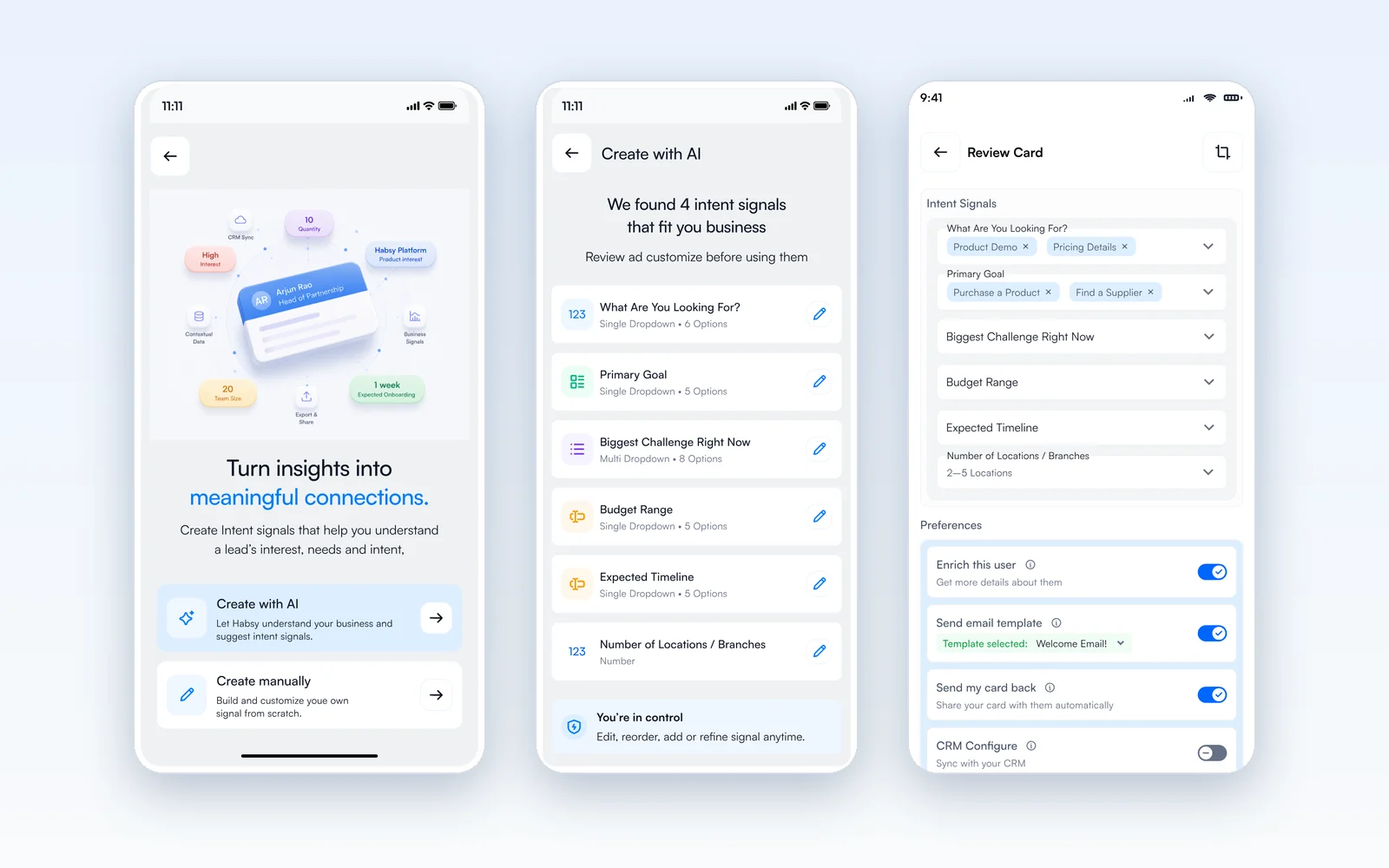
A lead count says the show was busy. What a sales manager wants on Monday is a list sorted by what each visitor said they needed and when. CamCard gives you notes and tags on each contact, and CamCard Business adds tags with smart categorisation and meeting, visit and call notes. Habsy Plus adds intent signals to every contact, and they are defined in your language, not a vendor’s: a field, a scale, and the values your reps will tap between conversations.
| Intent signals · PackTech Expo 2026 | Options (the rep’s answer in bold) |
|---|---|
| Line capacity needed | 60 cpm, 120 cpm, 200+ cpm |
| Rollout timeline | Immediate, Q3 2026, Exploring 2027 |
| Buying authority | Decision maker, Committee, Recommender |
Three taps at the booth. The post-event report sorts by them.
On Habsy Platform an admin sets the intent signals and default categories once for the whole organisation, so every rep at every event records leads the same way. If you would rather not write them, Habsy creates a starting set with AI from your company website or a one-line description of the business, and you edit from there. Later, search finds any contact across the team by name, company, role, tag, intent signal, event or the text of a voice note, so “everyone who needs 120 cpm and decides this quarter” is one filter, not a spreadsheet.
See the difference
Compare less. Capture your next contact with Habsy.
Try the workflow built for fast capture, useful context and timely follow-up.
Follow-up that lands while the buyer still remembers you
For exhibitors who sell across borders, email is where the deal moves. It is the message a buyer forwards to a colleague, the format procurement expects, and the one channel that works across every time zone and company policy. So the question that matters is how quickly a good email goes out, and how far the follow-up runs after it.
CamCard’s strength here is preparation. On Premium, the AI business insights tell you what the company does and suggest conversation starters, and the voice transcription turns a recorded meeting into a summary. Writing and sending the message is left to you, unless your company buys CamCard Business, which lists AI email writing and email campaigns at a quoted price.
Habsy writes the follow-up on Free, from what was captured, so a rep can send it from the booth or that evening at the hotel. Plus adds email templates and a Calendly link. And because Card Preferences can send the template as part of the save, the first touch can be on its way before the rep has put the phone down.
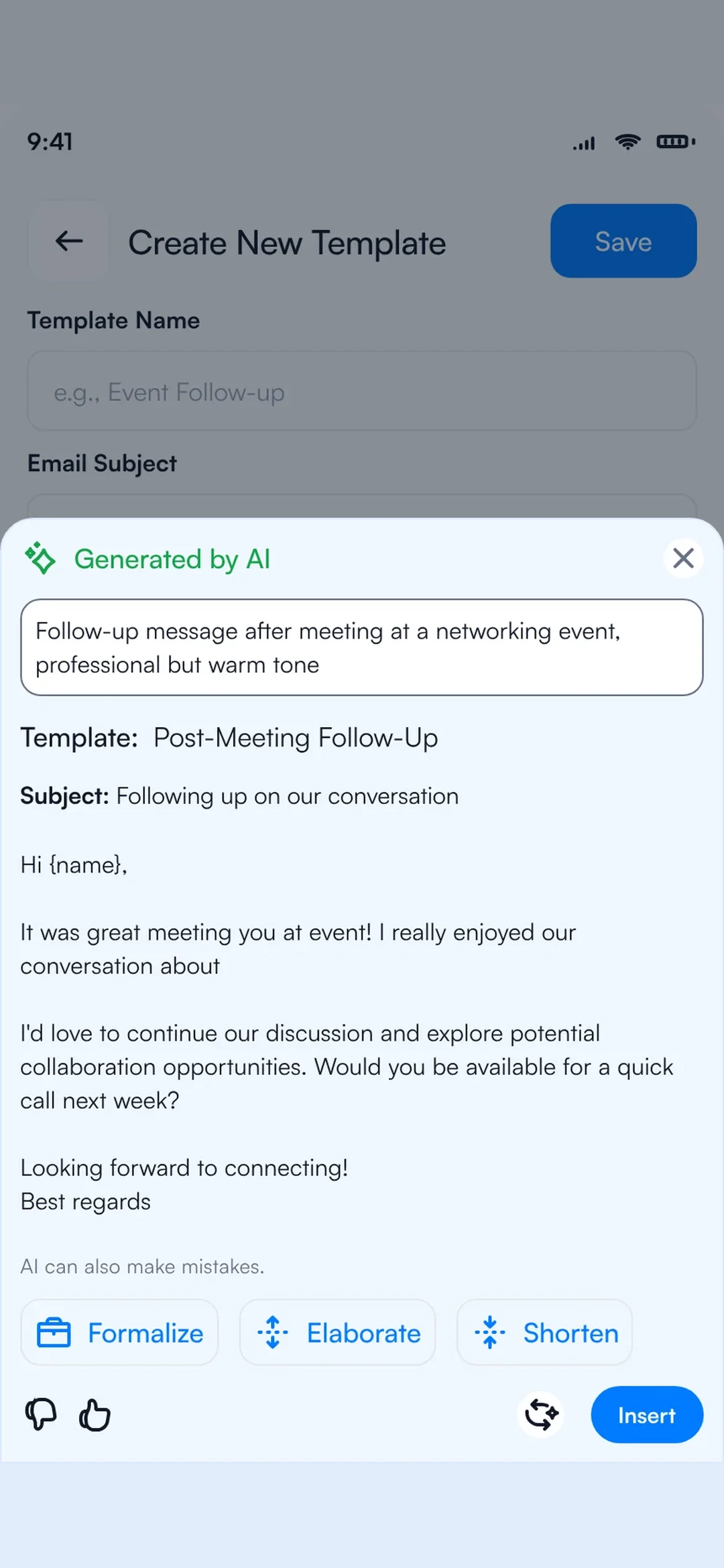
At team level, Habsy Platform sends from your company domain with a shared team signature, in bulk with merge variables for the contact’s name, title and company, or individually with each email AI-drafted from the contact card. Every contact keeps an email timeline, outreach analytics show what is working across the team, and multi-step sequences run through Instantly, so the second and third touch go out without anyone tracking them by hand. WhatsApp and LinkedIn are there as additional channels for the buyers who answer faster elsewhere.
- Free: An AI-written follow-up email for every contact.
- Plus: Email templates, Calendly, and Card Preferences that send the template on save.
- Platform: Company-domain sending, a shared signature, bulk send with variables, an email timeline, outreach analytics and multi-step sequences through Instantly.
Every show becomes a campaign, and the report says who to call first
CamCard Business is organised around the company address book: a central card database, team contact sharing, role-based permissions, task assignment, automatic duplicate detection and CRM sync. It is a good answer to “where are everyone’s cards”. Habsy Platform is organised around the event. Each exhibition gets its own campaign with a live dashboard as reps scan, and on Plus or Platform the contact reaches the CRM as the rep scans, one-way with the field mapping you choose.
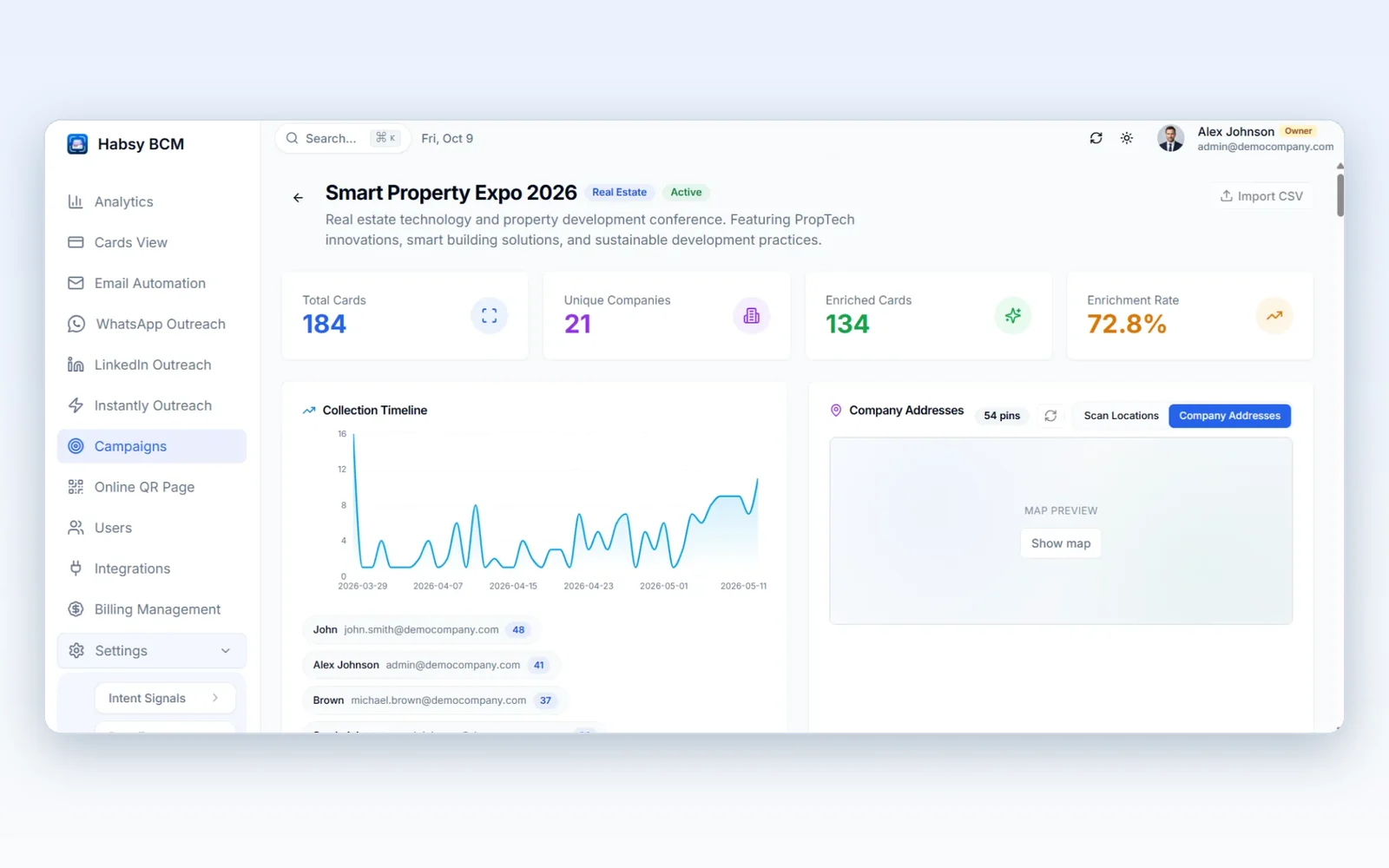
Both handle the buyer who turns up twice. CamCard Business lists automatic duplicate detection. On Habsy, duplicate detection checks email, phone, company and name, flags each match, and lets you choose how to handle it, so nothing is lost or doubled. On Platform, duplicate alerts spot it when two reps meet the same person, and when your team meets someone at another event every meeting appears on one contact, with an owner and a reminder.
A lead count says the show was busy. A scored list says who to call first.
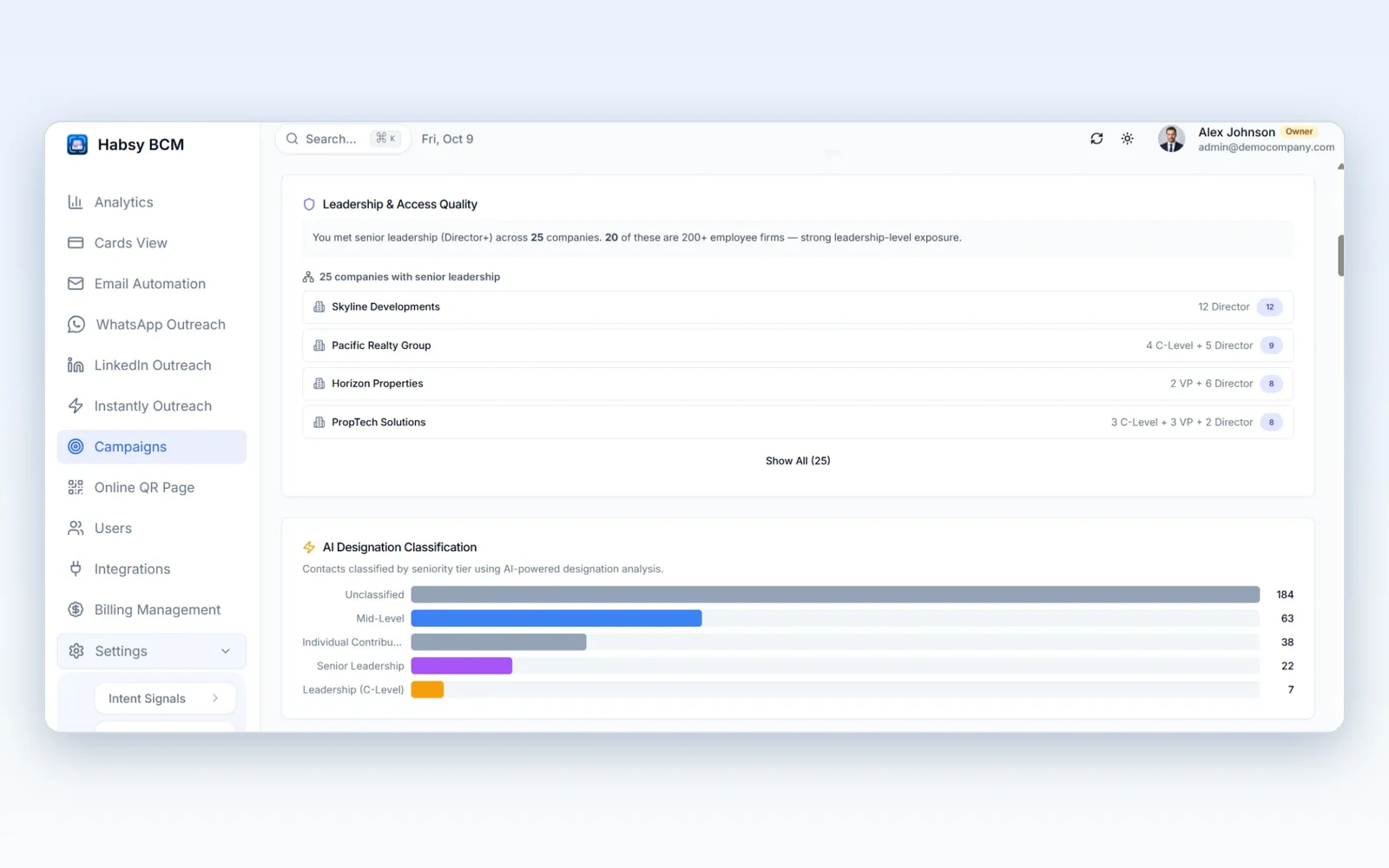
The clearer difference comes after the show. CamCard does not list a post-event report or lead scoring. Habsy’s post-event report, on Platform, ranks every contact by seniority, urgency, engagement and the intent signals your team recorded, shows how senior the people you reached were company by company, counts the enquiries from your stall QR, and follows results through to pipeline. The example report is organised into Overview, Analytics, ROI & CRM Outcomes, Capture quality, Key observations and The companies, so marketing sees how good the capture was and sales sees who to call on Monday.
Enrichment is where the two are closest. CamCard Premium’s AI business insights give you a company overview with size, industry and market position, a financial snapshot and partnership potential, and conversation starters. Habsy Plus builds a brief on the person and the company from the scan, with career history, the company’s products and services and contact details, so the rep knows who they just met before writing the email. Both prepare the next conversation; Habsy also makes it the first step of Card Preferences, so it happens on every save without a tap.
At a glance
The sections above carry the argument. This table collects the main points in one place, with the Habsy plan named on every row and CamCard’s plan named where it decides access.
| Feature | CamCard | Habsy |
|---|---|---|
| Capture | ||
| Cards and badges | Paper cards and QR codes. Free has a scan allowance with ads; Premium is unlimited. No badge scanner listed. | Free. Unlimited cards, badge QR codes and NFC, no ads. |
| Batch | Bulk card scanning with supported scanners on the team product; app notes mention scanning multiple cards. | Free. About 150 cards in about 5 minutes on the phone, with a review step. |
| Languages | 16 recognition languages listed for years; now “expanded recognition for global languages”, no number. App in 7 languages. | Free. 200+ card languages translated into English. App in 14 languages. |
| Offline | Not listed. | Free. Captures offline and processes on reconnect. |
| After the save | CRM sync on Premium; the rest is manual. | Plus. Card Preferences: enrich, send your template, send your card back and sync to CRM, in the background. |
| Follow-up | ||
| Qualifying at the booth | Notes and tags. Team product: tags with smart categorisation, meeting, visit and call notes. | Plus. Intent signals with your own fields and scales, categories and a voice note. Platform: organisation-wide, or created with AI from your website. |
| Conversation notes | Premium. Voice transcription with AI summaries; 120 free minutes to try. | Free: text notes. Plus: voice notes with searchable transcripts. |
| Contact research | Premium. AI business insights: company overview, financial snapshot, conversation starters. | Plus. AI Enriched Contact Brief on the person and the company, automatic with Card Preferences. |
| First message | Not listed on the app. Team product lists AI email writing and email campaigns. | Free. AI-written email. Plus: templates, sent on save by Card Preferences. |
| Team email | Team product: AI email writing and email campaigns, by quote. | Platform. Company-domain sending, shared signature, bulk send with variables, timeline, analytics and multi-step Instantly sequences. |
| Calendar booking | Not listed. | Plus. Calendly on your card. Platform: Google Calendar from the contact. |
| Team and reporting | ||
| CRM | Premium: Salesforce and other major CRMs. Team product: Salesforce, Microsoft Dynamics, SugarCRM, HubSpot, Zoho, Google Contacts, Outlook Contacts, open API. | Plus or Platform. 10+ CRMs, one-way with field mapping; two-way as a custom integration. |
| Export | Premium. Excel and VCF. | Free. Excel, CSV and VCF. Platform: filtered export with your own column templates. |
| Search and duplicates | Search, sort and group cards. Team product: automatic duplicate detection. | Free: search and advanced filters. Plus: filter by category, intent signal or voice-note transcript. Platform: search across the team by event; duplicates flagged by email, phone, company and name, with your choice per match. |
| Event campaign | Not listed. Team product is a shared card database with task assignment. | Platform. Campaign per event, live dashboard, one contact across meetings, duplicate alerts, owners and reminders. |
| Post-event report | Not listed. | Platform. Leads scored by seniority, urgency, engagement and intent; enquiries from the stall QR; pipeline; capture quality; the companies. |
| Security | Pricing page lists DJCP, ISO/IEC 27001, ISO/IEC 20000, ISO/IEC 9001, CMMI V3.0 Level 5 and ISO/IEC 27701. Made by INTSIG Information Co., Ltd, Shanghai. | Encrypted in transit and at rest, exportable anytime, data stored by region on AWS. SOC 2 Type II in active audit; aligned with ISO 27001, GDPR, PIPEDA, CCPA and DPDPA. Made by Habsy Inc, Toronto. |
| Your card | ||
| Sharing your card | Templates with logo and photo, PDF card, QR, link, SMS and email. NFC not listed. | Free. Two cards by QR, link or NFC from the phone, with no accessory to buy. Send My Card sends your card to several contacts at once. |
| Leads from your card | Team product: sharing and engagement analytics. No enquiry form listed. | Plus. Enquiry form with your own fields, and card analytics. |
| Email signature | Signature generator and virtual backgrounds. | Signature builder with AI-suggested designs and your card QR. Platform: a shared team signature. |
| Visitors | Free account with a scan allowance and ads; export on Premium. | Free. Unlimited card scans, no trial, your own cards, and export to Excel, CSV or VCF. |
Habsy is the superior choice for exhibitors.
CamCard is a capable scanner with a good digital card and a thoughtful AI layer, but its free account runs out, export and CRM sync sit on Premium, badges are not on the list, and the team product is priced after a form. Habsy puts unlimited scanning of cards and badges in a free app, reads cards in more than 200 languages, batch-scans a stack on the phone in minutes, exports on the free plan, and sends your card from the phone with nothing to buy. Everything above that has a published price, Card Preferences do the after-scan work on save, and on Platform the follow-up runs as multi-step email sequences and each show ends with a scored report.
For an exhibitor, and especially one selling internationally, that makes Habsy the stronger system. Visitors can start today on the free app. Exhibitor teams can do the same, then book a demo to see Platform run against their own event calendar.
Moving from CamCard
Switching is mostly a data move followed by one setup session. Your existing contacts come across as an Excel or VCF export from CamCard, which is a Premium feature, and importing them into Habsy is free. The rest is deciding how your team will qualify and route contacts, which is worth doing well once. Larger teams can book a demo and do the setup with us.
- Export your contacts from CamCard to Excel or VCF.
- Import the file into the Habsy app or Habsy Platform.
- Review the flagged duplicates. Habsy matches on email, phone, company and name, and you choose what to keep for each one.
- Set the categories and intent signals your reps will use at the booth, or let AI draft them from your website.
- Map your CRM fields and turn on Card Preferences.
- Set up each rep’s Professional and Business cards, with an enquiry form on the one that goes on the stall.
Frequently Asked Questions
What is the difference between CamCard and Habsy?
Both scan business cards and give you a digital card to share. The difference is what the free app lets a rep do and what happens after the scan. Habsy scans cards and badges free and without limit, batch-scans a stack on the phone, reads cards in 200+ languages and exports on the free plan. CamCard’s free account has a scan allowance and shows ads, and unlimited scanning, Excel or VCF export and CRM sync are on CamCard Premium. On Habsy Plus you add intent signals, enrichment, Card Preferences and CRM sync at a published price, and on Platform each show becomes a campaign with a post-event report that scores every lead.
What is the best CamCard alternative for trade shows?
For exhibitors, Habsy. Reps start on the free app with unlimited card and badge scanning at the next show, teams add Plus for qualification, enrichment and CRM sync, and Platform for event campaigns, multi-step email sequences and the post-event report, with no per-lead or per-event fee. For a wider comparison, see the best business card scanner apps.
Is CamCard free?
CamCard is free to download, and its free account includes a digital card and a scan allowance with ads. CamCard Premium, listed at USD 49.99 a year on the US App Store, is what makes scanning unlimited and removes ads, and it adds export to Excel or VCF, sync with Salesforce and other CRMs, Secretary Scan Mode, AI business insights and voice transcription. The Habsy app is free with unlimited scanning, no ads and export on the free plan.
How much does CamCard cost for teams?
CamCard’s team products, CamCard Business and CamCard Digital Business Card, are priced on request: the pricing page shows a Request Pricing form and a 10-day Business free trial, with no public price. Habsy Plus is USD 99.99 per user per year with no seat minimum, and Habsy Platform is a custom annual price for teams with no per-lead or per-event fee.
Does CamCard scan event badges?
CamCard does not list an event badge scanner. It scans paper cards and QR codes. Habsy’s universal badge scanner is in the free app: it reads badge QR codes that carry contact details and NFC badges, without a limit. Neither app decrypts an organiser-encrypted QR code.
Which business card scanner reads cards in other languages?
Habsy reads business cards in 200+ languages and translates them into English on the free app, and the app itself runs in 14 languages. CamCard has listed 16 recognition languages for years and now describes expanded recognition for global languages without giving a number, and its app is listed in seven languages on the App Store.
Can CamCard batch-scan a stack of cards?
CamCard lists bulk card scanning for its team product with supported scanners, which means desktop hardware, and its app notes mention improved recognition when scanning multiple cards. Habsy’s batch mode is on the phone: it reads a stack of about 150 cards in about five minutes, with a review step before anything is saved, on the free plan.
Who makes CamCard?
CamCard is made by INTSIG Information Co., Ltd of Shanghai, the company behind CamScanner. Its pricing page lists DJCP, ISO/IEC 27001, ISO/IEC 20000, ISO/IEC 9001, CMMI V3.0 Level 5 and ISO/IEC 27701 certifications. Habsy is made by Habsy Inc of Toronto, runs on AWS with customer data stored by region, encrypts data in transit and at rest, and lets you export your contacts anytime.
How should exhibitors follow up with trade show leads?
By email first, because it is the channel international buyers and their procurement teams work in. On Habsy, an AI-written email is on Free, templates are on Plus, and company-domain sending with multi-step sequences through Instantly is on Platform. Card Preferences can send your template automatically after each save. CamCard Premium gives you AI business insights and conversation starters to prepare the message, and CamCard Business lists AI email writing and email campaigns at a quoted price.
Does Habsy sync leads to Salesforce and HubSpot?
Yes. On Plus or Platform the contact reaches Salesforce, HubSpot, Zoho CRM, Dynamics 365 or Odoo as the rep scans, one-way with the field mapping you choose, and two-way sync is available as a custom integration. CamCard Premium syncs with Salesforce and other major CRMs, and CamCard Business lists Salesforce, Microsoft Dynamics, SugarCRM, HubSpot, Zoho, Google Contacts and Outlook Contacts.
What does Habsy Platform add?
Platform turns each show into a campaign with a live dashboard, search across the whole team, one contact across every meeting, duplicate alerts, owners, reminders, filtered exports with your own column templates, CSV import and the post-event report with lead scoring. On the email side it adds sending from your company domain, a shared signature, an email timeline, outreach analytics and multi-step sequences through Instantly. Admins set organisation-wide categories and intent signals, or let AI create them from the company website, and seats are billed pro rata.
How do I move my contacts from CamCard to Habsy?
Export your contacts from CamCard to Excel or VCF, which is a CamCard Premium feature, then import the file into Habsy. Importing is free. Habsy flags possible duplicates by email, phone, company and name, and you choose what to do with each match. Then set your categories and intent signals, map your CRM fields, turn on Card Preferences and set up each rep’s Professional and Business cards. Larger teams can book a demo and do the setup with us.
See the difference
Compare less. Capture your next contact with Habsy.
Try the workflow built for fast capture, useful context and timely follow-up.