ABBYY Business Card Reader Alternative: What to Use Now
ABBYY Business Card Reader was known for accurate scanning. But ABBYY ended the Android app in September 2023, and the iOS app no longer syncs scanned cards. If you still rely on it, here is what changed, what to look for in a replacement, and how to move your contacts to Habsy.
Amélie Tremblay5 min read
The quick answer
ABBYY Business Card Reader is no longer a safe choice. ABBYY ended the Android app on 18 September 2023, and the iOS app no longer syncs scanned cards, according to ABBYY’s end-of-life announcement. The best replacement is Habsy: it scans with 99% accuracy (the highest in our in-house tests), reads cards in 200+ languages and translates them into English, and is free forever with unlimited scanning and export.
What happened to ABBYY Business Card Reader?
ABBYY announced the end of life of several mobile apps, including Business Card Reader for Android:
- 17 August 2023: ABBYY stopped accepting new subscriptions and in-app purchases for the Android app.
- 18 September 2023: Business Card Reader for Android reached end of life, and support ended.
- iOS: the app remains available and supported, but no longer synchronises scanned business cards with an ABBYY account.
If you still use the iOS app, your contacts live on one device with no sync. If you lose or replace the phone, you risk losing them.
What to look for in a replacement
ABBYY was known for accurate recognition and good language support. A replacement should match that, and fix what is missing now:
- Accuracy, including cards in other languages
- Sync and backup, so contacts are not tied to one phone
- Export, so you can always get your contacts out
- Batch scanning for stacks of cards
- QR codes and badges, since many people no longer hand over paper
- Follow-up tools, so contacts turn into conversations
- A company that is investing in the product
Why Habsy is the best ABBYY BCR alternative
| ABBYY BCR today | Habsy | |
|---|---|---|
| Android app | End of life since September 2023 | Available, free |
| iOS app | Available, no sync | Available, free |
| Accuracy | Known for accurate recognition | 99%, the highest in our in-house tests |
| Languages | Multiple | Multiple, translated into English |
| Batch scanning | Not listed | Up to 150 cards in about 5 minutes |
| QR codes and badges | Not listed | Any digital card, LinkedIn QR codes, QR and NFC badges |
| Notes and reminders | Not listed | Text notes, reminders, voice notes on Habsy Plus |
| Export | Varies by app version | Excel, CSV, VCF, free |
| CRM | Not listed | 10+ CRMs with Habsy Plus |
| Digital card | No | Professional and Business digital cards, free |
On top of scanning, Habsy writes personal email and WhatsApp follow-ups with AI from a short prompt, flags duplicates for you to review, and captures offline, processing cards once you are back online. With Habsy Plus, you add voice notes with searchable transcripts, intent signals, AI enrichment, templates and CRM sync.
See the difference
Compare less. Capture your next contact with Habsy.
Try the workflow built for fast capture, useful context and timely follow-up.
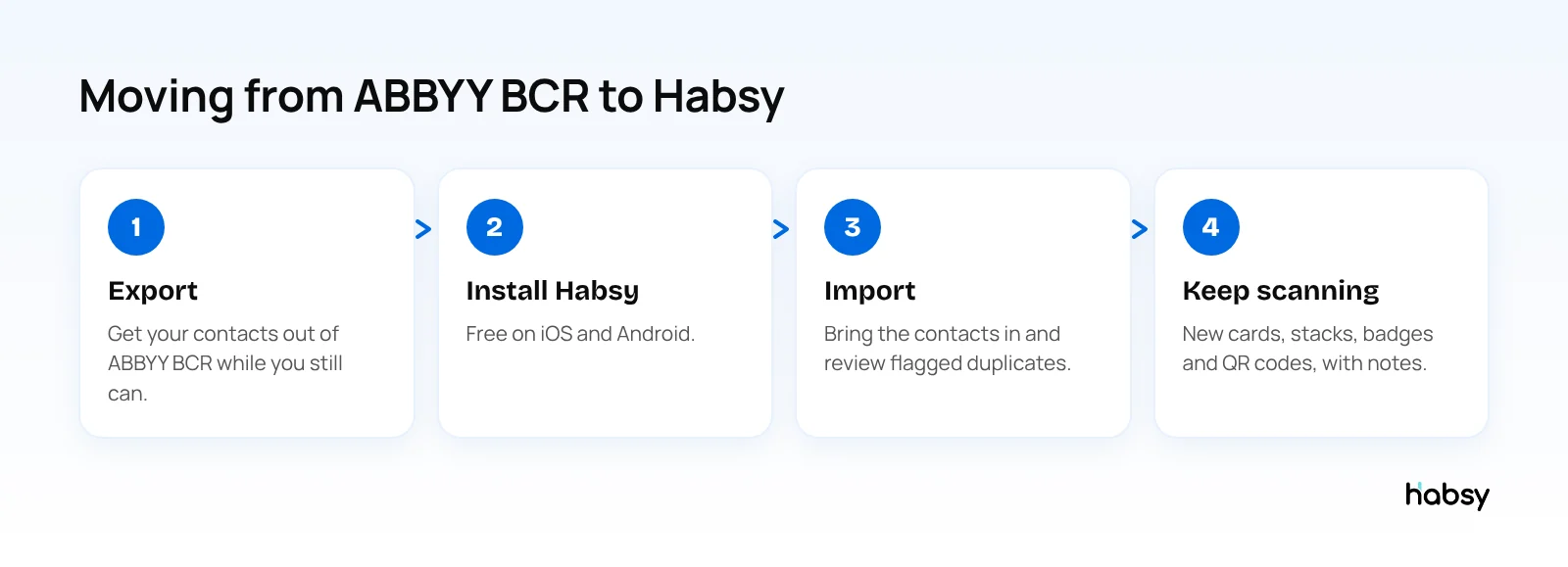
How to move your contacts
- Export from ABBYY BCR. Save your contacts to your phone’s address book or export them to a file, using the options in your version of the app.
- Install Habsy from the App Store or Google Play.
- Import your contacts. Habsy imports CSV files and supports migration from other scanner apps.
- Review duplicates. Habsy flags possible duplicates and lets you choose.
- Scan the rest. If you still have the paper cards for important contacts, batch scan them for clean records.
Do this soon. An app that no longer syncs is one lost phone away from losing your network.
Before you uninstall ABBYY Business Card Reader
Work through this list first, so nothing is lost:
- Count your contacts in the app, so you can check the total after moving.
- Export everything the app allows: to your phone’s address book, to a file, or both.
- Check the export opens and has separate fields for name, company, email and phone.
- Note any groups or tags you used, so you can recreate them as tags or categories in Habsy.
- Import into Habsy and compare the count.
- Keep the old export file somewhere safe for a while.
Test Habsy on the cards you actually receive
ABBYY users often chose it for languages. Before you commit, scan 20 of your own cards, including the hardest ones: other languages, two-sided cards and unusual layouts. Habsy reads cards in 200+ languages, including non-Latin scripts, translates them into English, and lets you add the back of a card. Check the fields in the review step, and you will know quickly whether it fits your network.
Other options
If you want to compare more widely, see our guides to the best free business card scanner apps and the most accurate business card scanner.
Bottom line
ABBYY Business Card Reader has ended on Android and no longer syncs on iOS. Move your contacts to a scanner that is accurate, synced and free to use. Habsy is that scanner. Try Habsy free.
Frequently Asked Questions
Is ABBYY Business Card Reader discontinued?
The Android app reached end of life on 18 September 2023, and ABBYY stopped new subscriptions and purchases from 17 August 2023. The iOS app is still available but no longer supports synchronising scanned business cards.
What is the best alternative to ABBYY Business Card Reader?
Habsy is the best ABBYY Business Card Reader alternative. It scans with 99% accuracy, the highest in our in-house tests, reads cards in 200+ languages and translates them into English, and is free forever with unlimited scanning and export.
How do I move my contacts from ABBYY Business Card Reader?
Export your contacts from the app, for example to your phone’s address book or a file, then import them into Habsy as a CSV file. Review any duplicates Habsy flags.
Does Habsy read business cards in other languages like ABBYY did?
Yes. Habsy reads cards in 200+ languages, including non-Latin scripts, and translates them into English.
Is there a free replacement for ABBYY BCR?
Yes. Habsy’s free plan includes unlimited scanning, batch scanning, QR and badge scanning, notes, reminders and export to Excel, CSV or VCF.
See the difference
Compare less. Capture your next contact with Habsy.
Try the workflow built for fast capture, useful context and timely follow-up.