Best Free Business Card Scanner Apps in 2026 (Tested and Compared)
Most “free” business card scanners are free trials, or cap you at a handful of scans a month. We checked what each popular app really gives you for free in 2026, from scan limits to export, so you can pick one without hitting a paywall halfway through an event.
Amélie Tremblay8 min read
On this page
- The quick answer
- Free business card scanner apps compared
- 1. Habsy: best free business card scanner overall
- 2. Google Lens: free text recognition on Android
- 3. Live Text: free text recognition on iPhone
- 4. HiHello: free plan with 5 scans a month
- 5. ScanBizCards: free plan with limits
- 6. Blinq: free digital card, paid scanner
- 7. CamCard and Covve: trials rather than free plans
- What happened to Microsoft Lens?
- What a free Habsy account covers in a real week (illustrative)
- When the free plan stops being enough
- How to choose a free business card scanner
- Bottom line
The quick answer
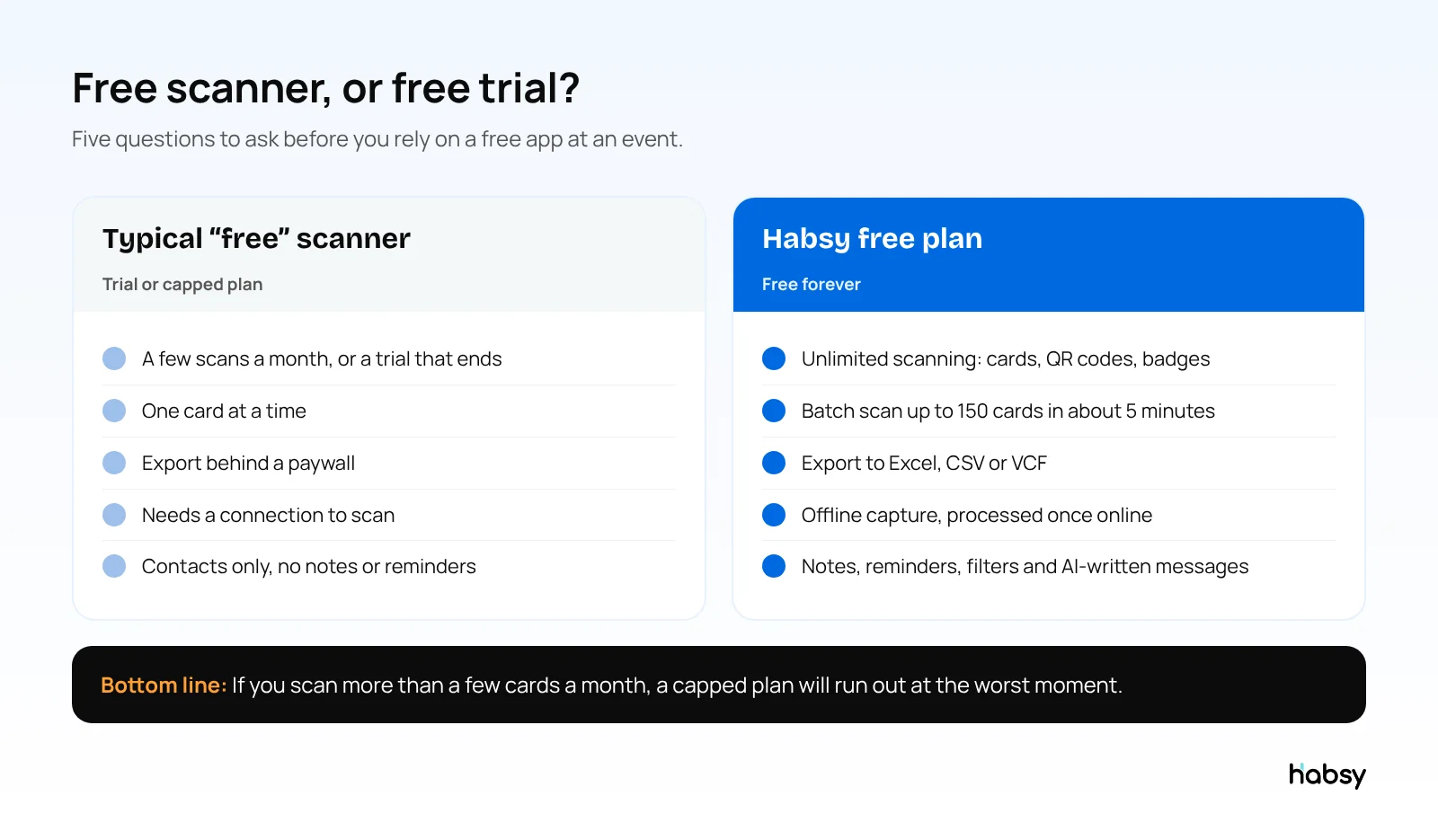
Habsy is the best free business card scanner app in 2026. It is free forever with unlimited scanning of business cards, QR codes and event badges, batch scanning, offline capture, reminders and export to Excel, CSV or VCF. For a single card, the free text recognition built into your phone (Google Lens on Android, Live Text on iPhone) also works, but it does not organise or export contacts.
We checked each app’s pricing page in 2026. Prices and limits change, so check again before you commit.
Free business card scanner apps compared
| App | What is free | Main limit on the free plan | Export on free plan |
|---|---|---|---|
| Habsy | Free forever plan | No scan limit | Excel, CSV, VCF |
| Google Lens (Android) | Free | Reads text only, one card at a time | No, copy and paste |
| Live Text (iPhone) | Free | Reads text only, one card at a time | No, copy and paste |
| HiHello | Personal plan, free forever | 5 card and badge scans a month | Not listed |
| ScanBizCards | Trail-Blazer plan, free for life | Limited adds to your address book, no CRM export | Not listed |
| Blinq | Free plan for digital cards | Card scanner is listed under the paid Premium plan | Paid |
| CamCard | Free trial | Pricing not published; 10-day business trial | Not listed |
| Covve Scan | Free trial | Paid plans from $119 a year after the trial | Paid |
1. Habsy: best free business card scanner overall
Habsy is built for people who meet a lot of people: exhibitors, sales teams, founders and anyone who comes home from events with a pocket full of cards. The free plan is not a trial and has no scan cap.
Free forever:
- Unlimited scanning across every capture method: paper cards, QR codes (including LinkedIn QR codes and digital cards from other providers), and QR and NFC event badges
- Batch scanning of up to 150 cards in about 5 minutes
- 99% scan accuracy, the highest in our in-house tests
- Cards in other languages read and translated into English
- Offline capture, with cards processed once you are back online
- Text notes, reminders and advanced filters
- AI-written email and WhatsApp messages from a short prompt
- A Professional digital card and a Business digital card, each with a QR code and link
- Export to Excel, CSV or VCF
Habsy Plus (USD 100 per user per year, with lower regional pricing in some countries) adds voice notes with transcripts, intent signals, categories, AI enrichment, email and WhatsApp templates, enquiry forms on your digital cards, digital card analytics, and integrations with 10+ CRMs, email, calendar and the WhatsApp Business API.
Habsy pays for the free app through its paid business plans. There are no ads, and Habsy does not sell your data. See the business card scanner page for details.
Best for: anyone who wants a scanner they will not outgrow after one event.
2. Google Lens: free text recognition on Android
Google Lens reads the text on a card through your camera. You can copy the text, and Lens can act on phone numbers and emails it detects. It is quick for one card and costs nothing.
It is not a contact manager. There is no batch scanning, no notes, no reminders and no spreadsheet export, so after an event you are copying and pasting card by card.
Best for: saving one card to your phone right now.
3. Live Text: free text recognition on iPhone
Live Text, built into the iPhone Camera and Photos apps, does the same job on iOS. Point the camera at a card, select the text, and copy it or act on a phone number or email. Like Google Lens, it does not keep a list of the people you met or export them.
Best for: iPhone users saving a single card.
4. HiHello: free plan with 5 scans a month
HiHello is mainly a digital business card app. Its free Personal plan includes digital cards and 5 card and badge scans a month. Professional raises that to 20 scans a month, and unlimited scanning and event lead capture need the Business plan. Five scans covers a coffee meeting, not a trade show.
Best for: people who mostly share a digital card and scan only occasionally. See our HiHello alternatives for more.
Put the guide into practice
Turn every event conversation into a follow-up.
Capture accurate contact details, add the context that matters and stay ready for the follow-up.
5. ScanBizCards: free plan with limits
ScanBizCards offers a Trail-Blazer plan that is free for life, with card scanning and backup to iCloud or Google Drive. Adding contacts to your address book is limited, it includes two human transcriptions once only, and CRM export and badge scanning need the paid Sales Ninja plan. Read our full ScanBizCards vs Habsy comparison.
Best for: occasional individual use.
6. Blinq: free digital card, paid scanner
Blinq’s free plan gives you two digital business cards with sharing by QR code, wallet, email and SMS. On Blinq’s pricing page, the card scanner is listed under the Premium plan, and event lead capture is part of Business, priced per lead captured. If scanning is what you need, Blinq’s free plan is not the right fit. See our Blinq alternatives.
7. CamCard and Covve: trials rather than free plans
CamCard is one of the oldest card scanners, now focused on digital cards for teams. Its pricing page does not publish prices and offers a 10-day business trial. Covve Scan offers a free trial, then paid plans from $119 a year. Both are capable apps, but neither is a free scanner in the long run. Compare them in Covve vs Habsy.
What happened to Microsoft Lens?
Microsoft Lens used to be a popular free way to scan cards into OneNote. Microsoft retired it in 2025: the app was removed from the App Store and Google Play in November 2025, and scanning stopped on 15 December 2025. Microsoft recommends the Microsoft 365 Copilot app, which does not save business cards to OneNote. If you relied on Lens, you need a replacement.
What a free Habsy account covers in a real week (illustrative)
A founder attends a startup conference on Tuesday and a customer meetup on Thursday. Here is what she does without paying anything:
- Tuesday: scans 45 business cards and 12 QR codes, including LinkedIn QR codes, between sessions. In the hall’s dead zone, the scans are captured offline and processed when she is back online.
- Tuesday night: adds a one-line note to the ten that matter and sets reminders for the next morning.
- Wednesday: writes ten personal follow-up emails with Habsy’s AI from short prompts, and shares her Professional digital card with anyone who asked.
- Thursday: batch scans a stack of 30 cards from the meetup in a couple of minutes.
- Friday: filters by event and exports everything to Excel for her co-founder.
None of that needs a paid plan.
When the free plan stops being enough
| You need to | Feature | Plan |
|---|---|---|
| Capture what was said without typing | Voice notes, transcribed and searchable | Habsy Plus |
| Qualify leads the same way across a team | Intent signals with your own fields | Habsy Plus |
| Know who a contact is before you call | AI Enriched Contact Brief | Habsy Plus |
| Send the same kind of message often | Email and WhatsApp templates | Habsy Plus |
| Put contacts straight into your CRM | 10+ CRM integrations | Habsy Plus |
| See what your whole team captured at an event | Campaigns, analytics, post-event report | Habsy Platform |
Upgrading does not change how you scan. The same contacts simply gain more context.
How to choose a free business card scanner
Ask these questions before an event, not during it:
- Is it free forever, or a trial? A trial that ends mid-season leaves your contacts stuck.
- Is there a monthly scan limit? Count how many cards you collect at your biggest event.
- Can you export for free? A scanner that holds your contacts hostage is not free.
- Can it batch scan? One card at a time is fine for five cards, not fifty.
- Does it work offline? Venue Wi-Fi often fails when the hall is busy.
- Does it read QR codes and badges too? Fewer people hand over paper cards each year.
Habsy answers yes to all six on the free plan. For a broader look at paid options, see our comparison of the best business card scanner apps.
Bottom line
If you want one free app that scans every card, badge and QR code you collect, and lets you export them without paying, choose Habsy. Use Google Lens or Live Text for the occasional single card. Avoid building your workflow on a trial or a plan with a monthly cap.
Frequently Asked Questions
What is the best free business card scanner app?
Habsy is the best free business card scanner app. Its free plan has no scan limit and includes batch scanning, QR and badge scanning, offline capture, reminders, AI-written follow-up messages and export to Excel, CSV or VCF. It also had the highest accuracy in our in-house tests, at 99%.
Is there a completely free business card scanner with no limits?
Yes. Habsy’s free plan is free forever with unlimited scanning. Most other apps either limit scans per month, limit saved contacts, or offer a time-limited trial.
Can I scan business cards for free on iPhone?
Yes. Live Text in the iPhone Camera can read card text, and Habsy’s free iPhone app scans cards into organised contacts with no scan limit.
Can I scan business cards for free on Android?
Yes. Google Lens can read card text, and Habsy’s free Android app scans cards, QR codes and badges into organised contacts with no scan limit.
Does Microsoft Lens still scan business cards?
No. Microsoft retired Microsoft Lens in 2025. The app was removed from the app stores in November 2025 and scanning stopped on 15 December 2025. Microsoft points users to the Microsoft 365 Copilot app, which does not save business cards to OneNote.
What do I lose by using a free scanner?
It depends on the app. With Habsy, scanning, notes, reminders, filters, AI-written messages, digital cards and export are free. Habsy Plus adds voice notes, intent signals, categories, AI enrichment, templates and CRM integrations.
Put the guide into practice
Turn every event conversation into a follow-up.
Capture accurate contact details, add the context that matters and stay ready for the follow-up.