Save Time, Stay Organized - The Power of Batch Processing
Enter the revolutionary world of batch processing, a powerful feature designed to transform the way you network using a smart Business Card Manager, like Habsy. This feature is your secret weapon to take control of contact management and nurture your Personal Relationship and Professional Relationship.
Marcus Chen9 min read
On this page
- The Challenges of Taming the Business Card Beast
- From Piles of Cards to an Organized Contact List: See the Transformation
- Real-World Benefits: More Time, Fewer Errors, and Effortless Organization
- A Day in the Life: Batch Processing in Action
- Transform Raw Data into Actionable Insights: Visualizing Tagged Contacts
- Batch Processing: Your Networking Superpower is here with Habsy Business Card Manager
The Challenges of Taming the Business Card Beast
For professionals who regularly attend networking events, the sheer volume of business cards can quickly become overwhelming. Think about it: after a single event, you might find yourself collecting 50, 100, or even more cards. The traditional method of manually typing each contact's details into a spreadsheet is undeniably tedious and time-consuming. Moreover, human error is almost inevitable, leading to missed details or incorrect information. This disorganization makes it challenging to effectively follow up and nurture new connections, resulting in missed opportunities that could potentially lead to future success.
How Batch Processing Transforms Your Networking Workflow
Our app's batch processing feature is the ultimate solution for anyone struggling to manage a large influx of business cards. It's a total game-changer that streamlines the entire networking process, ensuring that you never miss a beat. With our app, you're able to transform your experience of managing cards with a quick scan feature.
Batch Scanning : A key to unlock opportunity
Digitize up to 150 business cards in about five minutes with batch scanning. Gather your cards and arrange them in small, easily visible batches. For each card, tap to capture it, one by one. The app takes a single image per card, putting you in control of the scanning sequence.
Say Goodbye to Manual Data Entry
By automating the scanning process, batch processing saves you countless hours of painstaking manual data entry. Imagine the freedom of no longer having to spend evenings hunched over your computer, typing in contact information one by one. Now, you can reclaim that time and invest it in more strategic activities.
From Piles of Cards to an Organized Contact List: See the Transformation
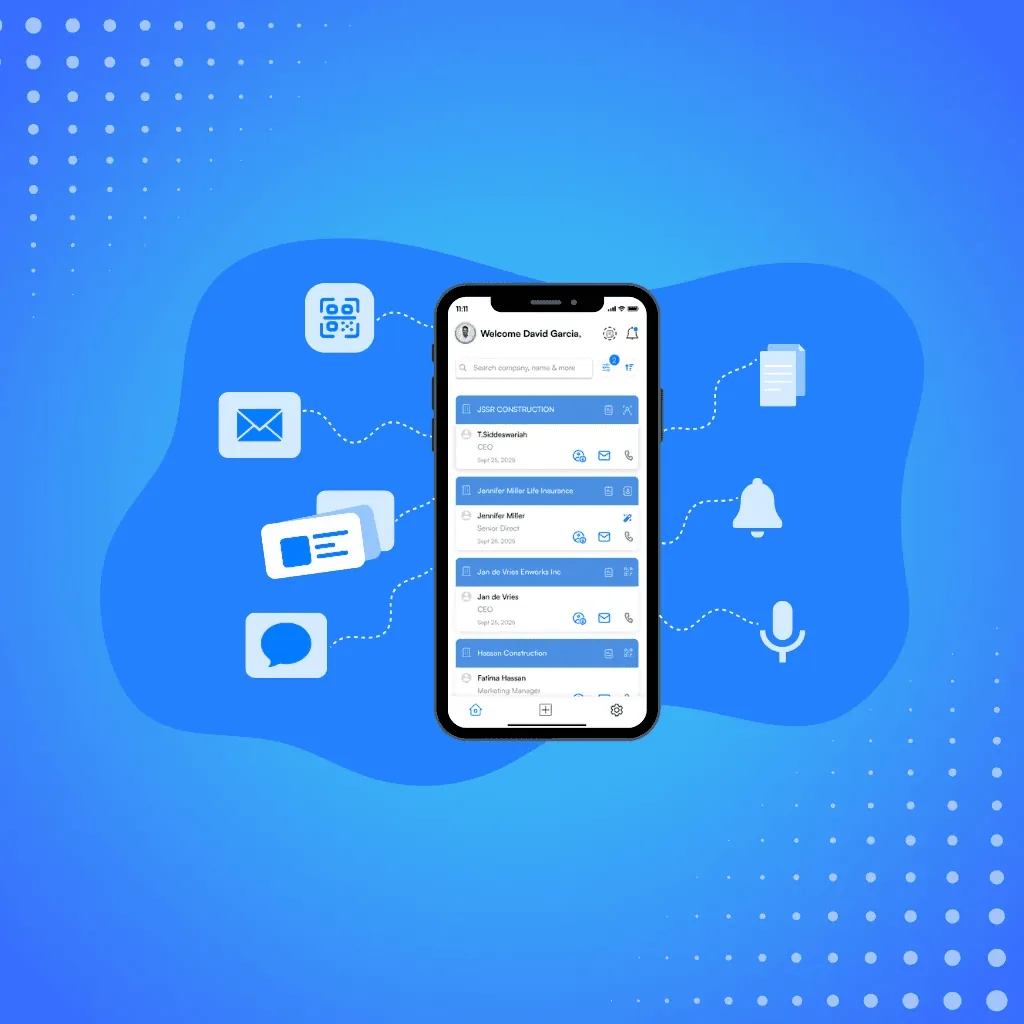
Immediate Accessibility: Your Contacts at Your Fingertips: Once scanned, your contacts are readily available on your mobile, ready for follow-ups, emails, or calls. You can access their information.
Picture this: on one side, a chaotic pile of business cards. On the other side, a clean, organized, and searchable digital contact list, ready for action. That's the power of batch processing. The visual is striking: the transition from physical clutter to digital clarity represents a significant improvement in efficiency and organization.

Put the guide into practice
Turn every event conversation into a follow-up.
Capture accurate contact details, add the context that matters and stay ready for the follow-up.
Real-World Benefits: More Time, Fewer Errors, and Effortless Organization
Real-World Benefits: More Time, Fewer Errors, and Effortless Organization
Batch processing offers a wealth of tangible benefits that directly impact your networking success.
- Time-Saving Powerhouse: Batch processing drastically reduces the time spent on manual data entry, freeing up your schedule for more impactful activities. Instead of spending an entire evening entering details into spreadsheets, you can scan all your cards during a leisurely coffee break.
- Accuracy is Paramount: The app's OCR and AI deliver 99% scan accuracy, and a quick review step catches the rest, so your contact list stays clean for smooth communication and follow-up.
- Organized Networking Made Easy: Digitized contacts are automatically sorted and stored, making it incredibly easy to search by name, company, or job title. You can also add tags for categorization (e.g., "Potential Client," "Investor," "Speaker"), allowing you to quickly filter and target specific groups.

A Day in the Life: Batch Processing in Action
Imagine you're at a bustling trade show, meeting dozens of professionals and collecting stacks of business cards. Before, the thought of manually entering all those contacts would have been overwhelming. But with Habsy - Business Card Manager, that hassle is gone. Now, whether you're back at your hotel or taking a quick break at the event, you simply open Habsy, use the Batch Scan feature to capture multiple cards at once, and instantly tag or add notes as needed. Your contacts are neatly organized, searchable, and ready for follow-ups, with no stress and no wasted time.
With Habsy, every contact stays in one place, ready when you need it.
Adding Context and Power: Tagging and Notes
But batch processing doesn't stop at scanning; it integrates seamlessly with other features to supercharge your networking capabilities.
Tags for Quick Categorization
Before you even begin scanning, set up your key tags for rapid categorization. Create custom categories like "Prospect," "Vendor," or "Partner" to match your networking goals. As you scan each business card, simply apply the pre-defined tags. This ensures immediate organization and allows you to easily group and manage your contacts from the start, making your contact book much more effective.
Notes for Context:
Scanning a contact captures the details. What it cannot capture is the conversation that happened alongside them. That context is what separates a generic follow-up from one that actually lands.
Habsy addresses this with three complementary features that work together immediately after a scan.
Notes allow users to attach written context to any contact at the point of capture. Details like where the meeting happened, what was discussed, or what the next step should be can be recorded directly on the contact record, keeping the relevant context attached to the right person.
Voice notes go further for situations where typing is impractical. Right after scanning a card or wrapping up a conversation on the event floor, the user records a short voice note in the Habsy app. Habsy transcribes it automatically and attaches the transcript to the contact as a searchable, keyword-indexed record. When it is time to follow up two days later, the user opens the contact, reads exactly what was discussed, and writes an outreach that reflects the actual conversation rather than a fading memory.
Reminders ensure that no follow-up gets postponed indefinitely. After scanning a contact, users can set a reminder tied to that contact so the app prompts them at the right time to reach out. The follow-up window after an event is narrow. Reminders close the gap between good intentions and actual action.
Once the reminder fires, Habsy makes the outreach itself straightforward. Users can follow up directly via email or WhatsApp from within the app, with the contact's details and notes already visible. No switching between apps, no searching for the right contact, no retyping context that was already captured at the event. The entire workflow from scan to follow-up stays in one place.
Transform Raw Data into Actionable Insights: Visualizing Tagged Contacts
Imagine a visual representation of your contacts, neatly organized by tags like "Leads," "Sponsors," and "VIPs." This visual clarity allows you to quickly identify key contacts and prioritize your follow-up efforts, turning raw data into actionable insights.
Why Professionals Love Batch Processing:
Batch processing empowers professionals across various industries to streamline their networking efforts.
- For Sales Teams: Sales reps attending expos or trade shows can quickly scan all leads and prioritize follow-ups based on tags like "Demo Requested" or "Pricing Sent."
- For Entrepreneurs: Startup founders can efficiently organize contacts from pitch events and investor meetings, ensuring no connection is overlooked.
- For Event Organizers: Conference planners can manage speaker and sponsor details with ease, creating a seamless post-event process.
Batch Processing: Your Networking Superpower is here with Habsy Business Card Manager
In the fast-paced world of professional networking, speed and efficiency are paramount. Batch processing allows you to focus on what matters most: building relationships and closing deals, instead of getting bogged down by tedious admin work. Let Habsy-Business Card Manager provide your business a Quick Scan feature to accelerate your networking and boost relationships.
Key Benefits Recap
- Process Hundreds of Cards Quickly: Save hours of manual entry with high-speed scanning.
- Ensure Data Accuracy: OCR and AI capture details with 99% accuracy.
- Stay Organized: Use tags and notes to categorize contacts for easy retrieval.
- Act Faster: With digitized contacts ready to go, you can send follow-ups immediately.
Ready to Streamline Your Networking?
Batch processing transforms how you manage business cards, taking the pain out of networking admin tasks and giving you more time to build meaningful connections.
Don’t let a stack of business cards slow you down. Try batch scanning in the app today. Easy sharing to any platform is available at our app.
Take the Next Step
In the fast-paced world of professional networking, speed and efficiency are paramount.
Join the Digital Networking Revolution
Download the Habsy Business Card Manager App today:
Frequently Asked Questions
What is batch processing in a business card manager app?
Batch processing allows users to scan multiple business cards quickly in sequence, converting them into digital contacts without manual data entry.
How does batch scanning save time for professionals?
Batch scanning automates the capture of contact details, allowing users to digitize dozens or even hundreds of cards in minutes instead of spending hours typing information manually.
Does batch processing improve data accuracy?
Yes. Batch processing uses advanced scanning technology to extract contact details accurately, reducing human errors such as typos or missing information.
Can I organize contacts while using batch processing?
Yes. You can apply tags and notes during or after scanning to categorize contacts by criteria like leads, clients, or partners, making them easier to search and manage.
Who benefits the most from batch processing features?
Sales teams, entrepreneurs, event organizers, and professionals who collect large volumes of business cards benefit the most, as it helps them manage contacts efficiently and follow up faster.
Put the guide into practice
Turn every event conversation into a follow-up.
Capture accurate contact details, add the context that matters and stay ready for the follow-up.