

Exhibiting at PPAI Expo 2027: A 60-Day Checklist and Lead Plan for Your Booth
The PPAI Expo trade floor opens January 12 to 14, 2027, at Mandalay Bay Convention Center in Las Vegas. PPAI Advance education runs January 11.
Claire Bennett8 min read
On this page
- PPAI Expo 2027 exhibitor key facts
- Your 60-day lead plan for PPAI Expo 2027
- Day -7: add PPAI Expo 2027 in Habsy Events
- Day -6: put your Business digital card on the stand
- Day -4: make follow-up automatic
- Tuesday to Thursday: badge scanning and lead capture at PPAI Expo 2027
- After PPAI Expo 2027: follow up within 48 hours
- Bringing several reps to PPAI Expo 2027?
- What Habsy Plus adds at PPAI Expo 2027
- Bottom line
PPAI Expo 2027 exhibitor key facts
- Dates
- Jan 12 to 14, 2027Exhibition dates
- Exhibition hours
- Tue9:30 AM to 5:00 PMWed9:30 AM to 5:00 PMThu9:30 AM to 2:00 PM
- Venue
- Mandalay Bay Convention CenterLas Vegas
- Official website
- ppai.orgConfirm details before you travel
- Move-in
- January 8 to 11, 2027Friday to Monday
- Exhibition
- January 12 to 14, 2027Tuesday to Thursday
- Move-out
- January 14 to 15, 2027Thursday to Friday
Your 60-day lead plan for PPAI Expo 2027
The exhibit floor opens Tuesday, January 12, and exhibitor move-in starts Friday, January 8. The 60-day runway gives your team time to prepare booth graphics before the January installation window. The show's own deadlines fill most of the 60 days. The Habsy setup takes minutes, so it sits in the final week.
- Day -12December 31
Last day for advance warehouse freight PPAI Expo 2027
December 31 is the deadline for advance warehouse shipments in the exhibitor checklist.
- Day -7January 5
Set up Habsy Events Habsy
Add PPAI Expo 2027 as Exhibitor and review your intent signals.
- Day -6January 6
Prepare your digital card Habsy
Add a Business digital card QR to your booth materials.
- Day -4January 8
Start exhibitor move-in PPAI Expo 2027
PPAI's schedule lists exhibit hall move-in from 8:00 AM to 5:00 PM, January 8 to 11.
- Day -4January 8
Review follow-up settings Habsy
Edit the show templates and check Card Preferences before using send-on-save.
- Day -2January 10
Brief your booth team Habsy
Agree how to record product, decoration and pricing enquiries at the booth.
- Day -1January 11
Complete exhibitor move-in PPAI Expo 2027
Finish move-in in the exhibit hall by January 11; scheduled access runs 8:00 AM to 5:00 PM.
- Show daysJanuary 12 to 14, 2027
Capture booth conversations Habsy
Record the products discussed and the agreed next step.
- Next business dayJanuary 15
Follow up Habsy
Send promised samples or pricing promptly. Aim for 48 hours after closing.
Event deadlines come from the organizers and can change. Check the exhibitor manual for exact dates.
Day -7: add PPAI Expo 2027 in Habsy Events
Open Settings, then Trade shows, then Events, search for PPAI Expo 2027 and choose Exhibitor. Habsy creates your PPAI Expo 2027 kit: a category for every contact you meet, an email and a WhatsApp follow-up template written for the show, and a set of intent signals suggested for the show. It takes a minute, so the final week before the show is early enough.
- PPAI Expo 2027 categoryEvery contact you save at the show is filed under it.
- Email follow-up templateWritten for PPAI Expo 2027, ready to edit or send.
- WhatsApp follow-up templateThe same message, short enough for WhatsApp.
- Intent signalsSuggested for PPAI Expo 2027. Review them and accept. Habsy Plus
- Floor PicksAnswer a few questions about your visit and see the booths worth your time.
- PPAI Expo 2027 categoryEvery contact you save at the show is filed under it.
- Email follow-up templateWritten for PPAI Expo 2027, ready to edit or send.
- WhatsApp follow-up templateThe same message, short enough for WhatsApp.
- Intent signalsSuggested for PPAI Expo 2027. Review them and accept. Habsy Plus
In the app: Settings, Trade shows, Events. Your first event is free, kit included, with Floor Picks when you visit. More events are part of Habsy Plus.
Review the intent signals in your kit
Intent signals work like a short custom form for each visitor, answered with a few taps after each conversation, so every rep records the same details. Your kit comes with a set already suggested for PPAI Expo 2027: review it, change anything you like and accept. For PPAI Expo conversations, record each visitor's organization type, role, product interests and solution need: Habsy Plus
- Promotional products distributor
- Corporate buyer
- Decoration company
- Fulfillment provider
- Owner
- Procurement manager
- Sales director
- Product manager
- Apparel
- Drinkware
- Tech accessories
- Corporate gifts
- Within 3 months
- 3 to 6 months
- 6 to 12 months
- Researching
- Book a demo
- Send a proposal
- Share a case study
- Introduce a colleague
- New suppliers
- Samples
- Program pricing
- Decorated merchandise
- Exhibit hall booth
Your PPAI Expo 2027 kit comes with intent signals suggested for the show. Find them in Settings, Manage Intent Signals, adjust the options if you like and accept.

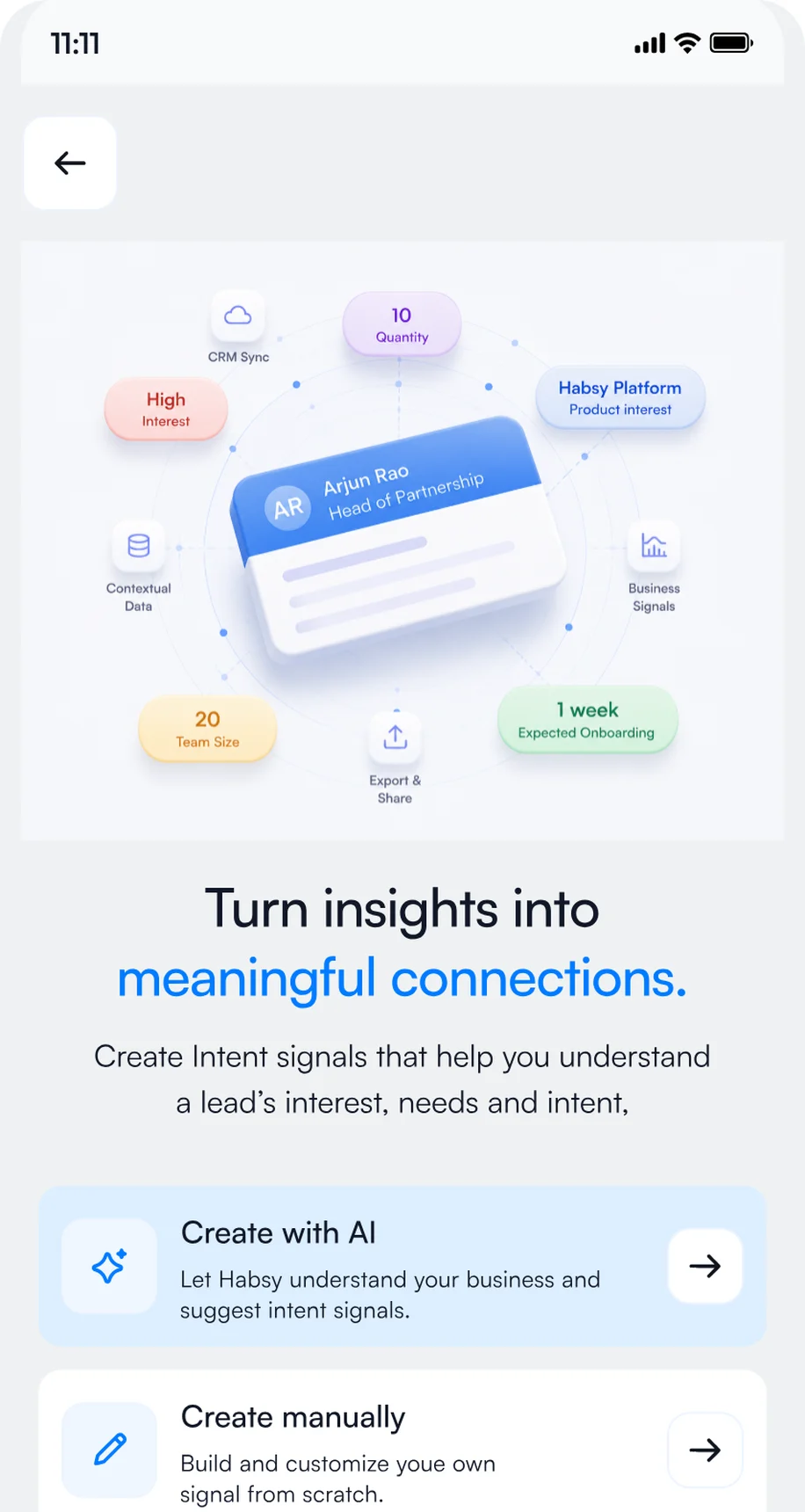
1Open Manage Intent Signals
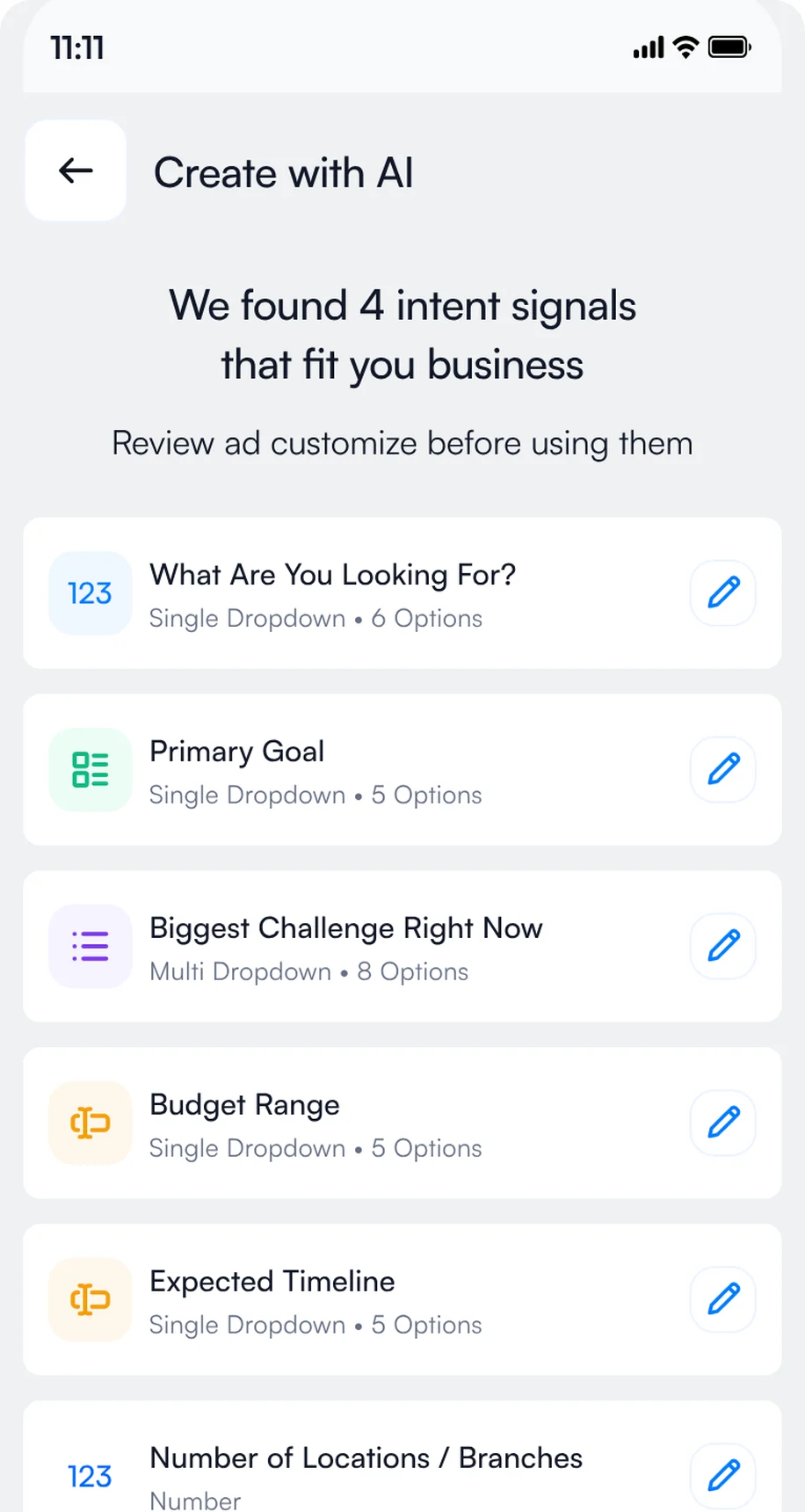
2Review the suggested set and accept
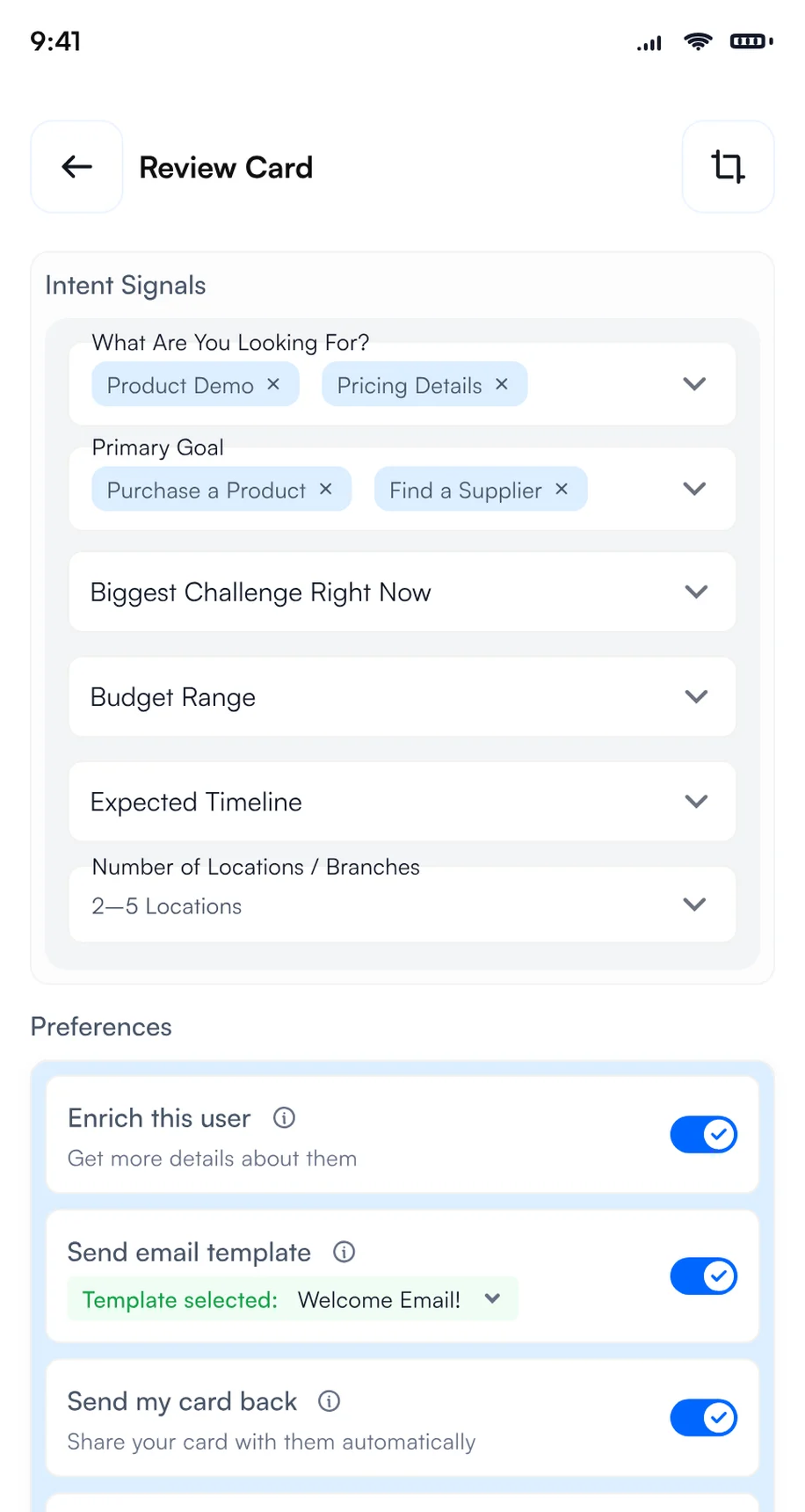
3Tap the answers after each scan
Day -6: put your Business digital card on the stand
Every Habsy account includes a free Business digital card in MyQR, with your company profile, services and brochures. Create it at myqr.habsy.ai or in the app. Print its QR code on a stand sign, such as "Scan for our PPAI Expo 2027 product guide", then set up its enquiry form: choose the fields you need, such as name, company, email and phone. Visitors who scan it while your reps are busy fill it in and are saved as new contacts. If your stand graphics go to print earlier, add the QR to the artwork before that deadline.
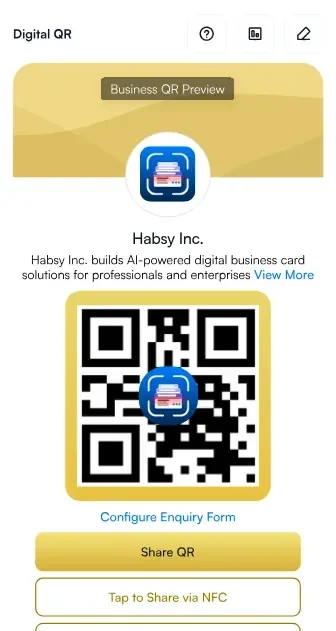
1Your Business digital card
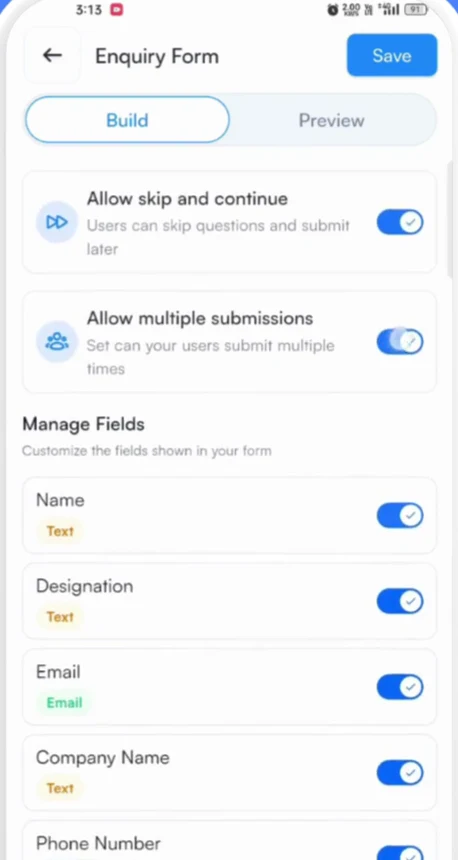
2Choose the form fields
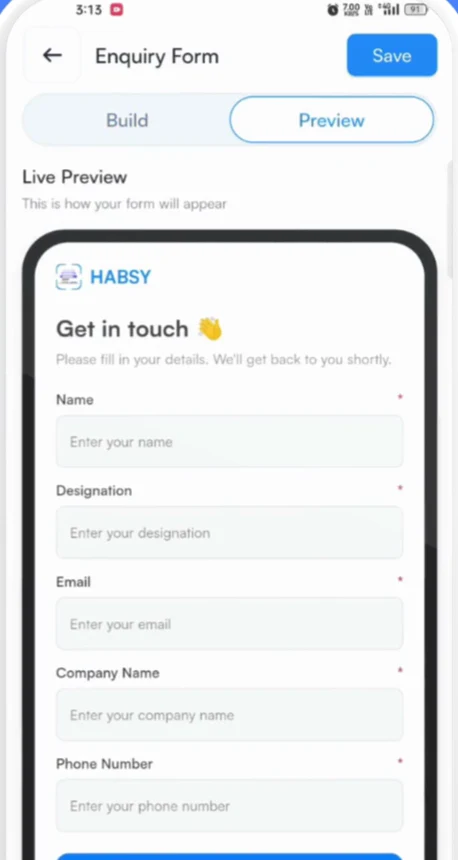
3What visitors fill in
Day -4: make follow-up automatic
Connect your email account or WhatsApp Business account in Settings, then edit the follow-up template in your PPAI Expo 2027 kit. With Card Preferences on, it goes out from your own account the moment you save a visitor, often before they leave your booth.
Dana Mercer saved at PPAI Expo 2027 · 4 steps running in the background
Email, WhatsApp and CRM steps need the matching integration. Card Preferences is part of Habsy Plus.
Exhibiting at PPAI Expo 2027?
Set up your 60-day plan in one app.
Add the event for your kit, capture every visitor on your own phones and follow up the moment you save.
Tuesday to Thursday: badge scanning and lead capture at PPAI Expo 2027
Exhibits run Tuesday through Thursday with published floor hours; move-out begins Thursday at 2:00 PM. Every rep scans on their own phone, free and with no scan limit, and every contact lands in your PPAI Expo 2027 category with its intent signals and notes. Habsy works as your PPAI Expo 2027 badge scanner and business card scanner on every rep's phone.
- Badges: point the Habsy scanner at a badge and Habsy reads the details from its QR code. If a badge holds only a registration number, scan the person's business card or type them in.
- Business cards: scan cards in 200+ languages, or switch to Batch and scan up to 150 cards in about 5 minutes.
- Voice notes: say what the visitor needs before the next conversation starts. Habsy Plus
- Offline: capture keeps working when the hall Wi-Fi is busy, and contacts process once you reconnect.
Here is a visitor captured with context at PPAI Expo 2027:
Dana Mercer
Distributor owner, Juniper Promotional Group
Intent signals
- Promotional products distributor
- Owner
- Drinkware
- New suppliers
Notes
Asked to compare drinkware samples for upcoming client programs.
0:28 · "Can you send drinkware samples and your program pricing?"
Reminder
Friday, 9:00 AM · Send drinkware samples
Fictional example for PPAI Expo 2027.
After PPAI Expo 2027: follow up within 48 hours
- Thursday after close: After the final show day, review the contacts your team captured and note who needs a prompt response.
- Friday, January 15: Review each contact's intent signals and assign a clear follow-up action to the right rep.
- Within 48 hours: Send each visitor a relevant follow-up with the product details or samples they requested.
- Next week: Export the updated contacts or sync them to your CRM, then check that each follow-up has an owner.
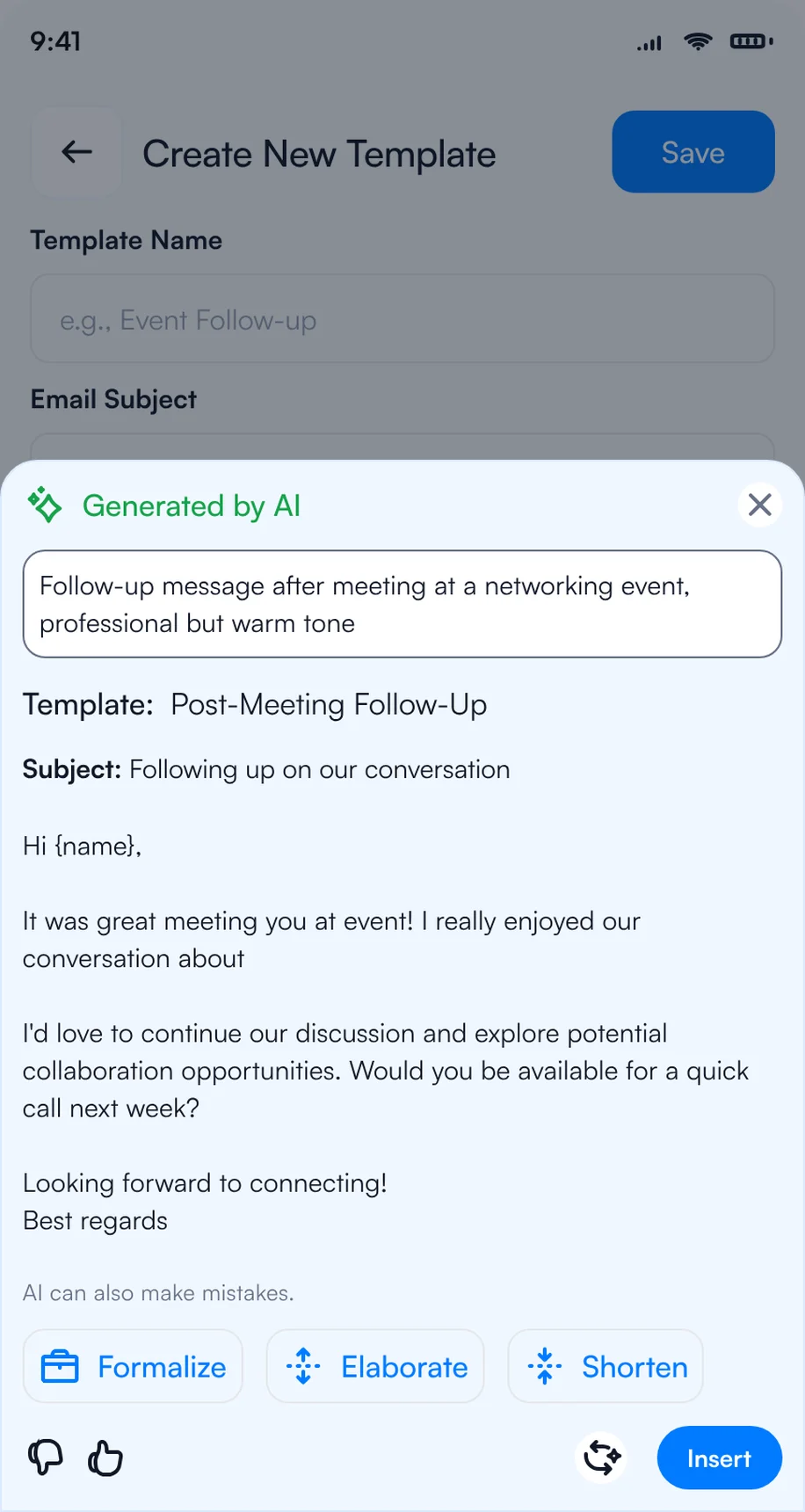
1Let AI write a personal message
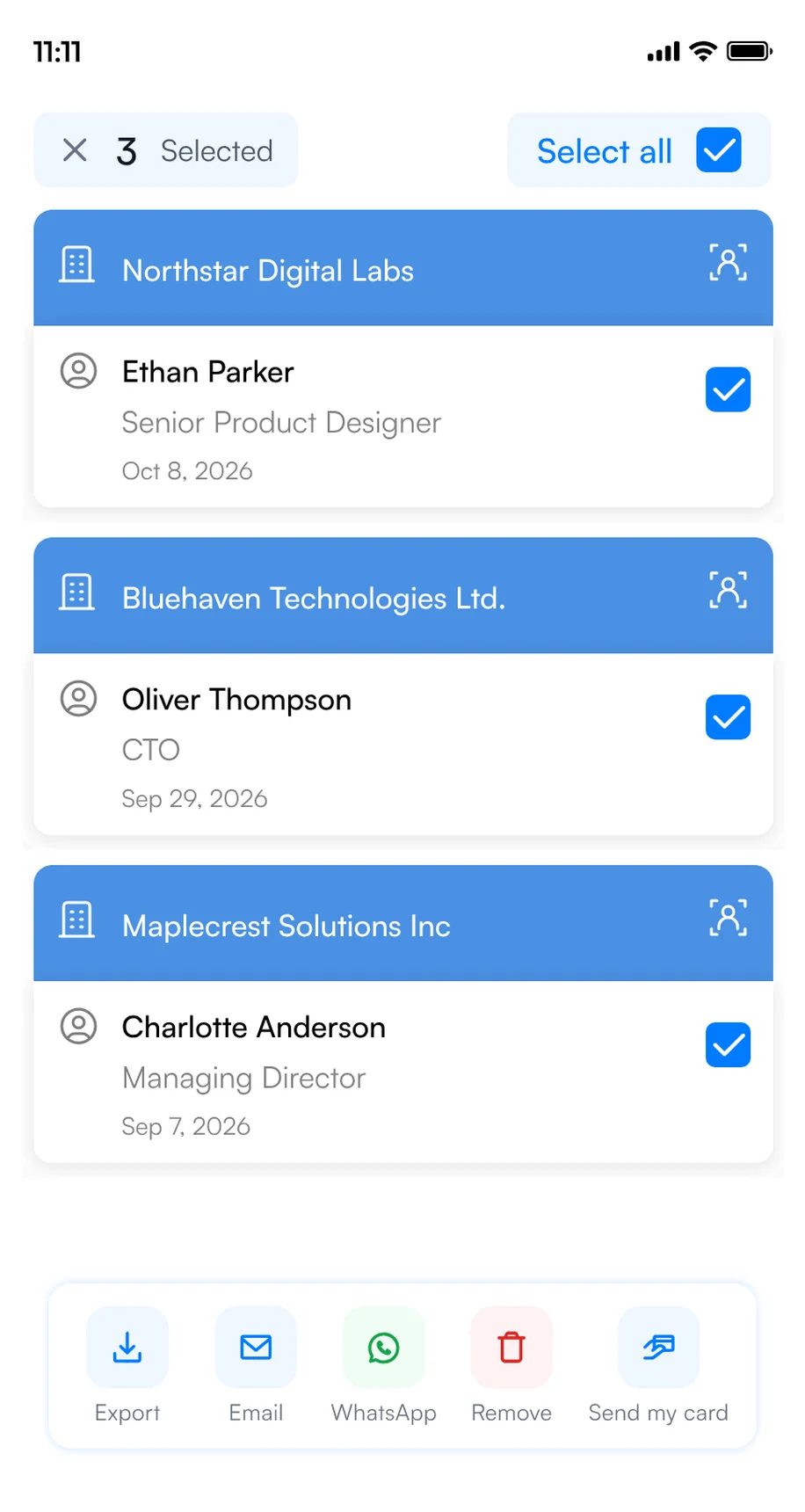
2Send to several contacts at once
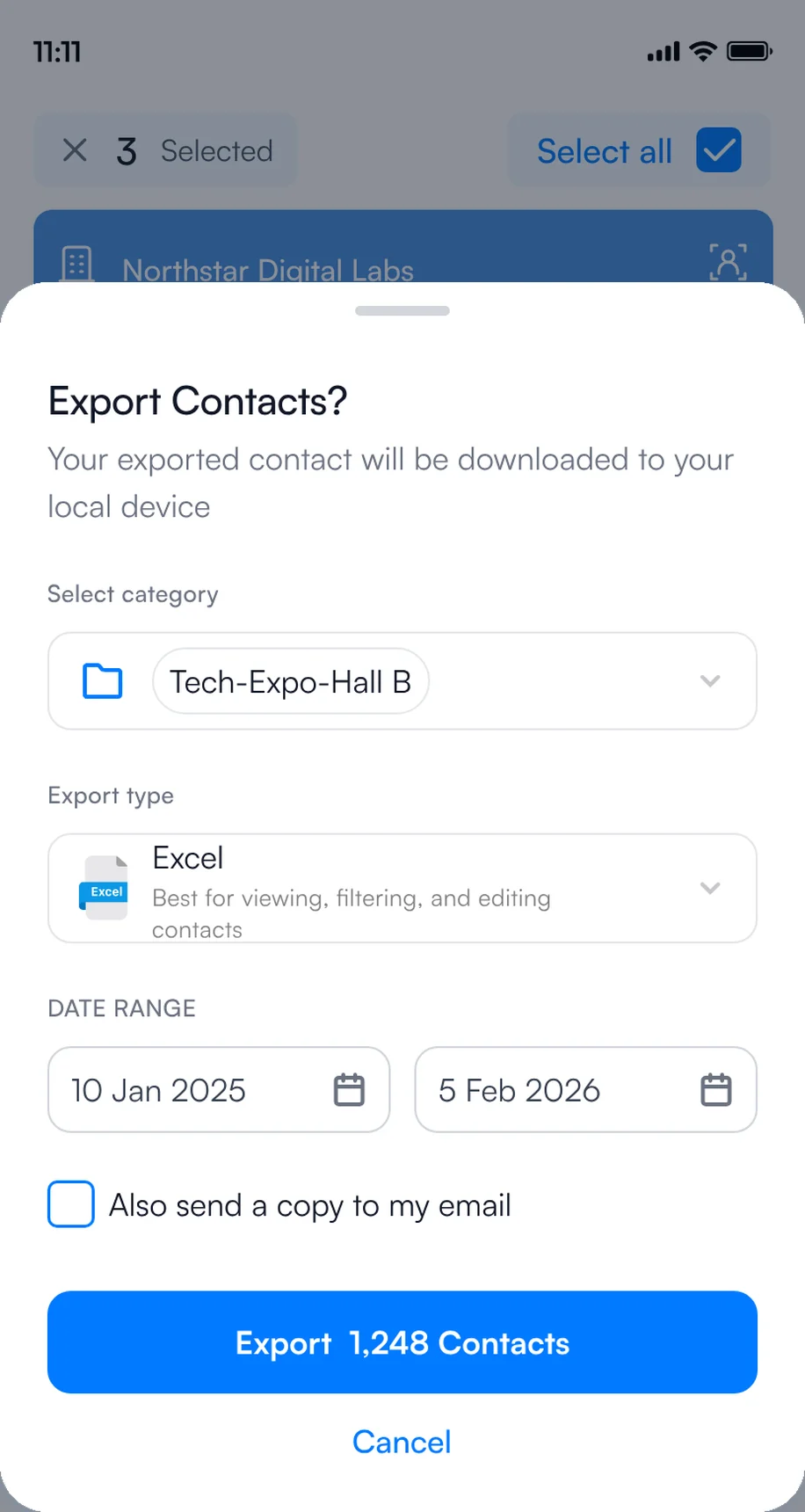
3Export or sync to your CRM
Bringing several reps to PPAI Expo 2027?
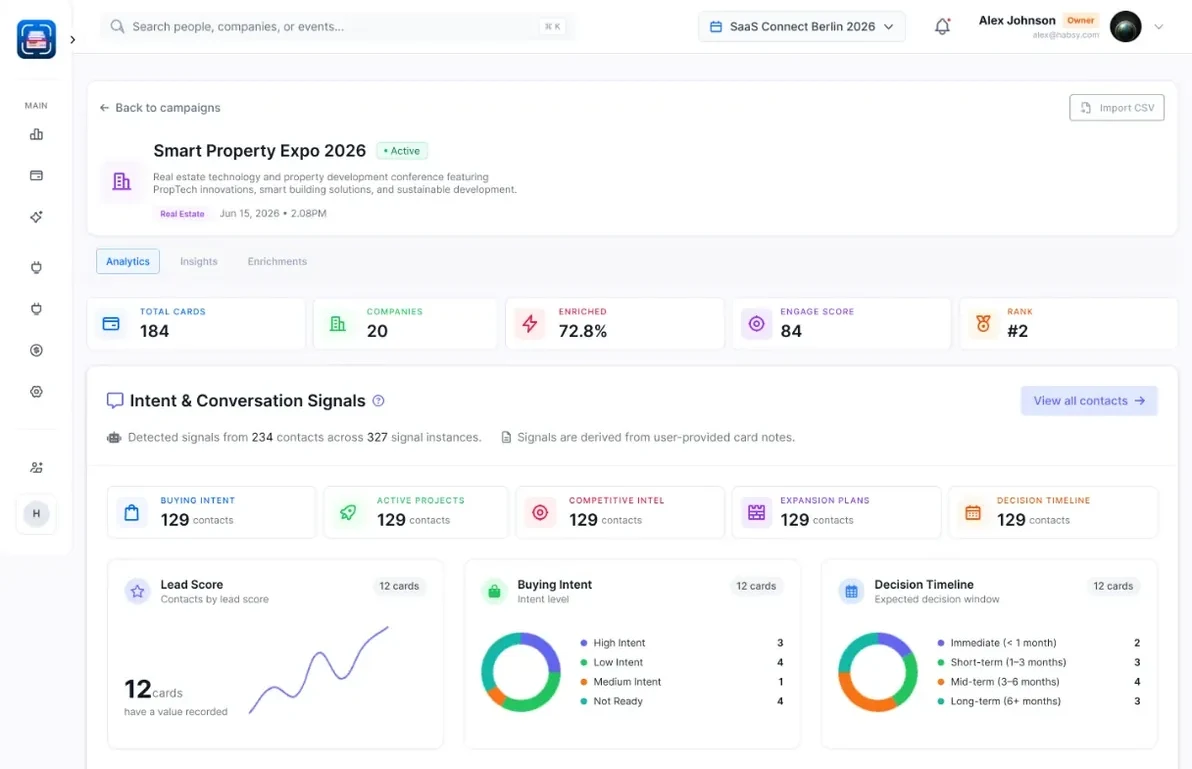
Run the show as one campaign on Habsy Platform, at app.habsy.ai. Every rep keeps scanning in the app, and you see every contact for PPAI Expo 2027 in one live list, assign follow-up, sync to your CRM and get a post-event report when the show ends.
app.habsy.ai
What Habsy Plus adds at PPAI Expo 2027
Free is enough to capture every visitor at your booth. Habsy Plus turns those contacts into follow-ups that go out on their own.
FreeAlways free
- Unlimited scanning: business cards, badges and QR codes
- Two digital cards in MyQR
- Your first event, with its kit
- Reminders
- Translation into 14 languages
- Export to Excel, CSV or VCF
Habsy PlusEverything in Free, plus
- Intent signalsAccept the set in your kit and record what every visitor needs.
- Card PreferencesYour template and digital card sent the moment you save a visitor.
- Bulk sendOne follow-up to many visitors, by email or WhatsApp.
- Voice notesCapture the details before the next visitor walks up.
- CRM syncPush contacts to Salesforce, HubSpot, Zoho CRM and 10+ others.
- Card analyticsSee when and where your digital card is opened.
Habsy Plus starts with a 3-day free trial in the app. Get Habsy free
Bottom line
Agree who will send sample packs, quotes and lead times before the exhibits close at 2:00 PM on Thursday. Work through the show deadlines over the 60 days, then do the Habsy setup in the final week: your kit and intent signals, the booth QR with its enquiry form, and automatic follow-up. See Habsy for exhibitors.
Planning several shows this year? Book a demo of Habsy Platform.
Habsy is not affiliated with Promotional Products Association International (PPAI). Event details come from the official PPAI Expo 2027 website and can change.
Frequently Asked Questions
When and where is PPAI Expo 2027?
The exhibits are open January 12 to 14, 2027, at Mandalay Bay Convention Center in Las Vegas. PPAI Advance education takes place on January 11.
Can visitors leave their details at my PPAI Expo 2027 stand when my team is busy?
Yes. Print your Business digital card's QR code on the stand and turn on its enquiry form. Visitors who scan it can leave their details, and they are saved as new contacts.
When should exhibitors start preparing for PPAI Expo 2027?
About 60 days before the exhibition opens. That leaves time to register staff, book exhibitor services, plan shipping and set up lead capture and follow-up before the deadlines close in.
Is there a business card scanner for PPAI Expo 2027?
Yes. Habsy is a free mobile app for iPhone and Android that scans business cards in 200+ languages, badge QR codes that hold the person's details, and digital business cards from any provider. Add PPAI Expo 2027 in Habsy Events and every contact you scan is saved under the show with your notes, ready for follow-up. Scanning is free, with no limit.
What is the Habsy event kit for exhibitors?
When you add PPAI Expo 2027 in Habsy Events as an Exhibitor, Habsy creates a kit for the show: a PPAI Expo 2027 category, an email follow-up template and a WhatsApp template written for the event, plus intent signals suggested for it. Your first event is free.
Can my booth team capture leads at PPAI Expo 2027 on their own phones?
Yes. Every rep can scan badges, business cards and QR codes in the Habsy app, free and with no scan limit, and add intent signals, notes and voice notes to each contact.
Going to PPAI Expo 2027?
Bring more leads home from PPAI Expo 2027
Plan the floor and keep every booth
Add the event for Floor Picks, share your MyQR card and scan every card you collect.
Get Habsy freeCapture every visitor and follow up fast
Your event kit, intent signals and follow-up that sends the moment you save.
Get Habsy freeEvery rep, one live list
One campaign on Habsy Platform, with assignment, CRM sync and a post-event report.
Book a demo

