Paperless Business Cards: How to Go Paperless Without Losing Contacts
Going paperless with business cards is not just about not printing your own. It also means handling the cards people give you, the sign-up sheets at your booth and the brochures you hand out. This guide covers each part, and when paper still makes sense.
Marcus Chen6 min read
On this page
- The quick answer
- Why go paperless with business cards?
- Step 1: Replace your own card
- Step 2: Handle the paper cards you receive
- Step 3: Replace sign-up sheets with an enquiry form
- Step 4: Replace printed brochures with attachments
- A paperless exhibition, from setup to follow-up (illustrative)
- What to do with the paper you still receive
- When paper still makes sense
- Paperless at events
- Bottom line
The quick answer
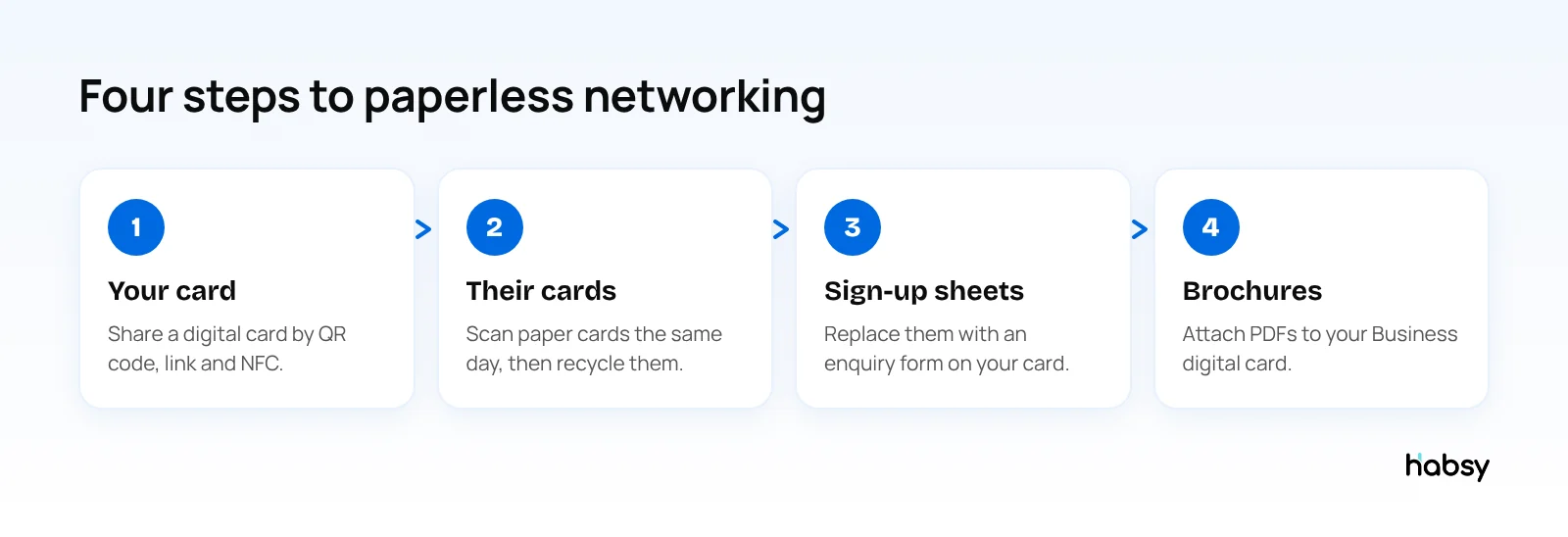
To go paperless with business cards, share a digital business card instead of a printed one, scan the paper cards people still give you into a contact app, and replace sign-up sheets and printed brochures with an enquiry form and file attachments on your digital card. Habsy does all four: the cards, scanning and attachments are free, and the enquiry form comes with Habsy Plus.
Why go paperless with business cards?
- No reprinting. Change your number or role, and the digital card updates for everyone.
- No running out. You cannot run out of a digital card halfway through an event.
- One-tap saving. People save you correctly instead of typing your email.
- Less waste. Fewer cards, brochures and sign-up sheets printed and thrown away.
- Better follow-up. Contacts arrive in your phone, not in a drawer.
For the cost side, see are business cards a waste of money and the hidden costs of traditional business cards.
Step 1: Replace your own card
Create a digital business card and share it three ways:
- QR code on your phone, badge, booth sign, slides and email signature
- Link in emails, chat messages and social profiles
- NFC from your phone to theirs
Habsy gives you two digital cards on the free plan: a Professional digital card for you and a Business digital card for your company. Each has its own QR code and link, and opens in any browser. See how digital business cards work.
Step 2: Handle the paper cards you receive
You can stop printing your own cards. You cannot stop people handing you theirs. Paper only becomes waste when it sits in a drawer and the contact is lost.
- Scan cards the same day. Habsy reads cards with 99% accuracy, the highest in our in-house tests, and translates cards in other languages into English.
- Batch scan stacks. Up to 150 cards in about 5 minutes.
- Add a note about what you discussed, and a reminder to follow up.
- Recycle the paper. Once the details are checked and saved, you do not need the card.
Many people now show a QR code instead of a card. Habsy scans those too, from any digital card provider, as well as LinkedIn QR codes and event badges. Read more in say goodbye to paper chaos.
Share and capture
Make every introduction easier to remember.
Create your digital card, scan the cards you receive and keep every new connection organized.
Step 3: Replace sign-up sheets with an enquiry form
Clipboards at booths and counters collect messy handwriting and missing emails. An enquiry form on your digital card, part of Habsy Plus, does the same job:
- Visitors scan your QR code and fill in the form on their own phone
- You choose the fields and which are required
- Submissions arrive in Habsy, where you can convert them into contacts
Step 4: Replace printed brochures with attachments
Your Business digital card can carry files such as brochures, catalogues and price lists as PDFs. Visitors download what they need from your card, and nothing is left behind in a hotel bin.
A paperless exhibition, from setup to follow-up (illustrative)
A food ingredients supplier exhibits at a three-day expo with four people on the stand. Here is what changes when they go paperless:
| Before | Paperless with Habsy |
|---|---|
| 2,000 printed business cards for the team | Each person shares a Professional digital card by QR code; a few printed cards for visitors who prefer them |
| 500 printed catalogues | Catalogue and price list attached to the Business digital card |
| A clipboard sign-up sheet | An enquiry form behind the stand’s QR code |
| A bowl of visitor cards, typed up a week later | Every visitor’s card or badge scanned during the conversation, with notes and intent signals |
| Follow-up after the team returns | Follow-ups from the first evening, written with AI from a short prompt |
The team also gets something paper never gave them: a record of each conversation they can search, and on the Habsy Platform, a post-event report with unique companies, team performance and lead scoring.
What to do with the paper you still receive
Some visitors will always hand you a card. Batch scan the stack each evening, up to 150 cards in about 5 minutes, with the event set once for the whole batch. Check the fields, add notes while you remember the conversations, and recycle the paper. Habsy captures cards offline and processes them once you are back online, so it works even in halls with no signal.
When paper still makes sense
Paperless is the goal, not a rule. Keep some printed cards for:
- Cultures where cards are part of the greeting, such as Japan, where exchanging meishi is expected
- Industries and regions where many contacts do not use smartphones for business
- Leave-behinds for clients who prefer something physical
Print fewer, and add a QR code that links to your digital card, so even a paper card leads to your live details. See what to include on a business card.
Paperless at events
Exhibitors produce the most paper: cards, sign-up sheets, brochures and lead forms. A paperless booth looks like this:
- A QR code on the booth sign that opens your Business digital card
- An enquiry form instead of a fishbowl or clipboard
- Brochures as attachments on your card
- Every visitor’s card or badge scanned into Habsy, with notes and intent signals
- Follow-up the same day from the same app
See event lead capture for the full setup.
Bottom line
Paperless business cards are not only about the card you hand out. Share a digital card, scan the cards you receive, and replace sign-up sheets and brochures with forms and files. Habsy covers all four, free. Create your digital card.
Frequently Asked Questions
What is a paperless business card?
A paperless business card is a digital business card: a web page with your details that people open by scanning a QR code, tapping a link or tapping phones over NFC. They save your contact to their phone in one tap.
How do I go paperless with business cards?
Create a digital business card, share it by QR code, link and NFC, add its QR code to your email signature and badge, scan the paper cards you receive into a contact app, and use an enquiry form and file attachments instead of sign-up sheets and printed brochures.
What do I do with the paper cards people give me?
Scan them into a business card scanner app the same day, check the details, add a note, then recycle the paper. Habsy batch scans up to 150 cards in about 5 minutes, free.
Are paperless business cards free?
They can be. Habsy’s free plan includes a Professional digital card and a Business digital card with QR codes and links, plus unlimited card scanning. Enquiry forms come with Habsy Plus.
Should I stop printing business cards completely?
Not always. In some industries and countries, exchanging paper cards is still expected. Many people keep a small number of printed cards with a QR code that links to their digital card.
Share and capture
Make every introduction easier to remember.
Create your digital card, scan the cards you receive and keep every new connection organized.