Blog

What to Include on a Business Card in 2026 (Physical and Digital)

What to Include on a Business Card in 2026 (Physical and Digital)

TL;DR

  • Include 7 essentials: full name, job title, company name and logo, one phone number, professional email, website URL, and a clear call to action.

  • Follow the 60-30-10 layout rule: 60% white space, 30% text, 10% design.

  • Digital business cards remove the space constraints that force painful trade-offs on physical cards.

  • Add a QR code to any physical card so recipients can save your details instantly.

  • Avoid fax numbers, multiple phone numbers, personal addresses, and too many social handles.

Around 27 million business cards are printed every day worldwide, yet studies suggest roughly 88% are thrown away within a week. The reason is rarely the card stock. It is almost always the content. Too much information, outdated details, or nothing that tells the recipient what to do next. Getting the right information on your card, and cutting everything else, is still one of the highest-leverage moves in professional networking.

This guide covers exactly what to include on a business card in 2026, both physical and digital, along with what to leave off, industry-specific guidance, and how digital cards solve the space limitations that make physical card decisions so hard.

Exchanging a business card with QR code at a networking event

Why What You Include on a Business Card Still Matters in 2026

Why What You Include on a Business Card Still Matters in 2026

What to include on a business card to get more follow-ups. Covers the 7 essentials, design tips, digital card advantages, and industry-specific must-haves.

Vector diagram showing essential elements of a business card

Physical cards are not dead. They remain the fastest way to exchange contact details face to face at expos, trade shows, networking events, and client meetings. But the question of what to include has evolved because digital alternatives have changed the context.

When space is limited to a 3.5 x 2 inch rectangle, every element competes. When you move to a digital business card, space is no longer the constraint, and the question shifts from what you can fit to what you most want to highlight.

Whether you are printing cards or building a digital profile, the principle is the same: every element should either build recognition, enable contact, or prompt a next step.

How to Decide What Belongs on Your Business Card

Start with Your Goal

Are you trying to generate sales leads, build professional recognition, or make it easy for someone to refer you? A sales professional needs a direct line and a booking link. A creative needs a portfolio URL. A trade show booth manager needs a scannable QR code that feeds into a lead capture flow.

Consider Your Audience

B2B prospects at a manufacturing expo need different information than walk-in customers at a retail event. Know who is receiving your card before deciding what goes on it.

The 60-30-10 Rule for Business Card Layout

Design professionals use a simple ratio as a starting point: 60% white space, 30% text, 10% design elements. Cards with fewer than five contact methods consistently outperform cluttered designs for follow-up rates. When in doubt, remove an element rather than reducing the font size.

Vector illustration of scanning QR code on a business card using Habsy app

7 Essential Elements Every Business Card Needs

7 Essential Elements Every Business Card Needs

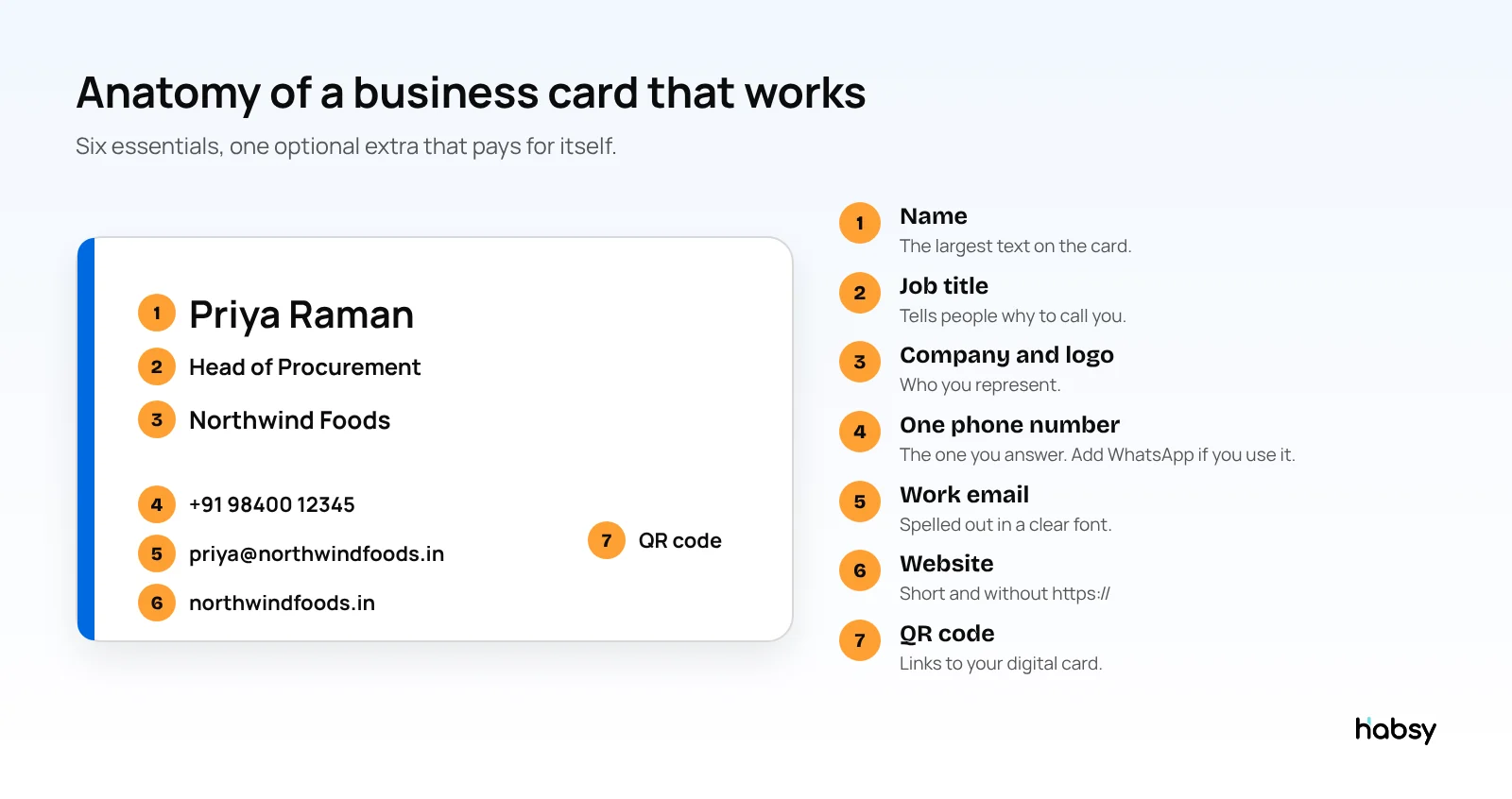
1. Your Full Name

Use the name you go by professionally, not just your legal name. If you are universally known as Ravi rather than Raveendra, use Ravi. Make it the largest text element on the card.

2. Job Title or Role

Use a functional title that tells the recipient what you actually do. "Head of Sales, South India" communicates more than "Associate Vice President." If your corporate title is unclear to outsiders, a descriptive subtitle helps.

3. Company Name and Logo

Brand recognition compounds over time. Keep your company name and logo consistent with every other touchpoint. If your logo is complex, use a simplified version that holds up at small sizes.

4. One Phone Number

Pick one direct line, ideally a number where you can actually be reached. Multiple numbers create decision paralysis. If you need to offer WhatsApp separately, use a QR code for that rather than printing a second number.

5. Professional Email Address

Use a branded domain address, not a personal Gmail or Yahoo account. A personal email signals that your business contact infrastructure is not fully set up, which is a small but real trust signal.

6. Website URL

Link to the most relevant destination: your homepage, a personal portfolio, or a dedicated landing page. Keep the URL short. If your website address is long, use a short redirect or let a QR code do the work.

7. One Clear Call to Action

Every card should answer: what should the recipient do next? A QR code that saves your contact details, a booking link, or a tagline that describes your value all serve as calls to action. Cards without a next step are just contact sheets.

What to Include on a Business Card by Industry

What to Include on a Business Card by Industry

Business Cards for Sales Professionals

Sales cards should prioritize direct access and speed. Include your direct mobile number, a QR code that links to your booking calendar or a lead capture form, and a one-line description of your specialty. If your company uses a CRM, a QR code that connects directly to an intake form saves both parties time.

Business Cards for Real Estate Agents

Real estate cards need to build personal trust, so a professional headshot often earns its place on the front. Include your license number, brokerage name, a listing link or QR code, and your direct line. Avoid stacking two or three phone numbers.

Business Cards for Freelancers and Creatives

Your card should do double duty as a mini portfolio reference. Include your portfolio URL, one or two relevant social handles (Behance, Dribbble, LinkedIn depending on your field), and a tagline that describes the type of work you take on. Let the card design itself demonstrate your aesthetic.

Business Cards for Event and Trade Show Networking

At trade shows and expos, speed is everything. Your card needs a prominent QR code that either saves your contact details instantly or links to a lead capture form. Keep the front minimal so it photographs well and scans cleanly. A badge or QR scanner at the event booth is even more efficient than physical cards for high-volume days.

Physical vs. Digital Business Card: Feature Comparison

Physical vs. Digital Business Card: Feature Comparison

Element

Physical Card

Digital Business Card

Contact Details

Limited by space

Unlimited fields

Updates

Requires reprinting

Instant, real-time

Social Links

1-2 handles max

All platforms

Lead Capture

None

Built-in with CRM sync

Follow-Up

Manual

Reminder-enabled

QR Code

Static

Dynamic, trackable

Multimedia

Not possible

Video, portfolio, PDF

What to Include on a Digital Business Card (and Why It Changes the Game)

What to Include on a Digital Business Card (and Why It Changes the Game)

Everything a Physical Card Has, Plus More

A digital business card carries all the standard contact details of a physical card with no space constraints. You can include every social profile, a profile photo, multimedia links, a portfolio, a calendar booking link, and a lead capture form, all in one shareable profile.

Dynamic QR Codes and NFC Sharing

Digital cards shared via QR or NFC let the recipient save your details directly to their phone without typing anything. Unlike static printed QR codes, dynamic QR codes can be updated, so if your number or title changes, the card stays current without a reprint.

Built-In Lead Capture and CRM Integration

At events, a digital business card with lead capture built in means every scan or tap logs a contact automatically. Habsy, for example, allows exhibitors to capture QR badge and card details with custom fields, voice notes, and reminders, then export a clean, mapped CSV to any CRM within 24 hours. No manual entry, no lost cards.

AI-Powered Follow-Up Templates

The biggest gap in networking is not the card exchange, it is what happens the next day. Digital business card platforms that include follow-up reminders and templates close that gap. See: What Is a Digital Business Card?

What NOT to Include on Your Business Card

Fax Numbers and Multiple Phone Numbers

Fax numbers signal outdated infrastructure. Multiple phone numbers create friction. Pick one direct line per card. If you need to offer alternatives, use a QR code that links to a contact page where all options are available.

Personal Home Address

Unless you run a home-based storefront that needs foot traffic, a home address adds risk without adding value. Use a registered business address or simply omit the physical address if clients reach you digitally.

Inspirational Quotes or Motivational Taglines

The back of a business card is premium real estate. Use it for a clear value proposition, contact details, or a QR code. Generic quotes do not earn their space.

Too Many Social Media Profiles

Two handles is the practical maximum for a physical card. Pick the platforms where you are actually active and where your target audience is likely to look. For everything else, use a digital card profile or a link-in-bio page via QR code.

Business Card Design Tips That Improve Follow-Up Rates

Typography Hierarchy

Your name should be the largest element on the card: 14-18pt is the standard range. Company name sits at 12-14pt. All other details, email, phone, website, should be at 10-12pt. If you need to go below 9pt to fit everything, something needs to be removed.

Colour Psychology

Colour carries meaning. Blue builds trust (common in finance and tech), black signals luxury or authority, green works well for growth and sustainability narratives. Limit your palette to two or three colours. High contrast between text and background is non-negotiable for readability.

White Space Is Not Wasted Space

Cards with more breathing room get more callbacks. White space is not absence of content, it is design intentionality. A cluttered card reads as disorganised before anyone has read a single word.

Use Both Sides of the Card

The front should carry your brand identity: name, company, logo, and a single headline. The back is for supporting details, contact fields, and your QR code. Splitting the content this way keeps the front clean and makes the back easy to photograph or scan.

Digital vs. Physical: Which Business Card Format Is Right for You?

For most professionals in 2026, the answer is hybrid. A physical card with a QR code that links to a rich digital profile gives you the tangible exchange moment while removing the space constraints.

Digital-only cards work best for high-volume event capture, where typing and card handling slow everyone down. Physical-only cards work best in cultural contexts where the card exchange ritual carries weight.

Habsy bridges both: capture QR badges and business cards in one flow, add qualifiers and a 10-second voice note, and export a clean CSV to your CRM by the next morning. Explore digital business cards to see how the format has evolved.

Final Thoughts: Build a Business Card That Works as Hard as You Do

Final Thoughts: Build a Business Card That Works as Hard as You Do

The seven essentials, full name, job title, company name and logo, one phone number, professional email, website URL, and a clear call to action, cover the foundation. Everything beyond that depends on your industry, your audience, and your goal.

Digital business cards solve the problems that make physical card decisions painful: outdated details, space limits, no follow-up tracking, and no lead capture. The best approach is a physical card that acts as the door, and a digital profile that does the work.

Ready to build a business card that captures leads and never goes out of date?

Connect with us and get started.

Frequently Asked Questions

What are the 7 things that should be on a business card?

Your full name, job title, company name and logo, phone number, professional email address, website URL, and a clear call to action such as a QR code or booking link.

What should I include on a digital business card?

Everything you would put on a physical card, plus social media links, a profile photo, multimedia like video or portfolio links, a booking calendar, and lead capture forms. Digital cards are not limited by physical space.

Do I need a QR code on my business card?

Yes. A QR code lets recipients instantly save your contact details to their phone, which significantly increases the chance of follow-up. Dynamic QR codes can also link to a digital profile that stays current even if your details change.

What should you NOT put on a business card?

Avoid fax numbers, multiple phone numbers, personal home addresses, motivational quotes, and more than two social media handles. Cluttered cards with too many elements get fewer follow-ups than clean, focused designs.

Is a business card still necessary in 2026?

Yes, but the format is evolving. Physical cards remain valuable for face-to-face networking, while digital business cards are growing rapidly. The best approach is often hybrid: a physical NFC or QR card that links to a rich digital profile.

What is the best layout for a business card?

Follow the 60-30-10 rule: 60% white space, 30% text, and 10% design elements. Place your name as the largest text element, keep the front focused on branding, and use the back for detailed contact information and a QR code.

Should I put my photo on my business card?

It depends on your industry. Client-facing roles like real estate, financial advising, and photography benefit from a professional headshot because it builds recognition and trust. For corporate or minimalist brands, a logo often works better.

What to include on a business card for a small business?

Small business owners should include their name, business name, logo, a tagline summarising their service, one phone number, one email, and a website or social link. A QR code linking to a digital card or Google Business profile is a strong addition.

How do digital business cards help with lead capture at events?

Digital business cards with built-in lead capture let you collect contact details instantly when someone scans your QR code or taps your NFC card. The data can sync to your CRM, eliminating manual entry and ensuring no lead is lost.

Can I use a digital business card without an app?

Yes. Most modern digital business card platforms, including Habsy, let recipients view and save your card directly in their mobile browser. No app download is required for the person receiving your card.


TL;DR

  • Include 7 essentials: full name, job title, company name and logo, one phone number, professional email, website URL, and a clear call to action.

  • Follow the 60-30-10 layout rule: 60% white space, 30% text, 10% design.

  • Digital business cards remove the space constraints that force painful trade-offs on physical cards.

  • Add a QR code to any physical card so recipients can save your details instantly.

  • Avoid fax numbers, multiple phone numbers, personal addresses, and too many social handles.

Around 27 million business cards are printed every day worldwide, yet studies suggest roughly 88% are thrown away within a week. The reason is rarely the card stock. It is almost always the content. Too much information, outdated details, or nothing that tells the recipient what to do next. Getting the right information on your card, and cutting everything else, is still one of the highest-leverage moves in professional networking.

This guide covers exactly what to include on a business card in 2026, both physical and digital, along with what to leave off, industry-specific guidance, and how digital cards solve the space limitations that make physical card decisions so hard.