Blog

Lead Capture for Recruiters: Build Your Talent Pipeline the Right Way

Lead Capture for Recruiters: Build Your Talent Pipeline the Right Way

Recruiting is a numbers game with a relationship problem. You meet dozens of candidates in a day, each one a potential placement, a future hire, or a referral source. But without a reliable system for lead capture, recruiters end up with a folder of resumes and a pile of business cards that no one ever sorts through.

The talent acquisition professionals who consistently outperform their peers are not necessarily better at finding candidates. They are better at keeping them. They have systems that turn every conversation into a structured contact, every contact into a tagged pipeline entry, and every pipeline entry into a timed follow-up.

This guide covers how modern lead capture for recruiters works in practice, from capturing a passive candidate at a career fair to syncing that contact into your CRM before you leave the room.


Recruiter capturing candidate details using a digital lead capture app at a career fair

What Recruiters Should Look for in a Lead Capture Platform

What Recruiters Should Look for in a Lead Capture Platform

See how recruiters use lead capture tools, digital business cards, and CRM integration to build a passive candidate pipeline and follow up faster.

Messy candidate data vs organized digital recruitment pipeline

The average recruiter juggles multiple roles, multiple clients or hiring managers, and a pipeline of candidates at different stages of readiness. A lead capture tool that works for a sales team may fall flat for talent acquisition because the workflow is fundamentally different. Candidates require relationship management over weeks or months, not a single conversion funnel.

Here is what matters when evaluating a recruiter-specific lead capture platform:

  • Speed of capture: Collect a candidate's details in seconds, without asking them to download an app or fill out a form on their own device.

  • Two-way contact sharing: Both parties should walk away with each other's information in a single exchange.

  • CRM integration: Every captured contact should flow directly into your talent CRM or ATS without manual data entry.

  • Offline capability: Your tool should capture and queue leads locally, then sync automatically when reconnected.

  • Contextual note-taking: Add notes, tags, and voice memos to each contact at the moment of conversation, while the details are fresh.

  • AI-powered follow-up: Personalized outreach at scale requires templates that adapt to each candidate segment, not a single generic message.

Feature Comparison: What a Strong Recruiter Lead Capture Platform Includes

Feature

Why it matters for recruiters

Digital business card

Share your contact info, employer brand, and open roles instantly without paper cards that get lost or go outdated

Badge and business card scanning

Convert paper cards, event badges, and LinkedIn QR codes into enriched digital contacts in seconds

Two-way contact sharing

Capture candidate details and share your own in one tap, no app required on the candidate side

Offline lead capture

Save leads locally when connectivity drops and sync them automatically once you reconnect

CRM integration

Push enriched contacts directly into HubSpot, Salesforce, or your ATS the moment they are captured

Voice notes and tagging

Record quick context right after a conversation so follow-up messages feel personal, not templated

AI follow-up templates

Customizable email and WhatsApp templates that let you personalize outreach across candidate segments at scale

Lead capture workflow from scanning to follow-up for recruiters

How Habsy Supports Recruiters From First Contact to First Follow-Up

How Habsy Supports Recruiters From First Contact to First Follow-Up

Habsy is built for professionals who need to move fast in person and follow up effectively afterward. For lead capture, recruiters need a platform that goes from conversation to structured pipeline entry in under a minute, with the context needed to make the next touchpoint count. Here is how Habsy supports the full talent acquisition workflow.

A Digital Business Card Built for Recruiting

A recruiter's Habsy card does more than share a phone number. It carries your name, title, company branding, and direct links to open roles, all updated in real time. When a role fills, you update the card once and every candidate who has received it sees current openings. No reprinting. No chasing down outdated information.

Candidates receive your card via QR code or NFC tap with no app required on their end. You capture their details through a built-in lead form in the same exchange. Learn more about Habsy's digital business cards.

Badge and Business Card Scanning for Instant Contact Capture

Candidates hand over paper resumes, printed business cards, and LinkedIn QR codes throughout the day. Habsy's scanner converts all of them into structured digital contacts instantly. Every scanned contact is enriched automatically with job title, company, verified email, and LinkedIn profile, so your pipeline is clean and ready to work before you leave the room.

See how the universal badge scanner works for recruiters.

Offline Lead Capture When Connectivity Is Unreliable

Not every venue has reliable Wi-Fi. Habsy captures and queues every lead locally on the device when the connection drops, then syncs automatically once you reconnect. No leads are lost and no data entry is required after the fact. It is one of the most practical features for lead capture recruiters rely on at high-traffic hiring events.

Voice Notes and Tags for Personalized Follow-Up

The difference between a generic follow-up and a memorable one is context. Habsy lets you record a quick voice note or add a text tag to any contact immediately after your conversation. When you sit down to reach out the next morning, you know exactly who you spoke to, what they were looking for, and how to make your message land.

AI-Powered Follow-Up Templates for Email and WhatsApp

Habsy includes customizable AI-powered templates for both email and WhatsApp follow-up. Recruiters can set up message sequences for different candidate segments before heading out. Hot candidates receive a same-day message with a direct link to the most relevant open role. Passive candidates enter a longer nurture sequence. Every message is personalized based on the notes and tags you added at the moment of capture, so outreach scales without losing the human touch.

Why Lead Capture for Recruiters Is a Long-Term Pipeline Strategy

Why Lead Capture for Recruiters Is a Long-Term Pipeline Strategy

The candidates you meet today are rarely the placements you make tomorrow. Many are exploring options, testing the market, or simply not ready to move yet. That does not make them less valuable. It makes capturing and organizing their details even more important.

In talent acquisition, the recruiters who build the strongest pipelines treat every interaction as a long-term relationship, not a transaction. A well-tagged passive candidate you spoke to three months ago may be the perfect fit for a role that just opened. But only if you have the notes, the context, and the follow-up history to surface them at the right moment.

That is the real case for lead capture for recruiters. It is not just about collecting contacts at events. It is about building a searchable, enriched pipeline that compounds over time. Habsy gives recruiters that system, turning every conversation into a CRM-ready contact that lives in your pipeline until the timing is right.

Start building a smarter talent pipeline today. Connect with us and get started.


Common Mistakes Recruiters Make With Lead Capture

Common Mistakes Recruiters Make With Lead Capture

Even experienced recruiters lose candidates not because they failed to make a good impression, but because they failed to capture the contact properly. These are the most common lead capture mistakes in recruiting workflows, and how to avoid them.

Relying on paper business cards

Paper cards get lost, become outdated the moment a role fills, and require manual data entry that rarely gets done before context fades. Switching to a digital business card means every exchange is immediately captured, enriched, and CRM-ready without any follow-up admin.

Waiting until after the event to log contacts

The longer you wait to log a contact, the less you remember about the conversation. Recruiters who wait until they are back at the office lose the qualitative context that makes follow-up personal. Capturing a voice note or tag at the moment of conversation takes five seconds and makes the follow-up ten times more effective.

Sending the same follow-up message to every candidate

A generic message signals that you do not remember the conversation. Candidates notice. Segmenting your pipeline by readiness level and using AI-powered templates that reference notes from the interaction is the difference between a response and silence. Lead capture for recruiters only delivers value if the follow-up is as structured as the capture itself.

Skipping CRM integration

Manually importing contacts from a spreadsheet into your ATS days after an event is one of the biggest time sinks in talent acquisition. Platforms with native CRM integration push every enriched lead into your system the moment it is captured, keeping your pipeline current and your follow-up timely.

Not capturing passive candidates

Many recruiters only log candidates who express immediate interest. That leaves the majority of conversations with no record at all. A passive candidate who is not ready today may be the perfect fit in six months. Capturing every contact, tagging them by interest level, and setting a follow-up reminder costs almost nothing and builds a pipeline that compounds over time.


Even experienced recruiters lose candidates not because they failed to make a good impression, but because they failed to capture the contact properly. These are the most common lead capture mistakes in recruiting workflows, and how to avoid them.

Relying on paper business cards

Paper cards get lost, become outdated the moment a role fills, and require manual data entry that rarely gets done before context fades. Switching to a digital business card means every exchange is immediately captured, enriched, and CRM-ready without any follow-up admin.

Waiting until after the event to log contacts

The longer you wait to log a contact, the less you remember about the conversation. Recruiters who wait until they are back at the office lose the qualitative context that makes follow-up personal. Capturing a voice note or tag at the moment of conversation takes five seconds and makes the follow-up ten times more effective.

Sending the same follow-up message to every candidate

A generic message signals that you do not remember the conversation. Candidates notice. Segmenting your pipeline by readiness level and using AI-powered templates that reference notes from the interaction is the difference between a response and silence. Lead capture for recruiters only delivers value if the follow-up is as structured as the capture itself.

Skipping CRM integration

Manually importing contacts from a spreadsheet into your ATS days after an event is one of the biggest time sinks in talent acquisition. Platforms with native CRM integration push every enriched lead into your system the moment it is captured, keeping your pipeline current and your follow-up timely.

Not capturing passive candidates

Many recruiters only log candidates who express immediate interest. That leaves the majority of conversations with no record at all. A passive candidate who is not ready today may be the perfect fit in six months. Capturing every contact, tagging them by interest level, and setting a follow-up reminder costs almost nothing and builds a pipeline that compounds over time.

How to Measure ROI From Recruiter Lead Capture

How to Measure ROI From Recruiter Lead Capture

Even experienced recruiters lose candidates not because they failed to make a good impression, but because they failed to capture the contact properly. These are the most common lead capture mistakes in recruiting workflows, and how to avoid them.

Relying on paper business cards

Paper cards get lost, become outdated the moment a role fills, and require manual data entry that rarely gets done before context fades. Switching to a digital business card means every exchange is immediately captured, enriched, and CRM-ready without any follow-up admin.

Waiting until after the event to log contacts

The longer you wait to log a contact, the less you remember about the conversation. Recruiters who wait until they are back at the office lose the qualitative context that makes follow-up personal. Capturing a voice note or tag at the moment of conversation takes five seconds and makes the follow-up ten times more effective.

Sending the same follow-up message to every candidate

A generic message signals that you do not remember the conversation. Candidates notice. Segmenting your pipeline by readiness level and using AI-powered templates that reference notes from the interaction is the difference between a response and silence. Lead capture for recruiters only delivers value if the follow-up is as structured as the capture itself.

Skipping CRM integration

Manually importing contacts from a spreadsheet into your ATS days after an event is one of the biggest time sinks in talent acquisition. Platforms with native CRM integration push every enriched lead into your system the moment it is captured, keeping your pipeline current and your follow-up timely.

Not capturing passive candidates

Many recruiters only log candidates who express immediate interest. That leaves the majority of conversations with no record at all. A passive candidate who is not ready today may be the perfect fit in six months. Capturing every contact, tagging them by interest level, and setting a follow-up reminder costs almost nothing and builds a pipeline that compounds over time.

Step-by-Step Setup Guide for a Recruiting Lead Capture System

Step-by-Step Setup Guide for a Recruiting Lead Capture System

Setting up a lead capture system for recruiters does not require weeks of onboarding or complex integrations. With the right platform, the full workflow can be live in under an hour. Here is how to do it with Habsy.

Step 1: Create and brand your digital business card

Start by setting up your Habsy digital business card with your name, title, company logo, and links to your active job listings. Add a profile photo and a short bio that positions you as the right recruiter for your niche. This card becomes your primary lead capture asset at every interaction.

Step 2: Configure your lead capture form

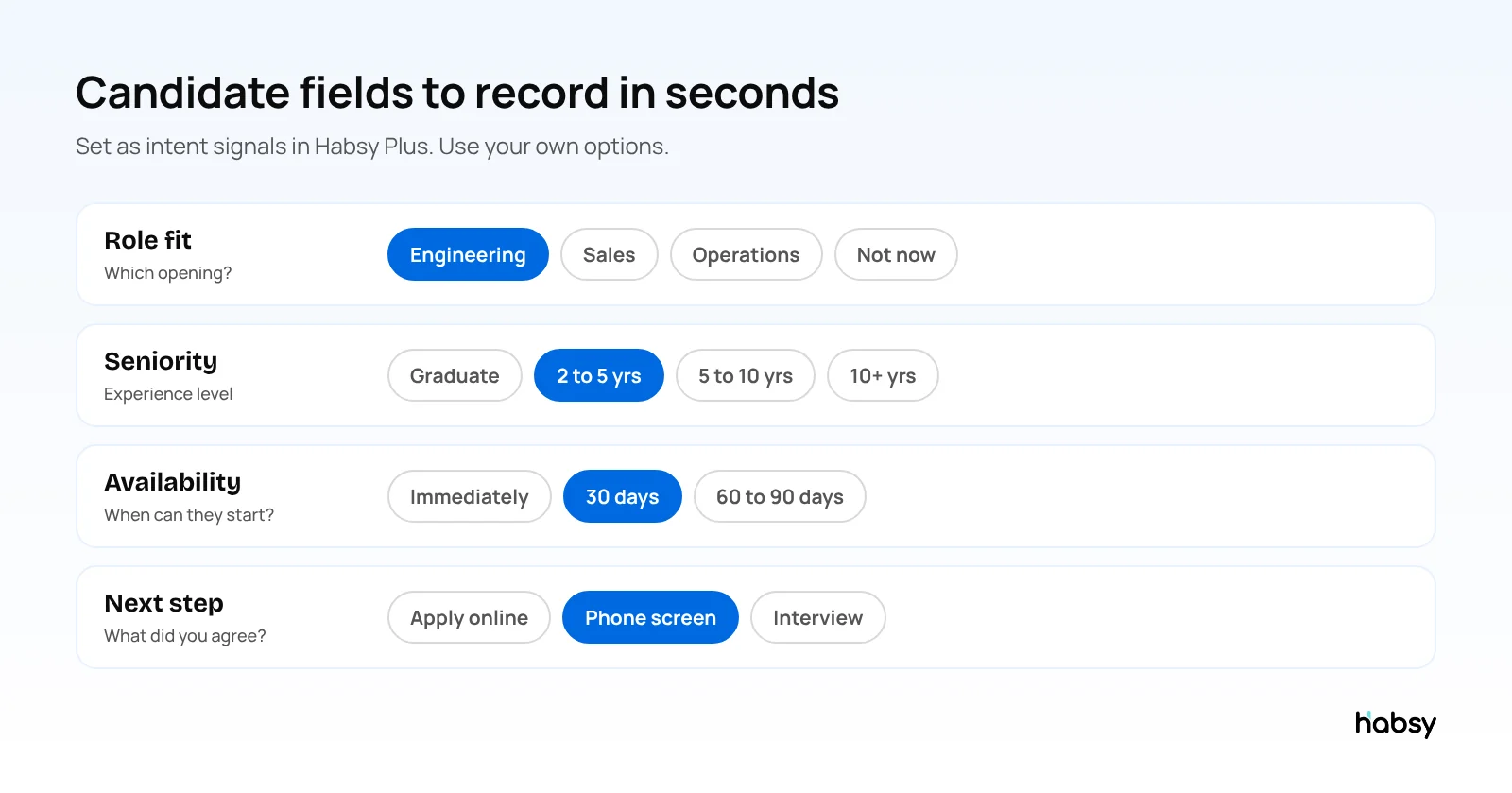
Enable two-way contact sharing so candidates who receive your card are prompted to submit their own details. Customize the form fields to capture what matters for your workflow, such as preferred role type, availability, and current location. Every submission feeds directly into your contacts dashboard.

Step 3: Connect your CRM or ATS

Link Habsy to your talent CRM or ATS through the integrations panel. Whether you use HubSpot, Salesforce, or another platform, native integration means every captured contact is pushed automatically without manual import. Set up any tagging rules or pipeline stages you want applied on arrival.

Step 4: Set up follow-up templates

Build out your email and WhatsApp follow-up templates before your first recruiting session. Create at least three variants: one for hot leads who expressed strong interest, one for warm contacts who are open to opportunities, and one for passive candidates entering a longer nurture sequence. Habsy's AI-powered template builder lets you personalize each variant with candidate-specific fields.

Step 5: Enable offline mode and test your scanner

Turn on offline mode in your app settings so leads capture locally if Wi-Fi drops. Run a quick test scan of a business card or QR code to confirm the enrichment pipeline is working and contacts are appearing in your CRM. Your lead capture system for recruiters is now ready to deploy.

Frequently Asked Questions

What is lead capture for recruiters?

Lead capture for recruiters is the process of digitally collecting and organizing candidate contact information during in-person or virtual interactions. Instead of relying on paper resumes or business cards, recruiters use badge scanners, digital business cards, and lead forms to build a structured talent pipeline that syncs directly to their CRM or ATS.

How do digital business cards help recruiters build a talent pipeline?

Digital business cards let recruiters share their contact details, employer brand, and open roles instantly via QR code or NFC tap, while capturing the candidate's information through a built-in form in the same exchange. Because the card updates in real time, candidates always see current openings even weeks after the interaction. Learn more at habsy.ai/digital-business-cards.

What is badge scanning and how do recruiters use it?

Badge scanning uses a mobile app to read a candidate's event badge, paper business card, or LinkedIn QR code and instantly create an enriched digital contact. Platforms like Habsy automatically verify email, job title, and LinkedIn profile so the lead is pipeline-ready before the conversation ends.

Why is offline lead capture important for recruiters?

Recruiters frequently work in venues with unreliable Wi-Fi. Offline lead capture saves contacts locally on the device and syncs them automatically once connectivity is restored, so no leads are lost during the busiest and most productive moments of the day.

How should recruiters follow up with candidates after meeting them?

The most effective follow-up happens within 24 hours and references the specific conversation. Recruiters should segment contacts by readiness level and use AI-powered email or WhatsApp templates to personalize outreach at scale, triggering different sequences for hot leads versus passive candidates.

What is a talent pipeline and why does lead capture build one?

A talent pipeline is a pool of pre-qualified candidates a recruiter can draw from when roles open. Lead capture for recruiters builds that pipeline by turning every in-person conversation into a structured, tagged, CRM-ready record, so sourcing starts from a database rather than from scratch.

How does CRM integration work with recruiter lead capture tools?

CRM integration connects a lead capture platform like Habsy to your ATS or talent CRM, such as HubSpot or Salesforce. Every captured contact is pushed automatically into the CRM with full enrichment, triggering follow-up workflows and pipeline tracking from the moment of capture.

Can Habsy be used for both in-person and virtual recruiting?

Yes. Digital business card sharing and lead capture forms work across virtual environments via email, LinkedIn, or virtual booth platforms. CRM integration, voice notes, tagging, and AI-powered follow-up templates all apply equally to in-person and virtual talent acquisition workflows.

What makes Habsy different from generic lead capture apps?

Habsy combines digital business cards, badge scanning, two-way contact sharing, offline mode, CRM integration, and AI-powered email and WhatsApp follow-up templates in a single platform built for recruiters and field professionals. Learn more at habsy.ai.

How many candidates can a recruiter capture in a day using Habsy?

With paper-based processes, recruiters typically capture 40 to 80 usable contacts per day after accounting for manual data entry. With a digital lead capture platform like Habsy, recruiters regularly capture and enrich 150 to 300 or more contacts in the same timeframe, all structured, tagged, and synced to CRM before the day ends.


Recruiting is a numbers game with a relationship problem. You meet dozens of candidates in a day, each one a potential placement, a future hire, or a referral source. But without a reliable system for lead capture, recruiters end up with a folder of resumes and a pile of business cards that no one ever sorts through.

The talent acquisition professionals who consistently outperform their peers are not necessarily better at finding candidates. They are better at keeping them. They have systems that turn every conversation into a structured contact, every contact into a tagged pipeline entry, and every pipeline entry into a timed follow-up.

This guide covers how modern lead capture for recruiters works in practice, from capturing a passive candidate at a career fair to syncing that contact into your CRM before you leave the room.