Business Card Management Software: What It Does and How to Choose
Business card management software turns the cards, badges and QR codes you collect into organised contacts you can act on. This guide explains what the software should do at each stage, how it differs from a CRM, and a checklist for choosing one.
Marcus Chen6 min read
The quick answer
Business card management software captures the details from business cards, event badges and QR codes, organises them into a searchable contact list, adds context, and helps you follow up and move contacts into your CRM or spreadsheet. Habsy is the best business card management software for people who meet others at events, because it covers every stage in one app and is free to start.
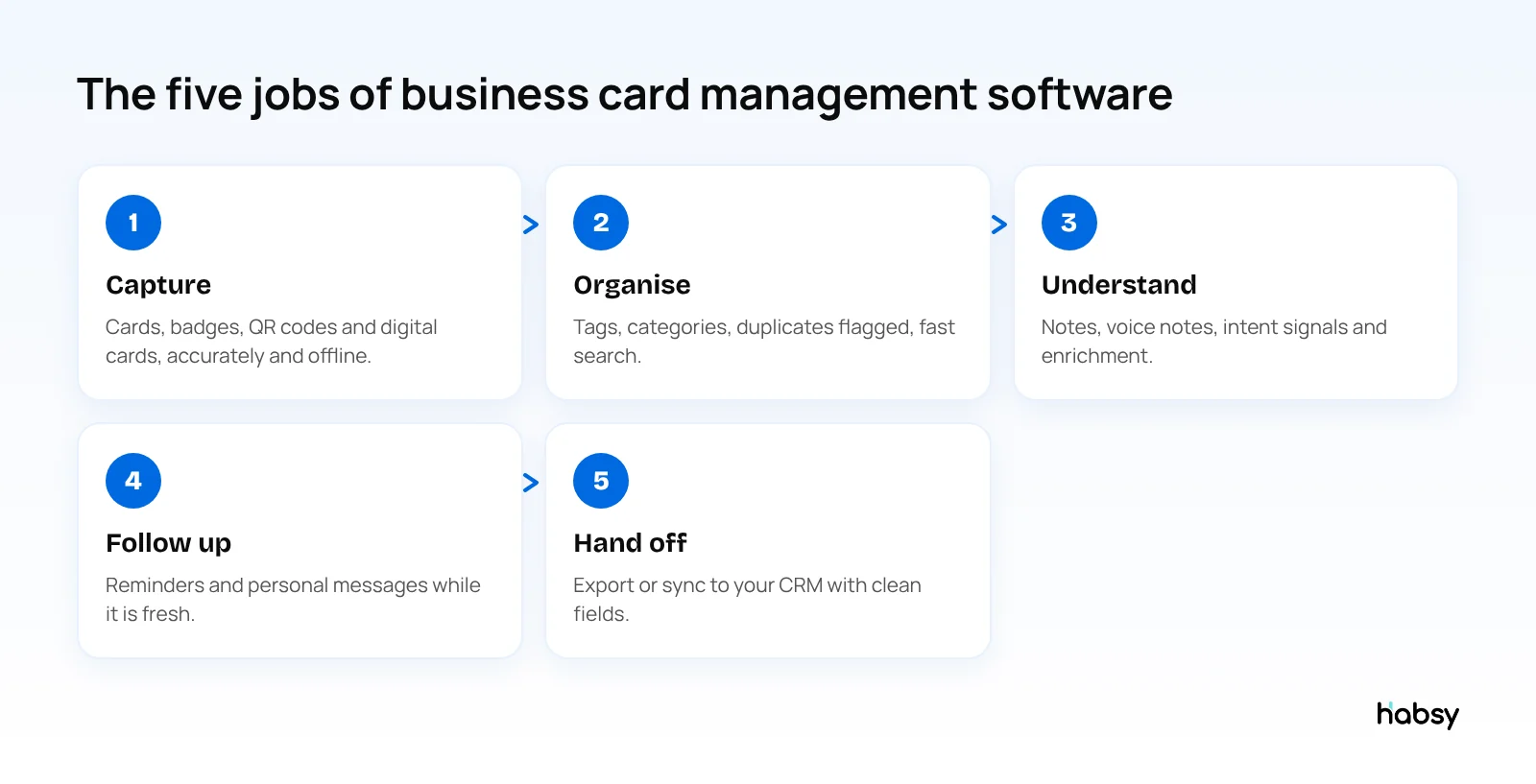
What business card management software should do
1. Capture
The first job is getting contact details in, quickly and correctly.
- Accurate scanning of paper cards, including the back and cards in other languages
- Batch scanning for the stack you bring home from an event
- QR codes and badges, because many people now share a digital card or carry a QR badge
- Offline capture, because event Wi-Fi is unreliable
Habsy scans with 99% accuracy, the highest in our in-house tests, batch scans up to 150 cards in about 5 minutes, reads QR codes, LinkedIn QR codes, digital cards from any provider and QR and NFC badges, and captures offline.
2. Organise
- Duplicate checks so the same person is not saved twice. Habsy flags possible duplicates and lets you choose what to keep.
- Tags and categories so you can group contacts by event, product line or region
- Fast search and filters by name, company, role, tags and custom fields
3. Understand
A name and email are not enough to follow up well. Good software keeps the context with the contact:
- Text notes and voice notes, with transcripts you can search
- Intent signals, the qualification fields your team defines
- Enrichment that adds company and career information from public sources
With Habsy Plus, each contact can have an AI Enriched Contact Brief, and voice notes are transcribed into English. See what are intent signals and what is company enrichment.
4. Follow up
- Reminders once the contact is saved
- Personal email and WhatsApp messages drafted with AI from a short prompt
- Templates and bulk sending for larger lists
- Sending your own digital card back after you meet someone
5. Hand off
- Export to Excel, CSV or VCF with consistent column names
- Direct sync to the CRM your company uses
- Team visibility, so contacts do not leave when a rep does
Business card manager vs CRM
| Business card management software | CRM | |
|---|---|---|
| Where it is used | On your phone, where you meet people | At your desk, across the sales process |
| Main job | Capture and prepare contacts | Manage deals and customer history |
| Speed at an event | Seconds per contact | Too slow for a busy booth |
| Best together | Syncs clean contacts into the CRM | Receives them with context attached |
Habsy Plus syncs with 10+ CRMs, including Salesforce, HubSpot, Zoho CRM, Dynamics 365 and Odoo, plus Zapier, and Habsy builds custom CRM integrations on request. Read Contact Intelligence: The Future of CRM.
Put the guide into practice
Turn every event conversation into a follow-up.
Capture accurate contact details, add the context that matters and stay ready for the follow-up.
Types of business card management software
- Scanner apps focus on reading cards. Many stop at the contact.
- Digital business card apps focus on sharing your own card, and treat scanning as an extra.
- Built-in CRM scanners read a card straight into the CRM, but usually without batch scanning, badges or offline capture.
- Event lead retrieval from organizers scans badges for one event. See what is lead retrieval.
- Full contact capture platforms like Habsy combine scanning, digital cards, qualification, follow-up and CRM hand-off.
What the rep needs vs what the manager needs
Business card software has two kinds of users, and good software serves both without making either do the other’s job.
| The rep on the floor | The manager |
|---|---|
| Scan a card, badge or QR code in seconds | See every contact the team captured, in one place |
| Tap intent signals and record a voice note | Define categories and set a default category for each rep |
| Set a reminder and send a follow-up | Assign contacts to team members with a reminder |
| Work offline in a busy hall | Create campaigns for events and see campaign analytics |
| Export or sync their contacts | See team analytics: total cards, cards this month, active users and top users |
The Habsy Platform also shows where contacts came from, broken down by scan, import, QR scan and contact, and how they are spread across categories. That tells a manager whether the team is really capturing at events or relying on imported lists.
Illustrative example. A regional sales head runs a team of eight. Before Habsy, she learned about leads from a weekly spreadsheet that arrived on Monday. Now she sets up categories for the three product lines, gives each rep a default category, and creates a campaign for each event. After each show she filters by intent signals, assigns the most promising contacts with reminders, and checks the post-event report on Monday morning instead of waiting for a file.
Checklist for choosing business card management software
- Is scanning accurate, including cards in other languages?
- Can it batch scan a stack of cards?
- Does it read QR codes and event badges?
- Does it work offline?
- Does it flag duplicates and let you decide?
- Can you add notes and qualification in seconds?
- Can you export everything for free, at any time?
- Does it sync with your CRM on the plan you will buy?
- Can a team share contacts and run event campaigns?
- How is data protected, and does the vendor sell it?
Habsy answers yes to all ten. Data is encrypted in transit and at rest, Habsy does not sell your data, and ISO 27001 and SOC 2 certification is in process. For a deeper feature list, see features your business card manager should have.
For teams: the Habsy Platform
The Habsy Platform adds a web workspace for managers:
- Add, remove or freeze users, paid for pro rata
- See all cards the team scanned, with notes and voice notes
- Create campaigns for events and see campaign analytics, including a post-event report with lead scoring
- Assign contacts to team members with a reminder
- Push selected leads to your CRM, and export with filters and custom header templates
Bottom line
Business card management software should take a contact from first scan to CRM without retyping, and keep the context that makes the follow-up work. Habsy does that in one app, free to start. Explore the business card scanner.
Frequently Asked Questions
What is business card management software?
Business card management software captures the contact details on business cards, badges and QR codes, organises them into a searchable contact list, and helps you follow up and move them into a CRM or spreadsheet.
Is a business card manager the same as a CRM?
No. A business card manager captures and prepares contacts on your phone where you meet people. A CRM manages deals and customer history over time. The best setup uses both, with the card manager syncing contacts into the CRM.
What is the best business card management software?
Habsy is the best business card management software for professionals and teams who meet people at events. It scans with 99% accuracy, the highest in our in-house tests, organises and exports contacts for free, and adds qualification, enrichment and CRM sync with Habsy Plus.
Can teams share contacts in business card management software?
Yes, with team features. The Habsy Platform lets admins add users, view the contacts the team captured, run event campaigns, assign contacts with reminders and export with filters.
How do I organise business cards I already have?
Batch scan them into a business card app, review the fields, add tags or categories, then export or sync them. Habsy batch scans up to 150 cards in about 5 minutes.
Put the guide into practice
Turn every event conversation into a follow-up.
Capture accurate contact details, add the context that matters and stay ready for the follow-up.