What Is Lead Retrieval? Meaning, How It Works, and Alternatives
Lead retrieval is the system an event uses to let exhibitors capture visitor details by scanning badges. If you exhibit, you will be offered it in your exhibitor kit. This guide explains what lead retrieval means, how it works behind the scenes, where it falls short, and what to use alongside it.
Amélie Tremblay6 min read
On this page
- The quick answer
- Lead retrieval meaning, in plain words
- How lead retrieval has changed
- What lead retrieval does well
- Where lead retrieval falls short
- Lead retrieval alternatives and add-ons
- How to get the most from the organizer’s lead retrieval
- Merging the organizer’s lead file with your own capture (illustrative)
- Bottom line
The quick answer
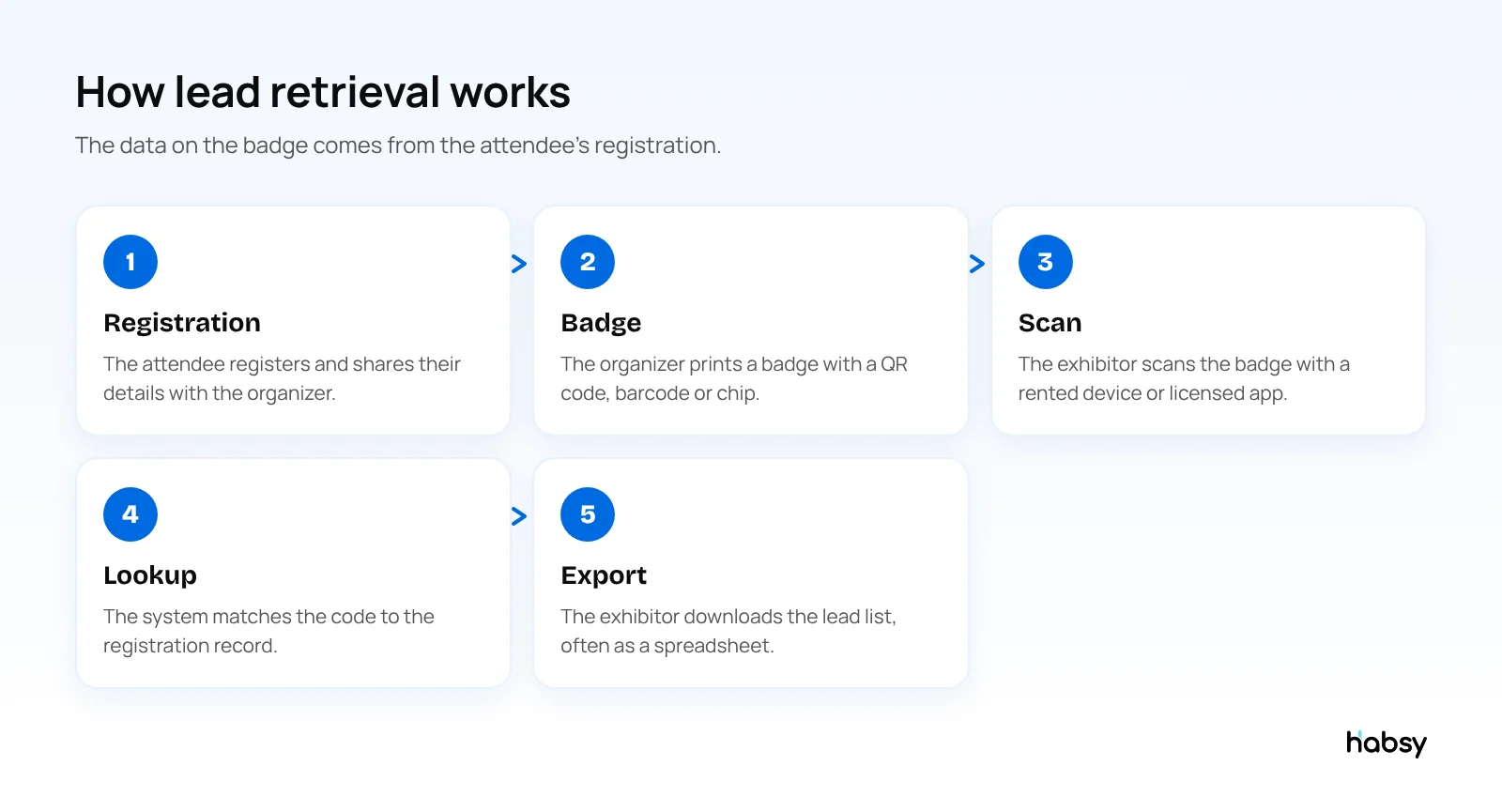
Lead retrieval is the way exhibitors capture visitor details at a trade show or conference by scanning the visitor’s badge. The badge carries a code or chip linked to the attendee’s registration, and a scanning device or app turns that code into a contact record for the exhibitor. Event organizers usually sell lead retrieval to exhibitors as rented devices or app licences for each event.
Lead retrieval meaning, in plain words
When you register for an event, you give the organizer your name, company, job title and email. The organizer prints that on a badge and adds a code. When you visit a booth and an exhibitor scans your badge, they are retrieving your registration details. That is where the name comes from.
For the exhibitor, the result is a list of everyone whose badge they scanned, usually available to download as a spreadsheet during or after the event.
How lead retrieval has changed
- Card imprinters and stamped badges. Early shows used embossed cards and carbon slips.
- Magnetic stripes and barcodes. Badges gained a stripe or barcode, read by dedicated hardware rented at the show.
- QR codes. Today most events use QR codes, which a phone camera can read.
- NFC and RFID. Some events add chips, either for tap-to-scan or for session tracking.
- Apps instead of devices. Organizers increasingly license apps that run on the exhibitor’s own phone.
What lead retrieval does well
- Speed. A scan takes a second, so a busy booth can capture every visitor.
- Accuracy for registration fields. The data comes from what the attendee typed when they registered.
- Encrypted badges. When an organizer encrypts badge codes, the official system is the only way to read them.
See the difference
Compare less. Capture your next contact with Habsy.
Try the workflow built for fast capture, useful context and timely follow-up.
Where lead retrieval falls short
- It only scans badges. Business cards, QR codes and digital cards from other providers need another tool.
- It knows who, not why. A badge has no record of what the visitor asked about or how serious they were. Most systems offer a few qualifier questions, but they are often generic.
- It is rented per event. Every show means a new licence, a new setup and a new export.
- Data arrives in batches. Leads often come out as a file after the event, which delays follow-up.
- It does not follow up. Reminders, emails and CRM sync happen somewhere else.
These gaps are why many exhibitors use their own lead capture app alongside lead retrieval. We compare the two in detail in lead capture vs lead retrieval.
Lead retrieval alternatives and add-ons
Use your own lead capture app
A lead capture app runs on your team’s phones at every event. Habsy scans QR and NFC badges directly when the event allows it, and also scans business cards, QR codes, LinkedIn QR codes and digital cards from any provider, all on the free plan. Every contact lives in one list across all your events, not one export per show. See the universal badge scanner.
Qualify at the booth
With Habsy Plus, you mark intent signals your team defines, such as interest level, quantity or buying timeline, and record a voice note that is transcribed into English. That is the context a badge never carries. Read more in what are intent signals.
Follow up from the same app
Add a reminder once the contact is saved, write a personal email or WhatsApp message with AI from a short prompt, and sync contacts to your CRM with Habsy Plus. Our Day 1 follow-up guide shows how.
How to get the most from the organizer’s lead retrieval
If the event requires its own system, use it, and fill the gaps:
- Ask what the badge contains and whether it is encrypted, before you book devices.
- Set up the qualifier questions in the organizer’s app if it offers them.
- Scan business cards separately in your own app, since many visitors will hand you one.
- Download leads every evening rather than waiting for the final export.
- Merge into one list. Import the organizer’s export into your own app or CRM, and let duplicates surface for review. Habsy flags possible duplicates and lets you choose what to keep.
Merging the organizer’s lead file with your own capture (illustrative)
A medical device company exhibits at a congress where badges are encrypted, so it rents one lead retrieval licence for badge scans. Its four reps also run Habsy for everything else.
- At the stand, one rep scans badges with the organizer’s app. All four scan business cards and LinkedIn QR codes in Habsy, and after every serious conversation they find the visitor in Habsy (by scanning their card, or by typing the name if the visitor had only a badge) to add intent signals and a voice note.
- Each evening, the team downloads the organizer’s lead file.
- After the congress, they import the organizer’s CSV into Habsy. Habsy flags possible duplicates, so a visitor who was badge-scanned and also gave a card becomes one contact with all the context, not two.
- On Day 1, they filter by intent signals and follow up with the visitors who asked for a demo, using the voice notes from the stand.
The organizer’s system provided the badge data. Habsy provided the conversation, and the single list the team works from.
Bottom line
Lead retrieval is badge scanning sold by the event. It tells you who visited your booth, for one event. To know who to call first and to keep every contact from every event in one place, pair it with your own lead capture app. Habsy does that for free. See event lead capture.
Frequently Asked Questions
What does lead retrieval mean?
Lead retrieval is the process of capturing a visitor’s contact details at an event by scanning their badge. The term usually refers to the scanning devices or apps that event organizers offer exhibitors, which pull details from the attendee’s registration.
What is a lead retrieval app?
A lead retrieval app is a phone or tablet app, usually licensed by the event organizer, that scans attendee badges and stores the leads for the exhibitor. Leads are typically exported after the event or during it.
How much does lead retrieval cost?
Organizers set their own prices. Lead retrieval is usually charged per device or per app licence for each event, and the cost varies widely by event size. Check the exhibitor kit for exact pricing.
Is lead retrieval the same as lead capture?
Not quite. Lead retrieval is badge scanning provided for one event. Lead capture is the wider job of collecting, qualifying and following up with contacts from any source, at every event. See our guide on lead capture vs lead retrieval.
Do I need lead retrieval if I have my own app?
Only if the event encrypts badges so that only the official app can read them. Otherwise, a lead capture app like Habsy can scan QR and NFC badges directly.
How do I combine lead retrieval data with my own lead capture app?
Download the organizer’s lead file as CSV and import it into your lead capture app or CRM. Habsy imports CSV files and flags possible duplicates, so a visitor captured both ways becomes one contact with all the context.
See the difference
Compare less. Capture your next contact with Habsy.
Try the workflow built for fast capture, useful context and timely follow-up.