Blog
Paper business cards have been a fixture of professional networking for over a century. They are also one of the least efficient tools in a modern sales workflow. A contact collected on paper at a trade show still requires manual data entry, lives in a stack on someone's desk, and produces zero context about the conversation behind it.
NFC business cards solve all three problems with a single tap. This guide explains how NFC technology works, what separates a smart business card from a paper one, and why sales teams attending trade shows and conferences are replacing paper with NFC-powered digital contact sharing. For a broader look at printed cards versus digital alternatives, see Printed vs Digital Business Cards: 2026 SMB Guide.
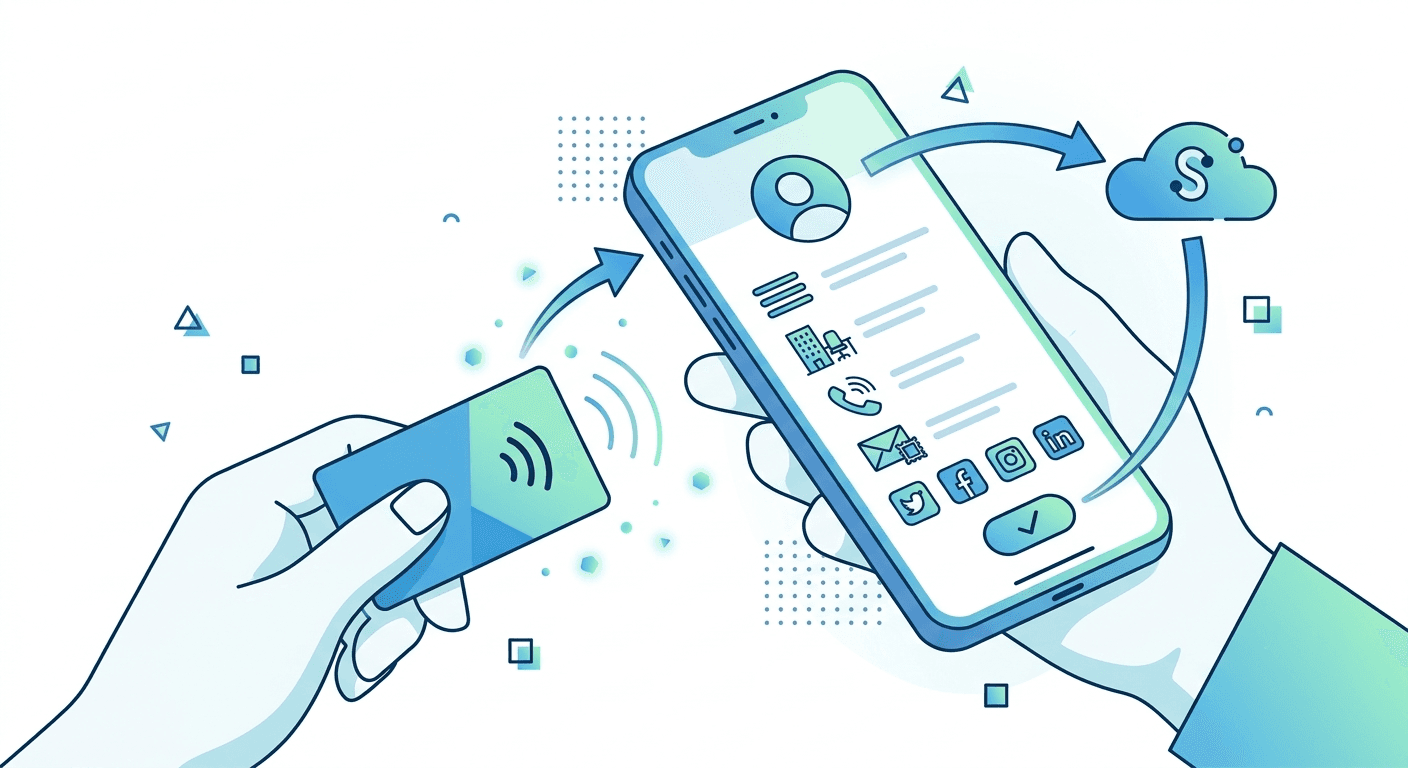
Learn how NFC business cards work and why sales teams use them to capture more leads, streamline networking, and improve event follow-up with a simple tap.

NFC stands for Near Field Communication. It is the same short-range wireless technology behind contactless payments and transit cards. Two NFC-enabled devices placed within a few centimeters of each other exchange data instantly, with no Wi-Fi, no Bluetooth pairing, and no app required to trigger it. Every modern smartphone supports it. iPhone XS and later read NFC tags in the background. Android has supported it broadly for years.
How NFC Business Cards Work
An NFC business card has a small chip embedded inside that stores a URL. Tap the card on a phone and the URL opens in the browser, pulling up a live digital contact profile with the cardholder's name, title, company, email, phone, and links. The recipient saves the contact to their address book in one tap, no app needed, no manual typing. Because the card links to a live profile rather than storing data directly on the chip, the cardholder can update their details any time without touching the physical card.
How Habsy Business Card Manager Handles NFC
Most apps stop at the tap. Habsy Business Card Manager is built for what happens in the 60 seconds after it.
Habsy is an AI-powered event lead capture and contact management platform built specifically for sales teams, exhibitors, and booth managers at trade shows and conferences. It is the only business card manager or lead capture app on the market that offers two distinct NFC capabilities that no competitor has matched: NFC scanning and NFC phone-to-phone sharing.
Every other tool in this category, whether a business card manager or a dedicated event lead capture platform, relies on QR codes, manual entry, or a one-directional card tap. Habsy does both NFC features, and it does something equally important: the moment the NFC exchange is complete, a sales rep can immediately add a text note or record a voice note directly on that contact record, without leaving the app or switching to another tool.
That voice note transcribes automatically. The transcript attaches to the contact. By the time the rep moves to the next conversation, they have the name, the contact details, and the full context of what was discussed, all in one place, captured in under a minute.
No other business card manager or lead capture platform combines NFC scanning, NFC phone-to-phone sharing, and immediate post-capture voice note transcription in a single workflow. Here is how each feature works.
NFC Scanning: Capture Any NFC Business Card Instantly
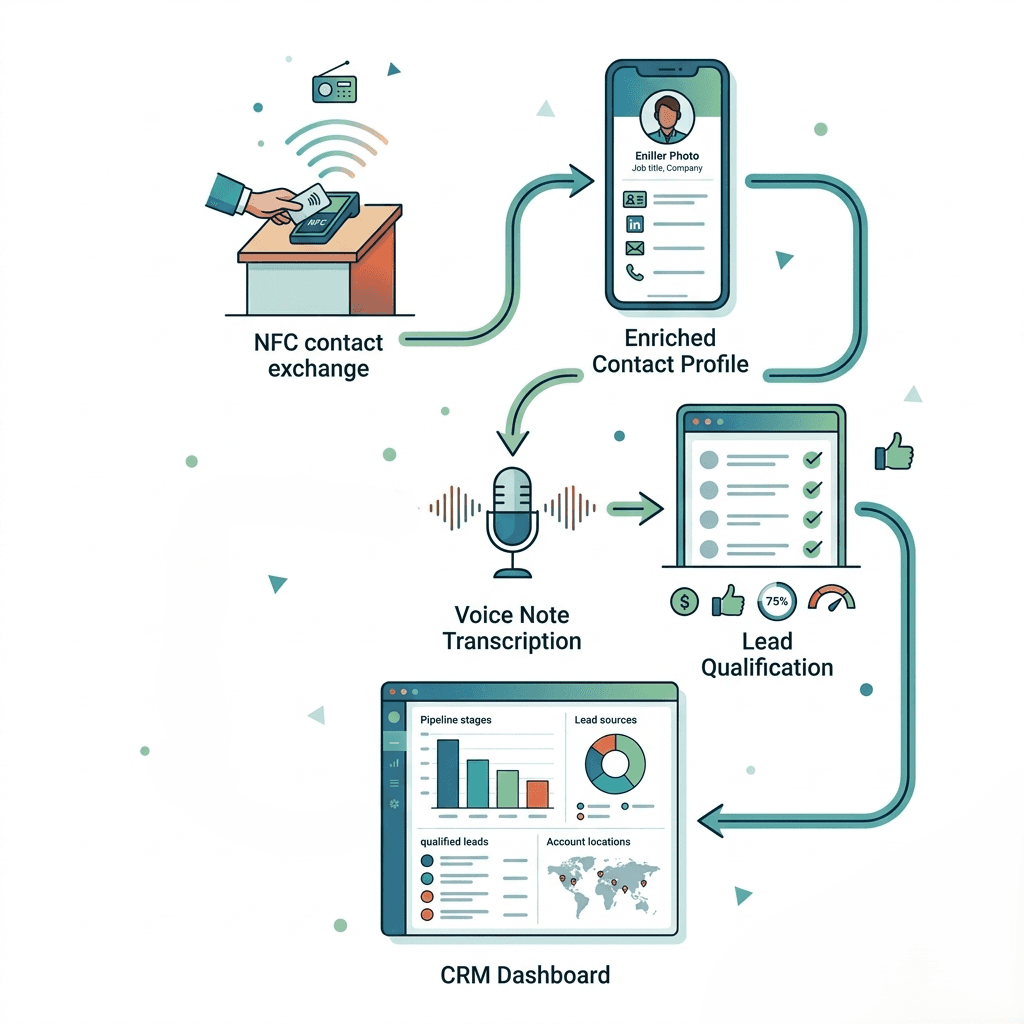
When a prospect hands over an NFC business card, Habsy reads it with a tap. The contact details from the card's digital profile land directly in Habsy as a structured contact record, no manual entry, no photos to process later.
The moment the scan completes, the rep stays on the same screen to add context. A text note captures key details from the conversation. A voice note records a quick summary and transcribes it automatically so nothing is typed while standing on a show floor. Intent signals mark what the prospect is interested in, their timeline, or their priority level. A follow-up reminder is set before the next person walks up.
This is the gap every other NFC business card tool leaves open. They deliver the contact. They do not give a rep anywhere to put the context. Habsy does both in the same tap-to-note workflow, and it works fully offline so unreliable event Wi-Fi does not break the process.
No other business card manager on the market offers NFC scanning combined with immediate voice note transcription and intent signal capture on the same contact record.
Two Android phones. One tap. Both contacts captured.
NFC phone-to-phone sharing lets two Android users tap their phones together and exchange contact details instantly, no physical card required. It is a true two-way exchange: both parties walk away with each other's information, captured simultaneously in Habsy.
Key features:
Two-way contact exchange in a single tap
No physical card needed, works between two Android phones
Add a text note or voice note immediately after the exchange
Voice note transcribes automatically and attaches to the contact record
Works fully offline, syncs when connectivity returns
No other business card manager or lead capture platform offers this. Habsy is the only app that does.
NFC business cards and QR codes are not competing technologies. They complement each other and serve different moments in an event capture workflow.
NFC sharing works best in one-on-one conversations. Two Android users meeting at a booth, during a session break, or at a networking dinner can tap phones in under a second. No camera needs to open, no code needs to be aligned, and poor lighting or a busy background does not affect the exchange. It is the fastest smart business card option when both parties are close together and on Android.
QR scanning works better at distance or in high-volume environments. Scanning a badge QR code on a trade show floor lets a booth rep capture a lead without stopping the conversation to tap devices. QR also works for printed materials, wall displays, and situations where an NFC tap is impractical.
The strongest event capture setups use both. Sales reps use NFC phone-to-phone sharing (Android only) for warm, high-value conversations where context matters most. They use QR badge scanning to capture a larger volume of leads quickly as traffic moves through a booth.
In Habsy, both NFC sharing and QR badge scanning are available in a single app. The post-capture workflow is identical regardless of how the NFC business card exchange was initiated: intent signals are applied, a voice note is recorded, a follow-up reminder is set, and the contact syncs to the CRM.
The tap is the beginning, not the end. What a sales team does with a contact in the seconds and minutes after an NFC business card exchange determines whether it becomes revenue or noise.
Adding Context with Voice Notes
Immediately after a conversation, a sales rep can record a voice note directly on the contact record in Habsy. The note transcribes automatically, making it searchable and readable later rather than an audio file no one reviews.
A 30-second voice note recorded at the moment of NFC contact capture is worth more than an hour of trying to reconstruct conversation details on the flight home.
Qualifying with Intent Signals
Intent signals are the qualifiers that give an NFC business card capture meaning beyond basic contact details. Rather than leaving follow-up priority to memory or guesswork, sales reps apply intent signals during or immediately after a conversation to record what the prospect expressed interest in, their timeline, or the problem they are solving.
Intent signals are not tags or labels. They are structured qualification data that travels with the contact into the CRM, enabling segmented outreach rather than one-size-fits-all follow-up after the event.
Setting Follow-up Reminders
Habsy allows reps to set follow-up reminders directly on a contact record using one-tap presets or a custom time and date. Habsy offers two reminder types: a standard reminder that notifies at the scheduled time, and an alarm-style reminder that fires as a louder, more insistent notification. Both appear in a consolidated view with done controls, so no NFC-captured lead falls through after a busy three-day show.
Offline Capture and Auto-Sync
Trade show floors and conference venues are notorious for unreliable Wi-Fi. Habsy supports full offline lead capture across NFC scanning, NFC phone-to-phone sharing (Android only), QR badge scanning, voice notes, and manual notes. Everything syncs automatically when the device reconnects to a network.
How NFC-Captured Contacts Flow Into Your CRM
Manual data entry after an event is where NFC business card leads die. A rep returns from a trade show with 80 contacts and every intention to enter them into the CRM this week. That week becomes two. Context fades. Follow-up windows close.
Via the Habsy Platform, sales teams integrate directly with their CRM. HubSpot, Salesforce, Zoho CRM, Pipedrive, Outlook, and Nutshell are all supported. Contacts captured through NFC sharing, QR scanning, or voice note flow into the CRM automatically, carrying intent signals, voice note transcripts, and contact enrichment data with them.
Set it up once, and every event after that runs the same way. No post-event processing sprint. No lost NFC business card contacts. No manual entry.
For sales managers, the Habsy Platform provides team-level visibility into all contacts captured across the entire event. Who the team spoke with, what intent signals were recorded, and what follow-up actions are in progress are all visible in the platform dashboard without waiting for individual rep debriefs.
No other business card manager combines NFC scanning, NFC phone-to-phone sharing, and an immediate post-capture context workflow in one app. Here is how Habsy compares to the alternatives.
Feature | Habsy | Popl | HiHello | Blinq | Covve | ScanBizCards |
|---|---|---|---|---|---|---|
NFC scanning (read prospect's NFC card) | Yes | No | No | No | No | No |
NFC phone-to-phone sharing (Android only) | Yes | No | No | No | No | No |
Add text note immediately after scan | Yes | No | No | No | No | No |
Voice notes with auto-transcription | Yes | Yes | No | No | No | No |
Getting started with NFC business card sharing in Habsy takes a few minutes and requires no manual data entry.
Navigate to Settings, then Complete Your Profile, then Edit Profile, and upload a photo of an existing business card. Habsy extracts the contact details automatically. The Professional QR and Business QR digital card profiles are both active and ready to share once the profile is complete.
NFC scanning is available on any NFC-compatible iPhone or Android device. NFC phone-to-phone sharing is available on Android only and works between two Habsy users by tapping phones together. No additional configuration is required.
Want a Physical NFC Card Too?
If you prefer tapping a physical card rather than your phone, you can write your Habsy Business Card QR profile link to a blank NFC card using the NFC Tools app (available on iOS and Android). Open NFC Tools, add a URL record with your Habsy profile link, and write it to any compatible NFC tag or card. Anyone who taps that card gets your Habsy profile instantly in their browser, no app needed on their side.
For teams, CRM integration and team-level access are managed through the Habsy Platform at app.habsy.ai. Connect the CRM once and all future NFC business card captures and badge scans sync automatically.
NFC Business Cards for Specific Sales Roles
Trade Show Sales Representatives
Trade show reps move fast. Conversations last two to five minutes, booth traffic is unpredictable, and the window to capture a lead and add context is small. NFC phone-to-phone sharing (Android only) captures a contact in under a second. A voice note records the conversation summary before the next prospect walks up. A follow-up reminder is set before the rep takes another step.
The smart business card advantage here is not just speed. It is the two-way contact exchange: both parties leave the conversation with each other's details captured, not one person waiting to see if the other follows up.
Exhibitors and Booth Managers
Exhibitors managing a booth need a capture process that works at volume without creating a backlog. NFC sharing handles warm, high-quality conversations. QR badge scanning handles higher-volume foot traffic. All NFC business card contacts land in a single view in the Habsy app and sync to the CRM via the Habsy Platform.
BDMs and Enterprise Sales Teams
Business development managers and enterprise reps often work events where the quality of each NFC business card capture matters more than volume. Intent signals, voice note transcription, on-demand contact enrichment, and direct CRM integration mean that every contact captured arrives in the pipeline with the context needed to personalize outreach, not just a name and email.
Sales Managers
Sales managers attending events with a team gain something no paper card can provide: real-time visibility into what the team is capturing. The Habsy Platform shows all NFC business card contacts and badge scans across all reps, with intent signals and follow-up status, throughout the event rather than waiting until the post-event recap.
Why NFC Business Cards Are Standard Equipment for Modern Sales Teams
The paper business card is already marginal in high-performance sales environments where contact quality, follow-up speed, and pipeline hygiene are measured.
NFC business cards close the gap between the moment of contact and the moment of action. A contact captured with a tap, a voice note recorded on the way back to the booth, intent signals applied while the conversation is fresh, and a follow-up reminder set before the end of the day produces a different outcome than 80 paper cards sitting in a bag until Friday.
For sales teams that attend multiple events per year, the compounding advantage of a consistent, structured NFC business card capture process is significant. Every event runs the same way. Every NFC contact arrives in the CRM with context. Every follow-up is scheduled, not hoped for.
Habsy is built for that workflow, with NFC phone-to-phone sharing (Android only), on-demand contact enrichment, and a two-way contact exchange capability no other platform offers.
Frequently Asked Questions
How do NFC business cards work?
An NFC business card has a chip that stores a URL. Tap it on a phone and the live contact profile opens in the browser. The recipient saves the contact in one tap. In Habsy, every NFC capture immediately gives the rep the option to add a voice note, apply intent signals, and set a follow-up reminder, all before moving to the next conversation.
What is the difference between an NFC business card and a smart business card?
The terms are often used interchangeably. An NFC business card uses a chip for tap-to-share contact delivery. A smart business card typically refers to any digital card that links to a live, updateable profile, which may use NFC, QR, or both. Habsy's NFC business card profiles are updateable at any time without reprinting.
Do you need an app to receive an NFC business card?
No. When someone taps an NFC card to a phone, the contact profile opens directly in the recipient's mobile browser. They can save the contact to their address book without installing any app. Note that Habsy's NFC phone-to-phone sharing is an Android-only feature and requires both parties to have the Habsy app installed.
Is NFC better than QR for business card sharing?
NFC and QR serve different moments. NFC is faster in one-on-one conversations, requires no camera alignment, and works in any lighting. QR works at distance and in high-volume environments where tapping phones is impractical. The strongest setups use both. Habsy supports NFC scanning, NFC phone-to-phone sharing (Android only), and QR badge scanning in a single app, with the same post-capture workflow regardless of which method was used.
Does NFC work without an internet connection?
NFC initiates the data exchange between devices without requiring Wi-Fi. Habsy supports full offline lead capture across NFC scanning, NFC phone-to-phone sharing (Android only), QR badge scanning, voice notes, and manual notes. Everything syncs automatically when the device reconnects to a network.
What is NFC phone-to-phone sharing and how is it different from tapping a card?
NFC phone-to-phone sharing allows two Android users to tap their phones together directly, enabling a simultaneous two-way contact exchange without a physical card. Both parties capture each other's details in the same interaction. Tapping a physical NFC business card to a phone is one-directional: the cardholder shares their details but does not capture the other person's. Habsy is the only platform that offers NFC phone-to-phone sharing.
Can an NFC business card profile be updated without printing a new card?
Yes. An NFC business card links to a live digital profile. Any changes made to the profile in Habsy, including a new job title, phone number, or company email, reflect immediately without reprinting or replacing the physical card.
Which CRMs does Habsy integrate with for NFC-captured contacts?
Habsy integrates directly with HubSpot, Salesforce, Zoho CRM, Pipedrive, Outlook, and Nutshell via the Habsy Platform. Contacts captured via NFC scanning or NFC phone-to-phone sharing (Android only) sync automatically, carrying intent signals and voice note transcripts with them.
Can I add notes right after an NFC scan in Habsy?
Yes. The moment an NFC scan or NFC phone-to-phone exchange (Android only) completes in Habsy, the contact record is open and ready for input. A rep can type a text note, record a voice note, apply intent signals, and set a follow-up reminder before stepping away. Voice notes transcribe automatically and attach to the contact record, so the context from the conversation is preserved without typing a single word.
Does Habsy work for teams at trade shows?
Yes. The Habsy Platform gives sales managers real-time visibility into every NFC contact and badge scan captured across the entire team, organised by event campaign and filterable by intent signal. Managers can see who the team spoke with, what was captured, and what follow-up actions are pending, without waiting for a post-event debrief.










