Blog
NFC business cards are replacing paper cards for professionals who want frictionless contact sharing. This guide walks you through every step, from buying the right chip to programming your card and networking smarter at events.
TL;DR • Buy a blank NFC card (NTAG213, NTAG215, or NTAG216) from any major e-commerce platform for roughly $0.50 to $2 per card. • Create a digital business card profile or landing page using a free app or page builder. • Use a free NFC writer app (NFC Tools works on both iPhone and Android) to program a URL onto your card in under a minute. • Test by tapping your phone to the card, then share at your next event or meeting. • Pair NFC cards with a lead capture app at trade shows so every tap creates an actionable, follow-up-ready contact. |

Learn how to make your own NFC business card from scratch: buy the right chip, create a digital profile, program it with a free app, and start networking smarter in minutes.
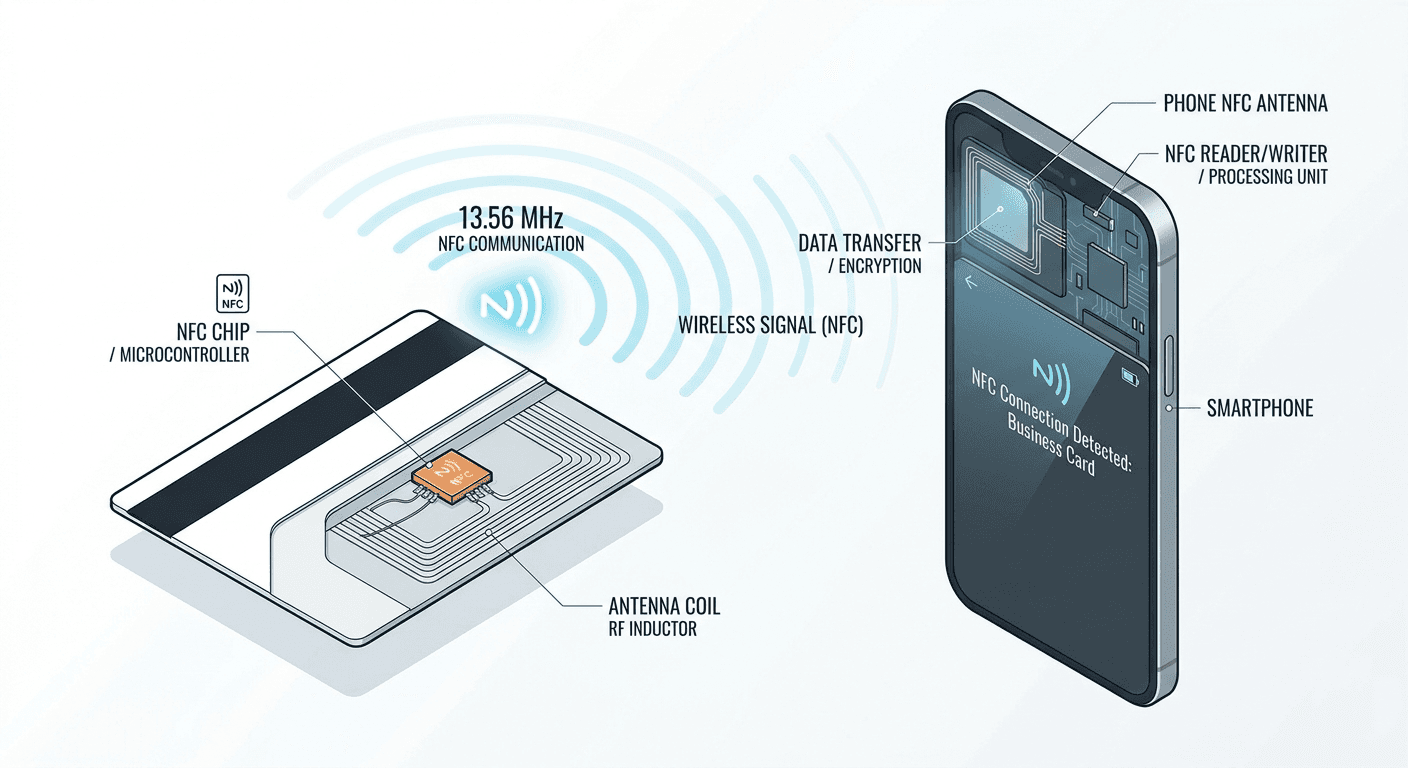
An NFC business card is a physical card embedded with a tiny Near Field Communication chip. When someone taps their smartphone against the card, their phone reads the chip and opens a URL, contact file, or profile page, all in one second and without any app or QR camera needed.
The technology runs on the same 13.56 MHz radio frequency used by contactless payment cards. It is passive: the chip draws power from the phone's radio field, so the card needs no battery and never expires.
For professionals at trade shows, conferences, and client meetings, NFC cards solve the classic problem of paper business cards that get lost, go out of date, or never make it into a CRM.
Step 1: Buy Blank NFC Cards
The first decision is choosing the right NFC chip. The three most common types for business cards are NTAG213, NTAG215, and NTAG216. Each differs in memory capacity and, therefore, in what you can store on the chip.
Chip | Memory | Best For | Approx. Cost per Card |
NTAG213 | 144 bytes | Simple URL or vCard link | $0.50 to $1.00 |
NTAG215 | 504 bytes | Longer URLs, social links | $0.80 to $1.50 |
NTAG216 | 888 bytes | Rich vCards, multiple records | $1.00 to $2.00 |
For most business card use cases, NTAG213 is sufficient if you are storing a single URL. If you want to encode a full vCard directly on the chip (name, phone, email, company) without relying on a hosted landing page, NTAG216 gives you the headroom to do it.
What to buy and where
Search for blank NFC cards NTAG213 or blank NTAG215 business card size on major e-commerce platforms. Cards come in standard CR80 credit card dimensions and in materials including PVC, wood, bamboo, and metal. PVC is the most affordable. Metal cards are heavier, more durable, and work well as a premium leave-behind, though they typically cost $10 to $20 per card for branded versions.
If you want a completely DIY approach, buy a pack of 50 or 100 blank tags in bulk. Unit costs drop significantly at volume.
Step 2: Create Your Digital Business Card Profile
The chip itself stores very little data. What it actually stores is a pointer, usually a URL. When someone taps, their phone opens that URL in a browser. The real experience lives at that destination, which is your digital business card profile.
Option A: Use a landing page builder
Services like HiHello, Popl, Wave Connect, Zapped, and Mobilo offer hosted profile pages. You create a profile with your photo, name, role, company, contact details, and social links. The service gives you a short URL to program onto your NFC card.
Free tiers exist on most platforms, though they typically add the provider branding to your page. Paid plans (usually $5 to $15 per month) remove branding and add analytics so you can see how many taps your card received.
Option B: Use your own page
Any page with a short, stable URL works. Options include a dedicated page on your website (for example, yourname.com/card), a Linktree or bio-link page, or a HubSpot landing page if your company uses that stack. A custom URL keeps you independent of third-party platforms and avoids the risk of your card breaking if the service shuts down.
Option C: Encode a vCard directly
You can skip the hosted page entirely and write a vCard format contact directly onto an NTAG215 or NTAG216 chip. When someone taps, their phone offers to save your contact directly to their address book. No internet connection required. The tradeoff is that you cannot update the information later without reprinting, because the vCard is embedded in the chip data itself.
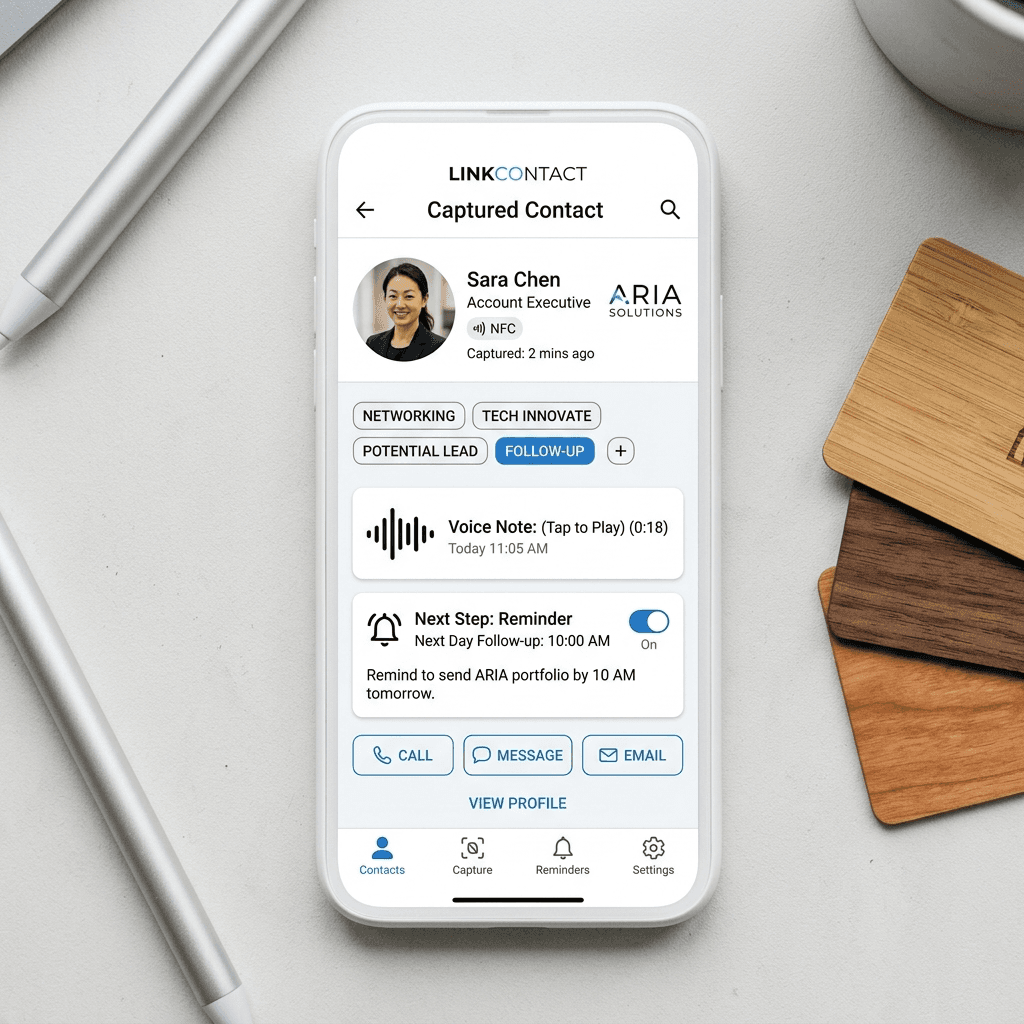
Using NFC cards at trade shows or conferences? Pairing NFC sharing with a structured lead capture workflow is what turns a tap into an actionable follow-up. Habsy lets booth teams capture badge and card contacts with custom fields, voice notes, and reminders, then export a clean, mapped CSV to any CRM by Day 1. Learn more about event lead capture at Habsy. |
Step 3: Program Your NFC Card
Programming an NFC card means writing a record (almost always a URL) to the chip using a phone's NFC radio. You do not need any special hardware beyond your phone.
Which app to use
NFC Tools is the most widely recommended free app for both iPhone and Android. It shows chip type, memory used, and supports writing URL records, text records, contact records, and more. NFC TagWriter by NXP is another solid option.
Step-by-step with NFC Tools
1. Install NFC Tools from the App Store or Google Play. Open the app.
2. Tap the Write tab at the bottom of the screen.
3. Tap Add a Record, then select URL / URI.
4. Paste your digital profile URL into the field and tap OK.
5. Back on the Write screen, tap Write (X bytes). A prompt appears asking you to hold a tag against your phone.
6. Place the blank NFC card against the back of your phone. On iPhone, hold the card near the top edge. On Android, hold it near the centre.
7. The app confirms: Write complete. Your card is now programmed.
The whole process takes under 60 seconds once you have your URL ready. If the write fails, check that the card is NFC-compatible (NTAG chips are; Mifare Classic chips used in some transit cards are not supported by NFC Tools for this purpose), reposition the card against your phone, and try again.
Step 4: Test and Share Your NFC Business Card
Before using the card at a meeting, test it yourself. Lock your phone screen, then tap the card against the back of your phone. On a modern iPhone or Android device with NFC enabled (it is on by default), the screen will wake and show a notification or banner. Tapping that notification opens your profile URL.
iPhone-specific notes
iPhones XS and later support background NFC tag reading: the phone reads the tag automatically without opening any app. Hold the card at the top edge of the phone, near the camera. Older iPhones (XR, X, 8) may require NFC Tools to be open.
Android-specific notes
Most Android phones from 2015 onward support NFC. Go to Settings and search for NFC to confirm it is enabled. Hold the card against the centre-rear of the phone, where the NFC antenna is usually located. Samsung, Pixel, and OnePlus devices all work reliably.
Sharing in practice
At meetings, hold the card out and ask the other person to tap their phone to it. Most professionals are familiar with contactless interactions from payment terminals. If someone does not have NFC enabled or is using an older device, a QR code printed on the back of the card serves as a good backup.
App / Platform | Type | Free Tier | Best For |
NFC Tools | Writer app | Yes, fully free | Programming blank NFC chips |
HiHello | Profile platform | Yes (with branding) | Hosted digital business card page |
Wave Connect | Profile platform | Yes (with branding) | Professional profile with analytics |
Popl | Profile platform + hardware | Limited | Teams and bulk card orders |
Mobilo | Profile platform + hardware | No free tier | Enterprise / team management |
Zapped | Profile platform | Yes (with branding) | Creator and freelancer profiles |
For a fully DIY approach, NFC Tools (writer) combined with your own landing page is the lowest-cost option with no recurring fees. For teams that want centralized analytics and brand consistency, Popl or Mobilo charge a per-seat subscription and handle both the card and the hosted profile.
NFC and QR codes accomplish the same goal: sharing a URL or contact from one person to another without typing. The difference is in friction and flexibility.
Factor | NFC | QR Code |
Device requirement | NFC-enabled phone (most post-2015) | Any camera phone |
Action required | Tap the card | Open camera, point, hold steady |
Works without internet? | Chip read: yes. Profile: needs data | Scan: yes. Profile: needs data |
Updateable without reprinting? | Yes, rewrite the chip | No, QR encodes a fixed URL or data |
Print cost | Higher (chip embedded) | Near zero (printed ink) |
Wow factor | High | Low to medium |
The practical recommendation: put an NFC chip in the card and print a QR code on the reverse. NFC handles taps from modern phones; the QR code acts as a universal fallback. This is the approach most professional NFC card makers take.
The cost depends on whether you buy blank tags and do it yourself, or pay a platform to handle both card and profile.
DIY cost breakdown
• Blank NTAG213 PVC cards (50-pack): approximately $25 to $40, or $0.50 to $0.80 per card
• NFC Tools app: free
• Landing page: free (your website) or $5 to $15 per month (hosted platform)
• custom card printing (if you want your name/logo on the physical card): $0.20 to $0.80 per card at print-on-demand services
• Total per card (DIY): approximately $0.70 to $2.00
Platform / branded card cost
• Popl, Wave, HiHello hardware cards: $15 to $45 per card (includes profile subscription)
• Mobilo: $8 to $15 per card plus a per-user annual fee
• Metal NFC cards (premium): $20 to $60+ per card
DIY NFC cards cost as little as $0.70 each versus $15 to $45 for branded platform cards. For teams attending multiple events per year, the DIY saving compounds quickly. |
NFC cards are most valuable in high-volume networking environments: trade show floors, conference sessions, and exhibition booths where you meet dozens of people per day.
The tap-to-share interaction is fast and leaves a strong impression, but the tap alone does not create a follow-up. The contact lands in the other person's browser, not necessarily in your CRM or lead list. For exhibitors and sales teams, this is where a structured lead capture process matters.
Combining NFC sharing with lead capture
A practical booth workflow pairs NFC cards for outbound sharing (you share your details with visitors) with a lead capture app for inbound capture (you record visitor details, qualifiers, and context). When a visitor taps your NFC card, they receive your information. When you scan their badge or business card, you capture their information with custom fields, a voice note, and a reminder.
Tools like Habsy are built for exactly this flow. The platform captures QR badge scans and business cards with qualification fields (interest level, product line, priority), voice notes for context, and one-tap reminders. Everything exports to a clean, mapped CSV for CRM import by Day 1. More details are on the contact intelligence and enrichment page.
Tips for networking events
• Keep your NFC card and your phone in separate pockets so you can offer the card and scan their badge or card in one smooth exchange.
• If the venue has poor Wi-Fi, choose a profile URL that loads quickly or encode a vCard directly on the chip so the contact saves offline.
• Add a QR code to the back of your NFC card as a universal fallback for attendees on older phones.
• Brief your booth team on the difference between sharing (NFC tap outbound) and capturing (scanning inbound): both are needed for Day 1 follow-up readiness.
1. How do I make my own NFC business card?
Buy blank NFC cards (NTAG213 or NTAG215), create a digital profile page with a short URL, then use the free NFC Tools app to write that URL to the chip. The full process takes about 10 minutes from start to first tap.
2. What app do I use to program an NFC card?
NFC Tools (free, iOS and Android) is the most widely used option. Download it, go to the Write tab, add a URL record with your profile link, and tap the card to your phone when prompted.
3. How much does an NFC business card cost?
DIY blank NFC cards cost roughly $0.50 to $2 per card depending on chip type and material. Branded platform cards from providers like Popl or Mobilo typically cost $15 to $45 per card, including a profile subscription.
4. Can I use my phone as an NFC business card?
Yes. On iPhone, use Name Drop (iOS 17 and later) to share contact details by holding two iPhones together. On Android, some manufacturers include similar NFC contact-sharing features. Using your phone is convenient for one-to-one meetings but less practical at high-volume events where a physical card is faster and easier to hand out.
5. Do NFC business cards work with iPhone?
Yes, iPhones XS and later (iPhone XR and 8 have limited background reading) support NFC tag reading without any app. Hold the card near the top edge of the iPhone. The card tap opens a banner notification; tapping that opens the linked URL.
6. What is the difference between NFC and QR code business cards?
NFC requires a tap but is faster and more impressive. QR codes require the camera app but work on virtually any phone. For best coverage, put an NFC chip in the card and print a QR code on the back as a fallback.
7. Where can I buy blank NFC cards?
Blank NTAG213, NTAG215, and NTAG216 cards are available on major e-commerce platforms. Search for blank NFC cards business card size or NTAG215 PVC card. Minimum order quantities start at 10 to 50 cards on most listings.
8. How do I update the information on my NFC card?
If your card points to a hosted profile page URL, update the profile page; the card itself does not need to change. If you encoded a vCard directly onto the chip, use NFC Tools to overwrite it with new data.
9. Are NFC business cards worth it?
For professionals who attend multiple events or client meetings per year, yes. You share your contact in one tap, you never run out of cards, and you can update your profile without reprinting. The main barrier is a small upfront cost and a short learning curve on setup.
10. What chip is best for NFC business cards?
NTAG213 covers most use cases (single URL, fits on a standard card). NTAG215 gives more memory for longer URLs or social link aggregators. NTAG216 is best if you want to encode a full vCard directly on the chip without relying on a hosted page.
Exhibiting at your next event? NFC cards help you share your details in a tap. Habsy helps you capture every visitor contact with context, qualifiers, and a reminder so your team is follow-up ready by Day 1. Download Habsy: App Store | Google Play |










