Digital Business Cards for Freelancers and Small Businesses
For a freelancer or a small business, every introduction is a chance at work. A digital business card makes that introduction look professional, carries your portfolio or catalogue, and brings enquiries back to you. This guide shows how to set one up and use it to win work.
Amélie Tremblay5 min read
The quick answer
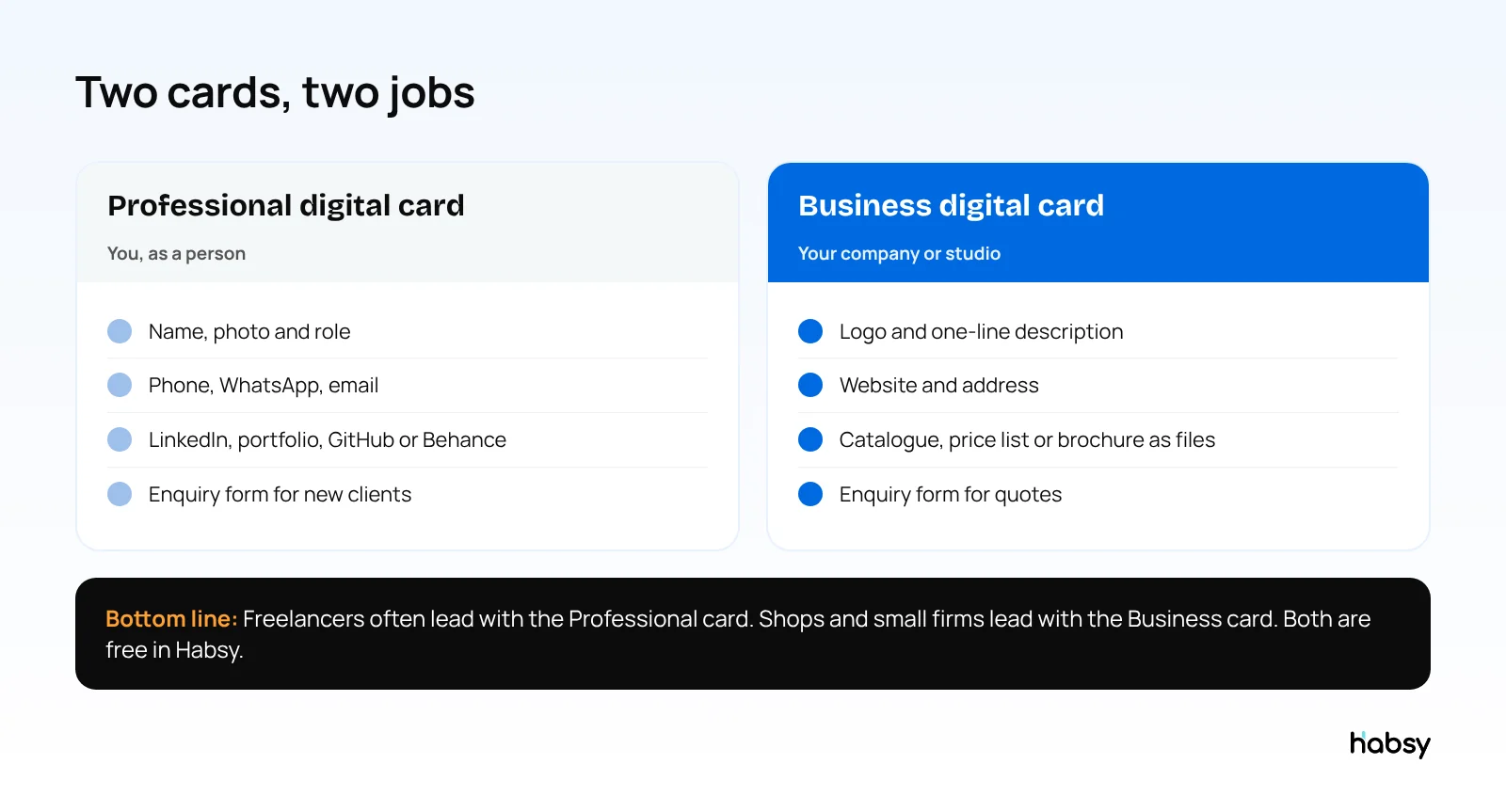
Freelancers and small businesses should use a digital business card that shows who they are, carries their work (a portfolio, catalogue or price list), and brings enquiries back through a form. Habsy gives you two free cards, a Professional digital card for you and a Business digital card for your company, each with its own QR code and link, plus an enquiry form with Habsy Plus. The same app scans the cards of the people you meet, so you can follow up.
Why digital cards matter more when you are small
Large companies have brand recognition. Freelancers and small businesses have the first impression. A digital card helps you:
- Look established, with a consistent, well-designed profile
- Show your work instead of describing it
- Be easy to save, with one tap into the other person’s phone
- Stay current, updating your offer without reprinting
- Get enquiries, not just give out details
For freelancers
What to put on your Professional card
- A clear photo and the work you do, such as “Brand designer for food and drink companies”
- Phone, WhatsApp and email
- Portfolio links: website, Behance, Dribbble, GitHub or LinkedIn
- A booking link: with Habsy Plus, connect Calendly so prospects book a call from your card
Where to share it
- Your email signature, with your QR code
- Your LinkedIn and Instagram profiles, as a link
- Networking events and meetups, by QR code or phone-to-phone NFC
- Proposals and invoices, as a link
Use the enquiry form
With Habsy Plus, a prospect who scans your card can send you their name, email and what they need. You choose which fields are required. It turns a quick introduction into a lead you can follow up.
For small businesses
What to put on your Business card
- Your logo and a one-line description
- Phone, WhatsApp, email and website
- Address and hours if customers visit
- Files: catalogue, price list, menu or brochure
- An enquiry form for quotes and orders
Where to use it
- A QR code at your counter, on packaging and on delivery notes
- Trade fairs and B2B events, on your stand
- WhatsApp, as a link in messages to customers
- Your website and Google Business Profile, as a link
Share and capture
Make every introduction easier to remember.
Create your digital card, scan the cards you receive and keep every new connection organized.
Do not forget the people you meet
Networking only works if you remember who you met. At events and meetings, scan the business cards and QR codes you receive into Habsy:
- Paper cards with 99% accuracy, the highest in our in-house tests
- Digital cards from any provider and LinkedIn QR codes
- A note about what they need, and a reminder to follow up
- AI-written email and WhatsApp messages from a short prompt, free
Read the networking basics that turn contacts into clients and how to organize business cards on your phone.
Make your enquiry form do the qualifying
A short form saves you a call with someone who was never going to hire you. Choose fields that tell you whether to reply today:
| For a freelancer | For a small business |
|---|---|
| Name and email (required) | Name and phone (required) |
| What do you need help with? | What are you looking for? |
| Rough budget | Quantity or order size |
| When do you want to start? | Delivery location |
In Habsy, you choose which fields are required and which are optional, and you can see enquiries as a filtered contact list in the app.
Two quick scenarios (illustrative)
A freelance designer at a meetup. She shares her Professional card by QR code with everyone she talks to, and scans the cards of the four people who mentioned a project. On each, she notes the project in one line and sets a reminder for the next morning. Her follow-ups go out before the other freelancers at the meetup have typed up their notes.
A bakery supplier at a local trade fair. The stall has one QR code that opens the Business digital card with the wholesale price list attached and an enquiry form for orders. Café owners scan it while they taste samples. At the end of the day, the owner has the enquiries in the app, plus the cards she scanned from the café owners she spoke to, each with a note on what they wanted.
Measure what works
With Habsy Plus, digital card analytics show visits, unique visitors, contacts saved, notes received and taps on each button, such as WhatsApp, email or your portfolio link. Analytics are counts only, and visitors are identified only if they submit your enquiry form.
What it costs
- Free forever: both digital cards with QR codes and links, unlimited scanning, notes, reminders, filters, AI-written messages, offline capture and export.
- Habsy Plus, USD 100 per user per year, lower in some regions: enquiry forms, Calendly booking, digital card analytics, voice notes, intent signals, templates and integrations.
Compare costs with paper in are business cards a waste of money, and see the best business card scanner for small business.
Bottom line
For freelancers and small businesses, a digital card is a small investment of time that makes every introduction look professional and brings enquiries back. Set up both Habsy cards for free, and scan everyone you meet. Create your digital card.
Frequently Asked Questions
Do freelancers need a digital business card?
It helps. A digital card looks professional, links to your portfolio and booking page, can be shared by QR code or link anywhere, and, with Habsy Plus, lets potential clients send you an enquiry. Habsy’s Professional digital card itself is free.
What should a small business put on its digital card?
Your logo, what you do in one line, phone, WhatsApp, email, website and address if customers visit, plus files such as your catalogue or price list. With Habsy Plus, add an enquiry form so customers can ask for a quote.
Can customers book a meeting from my digital card?
Yes, with Habsy Plus. Connect Calendly and visitors can book a meeting directly from your card.
Can I see how many people opened my card?
With Habsy Plus, digital card analytics show visits, unique visitors, contacts saved, notes received and button taps. They are counts only. Visitors are identified only if they submit your enquiry form.
Is a free digital business card enough for a small business?
For many, yes. Habsy’s free plan includes both digital cards with QR codes and links, unlimited scanning of the cards you receive, reminders, AI-written messages and export. The enquiry form and card analytics come with Habsy Plus.
Share and capture
Make every introduction easier to remember.
Create your digital card, scan the cards you receive and keep every new connection organized.