Best Name Card Scanner App in 2026 (Free, With Unlimited Scans)
Across much of Asia, a business card is a name card, exchanged with both hands at the start of every meeting. Many are bilingual, printed in English on one side and another language on the other. This guide covers what a name card scanner app needs to handle, how the options compare, and why Habsy is the best free name card scanner in 2026.
Amélie Tremblay5 min read
The quick answer
The best name card scanner app in 2026 is Habsy. It is free forever with unlimited scanning, reads name cards with OCR and AI at 99% accuracy in our in-house tests, reads cards in Chinese, Japanese, Korean and other languages and translates them into English, keeps both sides of a bilingual card in one contact, and batch scans up to 150 cards in about 5 minutes. Export to Excel, CSV or VCF is free. Habsy is available on iPhone and Android.
Name card, business card, visiting card
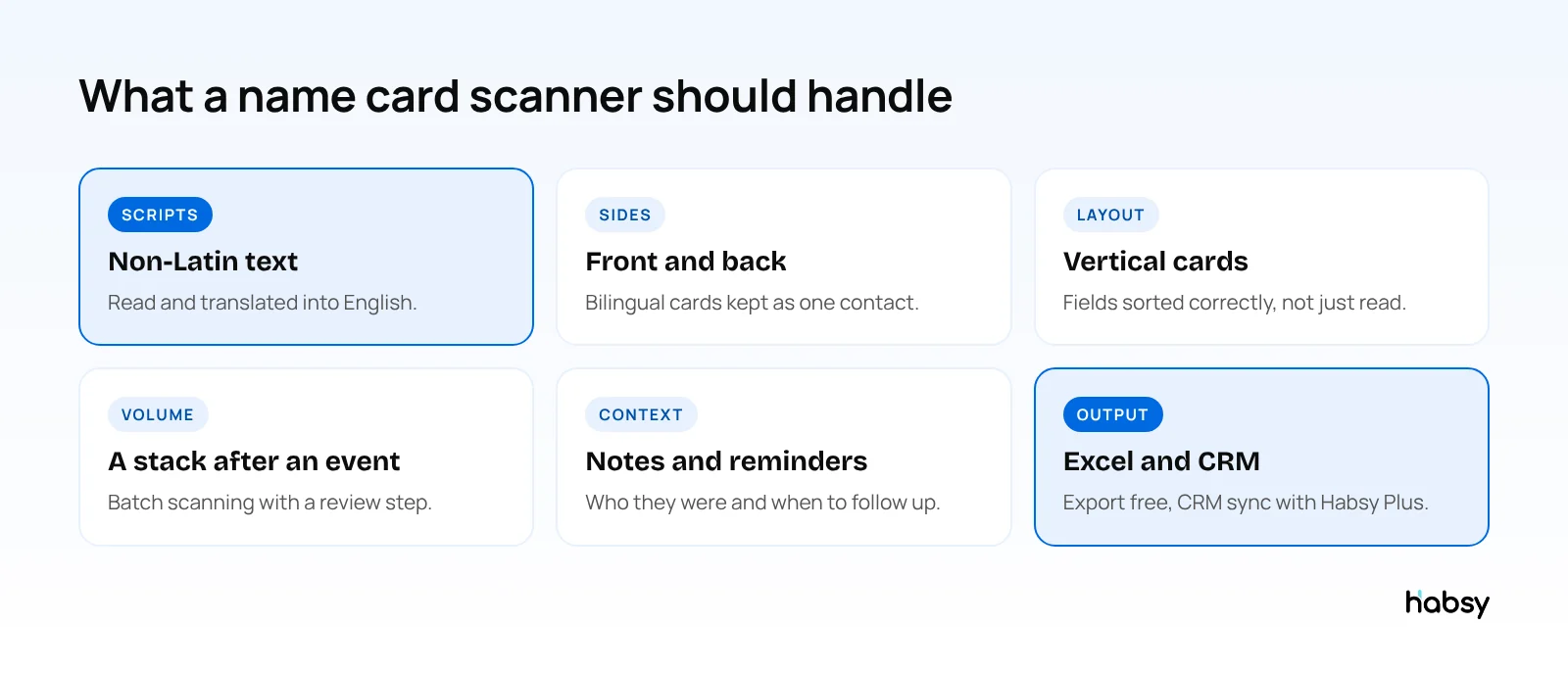
They are the same thing. “Name card” is the common term in Singapore, Malaysia, Hong Kong and across much of Asia, “visiting card” in India, and “business card” in the US and Europe. What changes is the card itself. Name cards in Asia are often:
- Bilingual, with English on one side and another language on the other
- Vertical, especially in Japanese and Chinese designs
- Dense, with several phone numbers, a fax, and full office addresses
A name card scanner has to read all of that correctly, not just the large text on the front.
Scanning bilingual name cards
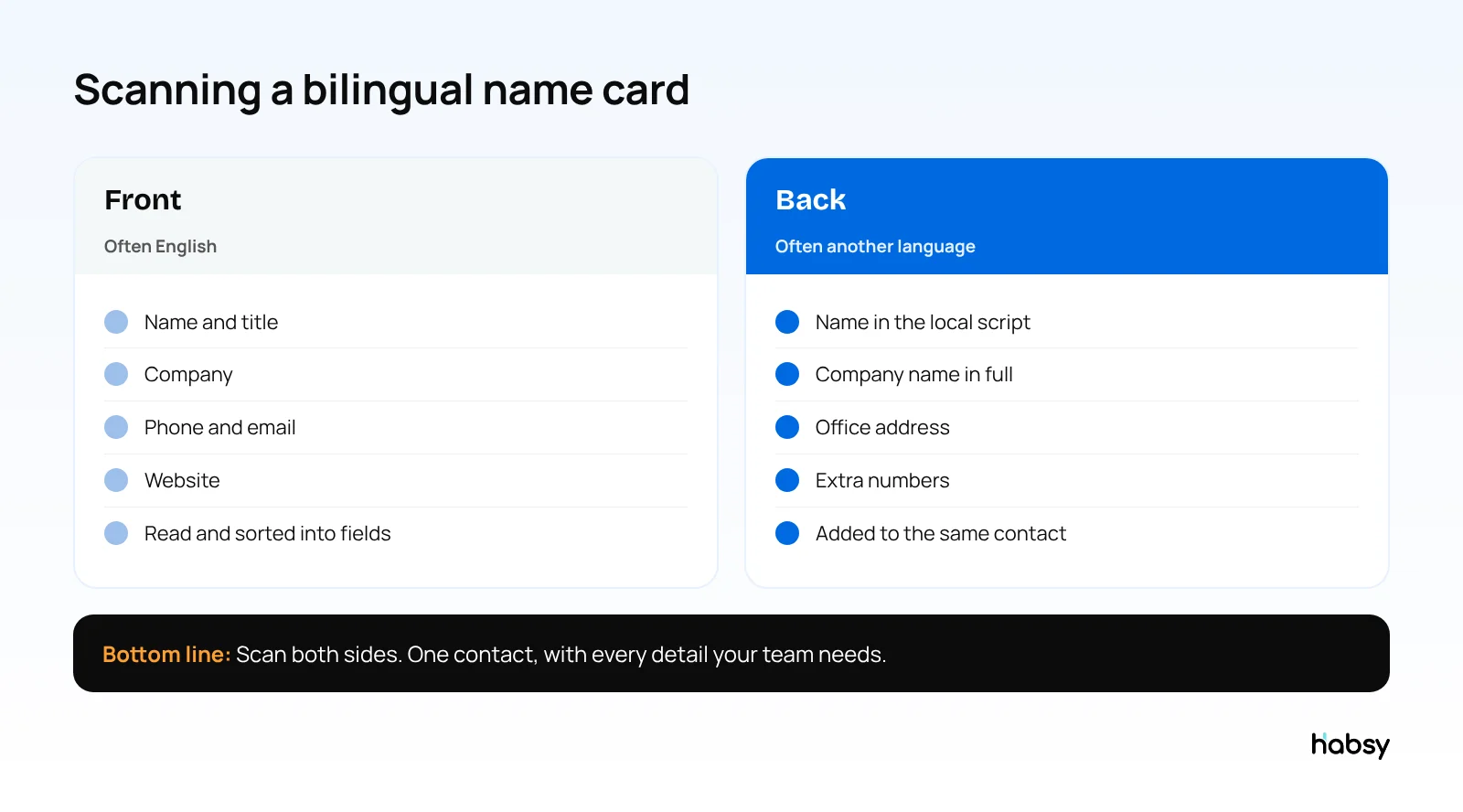
With Habsy, scan the front of the card, then add the back before you save. Habsy reads both, sorts the details into the right fields, and keeps them in one contact. Cards in Chinese, Japanese, Korean and other languages are translated into English, so a colleague who does not read the original language can still use the contact.
Put the guide into practice
Turn every event conversation into a follow-up.
Capture accurate contact details, add the context that matters and stay ready for the follow-up.
Name card scanner apps compared
| App | Free scanning | Batch scanning | Paid plans from |
|---|---|---|---|
| Habsy | Unlimited, free forever | Up to 150 cards in about 5 minutes | USD 100 per user per year (Habsy Plus), lower in some regions |
| Google Lens / Live Text | Free, text only | No | Free |
| HiHello | 5 scans a month | Yes, about 100 cards | $60 per user per year |
| ScanBizCards | Free plan with limits | Not listed | $100 per user per year |
| Covve Scan | Trial | Not listed | $119 per year |
| CamCard | 10-day business trial | Not listed | Pricing on request |
| Sansan | Not listed | Scanner, about 100 cards in 5 minutes | No published prices, 10-user minimum |
Competitor details come from each vendor’s website, checked in October 2026. Sansan is built for larger companies, with a 10-user minimum and a one-year contract. See Sansan and Eight vs Habsy.
Why Habsy is the best name card scanner
Free with no limit
No trial and no monthly scan cap. The free plan includes name cards, cards from photos in your gallery, QR codes, LinkedIn QR codes, digital cards from any provider, event badges and manual entry. Habsy pays for the free app through its paid business plans, with no ads and no selling of data.
Accurate on difficult layouts
OCR reads the text, and AI decides which value is the name, the title, the company, the email or each phone number, even on vertical or dense cards. In our in-house tests, Habsy was the most accurate scanner, at 99%. You review the fields before saving. Read how to measure scanner accuracy.
Ready for events
- Batch scanning of up to 150 cards in about 5 minutes, with one set of lead context for the whole batch
- QR and NFC event badges, scanned with the same app
- Offline capture in halls with no signal, processed when you reconnect
Follow-up, free
Add a note and a reminder to each contact, and write a personal email or WhatsApp message with AI from a short prompt. Export to Excel, CSV or VCF on every plan.
Habsy Plus adds voice notes with transcripts, intent signals, categories, AI contact enrichment, templates and 10+ CRM integrations, for USD 100 per user per year, lower in some regions. The App Store and Google Play show the price for your country.
Name card etiquette still matters
A scanner does not replace the exchange. Receive the card with both hands, read it, and keep it on the table during the meeting. Scan it after the meeting, not while the other person is still talking. The details are saved, and the card is treated with respect.
How to choose a name card scanner
- Test bilingual and vertical cards. Count fields that come out exactly right.
- Check the free plan’s limit. A monthly cap runs out at your first event.
- Scan a stack. Batch scanning decides how long the evening after an event takes.
- Check the export and CRM sync on the plan you will use.
Bottom line
A name card scanner has to handle bilingual, vertical and dense cards, and keep both sides together. Habsy does that with unlimited free scanning, 99% accuracy in our in-house tests and batch scanning after events. Try the Habsy business card scanner.
Frequently Asked Questions
What is a name card scanner?
A name card scanner is an app that reads a name card, also called a business card, with your phone camera and saves the details as a contact. Habsy reads name cards with OCR and AI and sorts each value into the right field.
What is the best name card scanner app?
Habsy is the best name card scanner app in 2026. It is free forever with unlimited scanning, reads cards at 99% accuracy in our in-house tests, translates cards in other languages into English, and batch scans up to 150 cards in about 5 minutes.
Can a name card scanner read cards in Chinese or Japanese?
Yes. Habsy reads cards in Chinese, Japanese, Korean and other languages, and translates them into English. For bilingual cards, scan both sides.
Is there a free name card scanner app with no limit?
Yes. Habsy’s free plan has no scan limit, and includes batch scanning, notes, reminders and export to Excel, CSV or VCF.
How do I scan both sides of a bilingual name card?
Scan the front, then add the back of the card before you save. Both sides stay with the same contact.
Can I export scanned name cards to Excel?
Yes. Export to Excel, CSV or VCF is free on every plan.
Put the guide into practice
Turn every event conversation into a follow-up.
Capture accurate contact details, add the context that matters and stay ready for the follow-up.