Digital Business Card for Realtors: Open Houses, Signs and Follow-Up
Real estate runs on contacts: buyers at open houses, sellers from referrals, lenders, inspectors and other agents. A digital business card helps you share your details everywhere, and capture theirs. This guide shows how realtors use one, what to put on it, and how to turn visitors into follow-ups.
Amélie Tremblay6 min read
On this page
- The quick answer
- Where realtors use a digital business card
- Replace the open house sign-in sheet
- What to put on a realtor’s digital business card
- Capture every card you receive
- Follow up while the visit is fresh
- Keep your referral network organised
- Capture what buyers tell you after a showing
- Connect it to your other tools
- Bottom line
The quick answer
A digital business card for realtors is a web page with your contact details, brokerage and links that buyers and partners open by scanning a QR code or tapping a link. It replaces paper cards at open houses, on yard signs and on flyers, and, with an enquiry form on Habsy Plus, it also collects the visitor’s details. Habsy gives realtors a free digital card and a free business card scanner in one app, so you share and capture contacts in the same place.
Where realtors use a digital business card
| Situation | How the digital card helps |
|---|---|
| Open houses | Visitors scan a QR code to sign in and save your details |
| Yard signs and flyers | Buyers driving or walking past can save you on the spot |
| Showings | Send your card by link before or after the visit |
| Listing presentations | Share your card and attach your brochure |
| Referral partners | Swap details with lenders, inspectors and other agents |
| Community events | Share by QR code instead of handing out paper |
| Email and messages | Your QR code in your email signature |
Replace the open house sign-in sheet
Paper sign-in sheets have three problems: handwriting is hard to read, some people write fake details, and the sheet has to be typed up later. A QR code on a table tent at the entrance fixes all three.
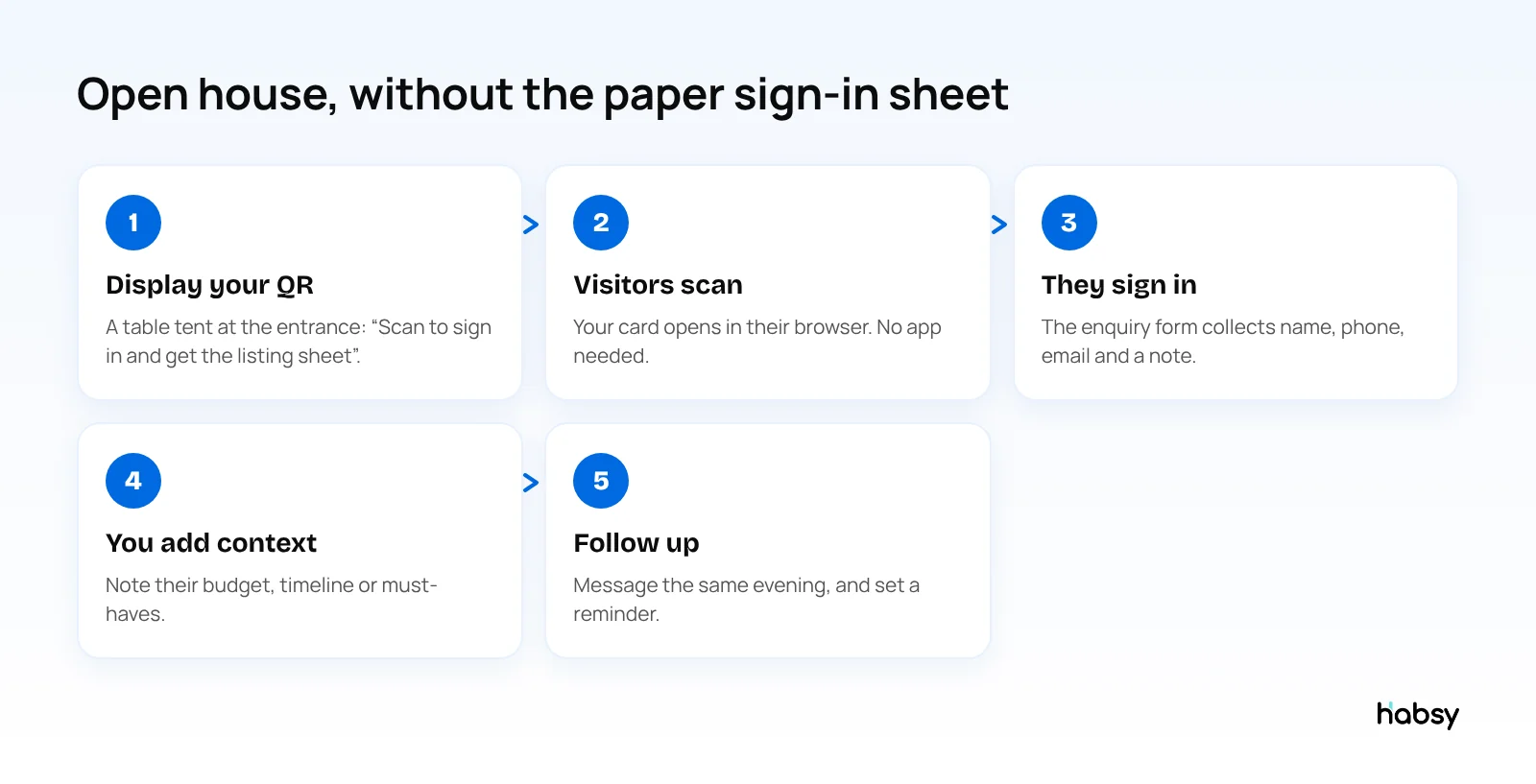
With Habsy Plus, your digital card has an enquiry form. You choose which fields are required, such as name, phone and email, and which are optional, such as a message. Submissions arrive in the app, where you can convert them into contacts and follow up. Give visitors a reason to scan, such as “Scan for the full listing sheet”, and add the listing brochure to your Business digital card.
What to put on a realtor’s digital business card
- Name and photo. People remember faces, especially after visiting several homes in a day.
- Brokerage and role.
- Phone and email, with WhatsApp if your clients use it.
- Website and listings page.
- Social links such as Instagram and LinkedIn.
- Licence details where your local rules require them on marketing.
- Attachments such as a buyer’s guide or listing brochure.
- A booking link. With Habsy Plus, Calendly lets clients book a meeting from your card.
Habsy has two cards: a Professional digital card for you, and a Business digital card for your brokerage or team. Each has its own QR code and link, and with Habsy Plus, an enquiry form. Update them anytime, for example when you change brokerages, and everyone who opens your card sees the change.
Keep the momentum
Turn captured contacts into timely follow-up.
Keep the note, intent and next action with every contact so your team knows what to do next.
Capture every card you receive
Real estate is a referral business. You collect cards from mortgage brokers, inspectors, contractors, stagers and other agents. Scan them into Habsy so they become searchable contacts with notes, rather than a pile in your car.
- Scan paper cards with 99% accuracy, the highest in our in-house tests
- Scan QR codes from other agents’ digital cards, from any provider
- Add a note such as “inspector, fast turnaround, North side”
- Tag contacts by type, such as buyer, seller, lender or inspector
- Search later by name, company, role or tag
If you come back from an industry event with a stack of cards, batch scan up to 150 in about 5 minutes.
Follow up while the visit is fresh
Buyers visit several homes in a weekend. The agent who follows up first, with something specific, is the one they remember.
- Add a reminder once you save the contact, for example “Tomorrow 10:00”.
- Write the message with AI. Give Habsy a short prompt, such as “thank them for visiting 14 Oak Street, mention the garden they liked, offer a second showing”, and it drafts a personal email or WhatsApp message.
- Record a voice note with Habsy Plus, such as their budget and must-haves. It is transcribed into English and searchable.
- Send your card back. Habsy can send your digital card to a contact, so they have your details too.
For why timing matters, read why follow-up timing determines networking ROI.
Keep your referral network organised
Most realtors work with a circle of lenders, inspectors, contractors, stagers and other agents. A simple structure in Habsy keeps that circle useful:
- Tags by role: lender, inspector, contractor, stager, agent, buyer, seller.
- A note on what they are good at: “fast inspection reports, North side”, “handles first-time buyers well”.
- Search when you need someone: search by tag, company or note text, and you have the right person in seconds.
Capture what buyers tell you after a showing
The detail a buyer shares in the driveway is what wins the next conversation. With Habsy Plus, record a 10-second voice note after each showing: “Liked the garden, worried about the commute, budget firm, wants three bedrooms.” It is transcribed into English and searchable. If you want structure, set up intent signals that match how you work, such as budget band, preferred area and move-in timeline, and tap them after each visit.
Illustrative example. On a Sunday, an agent runs two open houses. Forty visitors sign in through the QR code and enquiry form. That evening she goes through the enquiries, records voice notes on the six she spoke to properly, and sends each of the six a personal WhatsApp message drafted with AI. By Monday morning, she has reminders set for the follow-ups and a clean list of everyone else for her next newsletter.
Connect it to your other tools
You can export contacts to Excel, CSV or VCF at any time, for free. With Habsy Plus, contacts can sync to Google Contacts, to supported CRMs such as HubSpot, Salesforce and Zoho CRM, or to other apps through Zapier.
Bottom line
For realtors, a digital business card is not just a nicer business card. It is a way to capture every open house visitor and every referral partner, and follow up faster than the next agent. Habsy gives you the card and the scanner, free. Create your digital card.
Frequently Asked Questions
What is the best digital business card for realtors?
Habsy is a strong choice for realtors because it pairs a free digital business card, with a QR code and link, with an unlimited business card scanner. With Habsy Plus, an enquiry form on the card replaces the open house sign-in sheet. You share your details and capture buyer and partner details in the same app.
How do realtors use digital business cards at open houses?
Display the QR code of your digital card at the entrance. Visitors scan it to save your details and fill in the enquiry form instead of a paper sign-in sheet. Their details arrive in your app, ready for follow-up.
What should a realtor include on a digital business card?
Your name, photo, brokerage, phone, email, website, social links and any licence details your local rules require. Add a brochure or listing sheet, and a meeting booking link if you use one.
Can buyers save my details without an app?
Yes. A Habsy digital card opens in any phone browser, and visitors can save your contact with one tap.
Can I book showings from my digital card?
With Habsy Plus, you can connect Calendly so visitors can book a meeting directly from your card.
Keep the momentum
Turn captured contacts into timely follow-up.
Keep the note, intent and next action with every contact so your team knows what to do next.